
POC-700: Intel Core i3-N305/Atom x7425E Ultra-Compact Embedded Computer with 4x PoE+, USB 3.2, and MezIO Interface
POC-700 SeriesStarting at $810.00
- Intel Alder Lake Core i3-N305 processor 15W with 8 E-Cores or Atom x7425E
- Up to 16GB DDR5-4800 SODIMM
- -25 °C to 70 °C rugged wide temperature operation
- 4x GbE ports PoE+ / 4x USB3.2 Gen 2 with screw-lock
- M.2 2280 M key SATA socket
- DP++ / HDMI 1.4b dual display outputs
- 4-CH isolated DI + 4-CH isolated DO
- Front I/O access DIN-mounting design
- MezIO compatible
- UL certification (UL-US-2409582-0)
- Complies with UL 62368-1 standards


Frequently Asked Questions
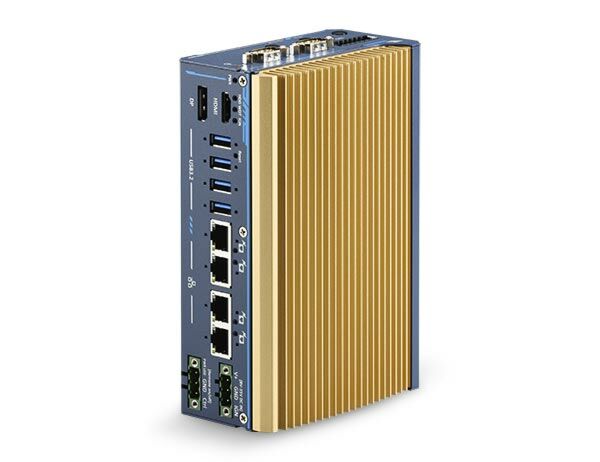
The POC-700 Series front panel provides:
- 4x Gb Ethernet ports (Intel® I350-AM4), with IEEE 802.3at PoE+ on all 4 ports (POC-715 only)
- 4x USB 3.2 Gen2 ports with screw-lock
- 1x DisplayPort++ (up to 4096 x 2160 @ 60Hz)
- 1x HDMI 1.4b (up to 3840 x 2160 @ 30Hz)
- 1x software-programmable RS-232/422/485 port (COM1)
- 3x 3-wire RS-232 ports or 1x RS-422/485 port (COM2/3/4)
- 4-channel isolated digital input and 4-channel isolated digital output
- 3-pin terminal block for DC input and 3-pin remote on/off terminal block
The system accepts DC power via a 3-pin pluggable terminal block. Standard units accept 8V to 35V DC, while UL-certified series units accept 12V to 35V DC. Supplying voltage over 35V will damage the system.
The system operates from -25°C to 70°C and can be stored from -40°C to 85°C, with 10%-90% non-condensing humidity. Note: for sub-zero or over 60°C operation, a wide-temperature SSD is required. It is tested to MIL-STD-810H for vibration (Method 514.8, Category 4) and shock (Method 516.8, Procedure I), and complies with CE/FCC Class A (EN 55032 & EN 55035). UL-certified series units also meet UL 62368-1 / IEC 62368-1 safety standards.
The POC-700 Series has one SO-DIMM socket supporting up to 16GB of DDR5-4800 SDRAM. For storage, it includes one M.2 2280 M-key socket (PCIe Gen3 x1) that supports NVMe SSDs and also supports SATA signal for SATA SSDs. The M.2 slot automatically detects and configures for PCIe or SATA depending on the installed device.
The system includes one full-size mini-PCIe socket with an internal SIM socket, supporting wireless WiFi, LTE/5G, or CAN bus devices. Three SMA antenna openings are reserved on the DIO/COM port panel for external antenna installation when using wireless modules such as 3G, 4G, GPS, or WiFi.
Neousys has tested the following operating systems on the POC-700 Series: Microsoft Windows 10 LTSC 2021 (x64), Microsoft Windows 11 IoT Enterprise 22H2 (64-bit), and Ubuntu 20.04.2 LTS or other Linux distributions with kernel version 5.19 or higher. For Linux, users may need to manually compile and install drivers for the Intel graphics or Ethernet controller if not included in the kernel.
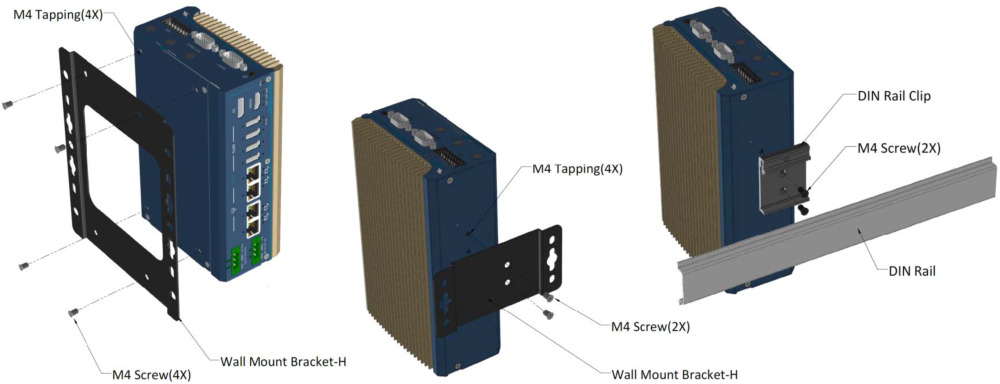
The system supports DIN-rail mounting as standard, using the included DIN rail clip. Optional wall-mount brackets are available in both horizontal and vertical orientations. Dimensions are 64 (W) x 116 (D) x 176 (H) mm and weight is 1.2 kg.
The POC-715 uses the Intel® Alder Lake Core™ i3-N305 processor (8C/8T, 1.8/3.8 GHz, 15W TDP) with 32EU integrated UHD graphics, and its 4 Ethernet ports support IEEE 802.3at PoE+. The POC-712 uses the Intel® Atom® x7425E processor (4C/4T, 1.5/3.4 GHz, 12W TDP) with 24EU integrated UHD graphics, and does not list PoE+ support on its Ethernet ports.
POC-700 and POC-700-FT share the same I/O ports and specifications, but differ in mechanical dimensions. The standard POC-700 measures 64.4 x 116 x 176 mm, while the POC-700-FT uses a flat heatsink design measuring approximately 51.65 x 115.5 x 175.8 mm, reducing overall size by up to 30% for use in more compact or challenging environments.
How-to Guides
- Disassemble the system enclosure to access the motherboard.
- Locate the SO-DIMM slot on the motherboard once the enclosure and heat spreader have been removed.
- Insert the gold finger end of the SO-DIMM at a 45-degree angle into the slot and gently push it down until it clips in.
- Remove the protection film on the thermal pad.
- Secure the DRAM/M.2 heat spreader onto the side of the system heatsink.
- Reinstall the enclosure when done.
- Disassemble the system enclosure.
- Locate the M.2 2280 M-key slot once the system enclosure and heat spreader have been removed.
- Insert the M.2 SSD into the slot at a 45° angle.
- Gently push it towards the motherboard and secure the SSD with the supplied screw.
- Remove the protective film from the thermal pads before reinstalling the heat spreader.
- Secure the heat spreader with its two screws.
- Reinstall the enclosure when done.
- Disassemble the system enclosure.
- Locate the mini-PCIe and SIM slots.
- If installing a 3G/4G wireless module requiring a SIM, push the SIM slot holder in the indicated direction, flip open the holder, and place the SIM into the slot, then flip the holder back and push to lock it in.
- Insert the mini-PCIe module's gold finger at a 45-degree angle into the socket, gently press it down, and secure with a screw.
- Clip on the mini-PCIe module's antenna cable (refer to the module's own manual for connection details).
- Remove one of the antenna covers from the enclosure and secure the SMA antenna connector.
- Reinstall the enclosure and attach the external SMA antenna.
- Secure the DIN rail clip (from the accessory box) to the rear side panel of the enclosure using the provided M4 screws.
- To install the clip onto the DIN rail, tilt the unit over the top of the rail, overlap the top clip edge of the DIN rail clip onto the rail first, then firmly press the bottom-front of the enclosure to clip the bottom edge of the mount plate.
- Confirm the mount plate has clipped onto the DIN rail properly to complete installation.
- Press F2 when the system boots up to enter the BIOS setup utility.
- Go to
Advanced>Peripheral Configuration. - Set the
Set COM1 Mode asoption to the desired mode (RS-232, RS-422, or RS-485). - For long-distance RS-422/485 transmission, set the
Slew Rateoption toHighto improve signal quality, and adjust theRS-422/485 Terminationoption according to your wiring configuration. - Press F10 to save settings and exit.
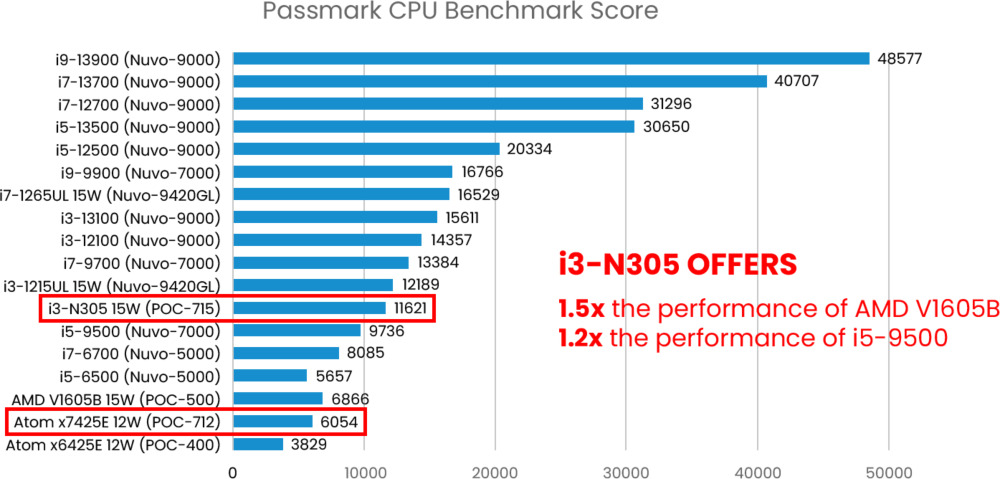
POC-700 is Neousys’ next-generation ultra-compact embedded controller, with a choice of the latest Intel Alder Lake i3-N305 or x7425E processor that is capable of delivering up to 1.3x the CPU performance when compared to previous POC-500 series.
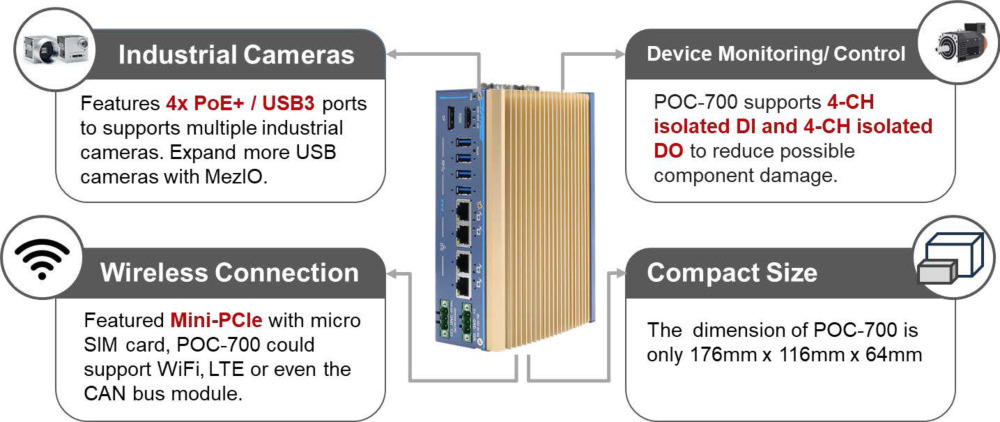
Neousys POC-700 is powered by Intel’s Alder Lake i3-N305 featuring 8-core/ 8-thread processor with 32EUs UHD Graphics or Atom x7425E featuring 4-core/ 4-thread with 24EUs UHD Graphics to support Intel OpenVINOTM for AI inference capabilities. The systems adopts DDR5-4800 to offer up to 1.8x the memory bandwidth over DDR4 to boost overall system performance. It also has four USB3.2 Gen2, and four GigE PoE+ ports with screw lock mechanisms to connect and secure industrial cameras for machine vision applications. Display output wise, there are HDMI and DP video outputs to support high-definition display devices. As for connections and expansions, POC-700 features isolated DIO for device monitoring/control, M.2 2280 M key for SATA SSD and a mini-PCIe socket for wireless WiFi, LTE/5G or CAN bus device.
Measuring just 64 x 116 x 176mm, the ultra-compact POC-700 can easily fit into confined spaces and is a seamless upgrade from POC-500 series with identical footprint. Benefiting from the performance gains of the latest Intel CPU, wide-temperature fanless design, and ample interfaces for industrial cameras and I/Os, POC-700 is perfect for machine vision and smart city applications.
| Manufacturer | Neousys |
|---|---|
| Short Description | POC-700 is Neousys’ next-generation ultra-compact embedded controller, with a choice of the latest Intel Alder Lake i3-N305 or x7425E processor that is capable of delivering up to 1.3x the CPU performance when compared to previous POC-500 series. |
| Processor | POC-715: Intel Alder Lake Core i3-N305 processor (8C/8T, 1.8/3.8 GHz, 15W TDP) |
| Graphics | POC-715: Integrated Intel UHD Graphics with 32EUs |
| Memory | Up to 16 GB DDR5-4800 SDRAM (one SODIMM socket) |
| PoE | IEEE 802.3at PoE+ on port #1~4 |
| Video Port | 1x DP++, Supporting 4096 x 2160 resolution |
| DIO | 4-CH isolated DI and 4-CH isolated DO |
| M.2 | 1x M.2 2280 M key socket (PCIe Gen3 x1) for NVMe SSD storage (supports SATA signal) |
| Mini PCI-E | 1x full-size mini PCI Express socket with internal micro SIM socket |
| DC Input | 1x 3-pin pluggable terminal block for 8 to 35V DC input 1x 3-pin pluggable terminal block for 12 to 35V DC input (UL series) |
| Fan | Optional external-accessible 80mm x 80mm fan for system heat dissipation |
| Remote Ctrl. & Status Output | 1x 3-pin pluggable terminal block for remote control and PWR LED output |
| Dimension | 64 (W) x 116 (D) x 176 (H) mm |
| Weight | 1.2 kg |
| Mounting | DIN-rail mount (standard) or wall-mount (optional) |
| Operating Temperature | -25°C ~ 70°C* |
| Storage Temperature | -40°C ~ 85°C |
| Humidity | 10%~90% , non-condensing |
| Vibration | MIL-STD-810H, Method 514.6, Category 4 |
| Shock | MIL-STD-810H, Method 516.6, Procedure I |
| EMC | CE/FCC Class A, according to EN 55032 & EN 55035 |
| CPU Cores | 4, 8 |
| CPU Family | Intel Atom, Intel Core |
| Base CPU Speed | Under 2.0 Ghz |
| Video Output | Display Port, HDMI |
| PoE Ports | 4 |
| LAN Ports | 1-4 |
| Serial Ports | 3-4 |
| USB 3.2 | 1 - 4 |
| Max Memory | 16 GB |
| Operating System | Windows 10, Linux |
| Effective Memory Speed | 4800 MHz |
| Form Factor | Fanless |
| Native Storage Type | M.2 NVMe SSD |
| On/Ignition | Remote On/Off |