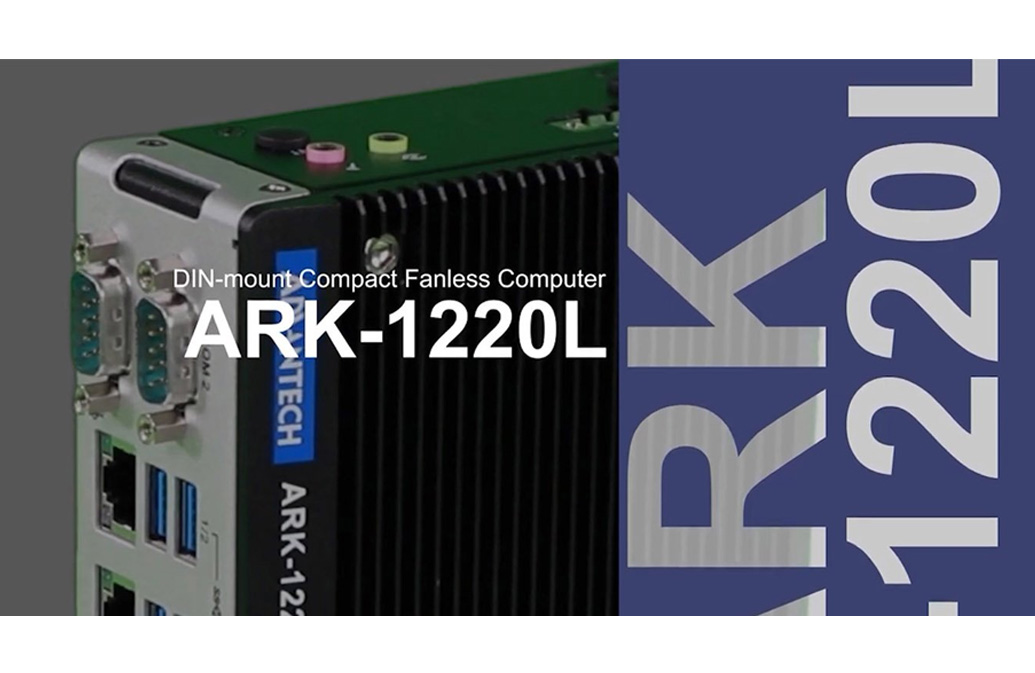
Advantech Intel Atom E3940 QC SoC with 4K Dual HDMI/Dual LAN/M.2 DIN-Rail Fanless Box PC
ARK-1220LStarting at $710.00
Main Features:
- Intel Atom E3940 Quad Core SoC turbo burst up to 1.8 GHz
- DIN-Rail system with essential I/O ports on front-side bezel
- 2 x Intel GbE and 4 x USB 3.0
- Dual HDMI display up to 4K resolution
- 1 x full-size mPCIe with SIM holder and 1 x M.2 2230 for WIFI
- 1 x 2.5" SATA III SSD and 1 x full-size mSATA
- 12V ~ 28V wide range power input
- -30C ~ 70C extended operating temperature
- Advantech WISE-PaaS support

Frequently Asked Questions
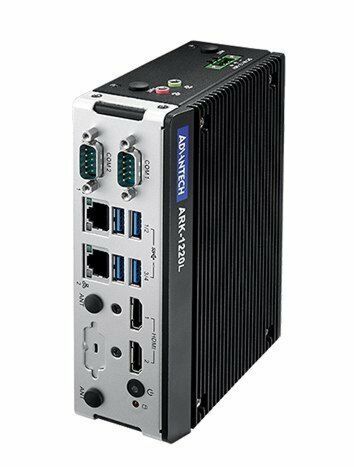
The ARK-1220L provides the following I/O on the front bezel:
- 2 x Intel i210 GbE LAN ports (10/100/1000 Mbps, Wake On LAN supported)
- 4 x USB 3.0 ports
- 2 x HDMI ports (each supporting up to 3840 x 2160 @ 30Hz, dual display supported)
- 2 x RS-232/422/485 serial ports with auto flow control; COM2 supplies 5V/12V power
- Audio: Mic-in and Line-out (Realtek ALC888S High Definition Audio)
- DC power input connector and ON/OFF switch
- Optional 8-bit Programmable DIO (GPIO)
The ARK-1220L accepts a wide-range 12 ~ 28 VDC power input (ATX/AT type). Typical power consumption is 7.6W, with a maximum of 19W. An optional 60W AC-to-DC adaptor (24V/2.5A) is available.
With extended-temperature peripherals and 0.7 m/s air flow, the system operates from -30 ~ 70 °C (-22 ~ 158 °F). If a 2.5" hard disk is installed, the operating range is reduced to 0 ~ 40 °C (32 ~ 104 °F) with the same air flow. Storage temperature is -40 ~ 85 °C. The unit is rated for 95% relative humidity at 40 °C (non-condensing). Certifications include CE/FCC Class B, CCC, BSMI (EMC) and UL, CB, CCC, BSMI (Safety).
The ARK-1220L supports:
- 1 x 2.5" SATA III drive bay (compatible with 9.5mm height)
- 1 x full-size mSATA (shares the mPCIe slot)
- 1 x full-size mPCIe slot with SIM holder
- 1 x M.2 2230 E-key slot for a WIFI module
Note: the SIM holder and M.2 slot are hardware interfaces intended for wireless communication integration only; system-level RF certification is not available.
The system uses DDR3L 1600MHz memory in 2 x 204-pin SO-DIMM sockets, supporting a maximum capacity of 8GB (configurable as 2 x 4GB or 1 x 8GB).
The ARK-1220L supports Microsoft Windows 10 Enterprise and Linux Ubuntu Desktop 20.04 LTS 64-bit. Memory, storage, and operating system can be bundled by request. An embedded OS image (Win10 IoT Ent 2019 LTSC 64bit or Ubuntu Desktop 20.04 LTS 64bit with license) is also available as an optional item.
The ARK-1220L is housed in an aluminum enclosure and supports DIN-rail or wall mounting. Dimensions are 53.5 x 158 x 114 mm (2.11" x 6.22" x 4.49"), and weight is 0.9 kg (1.98 lb). A DIN-rail bracket is included in the packing list, and an optional wall mount kit (AMK-W003) is available.
The ARK-1220L uses an Intel Atom E3940 Quad Core SoC running at 1.6 GHz with turbo burst up to 1.8 GHz. Graphics are handled by the CPU-integrated Intel HD Graphics 500 (Gen9 Low Power, 18 Execution Units), supporting hardware media codecs (H.264, MPEG2, MVC, VC-1, WMV9, H.265/HEVC, VP8, JPEG/MJPEG) and 3D acceleration via OpenGL 4.4, DirectX 12, and OpenCL 2.0.
The ARK-1220L includes a full-size mPCIe slot with a SIM holder and an M.2 2230 E-key slot for a WIFI module, providing hardware interfaces for wireless communication integration. Note that these are hardware interfaces only — system-level RF certification is not available.
How-to Guides
- Confirm you have the 1 x DIN-rail bracket included in the packing list (P/N 1950016395T10C).
- Attach the DIN-rail bracket to the rear of the ARK-1220L unit.
- Position the unit onto the DIN rail and secure per the bracket's design.
Refer to the datasheet's DIN Rail dimension drawing for mechanical layout reference.
- Obtain the optional wall mount kit (AMK-W003), sold separately.
- Use the Wall Mount mechanical drawing on page 2 as a mounting reference.
- Attach the wall mount kit to the unit and secure to the wall surface.
- Confirm the power source is within the supported 12 ~ 28 VDC input range.
- Use the included 3-pin terminal block (P/N 1652004519) or an optional AC-to-DC adaptor (24V/2.5A, 60W, P/N 96PSA-A60W24T2-3) with the appropriate regional power cable.
- Connect the power leads to the DC IN connector on the front panel.
- Use the ON/OFF switch on the front panel to power the unit on.
- Use the wrench included in the packing list to remove the top cover.
- Locate the 2.5" SATA III drive bay (supports drives up to 9.5mm height).
- Install the drive into the bay and connect it to the SATA III interface.
- Reattach the top cover using the wrench.
Note: if a 2.5" hard disk is installed, the operating temperature range is reduced to 0 ~ 40 °C.
- Use the wrench included in the packing list to remove the top cover and access the 2 x 204-pin SO-DIMM sockets.
- Install either 2 x 4GB modules or 1 x 8GB module of DDR3L 1600MHz memory (maximum supported capacity is 8GB).
- Reattach the top cover.
| Manufacturer | Advantech |
|---|---|
| CPU Cores | 4 |
| CPU Family | Intel Atom |
| Base CPU Speed | Under 2.0 Ghz |
| Video Output | HDMI |
| LAN Ports | 1-4 |
| Serial Ports | 1-2 |
| USB 3.0 | 3-4 |
| Max Memory | 8 GB |
| Operating System | Windows 7, Windows 10, Linux |
| Effective Memory Speed | 1866 MHz |
| Form Factor | Fanless |
| Native Storage Type | 2.5" SSD, mSATA Full |
| Mounting | DIN-rail/Wall Mount |
| Memory | DDR3L 1866 MHz 8 GB |
| Watchdog TImer | 255 levels timer interval, setup by software |
| Humidity | 95% @ 40° C (non-condensing) |
| Operating Temperature | With extended temp. peripherals: -30°C ~ 70°C (-22°F ~ 158°F)|w/ turbo burst off with 0.7 m/s air flow; With 2.5 inch hard disk: 0°C ~ 40°C (32°F ~ 104°F) with 0.7 m/s air flow |
| Storage Temperature | -40°C ~ 85°C (-40°F ~ 185°F) |
| Shock | With SSD: 30 G, IEC 60068-2-27, half sine, 11 ms duration |
| EMC | CE/FCC Class B, CCC, BSMI |
| Power Input Voltage | 12 ~ 28 VDC |
| Weight | 1.2 kg (2.65lb) |
| Dimension | 53.5 x 158 x 114 mm (2.11" x 6.22" x 4.49") |