
ARK-1251: Intel Core Ultra U Series Processor with Din-Rail Fanless Box PC
ARK-1251 SeriesStarting at $1,545.00
- Intel Core Ultra 5/Ultra 7 Processor
- DDR5-5600 SO-DIMM memory support up 96GB
- M.2 E Key, B Key and M Key for storage and wireless module installation
- Up to 3 x GbE, 4 x serial ports, 8-bit DIO, optional CANBus
- TPM on board for system security
- Dual displays with 1 x 8K HDMI + 1 x 8K DP
- 2 x USB 3.2 and 4 x USB 2.0
- 12V ~ 28V wide range power input
- -20 ~ 60 °C extended operating temperature
- DIN-Rail system with essential I/O ports on front-side bezel
- Support EdgeBMC OOB, DeviceOn, Edge AI SDK

Frequently Asked Questions
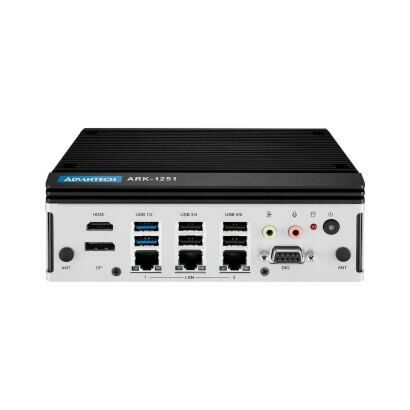
The ARK-1251 provides the following external I/O:
- 1 x HDMI (up to 4096 x 2160 @ 60Hz)
- 1 x DisplayPort (up to 4096 x 2160 @ 60Hz)
- 3 x GbE LAN (2 x 10/100/1000/2500 Mbps Intel i226-LM, 1 x 10/100/1000 Mbps Intel i210)
- 2 x USB 3.2 Gen2 and 4 x USB 2.0
- 4 x serial ports (2 x RS-232/422/485 with auto flow control, 2 x RS-422/485 with auto flow control)
- 8-bit programmable DIO
- 1 x Mic-in and 1 x Line-out audio jack
- Optional CAN bus (replaces the GPIO connector)
The ARK-1251 accepts 12 ~ 28 VDC wide-range input through a 3-pin power connector (pins are +, -, and Ground). Typical (OS idle) power consumption is 17.83W for the Core Ultra 5-125U model and 18.19W for the Core Ultra 7-155U model. Maximum (full load) power consumption is 59.44W and 61.74W respectively.
The ARK-1251 operates from -20 to 60 °C with extended-temperature peripherals and 0.7 m/s airflow. Note: when powered by the AC-to-DC adapter, maximum operating temperature is limited to 40 °C. Storage temperature range is -40 to 85 °C. It is certified to CE/FCC Class B, CCC, UKCA, and BSMI for EMC, and UL, CB, CCC, and UKCA for safety.
The system supports up to 96GB of DDR5-5600 memory across 2 x 262-pin SO-DIMM slots (ECC not supported). For storage and expansion, it provides three M.2 slots: 1 x M.2 2230 E-Key (NVMe, PCIe x2) for wireless modules, 1 x M.2 2280 B-Key with nano SIM holder (NVMe, PCIe x2/SATA), and 1 x M.2 2280 M-Key (NVMe, PCIe x4) used as the default storage slot.
The ARK-1251 supports Windows 10 Enterprise, Windows 11 Enterprise, and Ubuntu 24.04.
The ARK-1251 supports DIN-rail and wall mounting (a VESA mount kit, AMK-V023E, is also available but must be used together with the wall mount kit AMK-W006). The unit measures 173 x 60 x 141 mm (6.73 x 2.36 x 5.55 in) and weighs 1.5 kg.
Yes. The M.2 2230 E-Key slot is intended for wireless (Wi-Fi) modules, and the M.2 2280 B-Key slot includes a nano SIM holder and supports 5G/AI cards. The chassis includes 4 reserved antenna holes labeled "ANT" for wireless installation.
All four SKUs share the same I/O configuration (HDMI+DP, 3 x GbE, 4 x COM, 2 x USB 3.2, 4 x USB 2.0, M.2 B/E/M-Key, mic-in/line-out audio, SIM support). The difference is the CPU: ARK-1251-S3A1 and ARK-1251-S3A1U use the Intel Core Ultra 5-125U, while ARK-1251-S7A1 and ARK-1251-S7A1U use the Intel Core Ultra 7-155U. SKUs with the "U" suffix are Made in Taiwan.
Yes. The ARK-1251 supports optional MOS iDoor expansion modules (such as additional GbE LAN, isolated CAN bus, isolated/non-isolated RS-232, digital I/O, and USB modules) via the AMO-I032 expansion kit, which converts the M.2 B-Key slot to an mPCIe interface. Note that the AMO-I032 must be ordered together with a MOS module, and the M.2 E-Key slot cannot be used when a MOS module is installed due to mechanical interference.
How-to Guides
- Loosen the 6 screws on the front/sides and remove the bottom cover.
- Loosen the 4 spring screws on the main board.
- Loosen the 4 screws on the top cover and remove the top cover.
- Install the CPU thermal pad (25 x 20 x 0.21 mm) on the top cover, removing the release paper first.
- Install the memory module(s) into the SO-DIMM slots.
- Reattach the top cover with the 6 screws.
Note: There are two thermal pads for a second RAM module in the accessory box; install one if adding a second module. Remove the release paper before applying any memory thermal pad.
- Loosen the 6 screws on the front/sides and remove the bottom cover.
- Install the M.2 module into the appropriate slot.
- Replace the bottom cover with the 6 screws.
- Use four M3.5 screws from the accessory box to install the M.2 SSD thermal kit and thermal pad for a 2280 PCIe module, removing the release paper before applying the thermal pad.
Note: The M-Key slot is used by default for storage devices, the E-Key slot is for Wi-Fi modules, and the B-Key slot supports 5G, AI cards, or iDoor modules.
- Unscrew the 3 x M3x5L screws on the back side of the ARK-1251.
- Use the 3 screws to secure the DIN-rail bracket to the back of the unit.
- Unscrew the 4 x M3x5L screws on both sides of the ARK-1251.
- Use the 4 removed screws to secure the wall mount brackets on both sides of the unit.
- For VESA mounting, use 4 x M4x6L screws (from the VESA mount accessory box) to attach the VESA mount to the target surface.
- Use 4 x M3x6L screws (from the VESA mount accessory box) to secure the ARK-1251 to the VESA mount.
Note: The AMK-W006 wall mount kit must be used together with the AMK-V023E VESA mount kit.
- Loosen the 6 screws on the front/sides and remove the bottom cover.
- Loosen the 2 screws for the DIO connector.
- Remove the DIO cable.
- Install the CAN bus cable (Advantech part number 1700030518-01) at the back of the bottom cover.
Note: The CAN bus port replaces the DIO/GPIO connector.
The ARK-1251 is a compact, multi-functional, fanless embedded system powered by an Intel Core Ultra Processor 125U or 155U. These hybrid SoCs integrate the CPU, GPU, and NCU to deliver high performance with low power consumption. The ARK-1251 also provides ample I/O to support a wide range of applications, including machine automation, AI Inspection, cobots/AMRs, and edge computing.
| Short Description | The ARK-1251 is a compact, multi-functional, fanless embedded system powered by an Intel Core Ultra Processor 125U or 155U. These hybrid SoCs integrate the CPU, GPU, and NCU to deliver high performance with low power consumption. The ARK-1251 also provides ample I/O to support a wide range of applications, including machine automation, AI Inspection, cobots/AMRs, and edge computing. |
|---|---|
| Processor | Core Ultra 7-155U Core Ultra 5-125U Core Ultra 5-125U |
| Memory | Up to 96 GB DDR5 5600 MHz (2 x slots) |
| Chipset | Intel Graphics |
| Watchdog TImer | 255 levels timer interval, setup by software |
| Video Port | HDMI Up to 4096 x 2160@60Hz |
| Audio | Realtek ALC888S, Mic-in and Line-out |
| M.2 | 1x M.2 2230 E key (NVMe, PCIe x2), 1x M.2 2280 B key with nano SIM holder (NVMe, PCIe x2/ SATA), |
| SATA | 1x M.2 2280 B key with nano SIM holder (NVMe, PCIe x2/ SATA) |
| Power Input Voltage | 12-28 VDC |
| Power Type | ATX/AT |
| Dimension | 173 x 60 x 141 mm (6.73 x 2.36 x 5.55 in) |
| Weight | 1.5KG |
| Construction | Aluminum housing |
| Mounting | DIN-Rail/Wall Mount |
| Operating Temperature | With extended temp. peripherals: -20 ~ 60° C with 0.7m/s air flow |
| Storage Temperature | -40 ~ 85 °C (-40 ~ 185°F) |
| Humidity | 95% @ 40 °C (non-condensing) |
| Vibration | With SSD: 3 Grms, IEC60068-2-64, random, 5~500 Hz, 1hr/axis (with Wall Mount) |
| Shock | With SSD: 30 G, IEC-60068-2-27, half sine, 11 ms duration (with Wall Mount) |
| EMC | CE/FCC Class B, CCC, UKCA, BSMI |