
ARK-3535: AMD Ryzen Embedded 8000 Series Processor Fanless Box PC
ARK-3535 Series- Support AMD Ryzen 8640U/8845HS Processor
- DDR5-5600 SO-DIMM memory (up to 96GB)
- Tripal displays with 2 x 4K HDMI + 1 x 4K Type C(Alt)
- M.2 E Key and B Key for wireless module installation
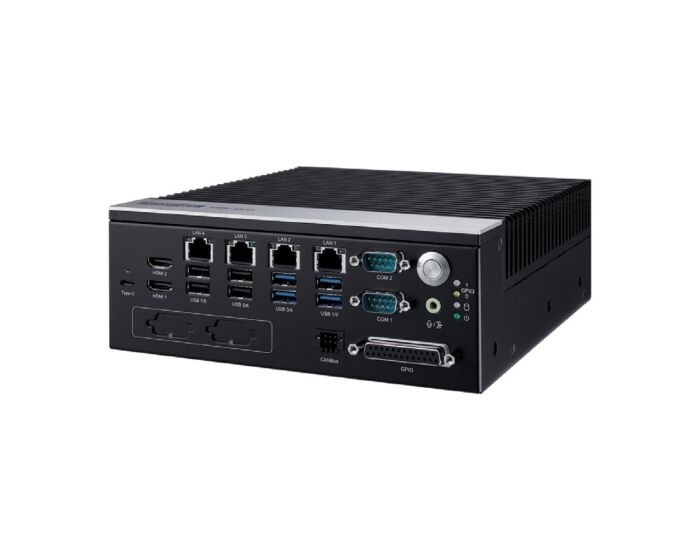
- Up to 4 x Intel GbE, 6 x COM, 8 x USB, 16-bit DIO, 2 x CANBus
- TPM on board for system security
- 2 x 2.5" SATA storage device
- M.2 E Key and B Key for wireless
- -40 ~ 50 °C extended operating temperature

Frequently Asked Questions
The ARK-3535 supports the AMD Ryzen Embedded 8000 Series processors: the Ryzen 5 Pro 8640U (6-core, 3.5-4.9GHz, 28W TDP, 31 TOPS AI capacity) and the Ryzen 7 Pro 8845HS (8-core, 3.8-5.1GHz, 45W TDP, 38 TOPS AI capacity).
The ARK-3535 provides:
- Up to 1 x GbE (LAN4, Intel i210IT) plus 3 x 2.5GbE (LAN1/2/3, Intel i226V)
- 6 x serial COM ports (2 x RS232/422/485 + 4 x RS232/485, COM1/COM2 support high speed COM)
- 8 x USB Type-A (4 x USB3.2, 2 x Gen2x1, 2 x Gen1x1 + 4 x USB2.0)
- 1 x USB Type-C (USB4, DP ALT mode, 15W)
- 2 x HDMI2.1 (up to 3840x2160@60Hz) and 1 x Type C (DP ALT mode, up to 3840x2160@60Hz), for triple display support
- 16-bit GPIO
- 2 x CANBus
- 1 x 4-pin remote switch connector
- Audio interface (Mic-in/Line-out, switchable by BIOS)
The ARK-3535 uses an ATX/AT power type with a DC input voltage range of 9-36 VDC. An optional 230W AC to DC power adapter is available. Typical power consumption in OS idle mode is 10.8W (8640U) or 9.12W (8845HS), while maximum full-load consumption is 74.4W (8640U) or 94.08W (8845HS).
The ARK-3535 has an extended operating temperature range of -20 to 50°C (with extended temp peripherals and 0.7m/s air flow), and a storage temperature range of -40 to 85°C. It carries CE/FCC Class B, CCC, and UKCA EMC certifications, and UL, CB, CCC, and BSMI safety certifications.
The ARK-3535 supports DDR5-5600 memory via 2 x 262-pin SO-DIMM sockets (with ECC support), up to a maximum capacity of 96GB. For storage, it has 2 x 2.5" SATA III bays (max 9.5mm height), plus M.2 slots: 1 x Key B 2280 (PCIe Gen4 x2) and 1 x Key E 2230 (PCIe Gen3 x2).
The ARK-3535 supports Microsoft Windows 11 and Linux Ubuntu 24.04.
The ARK-3535 provides M.2 expansion slots for wireless connectivity: 1 x Key B 2280 (PCIe Gen4 x2, USB3.2, with nano SIM holder) and 1 x Key E 2230 (PCIe Gen3 x2, USB2.0). There are also 6 antenna holes (3 on left, 3 on right). Note that the SIM holder and M.2 slot are hardware interfaces for wireless integration only; system-level RF certification is not available.
The ARK-3535 measures 200 x 75 x 215 mm (W x H x D) and weighs 3.285 kg. It uses an aluminum top and metal bottom construction, and comes with a wall mounting kit.
Yes. The ARK-3535 has 1 slot for a PCIe x16 add-on card, which requires the optional AMO-3511 expansion kit that provides PCIe x8 signal (1 x PCIex8 to 1 x PCIex16).
Both SKUs share the same DDR5 capacity, HDMI, LAN, COM, USB, M.2, and audio configuration. The difference is the CPU: the ARK-3535-T5A1 uses the Ryzen 5 Pro 8640U, while the ARK-3535-T8A1 uses the Ryzen 7 Pro 8845HS. The "U" suffix variants (ARK-3535-T5A1U / ARK-3535-T8A1U) are Made in Taiwan.
How-to Guides
- Obtain the optional AMO-3511 expansion kit, which converts the 1-slot PCIe x16 connector to PCIe x8 signal.
- Install the AMO-3511 expansion kit into the ARK-3535's PCIe x16 add-on card slot.
- Insert your PCIe add-on card into the expansion kit.
- Confirm your power source is within the supported 9-36 VDC input voltage range.
- Connect the power source to the DC IN 9-36V terminal located on the top panel.
- Optionally, use the AC to DC adapter (96PSA-A230W24P4-3, 24V 230W) with an appropriate regional power cable (USA, EU, UK, PSE, or BSMI type) if AC power is required.
- Use the included mounting kit designed for wall mounting.
- Align the wall mount bracket with the mounting holes shown in the Wall Mount Expansion drawing on the unit's side.
- Secure the unit to the wall using the mounting kit hardware.
- Identify the M.2 Key B 2280 slot (supports PCIe Gen4 x2, USB3.2, includes nano SIM holder) or the M.2 Key E 2230 slot (PCIe Gen3 x2, USB2.0).
- Insert the wireless module (e.g., 5G or Hailo AI module) into the appropriate M.2 slot.
- If using a 5G or Hailo AI module in the B key slot, install the optional AMK-A0058 thermal kit; if using the E key slot, install the optional AMK-A0061 thermal kit.
- If using a SIM card, install it in the nano SIM holder associated with the M.2 Key B slot.
- Connect an antenna to one of the 6 available antenna holes (3 left, 3 right) as needed.
The ARK-3535 is a high-performance industrial embedded computer designed for demanding Edge AI, automation, and machine vision applications. Powered by the AMD Ryzen Embedded 8000 Series, it delivers up to 38 TOPS of AI compute, enabling real-time inference, vision processing, and advanced control workloads directly at the edge.
Built for industrial environments, the ARK-3535 combines powerful processing with flexible expansion and modern connectivity. Optional GPU support enables accelerated AI workloads, while USB4 / Type-C connectivity simplifies integration with high-speed peripherals and compact system architectures.
With its rugged design, scalable performance, and flexible I/O, the ARK-3535 is well-suited for robotics, machine vision, industrial automation, and smart manufacturing systems where reliable edge computing is essential.
| Manufacturer | Advantech |
|---|---|
| Short Description | The ARK-3535 is a high-performance industrial embedded computer designed for demanding Edge AI, automation, and machine vision applications. Powered by the AMD Ryzen Embedded 8000 Series, it delivers up to 38 TOPS of AI compute, enabling real-time inference, vision processing, and advanced control workloads directly at the edge. |