
ASMB-589: LGA1851 Intel Core Ultra 9/7/5 MicroATX with 4x DDR5, 4xPCIe, 8xUSB 3.2, 5xSATA3, Quad/Dual LAN
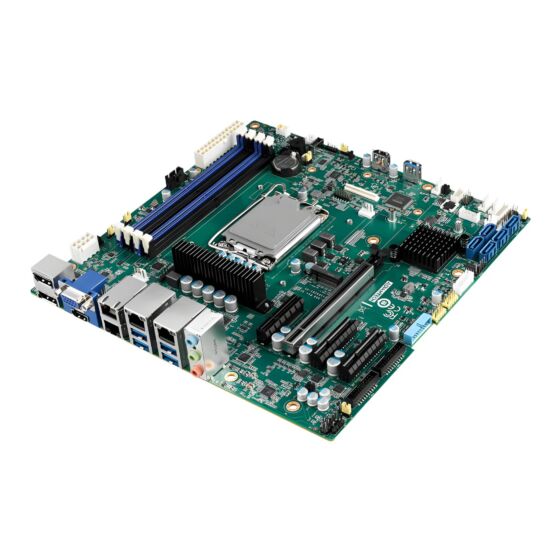
ASMB-589LGA1851 Intel Core Ultra (Series 2) ATX Motherboard with 4x DDR5, 4xPCIe, 8xUSB 3.2, 5xSATA3, and Quad/Dual LAN.
- LGA 1851 Intel Core Ultra 9/7/5 processors with W880 chipset
- DDR5 ECC/Non-ECC 5600*/4800/4400/ MT/s UDIMM up to 192 GB
- One PCIe x16 (Gen 5), one PCIe x4 (Gen 5) and two PCIe x4 (Gen 4) slots
- Triple displays - DP, VGA, and HDMI 2.0 ports
- Five SATA 3 ports and eight USB 3.2 ports
- One M.2 2280 (PCIe x4)
- Rackmount optimized placement with positive air flow design
- 0 ~ 60 °C (32 ~ 140 °F) ambient operating temperature range
- Supports Windows 10/11 (64-bit) and Server 2022 (64-bit)

Frequently Asked Questions
The rear panel provides: 4x USB 3.2 Gen 2 ports, 1x VGA port (up to 1920x1200 @ 60Hz), 1x HDMI port (up to 4096x2160 @ 60Hz), 2x DisplayPort (up to 8K60Hz 30bpp with DSC), 4x RJ-45 LAN ports, and 2x audio jacks (Mic-in, Line-out). Onboard headers add 1x external serial port (via included COM cable), 4x serial port headers (2x RS-232 dual-port), 1x SMBus, 1x chassis intrusion header, 2x front LAN LEDs, and an optional PS/2 KB/mouse connector (cable and bracket required separately).
The board uses a 24-pin SSI power connector plus an 8-pin SSI 12V power connector. Example power draw with an Ultra 5 245K CPU at 4.2GHz and 16GB x 4 DDR5 5600 memory is 1.56A at 3.3V, 1.91A at 5V, 0.36A at 12V, 0.33A at 12V_8P, and 0.63A at 5VSB.
The operating temperature range is 0 to 60 °C (32 to 140 °F), depending on CPU speed and cooler solution. Non-operating storage temperature is -40 to 85 °C. Operating humidity is rated at 40 °C @ 95% RH non-condensing, and non-operating humidity at 60 °C @ 95% RH non-condensing.
The board has 4 DDR5 DIMM slots (dual channel) supporting ECC/Non-ECC UDIMM at 5600*/4800/4400 MT/s, with a maximum capacity of 192 GB. Supported module sizes are 8 GB, 16 GB, 32 GB, and 48 GB. Note: 5600 MT/s is only supported with 1 DIMM per channel (2 DIMMs total).
Windows 10 (64-bit), Windows 11 (64-bit), and Windows Server 2022 (64-bit) have been validated on the ASMB-589.
The ASMB-589 is a Micro ATX form factor board with dimensions of 244 x 244 mm (9.6 x 9.6 in).
The board includes 4 GbE LAN ports: 1x Intel I219LM, 2x Intel I226, and 1x Intel I210AT. Depending on SKU, either 2 or 4 of the RJ-45 ports may be present (see ordering information: ASMB-589G2-00A1 has 2 LAN ports, ASMB-589G4-00A1 has 4 LAN ports).
The ASMB-589 provides 5 SATA3 6Gb/s ports via the Intel W880 chipset with Rapid Storage Technology support (Windows only), supporting software RAID 0, 1, 10, and 5. It also has 1 M.2 2280 slot (PCIe Gen 4 x4 link). Expansion is provided via 4 PCIe slots: one PCIe x16 (Gen 5), one PCIe x4 (Gen 5), and two PCIe x4 (Gen 4).
Both SKUs use the W880 chipset, DDR5 ECC/Non-ECC UDIMM memory, VGA + HDMI + DPx2 display outputs, 5 SATA III ports, and optional IPMI. The difference is the number of LAN ports: the G2 model has 2 LAN ports, while the G4 model has 4 LAN ports.
How-to Guides
- Locate the M.2 2280 slot, which supports PCIe Gen 4 x4 link devices.
- Insert the M.2 2280 module into the slot at an angle.
- Secure the module using the screw for M.2 device included in the packing list.
- Connect the 24-pin SSI main power connector to the board.
- Connect the 8-pin SSI 12V power connector to the board.
- Verify voltage rails (3.3V, 5V, 12V, 12V_8P, 5VSB) meet the board's power requirements before powering on.
- Use the included COM1 cable to connect to the external serial port, or use one of the 4 onboard RS-232 headers (2 dual-port headers, 2 ports each).
- For additional external serial connectivity, optional single-port or dual-port RS-232 COM cables with brackets are available separately.
- Attach the cable bracket to the chassis and connect the serial device.
- Purchase the ASMB-589 proprietary CPU cooler from Advantech; other brands may not be compatible.
- Select the appropriate cooler based on chassis height and CPU TDP (options include coolers for 3U/4U tower, 1U chassis heatsink, 2U/4U chassis coolers for 125W or under 65W CPUs).
- Mount the cooler onto the LGA 1851 socket following the cooler's mounting hardware.
LGA1851 Intel Core Ultra (Series 2) ATX Motherboard with 4x DDR5, 4xPCIe, 8xUSB 3.2, 5xSATA3, and Quad/Dual LAN.
| Product Available On | Jun 2, 2030 |
|---|---|
| Manufacturer | Advantech |
| Short Description | LGA1851 Intel Core Ultra (Series 2) ATX Motherboard with 4x DDR5, 4xPCIe, 8xUSB 3.2, 5xSATA3, and Quad/Dual LAN. |