
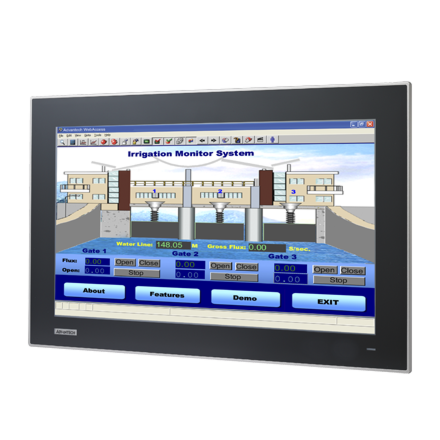
21.5" Industrail Monitor, with PCT touch
FPM-7211W-P3AEStarting at $1,710.00
Main Features:
- 21.5 inch Full HD TFT LED LCD wide screen display
- Truly-flat touch screen with IP65 compliance
- Slim type design for Panel mount / Wall mount easy installation
- Supports industrial 24VDC power input
- Supports panel, wall, desktop and VESA arm mounting
- OSD control pad on rear panel
- Projected Capacitive Touchscreen, with Multi touch.
- Robust design with SECCl chassis and Magnesium alloy front panel
- Lockable I/O connectors

Frequently Asked Questions
The FPM-7211W provides a VGA port (DB-15) and a DVI-D port for direct connection to an industrial PC or workstation (DVI-D supports digital signal only). For touch input it has a touchscreen connector (DB-9, RS-232) and a touchscreen connector (USB). Both RS-232 and USB touch interfaces can be connected at the same time, but USB has priority; if you switch from USB to RS-232 you must restart the PC.
The monitor is powered via a Phoenix Jack, 24 VDC input. Power consumption is rated at 25 W + 20% on the datasheet. The user manual also lists a maximum power consumption of 35 W and notes an optional external power adapter (100-240 VAC input, 12 V @ 4.75 A / 57 W output) that connects via a DC jack. An optional 60 W adapter (100-240V, 24V @ 2.5A) is also listed as an accessory.
Per the product datasheet, the FPM-7211W operates from 0 to 55 °C (32 to 131 °F) and can be stored from -20 to 60 °C (-4 to 140 °F), with 10-90% non-condensing humidity in storage. The front panel is IP66-rated. Certifications listed are BSMI, CCC, CE, FCC Class A, and UL.
The monitor supports panel, wall, desktop, and VESA (MIS,100,C) mounting. The panel cutout dimensions are 550.30 x 341.8 mm (21.67 x 13.46 in), with a 5 mm corner radius. Optional mounting kits are available: a desktop mounting kit (FPM-1000T-SMKE), a wall mount kit (PPC-174T-WL-MTE), a VESA arm (PPC-ARM-A03), and a stand mounting kit (PPC-STAND-A1E).
The datasheet lists OS support for Windows XP, Vista, 7, 8, 10, 11, XPe, and Linux. The included touch driver CD supports Windows XP, Vista, and 7; drivers for other operating systems are available from the touch controller vendor's website (EETI).
Yes. The touchscreen is a projected capacitive (PCAP) type supporting 10-point multi-touch via USB interface in Windows 7/8. The touch driver installation guide also notes multi-touch support of 4 points on the 18.5" model and 5 points on the 21.5" model, and states the touch is factory-calibrated so no user calibration is required.
Per the datasheet, the FPM-7211W measures 558.4 x 349.8 x 47.7 mm (21.98 x 13.77 x 1.88 in) and weighs 8 kg (17.6 lb).
It is a 21.5" Full HD TFT LED LCD with a maximum resolution of 1920 x 1080, 16.7M colors, a 178°/178° (H/V) viewing angle, 300 cd/m2 luminance, a 5000:1 contrast ratio, and a backlight life of 50,000 hours.
How-to Guides
- For wall mounting, use the FPM-7211W-SMKE kit and follow the wall mounting bracket instructions.
- For panel mounting: screw the snap hook out from the upper side, and screw the stopper screw out from the lower side. Push the FPM-7211W into the panel opening so the stopper screw and snap hook hold it in place, then add the panel mount kit to the rear and fix the 10 panel brackets around the monitor.
- For desktop mounting, use the FPM-7211W-SMKE desktop stand kit as shown in the desktop stand mounting diagram.
- For VESA mounting, use the 100 mm VESA mounting pattern with M4 screws (length 8-10 mm). Use a suitable mounting apparatus to avoid injury.
- Insert the driver CD (supports Windows XP, Vista, and 7) and run the installer, or download the appropriate driver for other operating systems from the EETI touch driver support site.
- Install the driver.
- Select the touch interface: RS-232 or USB.
- Select whether to support multi-monitor operation or not.
- No manual calibration is required; the touch panel is factory-calibrated (supports 5-point multi-touch on the 21.5" model).
- Connect a 24 VDC supply to the Phoenix Jack power input.
- Alternatively, connect a 12 VDC switching power supply to the DC jack power input.
- If using the plug-in block connector, connect via the external plug-in block 3P (with flanges, female MC211-F103 connector), rated for DC 10-30V.
- Confirm the power source voltage matches the connector rating before applying power.
- Connect the touch RS-232 cable between the monitor's DB-9 touchscreen connector and the PC's RS-232 port, or connect the USB touch cable between the monitor's USB touchscreen connector and the PC's USB port.
- Note that both interfaces can be connected simultaneously, but the USB interface takes priority.
- If you switch from USB to RS-232 touch interface, restart the industrial PC or workstation for the change to take effect.
| Manufacturer | Advantech |
|---|---|
| Brightness | 300-399 nit |
| Resolution | 1920 x 1080 |
| Screen Size | 20" and up |
| Video Output | DVI-D, VGA |
| Operating System | Windows 7, Windows 10, Linux |
| Mounting | Rear cover: SECC |
| Display Type | 21.5" Full HD TFT LED LCD |
| Display Size | 21.5" |
| Max Resolution | 1920 x 1080 |
| Max Colors | 16.7 M |
| Luminance | 300 |
| Viewing Angle | 178/178 |
| Backlight Lifetime | 50,000 Hours |
| Contrast Ratio | 5000:1 |
| Light Transmission | Above 75% |
| Type | Projected capacitive touch |
| Humidity | 10 ~ 90% non-condensing |
| Operating Temperature | 0°C ~ 55°C (32°F ~ 131°F) |
| Storage Temperature | -20°C ~ 60°C (-4°F ~ 140°F) |
| EMC | BSMI, CCC, CE, FCC Class A, UL |
| Power Input Voltage | Phoenix Jack: 24 VDC input |
| Power Consumption | 25 W + 20% |
| OS Support | Windows XP, Vista,7, 8,10,XPe and Linux |
| Weight | 8kg |
| Dimension | 558.4mm x 349.8mm x 47.7 mm (21.98" x 13.77" x 1.88") |