
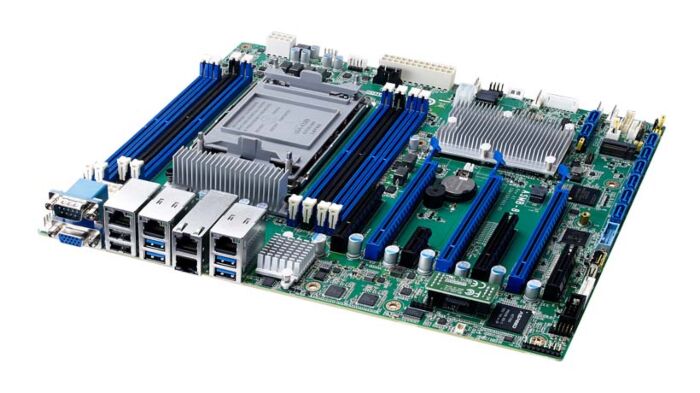
LGA 4189 Intel® Xeon® Scalable ATXServer Board with 8x DDR4, 3x PCIe x16,8x SATA 3, 6x USB 3.0, Dual 10GbE, and IPMI
ASMB-816Main Features
- LGA4189 (Socket P+) ATX server board with 3rd Gen. Xeon® Scalable processor
- DDR4 3200 MHz RDIMM up to 512 GB (8 DIMMs) supports Intel® Optane™ Persistent Memory
- Features 3x PCIe x16, 1x PCIe x8, 2x PCIe x4, and 1x PCIe x1
- Intel® X550 dual 10GbE ports
- Eight SA TA 3 and one M.2 connectors (SATA/PCIe compatible)
- 0 ~ 60 °C/ 32 ~ 140 °F ambient operating temperature range

Frequently Asked Questions
The ASMB-816 is an ATX server board using an LGA4189 (Socket P+) socket that supports Intel 3rd Generation Xeon® Scalable processors. It uses the Intel® C621A PCH chipset. A CPU cooler is not included and should be purchased separately; the board's power design supports CPUs up to 270W TDP, though an extended air thermal solution is recommended above 205W TDP.
The board has 8 DDR4 DIMM slots (1 DIMM per channel) supporting DDR4-2666/2933/3200 Registered ECC DIMM, with a maximum capacity of 512 GB. It also supports Intel® Optane™ Persistent Memory. Note that due to inherent limitations of older PC architectures, the system may not fully detect 512 GB of RAM when installed.
The board provides 8 x SATA3 6Gb/s ports (SATA0-SATA7) via the Intel C621A chipset, supporting software RAID 0, 1, 5, and 10 (Intel Rapid Storage, Windows only). There is also 1 x M.2 2280/22110 connector (B+M key) supporting both SATA and PCIe x4 devices.
The board supports up to 6 x USB 3.0 ports (2 from an onboard 20-pin header, plus rear ports) and 7 x USB 2.0 ports (1 Type-A port, 4 from an onboard 10-pin header, plus 2 rear/onboard headers).
The board provides 10/100/1000 Mbps and 10 GbE Base-T Ethernet. LAN1/LAN2 use an Intel I210 controller, and LAN3/LAN4 use an Intel X550 controller for dual 10GbE. On the ASMB-816I and ASMB-816T2 SKUs, there is also a dedicated IPMI LAN connector (LAN5).
The board requires +3.3V, +5V, ±12V, and +5Vsb power supply voltages, delivered via a 24-pin SSI power connector plus 2 x 8-pin SSI 12V connectors and a 4-pin SSI 12V connector. Maximum load current draws are approximately: +3.3V @ 13.9754A, +5V @ 4.565A, +12V @ 9.406A, +5Vsb @ 0.224A, -12V @ 0.082A, and 12V_8P @ 25.14A.
The board operates in an ambient temperature range of 0 ~ 60 °C (32 ~ 140 °F), depending on the CPU and cooling solution used. The non-operating (storage) temperature range is -40 ~ 85 °C (-40 ~ 185 °F). Operating humidity is 10% ~ 95%, and non-operating humidity is 10% ~ 95% non-condensing.
The board measures 244 x 304 mm (9.6" x 12") and is ATX form factor. The board alone weighs 1.05 kg.
The board has 7 PCIe expansion slots: PCIEX4_SLOT1 (PCIe x4 link, from PCH), PCIEX16_SLOT2 (PCIe x16 link, from CPU), PCIEX4_SLOT3 (PCIe x8 slot, x4 link, from CPU), PCIEX16_SLOT4 (PCIe x16 link, from CPU), PCIEX1_SLOT5 (PCIe x1 link, from PCH), PCIEX16_SLOT6 (PCIe x16 link, from CPU), and PCIEX8_SLOT7 (PCIe x8 link, from CPU).
Both SKUs use the C621A chipset, DDR4 RDIMM memory, and AST2500 graphics, and both include IPMI. The ASMB-816I has 2 GbE LAN ports (no additional 10GbE), while the ASMB-816T2 has 2 GbE plus 2 x 10GbE ports. Also, the BMC_CN1/BMC_CN2 IPMI module headers and the LAN5 dedicated IPMI LAN connector are only present on the ASMB-816I and T2 SKUs.
How-to Guides
- Locate the JCMOS1 jumper on the board.
- By default, pins 1-2 are closed, which keeps CMOS data and disables ME update.
- To clear CMOS data and enable ME update, move the jumper cap to close pins 2-3.
- After clearing, return the jumper to the default 1-2 position to resume normal operation.
- Locate the PSON1 jumper on the board.
- Close pins 1-2 to select AT mode.
- Close pins 2-3 to select ATX mode.
- Identify the 2.0 mm JFP connector on the board (JFP1), which has 16 pins.
- Connect the reset button to pin 2 (RST BTN) and power button to pin 1 (PWD BTN).
- Connect power ground to pins 3 and 4 (PWD GND).
- Connect LAN1 LED positive/negative to pins 6 and 8, and LAN2 LED positive/negative to pins 5 and 7.
- Connect system LED positive/negative to pins 9 and 11 (GND).
- Connect power LED positive/negative to pins 14 and 16, and HDD LED positive/negative to pins 13 and 15.
- If using a 2.54 mm pitch header adapter instead, match pin functions as shown in the 2.0 mm to 2.54 mm conversion table, noting that some pin numbers and colors differ (e.g., RST BTN moves to pin 2 on the 2.54 mm side, PWD BTN to pin 1).
| Product Available On | Dec 30, 2021 | ||||||||
|---|---|---|---|---|---|---|---|---|---|
| Manufacturer | Advantech | ||||||||
| Memory |
| ||||||||
| Watchdog TImer |
| ||||||||
| Operating Temperature | 0 ~ 60 °C/32 ~ 140 °F, depends on CPU speed and cooling solution | ||||||||
| Dimension | 304 x 244 mm (12 x 9.6 in) |