
MezIO-R12: SATA Port for 2.5" HDD/ SSD, 4-CH Isolated DI and 4-CH Isolated DO
MezIO-R12Works with POC-300 Platforms from Neousys
Main Features:
- Accommodates 2.5" SATA HDD/SSD
- 4-CH Isolateded DI
- 4-CH Isolated DO

Frequently Asked Questions
MezIO is a mezzanine-style expansion interface used by Neousys embedded systems to add application-specific I/O functions. A MezIO module connects via a high-speed board-to-board connector and is mechanically secured with a 3-point mounted structure. The module draws signals, power rails, and control lines from the host system to implement its I/O functions.
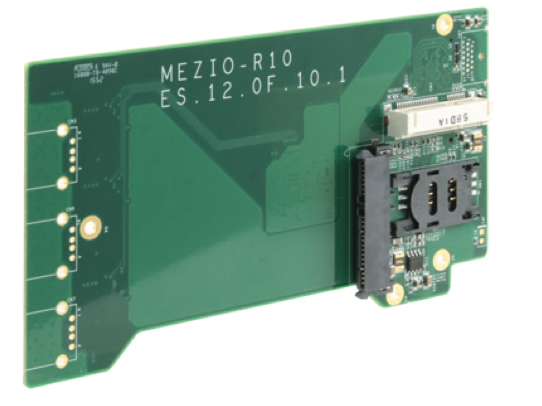
The module (documented as MezIO-R10 in the manufacturer's guide) provides one internal SATA port for a 2.5" HDD or SSD.
Yes. The module includes one full-size mini-PCIe socket with a SIM card socket, carrying both mini-PCIe and USB signals. With a SIM card installed, it can connect the host system to a 3G/4G telecom network. The host system (Nuvo-5000 series) provides multiple SMA antenna apertures on the front and back panel for multi-antenna WiFi/3G/4G configurations.
According to the source guide, this module (listed as MezIO-R10) is designed for use with the POC-120MZ controller.
The mini-PCIe socket follows the standard 52-pin mini-PCIe pinout, including PCIe signal pairs (PERn0/PERp0, PETn0/PETp0), USB D+/D-, UIM (SIM) pins, power rails (+3.3Vaux, +1.5V), and WWAN/WLAN/WPAN LED signals. Refer to the full pin table in the source documentation for exact pin assignments.
Not necessarily. Some off-the-shelf mini-PCIe 4G modules do not comply with the standard mini-PCIe interface: they may use 1.8V I/O signals instead of the standard 3.3V I/O, and can have signal conflicts on certain pins. The manufacturer recommends confirming your 4G module's pin definition or consulting Neousys for compatibility before installation, since an incompatible module may damage the system or the module itself.
How-to Guides
- Identify the target mini-PCIe 4G/3G module you plan to install.
- Verify its I/O voltage is 3.3V (standard mini-PCIe); some off-the-shelf 4G modules use 1.8V I/O instead and can conflict with this socket.
- Cross-check the module's pin definitions against the mini-PCIe pinout documented for this module.
- If unsure of compatibility, contact Neousys before installing, since an incompatible module can damage the system or the module itself.
- Obtain a mini-PCIe 3G/4G module compatible with the socket's USB and mini-PCIe signals.
- Insert a SIM card into the SIM socket provided alongside the mini-PCIe slot.
- Install the mini-PCIe module into the full-size mini-PCIe socket.
- Connect the module's antenna leads to the SMA antenna apertures on the host system's front or back panel for WiFi/3G/4G reception.