
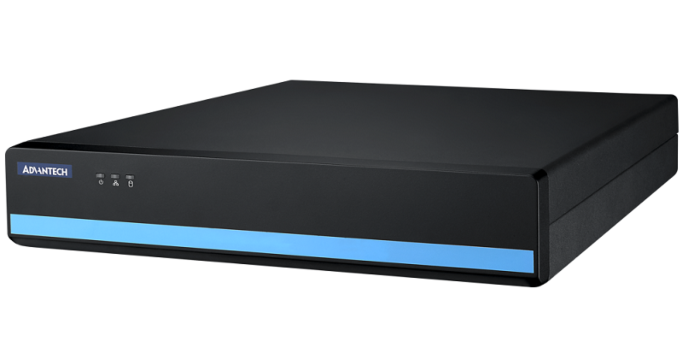
MIC-710IVX 8CH Video System with NVIDIA Xavier NX
MIC-710IVX- NVIDIA Jetson Xavier NX embedded
- Support 8CH PoE video Input
- Supports 2x 2.5"/3.5" drives
- Bundled with Linux Ubuntu 18.04 with BSP
- Low power consumption
- H.264/H.265 camera supported

Frequently Asked Questions
The MIC-710IVX is built on the NVIDIA® Jetson™ Xavier NX module. It uses an ARMv8.2 (64-bit) heterogeneous multi-processing CPU with three dual-core clusters (six NVIDIA Carmel cores), with a max operating frequency of 1.9GHz. The GPU is a Volta GPU with 384 CUDA cores and 48 Tensor cores, delivering performance up to 21 TOPS (INT8) at a max frequency of 1100MHz.
The unit provides:
- 1 x HDMI display output (max resolution 3840 x 2160 @ 60Hz)
- 1 x USB 3.0 and 1 x USB 2.0 (external), plus 1 x USB 2.0 OTG (internal)
- 4 in / 4 out digital I/O (DI/DO)
- 1 x RS-485 COM port
- 1 x RJ45 Gigabit Ethernet port (Intel® i211AT controller, 10/100/1000 Mbps)
- 8 channels of PoE video input for cameras
- 1 x Power ON/OFF switch
Yes. It supports 8 channels of PoE video input, compliant with IEEE 802.3af, with a power output of 15.4W per port. The PoE controller is a MICROSEMI PD69104B1ILQ and the LAN switch is a Realtek RTL8316SI, supporting 10/100 Mbps bandwidth. It supports H.264/H.265 cameras.
The unit uses an AC100-240V 250W ATX power supply. The datasheet notes low power consumption but does not specify an exact wattage draw figure.
The MIC-710IVX operates from 0 to 40 °C with 0.7 m/s air flow. Operating humidity is rated at 95% @ 40 °C (non-condensing). Vibration tolerance is 0.5 Grms @ 5~500 Hz, random, 1 hr/axis.
The MIC-710IVX is certified CE/FCC/BSMI/CCC and is RoHS compliant (2002/95/EC).
It includes 8GB of LPDDR4 memory and 16GB of eMMC flash storage. For drives, it supports 2 x 3.5" HDDs installed internally, or 2 x 2.5" HDDs via the optional 989K008734 module. There are 2 SATA ports.
The board support package (BSP) includes Linux Ubuntu 18.04, which is the operating system supplied with the unit.
The unit measures 300 x 330 x 57mm (11.8 x 13 x 2.2 in), weighs 3 kg, and is designed for desktop installation.
How-to Guides
- Obtain the optional 989K008734 module, which is designed to securely fix two 2.5" HDDs in one 3.5" HDD bay.
- Mount the two 2.5" HDDs into the module.
- Install the module into the internal 3.5" HDD bay of the MIC-710IVX in place of a 3.5" HDD.
- Connect the HDD SATA cable(s) to the drive(s) as with a standard 3.5" HDD installation.
- Identify one of the 8 PoE channels (CH1-CH8) located on the rear view of the unit.
- Connect an IEEE 802.3af compliant PoE camera supporting H.264/H.265 video to the desired PoE channel using a standard Ethernet cable.
- The PoE controller supplies up to 15.4W of power output per port to the connected camera over the 10/100 Mbps PoE LAN.
- Verify camera connection using the PoE LED indicators on the rear panel.
- Locate the ATX 250W power supply input on the rear of the unit.
- Connect an appropriate power cord based on region: UL Power cord (125V, 15A), BSMI Power cord (125V, 15A), or EU Power cord (250V, 10A), all available as optional accessories.
- Connect the cord to an AC100-240V power source.
- Use the Power ON/OFF switch on the front panel to power the unit on.
| Manufacturer | Advantech |
|---|---|
| Processor | ARMv8.2 64 bit HMP 3x dual core CPU clusters (six NVIDIA Carmel processor cores) |
| Graphics | Volta GPU, 384 CUDA cores, 48 Tensor cores, up to 21 TFLOPS |
| Memory | 8GB LPDDR4 |
| PoE | 8x RJ45 |
| Ethernet Standard | IEEE 802.3af |
| Video Port | HDMI |
| DIO | 4ch IN 4ch OUT |
| 2.5" Drive | in 3.5" bays option |
| DC Input | built in |
| Power Adapter | built in |
| Power Type | 250W ATX DC built in |
| Dimension | 300 x 330x x57 mm |
| Weight | 3 kg unboxed |
| Humidity | see manual |
| Vibration | see manual |
| Shock | see manual |
| CPU Cores | 6 |
| Base CPU Speed | Under 2.0 Ghz |
| Video Output | HDMI |
| LAN Ports | 1-4 |
| Serial Ports | 1-2 |
| USB 2.0 | 1-2 |
| USB 3.0 | 1-2 |
| Max Memory | 8 GB |
| Operating System | Linux |
| Native Storage Type | 2.5" SSD, 3.5" HDD |