
MIC-713S: AI Solution Kit Based on NVIDIA Jetson Orin Nano and NX
MIC-713SStarting at $1,570.00
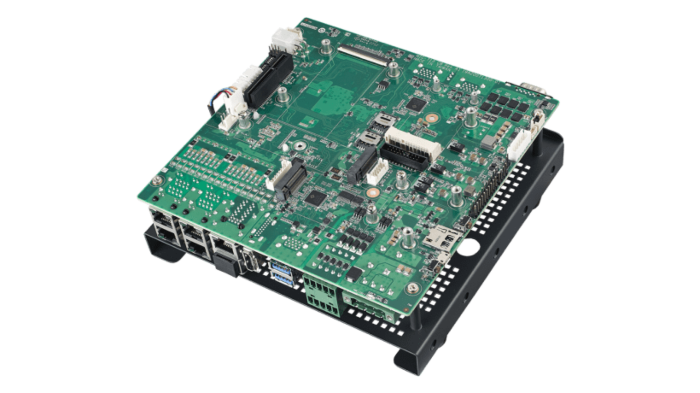
- Open-frame solution kit design
- Embedded with NVIDIA Jetson Orin NX up to 100 TOPS
- Supports 5 x GbE, 6 x USB 3.2 Gen 2
- Supports 1 x mPCIe, 1 x M.2 3052, 1 x M.2 2280
- Supports Allxon 24/7 remote monitoring and OTA deployment

Frequently Asked Questions
The MIC-713S solution kit provides 5 x 10/100/1000 Mbps Ethernet ports, 6 x USB 3.2 Gen 2 (external), 1 x Micro USB (internal, for OTG/system recovery), 1 x HDMI (max resolution 3840x2160 @ 60Hz), 4-channel digital input and 4-channel digital output, 2 x RS-232/422/485 on an on-board pin header, and 1 x CAN Bus connector.
The MIC-713S supports 1 x mPCIe slot (PCIe + USB 2.0 signal), 1 x M.2 3052 slot (USB signal) with a NANO SIM slot, 1 x M.2 2280 slot (PCIe x1 Gen 4 signal) used for NVMe storage, 1 x PCIe x4 slot (Gen 4, x4 link), 1 x Micro SD slot, and 2 x Nano SIM slots. An optional TPM 2.0 module and optional 2-channel GMSL2.0 card with FAKRA connectors are also available.
The MIC-713S accepts a DC input of 9-36 V. The system is AT power mode. Advantech recommends a 12 V (or higher) / 120 W (or higher) adapter when using the USB 3.2 ports; if a 9 V adapter is used, the total power available across the six USB ports is limited to 30 W.
The MIC-713S operates from -10 to 60 °C with 0.7 m/s air flow (derating is possible when a cellular LTE module is used). Operating humidity is rated at 95% @ 40 °C, non-condensing. The unit carries CE/FCC certification (no RED certification). It is also rated for 3 Grms vibration (5-500 Hz, random, 1 hr/axis) and 10G/11ms shock.
The MIC-713S solution kit measures 181.4 x 180 x 81.71 mm (7.14" x 7.09" x 3.22") and weighs 0.75 kg. It is designed for desktop installation.
The MIC-713S is based on the NVIDIA Jetson Orin Nano module. The 8GB configuration uses a 6-core NVIDIA Arm Cortex A78AE v8.2 64-bit CPU with a 1024-core NVIDIA Ampere GPU (32 Tensor Cores) and 8GB LPDDR5 memory. The 4GB configuration uses the same CPU core count with a 512-core Ampere GPU (16 Tensor Cores) and 4GB LPDDR5 memory.
The MIC-713S runs on NVIDIA JetPack, BSP version 5.1 or above.
MIC-713S-ON3A1 uses the NVIDIA Orin Nano 8GB module, while MIC-713S-ON2A1 uses the NVIDIA Orin Nano 4GB module. Both come with a 128GB NVMe M.2 SSD with the system BSP pre-installed.
The MIC-713S includes 2 x Nano SIM slots (for the mPCIe and M.2 3052 expansion slots) to support optional cellular modules. The peripheral compatibility list includes 4G LTE cards (Sierra WP7611, ZonBEST EWM-C109F6G1E) and a 5G(Sub-6G)/LTE/WCDMA module (Advantech AIW-355DQ-E01, with GNSS) that can be installed in these slots. The chassis also provides SMA half-punched holes for antenna installation on the standard MIC-713 system.
Yes. The MIC-713S supports Allxon 24/7 remote monitoring and OTA deployment, using the optional Allxon out-of-band module (Advantech PN 98RV710AL00).
How-to Guides
- Ensure wiring is performed only by a skilled person.
- Use copper conductors only.
- Choose an appropriate wire diameter; the terminal block is suitable for 14 AWG wire with a torque value of 7 lb-in.
- Confirm the system voltage is 9-36 V DC and current is 15-5.6 A.
- If your power adapter only provides a 2-pin or 3-pin phoenix connector, swap in the 4-pin phoenix connector supplied in the accessory box.
- Locate the COM port DIP switch (SW_COM1/SW_COM2) on the board.
- For RS-232 mode, set all switch pins (1-4) to OFF (this is the default setting).
- For RS-422 mode, set Pin 1 to ON and Pin 2 to OFF, then configure Pin 3 and Pin 4 per the receiver termination and RTS polarity settings required.
- For RS-485 mode, set Pin 1 and Pin 2 to ON, then configure Pin 3 and Pin 4 per the receiver termination and RTS polarity settings required.
- Prepare a host PC (refer to the software update SOP file on the BSP download page).
- Shut down the MIC-713.
- Connect the MIC-713 internal Micro USB port to the host PC using the supplied USB cable.
- Press and hold the onboard recovery button.
- Press the reset button.
- After 5 seconds, release the recovery button.
- On the host PC, run the command
lsusb; if "NVIDIA Corp" appears, the MIC-713 is in recovery mode.
- Locate the M.2 2242/2280 slot, which provides PCIe Gen 4 x1 signal.
- If installing an M.2 M-Key 2242 device, first install the optional standoff part (Advantech PN 1910000747).
- Insert the M.2 M-Key card into the slot and secure it.
- Take the mounting bracket (Advantech PN 1960110505N001) from the accessory box.
- Secure the bracket with 4 screws (Advantech PN 1930007259-01).
- Install the system on a table using the mounted bracket.
| Manufacturer | Advantech |
|---|---|
| Short Description | AI Solution Kit Based on NVIDIA Jetson Orin NX |
| Processor | MIC-713S-ON 4GB: 6-core NVIDIA Arm Cortex A78AE v8.2 64-bit CPU MIC-713S-OX 8GB: 6-core NVIDIA Arm® Cortex A78AE v8.2 64-bit CPU |
| Graphics | MIC-713S-ON 4GB: 512 core NVIDIA Ampere GPU with 16 Tensor Cores MIC-713S-OX 1024-core NVIDIA Ampere GPU with 32 Tensor Cores |
| Memory | MIC-713S-ON 4GB: 4GB LPDDR5 MIC-713S-OX 8GB: 8GB LPDDR5 |
| Video Port | HDMI (Max. resolution 3840x2160 @ 60Hz) |
| DIO | 4-ch DI, 4-ch DO |
| PCI Express | 1 x PCIe x4 slot (PCIe x4 link, Gen 4) |
| M.2 | 1 x M.2 2280 (Signal: PCIe x1, Gen 4) |
| Power Input Voltage | 9 ~ 36 VDC |
| Power Type | DC |
| Fan | Dimension 60 x 60 x 13 mm (2.36" x 2.36" x 0.51") |
| Dimension | 181.4 x 180 x 81.71 mm (7.14" x 7.09" x 3.22") |
| Weight | 0.75 kg (1.65 lb) |
| Operating Temperature | -10 ~ 60 °C with 0.7 m/s air flow |
| Humidity | 95% @ 40 °C (non-condensing) |
| Vibration | 3 Grms @ 5 ~ 500 Hz, random, 1 hr/axis |
| Shock | 10G / 11ms |