
MIC-715-OX Ruggedized In-Vehicle AI Fanless System Based on NVIDIA Jetson Orin NX
MIC-715-OXStarting at $3,685.00
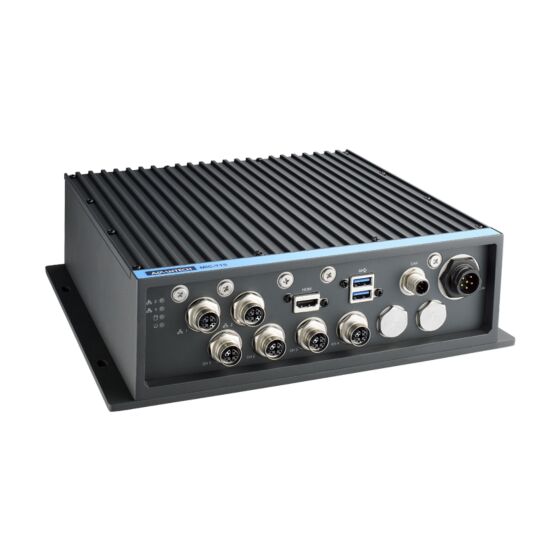
- Ruggedized IP67 waterproof fanless design
- Embedded with NVIDIA Jetson Orin NX up to 100 TOPS
- 2 x GbE and 4 x PoE with IEEE 802.3af compliance
- 2 x USB 3.0, 1 x CANbus, 1 x HDMI
- Supports 2 x mPCIe, 1 x M.2 3052, 1 x M.2 2280
- Supports Allxon 24/7 remote monitoring and OTA deployment


Frequently Asked Questions
The MIC-715-OX provides the following I/O:
- 6 x Gigabit Ethernet (10/100/1000 Mbps) in M12 X-coded 8-pin female connectors, with 4 of the 6 ports supporting PoE (IEEE 802.3af)
- 2 x USB 3.0 (waterproof connector)
- 1 x HDMI (max resolution 3840 x 2160 @ 60Hz, waterproof connector)
- 2 x CAN bus (M12 A-coded, 5-pin male)
- 2 x full-size Mini PCIe (signal: PCIe + USB), one with SIM slot support
- 1 x M.2 3052 B-Key (signal: PCIe + USB) and 1 x M.2 2280 M-Key (NVMe, PCIe x1)
- 1 x internal OTG Micro USB
- 1 x internal Micro SD card slot
The MIC-715-OX accepts 12/24V DC input (12-6A) through an M16, 6-pin male connector, with ignition support. The default setting is 12V DC. If your power source is 24V, you must open the case and change the SW1 DIP switch setting from 00 to 01.
The MIC-715-OX operates from -20 to 60°C with 0.7 m/s airflow (Max-N ARM mode), and tolerates 95% humidity at 40°C (non-condensing). Storage temperature range is -40 to 85°C. It is rated for 3 Grms vibration (5-500 Hz, random, 1 hr/axis) and 10G/11ms shock. It carries CB, UL, CE, FCC, and CCC certifications (no RED certification) and is e-mark compliant. The enclosure is IP67 rated for water and dust resistance.
The system supports:
- 1 x M.2 2280 M-Key slot (NVMe, PCIe x1) for storage — the shipping SKU (MIC-715-OX4A1) comes with a pre-installed 128GB NVMe M.2 SSD with BSP
- 1 x M.2 3052 B-Key slot (signal: PCIe + USB)
- 2 x full-size Mini PCIe slots (signal: PCIe + USB)
- 2 x Nano SIM slots (located on the M.2 3052 and one Mini PCIe slot)
- 1 x internal Micro SD card slot
16GB LPDDR5 memory is built into the Jetson Orin NX module and is not user-expandable per the listed specs.
The system ships with a JetPack BSP (version 5.1 or above) pre-installed on the onboard NVMe M.2 SSD. It also supports Allxon for 24/7 remote monitoring and OTA deployment.
The MIC-715-OX measures 275 x 220 x 80 mm (10.8" x 8.7" x 3.2") and weighs 4.5 kg. It is designed for desktop/enclosure installation as a fanless unit.
Yes. The MIC-715-OX supports Allxon for 24/7 remote monitoring and OTA deployment. You can enroll your device through the Allxon Jetson enrollment portal to access a centralized cloud management dashboard.
VPM is a feature managed by the onboard MCU (STM32L0) that controls how the system turns on/off in response to vehicle ignition signals and monitors battery voltage to protect against draining the vehicle battery. Configurable parameters include ON_DELAY, OFF_EVENT_DELAY, HARD_OFF_DELAY, and a low-voltage LOW_THRESHOLD (default 10.8V in 12V mode), each adjustable through the vpmctrl command-line utility.
How-to Guides
- Note that the MIC-715-OX default power input is 12V DC.
- If your power source is 24V, open the case to access the SW1 DIP switch.
- Change the DCIN_MODE_RANGE setting on SW1 from 00 (12V, default) to 01 (24V).
- Close the case before applying power.
- Prepare a HOST PC (refer to the software update SOP for host PC requirements).
- Shut down the MIC-715-OX.
- Connect the HOST PC to the MIC-715-OX using the internal micro USB cable.
- Press and hold the internal SW_REC1 button.
- Press the SW_RST1 button.
- After 5 seconds, release the SW_REC1 button.
- On the HOST PC, run the
lsusbcommand. If "NVIDIA Corp." appears in the output, the MIC-715-OX is in recovery mode and ready for flashing.
Note: The default root password of the MIC-715-OX is MIC-715-OX.
- Obtain the MIC-715 M.2/Mini PCIe Module Thermal Kit (PN: 98R27150000).
- For an M.2 module: use the supplied screw (1930005673-11) and thermal pad for M.2-3052 (1990030086N000, Stick A).
- For a Mini PCIe module: use the supplied screw (1930008089) and thermal pad (1990027303N010, Stick B).
- Open the internal module bay per the internal module installation diagram, seat the module in its slot, and secure it with the appropriate screw and thermal pad.
- Obtain the power cord from the accessory box.
- IGN mode: Connect the V+ pin and the two IGN pins to the second V+ screw terminal. In this mode, the PSW connection is left suspended.
- ATX mode: Connect the PSW wire to one of the button connections, and connect the other button connection to V- with a wire. In this mode, IGN is suspended.
- Go to the Allxon Jetson device enrollment page at https://allxon.com/jetson/device_enroll/.
- Follow the enrollment steps to register the MIC-715-OX to the Allxon Portal.
- Once enrolled, manage the device remotely through the centralized cloud portal, including 24/7 monitoring and OTA deployment.
| Product Available On | Sep 25, 2024 |
|---|---|
| Manufacturer | Advantech |
| Short Description | Ruggedized In-Vehicle AI Fanless System Based on NVIDIA Jetson Orin NX. |
| CPU Cores | 8 |
| CPU Family | Jetson AGX Orin |
| Base CPU Speed | 2.1 to 3.0 GHz |
| Video Output | HDMI |
| PoE Ports | 4 |
| LAN Ports | 5-8 |
| USB 3.0 | 1-2 |
| Max Memory | 16 GB |
| Operating System | NVIDIA JetPack 5.0.2 |
| Form Factor | Fanless |
| Native Storage Type | M.2 NVMe SSD |
| Certification | CB/UL/CE/FCC/CCC (No RED certification) |
| CPU | 8-core NVIDIA Arm Cortex A78AE v8.2 64-bit CPU |
| Memory | 16GB LPDDR5 |
| Storage | M.2: 1 x M.2 2280 M-Key (NVMe, PCIe x1) |
| I/O | Ethernet: 6 x 10/100/1000 Mbps (4 x PoE support, IEEE 802.3af) in M12 X-coded, 8-pin female connector |
| Expansion Slots | Mini PCIe: 2 x mPCIe (signal: PCIe + USB) |
| Power Input Voltage | 12/24VDC (12-6A) with ignition* |
| Weight | 4.5 kg |
| Dimension | 275 x 220 x 80 mm (10.8" x 8.7" x 3.2") |