
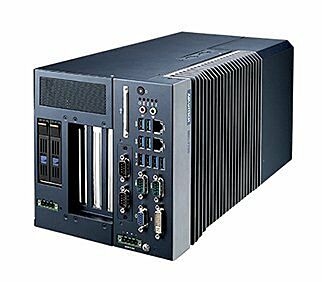
MIC-75G20 i-module, 1PCIEX16+1PCIEX4
MIC-75G20-10A2Starting at $830.00
Main Features:
- Offering powerful GPU solution for NVIDIA GPUs, 2-slot width/285mm length GPU cards for new AI application
- Dual 24VDC power inputs with reliable power and OCP solution for up to 600W maximum peak power currency
- Intelligent power status indicating LED for system and GPU card independently
- Versatile wall-mount, table-mount, suitable for any industrial environment deployed
- Dual front accessible storage bay for easy swap
- IP30 rating with fan filter, suitable for outdoor or industrial environment
- Compact size design

Frequently Asked Questions
The MIC-75G20 provides the following connectors:
DCIN1- 24VDC power inPPCIE2- PCIe x16 slotPPCIE1- PCIe x4 slotSATAPWR1- 4-pin SATA power connector (5V)SATA1- SATA signal connectorGPUPWR1andGPUPWR2- 6-pin power connectors for the GPU card (12V, 17A each)DC12VO-OUT1- 4-pin power connector (12V, 5A)SYSFAN1- 4-pin fan connectorSYSFAN2- 4-pin fan connector (reserved)LED- GPU card power status indicator
The module takes 24VDC input via the DCIN1 connector. It also provides a 4-pin SATA power connector at 5V, two 6-pin GPU power connectors rated at 12V/17A each, and a 4-pin 12V/5A output connector. An independent 24VDC power path is provided for the GPU card, supporting up to 600W max peak power.
The MIC-75G20 operates from 0 to 40°C with 0.7 m/sec air flow when used with an industrial SSD. Storage temperature range is -40 to 85°C (-40 to 185°F). Relative humidity is rated at 95% at 40°C, non-condensing.
The i-Module itself measures 110 x 192 x 350 mm (W x H x D). When combined with a MIC-7 series system, the overall dimensions become 183 x 192 x 350 mm. Note that width increases by 4mm when installed with a MIC-77xx system.
The MIC-75G20 has an independent 24VDC power path for the GPU card, supporting up to 600W max peak power. Two 6-pin GPU power connectors (GPUPWR1 and GPUPWR2) each supply 12V at 17A to the installed GPU card.
Yes, the front of the unit includes 2 x swappable storage bays.
Yes, the MIC-75G20 can be assembled with all MIC-7 series IPC systems.
The documented power supply is a 480W PSU (P/N: 96PSD-A480W24-MN), connected via a PSU power cord and an optional Y-type cable (P/N: 1700029474-01) with a 2x 4-pin phoenix connector, which allows the PSU to power both the MIC-7000 system and the MIC-75G20.
How-to Guides
- Undo the MIC-7 series system screws and remove the bottom cover.
- Remove the 2 x dust covers (important).
- Undo the 4 x screws on the MIC-75G20.
- Remove the i-door bottom cover, then assemble and secure it into the i-Module's bottom cover.
- Align the MIC-75G20 with the MIC-7 system and secure with 4 x screws.
- Assemble the MIC-75G20 cover and secure it with 6 x screws.
- Reassemble the chassis cover and secure with screws. Note that the chassis cover has a special notch that must mate with the hook on the chassis, and the MIC-75G20 has 2 bolts which must align with the holes on the device.
- Undo the system cover and remove the old fan filter.
- Install the new fan filter and reassemble the system cover with screws.
Advantech recommends replacing the fan filter at regular intervals to ensure stable system cooling.
- After the GPU card has been installed, secure 2 x screws on the GPU card brackets.
- Secure the GPU card holder with 4 x screws.
- Type 1: Secure 1 x mounting bracket (P/N: 1960070543T001) and 1 x mounting bracket (P/N: 1960070545N001) using 4 x screws (P/N: 1930007259-01).
- Type 2: Secure 2 x mounting brackets (P/N: 1960070543T001) using 4 x screws (P/N: 1930007259-01). Note that there are 2 x 1960070543T001 brackets included in the accessory box of the MIC-7 series.
- Connect the PSU power cord (P/N: TBD, 1.83M) to the 480W PSU (P/N: 96PSD-A480W24-MN).
- Connect from the PSU to the MIC-7000 and MIC-75G20 using the optional Y-type cable (P/N: 1700029474-01) with a 2x 4-pin phoenix connector (P/N: 1652003234).
- Confirm the TB1 pin-out for the PSU power cord (Pin 1: FG, Pin 2: AC/N or DC-, Pin 3: AC/L or DC+) and the TB2 pin-out for the Y-type cable (Pins 1,2: DC OUTPUT +V; Pins 3,4: DC OUTPUT -V).
| Manufacturer | Advantech |
|---|---|
| Storage | 2 x 2.5" swappable HDD/SSD storage bay |
| Expansion Slots | Slot 1/2: Blank, Slot 3: PCIe x16, Slot 4: PCIe x4 |
| Vibration Protection | With SSD: 1 Grms @ 5~500 Hz, randon, 1 hr/axis |
| Power Consumption | Max. Load: 448W (tested with 350W GPU, PoE card and MIC-770 system with 65W CPU) |