
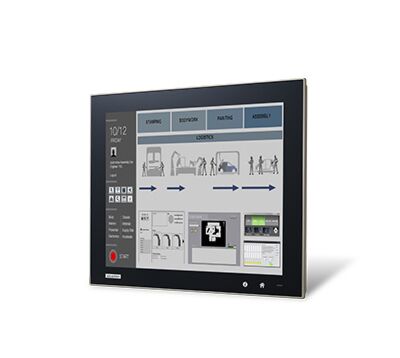
Modular Multi-touch Panel PC
TPC-5000 SeriesStarting at $495.00
Main Features
- Intel Celeron 3955U/Core i3-6100U/i5-6300U/i7-6600U processor with 4/8 GB DDR4 SODIMM
- Industrial-grade LED LCD with a lifespan of 50,000 hours
- Modular design enables flexible configuration and easy maintenance
- Display modules available in various sizes with projected capacitive or 5-wire resistive touch control
- Programmable home key and iKey for adjusting system settings
- Built-in TPM 2.0 technology
- 2 x full-size mini-PCIe and 1 x half-size PCIe
- IP66-rated front panel protects against water and dust
- 3 x LAN with multiple fieldbus protocol support and LAN surge protection
- Panel logo can be customized
- Supports SSD expansion

Frequently Asked Questions
The box module provides the following I/O:
- 2 x USB 3.0
- 2 x USB 2.0
- 1 x RS-232
- 1 x RS-232/422/485
- 1 x Audio line out
- 1 x DisplayPort 1.2 Out
- 3 x 10/100/1000BASE-T LAN (2 x Intel® I210, 1 x Intel® I219)
The system takes 24V DC ± 20% input, with a maximum power consumption of 75W.
Operating temperature is 0 ~ 55 °C (32 ~ 131 °F), except the 18.5" display panel configuration which is rated 0 ~ 50 °C (32 ~ 122 °F). Storage temperature is -20 ~ 60 °C (-4 ~ 140 °F). Certifications include BSMI, CCC, CE, FCC Class A, UL, EAC, and 61010.
Memory depends on the box module: the TPC-B500-6C2AE ships with 4 GB DDR4 2133 MHz SODIMM (expandable to 16 GB), while the TPC-B500-633AE/653AE/673AE ship with 8 GB DDR4 2133 MHz SODIMM (expandable to 32 GB). Storage options include 1 x M.2 (2280) SATA slot, 1 x 2.5" SATA SSD slot, and an optional CFast slot via an iDoor module.
The TPC-5000 supports Microsoft® Windows WES7 (32/64-bit) and Windows 10 IoT Enterprise LTSB/LTSC. Preconfigured OS images are also available, including Win10 IoT Ent 2019 LTSC High End (for Intel® Core™ i7), Win7 (WS7P) 64-bit, and Advantech Linux V1.0.8.
The system supports a panel mount kit as standard and an optional VESA mount kit. Panel cutout dimensions and wall thickness ranges (1 mm min. to 6 mm max.) are specified per display size in the datasheet's dimension table.
Wi-Fi/NFC support on the front panel is optional on the 15", 17", 15.6", 18.5", 21.5", and 23.8" display panel modules; it is not available on the 12" module. Contact Advantech for more information on this option.
The system includes 1 x half-size PCIe slot (x1 lane, max. dimension 167.65 mm x 64.41 mm x 14.48 mm) and 2 x full-size mini-PCIe slots. Optional iDoor modules can be added, such as isolated RS-422/485, isolated DI/O with counter, isolated CANBus, Gigabit Ethernet, PROFIBUS master fieldbus, and a CFast slot module.
The front panel is IP66-rated, protecting against water and dust.
Display modules are available in 12" XGA, 15" XGA, 17" SXGA, 15.6" FHD, 18.5" HD, 21.5" FHD, and 23.8" FHD, with maximum resolutions ranging from 1024 x 768 up to 1920 x 1080 depending on size. The 12" model uses 5-wire resistive touch, while all other sizes use projected capacitive (PCAP) touch.
How-to Guides
- Power down the system and disconnect the power input.
- Open the enclosure to access the storage bays.
- Install an M.2 (2280) SATA SSD into the M.2 slot, or install a drive into the 2.5" SATA SSD slot.
- For CFast storage, install the optional iDoor CFast module (PCM-23C1CF-BE), noting that an additional cable is required.
- Reassemble the enclosure and reconnect power.
- Determine the display size of your unit and locate the corresponding panel cutout dimensions (X2, Y2) in the dimension table.
- Prepare a mounting surface with a wall thickness between the minimum (1 mm) and maximum (6 mm) specified.
- Cut the panel opening to the specified X2 x Y2 dimensions.
- Insert the unit into the cutout and secure it using the panel mount kit.
- If VESA mounting is preferred, use the optional VESA mount kit instead.
- Power down the system and disconnect power.
- Open the enclosure to access the iDoor expansion bay/mini-PCIe slots.
- Select the desired iDoor module (e.g., PCM-24D2R4-AE for isolated RS-422/485, PCM-27D24DI-AE for isolated DI/O, PCM-26D2CA-AE for isolated CANBus, PCM-24R1TP-AE for Gigabit Ethernet, or PCM-26D1DB-MAE for PROFIBUS master).
- Install the module into the mPCIe slot and connect its corresponding external connector (DB9, DB37, or RJ45 as applicable).
- Reassemble the enclosure and power on the system.
- Confirm the power source supplies 24V DC (± 20%) and can support up to 75W.
- Use the supplied power adapter (96PSA-A120W24T2, 100~240V input, 120W, 24V/5A output) if operating from AC mains.
- Connect the appropriate power cable for your region (US, EU/UK, or China/Australia part numbers listed in the accessories section).
- Attach the power cable to the unit's power input connector (labeled "Q. Power input" in the rear view diagram).
- Power on the unit and confirm the power indicator (D) illuminates.
| Manufacturer | Advantech | ||||||||||||||
|---|---|---|---|---|---|---|---|---|---|---|---|---|---|---|---|
| CPU Family | Intel Celeron, Intel Core | ||||||||||||||
| Base CPU Speed | Under 2.0 Ghz, 2.1 to 3.0 GHz | ||||||||||||||
| Resolution | 1024 x 768, 1280 x 1024, 1920 x 1080 | ||||||||||||||
| Screen Size | 10.1-15", 15.1-19", 20" and up | ||||||||||||||
| Video Output | Display Port | ||||||||||||||
| LAN Ports | 1-4 | ||||||||||||||
| Serial Ports | 1-2 | ||||||||||||||
| USB 2.0 | 1-2 | ||||||||||||||
| USB 3.0 | 1-2 | ||||||||||||||
| Max Memory | 16 GB, 32 GB | ||||||||||||||
| Operating System | Windows 10, Linux | ||||||||||||||
| Effective Memory Speed | 2133 MHz | ||||||||||||||
| Form Factor | Fanless | ||||||||||||||
| Native Storage Type | 2.5" SSD, M.2 SATA S80 | ||||||||||||||
| BIOS | AMI UEFI | ||||||||||||||
| Certification | BSMI, CCC, CE, FCC Class A, UL, EAC, 61010 | ||||||||||||||
| Cooling System | Fanless design | ||||||||||||||
| Enclosure | Front bezel: Die cast aluminum alloy Back housing: SECC | ||||||||||||||
| Mounting | Panel mount kit; VESA mount kit (optional) | ||||||||||||||
| CPU | 6th Gen Intel Celeron 3955U 2.00 GHz 6th Gen Intel Core™ i3-6100U 2.30 GHz 6th Gen Intel Core™ i5-6300U 2.40 GHz 6th Gen Intel Core™ i7-6600U 2.60 GHz | ||||||||||||||
| Memory | TPC-B500-6C2AE: 4 GB DDR4 2133 MHz SODIMM SDRAM (up to 16 GB) TPC-B500-633AE/653AE/673AE: 8 GB DDR4 2133 MHz SODIMM SDRAM (up to 32 GB) | ||||||||||||||
| Network (LAN) | 3 x 10/100/1000BASE-T (2 x Intel I210, 1 x Intel I219) | ||||||||||||||
| I/O | 1 x RS-232, 1 x RS-232/422/485 2 x USB 3.0, 2 x USB 2.0 1 x Audio line out 1 x DisplayPort 1.2 Out | ||||||||||||||
| Expansion Slots | 1 x Half-size PCIe (Lanes: x1; Max. Dimension: 167.65 mm x 64.41 mm x 14.48 mm (D x W x H)) 2 x Full-size mini PCIe | ||||||||||||||
| Display Type |
| ||||||||||||||
| Display Size |
| ||||||||||||||
| Max Resolution |
| ||||||||||||||
| Max Colors |
| ||||||||||||||
| Luminance |
| ||||||||||||||
| Viewing Angle |
| ||||||||||||||
| Backlight Lifetime |
| ||||||||||||||
| Contrast Ratio |
| ||||||||||||||
| Light Transmission |
| ||||||||||||||
| Humidity | 10 ~ 95% RH @ 40 C, non-condensing | ||||||||||||||
| Ingress Protection | IP66-rated front panel | ||||||||||||||
| Operating Temperature | 0 ~ 55 C (32 ~ 131 F); 0 ~ 50 C (32 ~ 122 F) for 18.5" display panel | ||||||||||||||
| Storage Temperature | -20 ~ 60 C (-4 ~ 140 F) | ||||||||||||||
| Power Input Voltage | 24 VDC +/- 20% | ||||||||||||||
| Power Consumption | Typ. 41W; Max. 75W | ||||||||||||||
| OS Support | Microsoft Windows WES7 (32/64-bit), Windows 10 IoT Enterprise LTSB/LTSC |