
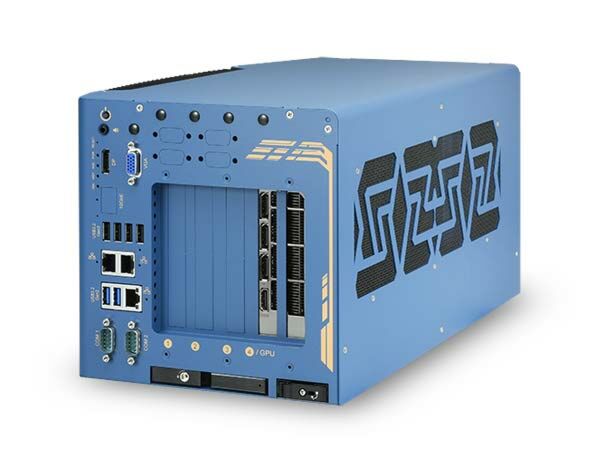
Nuvo-10108GC: Industrial Edge AI Computer Supporting a 350W NVIDIA RTX GPU and Intel 14th/13th/12th-Gen Core Processor with Three Additional PCIe Slots
Nuvo-10108GC SeriesStarting at $2,120.00
Main Features:
- Supports an NVIDIA 350W GPU (Gen4 x16 PCIe)
- Dedicated GPU-locking bracket
- Intel 14th/13th/12th-Gen Core 35W/65W CPUs
- Up to 64GB ECC/ non-ECC DDR5 4800 with Intel R680E chipset (2x SODIMM)
- Three x8 PCIe slots (Gen3 x4) for add-on cards
- 6x USB 3.2, 2x 2.5GbE, 1x GbE, and 1x optional 10GbE
- Two front-accessible tray storage options: 1x 2.5" SATA and 1x optional NVMe
- 8V to 48V wide-range DC input with ignition power control
- -25°C to 60°C wide temperature operation

Frequently Asked Questions
The system provides the following external I/O:
- 6x USB 3.2 Gen2x1 (10Gbps) ports
- 1x USB 2.0 port (internal, for dongle use)
- 2x 2.5GbE ports (Intel I226-IT) and 1x GbE port (Intel I219-LM)
- 1x optional 10GBASE-T port (Marvell AQC113CS), backward compatible with 5GBASE-T, 2.5GBASE-T, and 1000BASE-T
- 1x VGA connector (up to 1920x1200) and 1x DisplayPort connector (up to 4096x2304)
- 2x software-programmable RS-232/422/485 ports (COM1/COM2)
- 1x 3.5mm jack for mic-in and speaker-out
The system accepts 8V to 48V wide-range DC input through a 3-pin + 4-pin pluggable terminal block, with support for ignition power control. For system load under 100W, the required DC input range is 8V to 48V. For system load between 100W and 480W (single GPU), the required DC input range is 13.8V to 48V. Supplying a voltage over 48V will damage the system.
With a 35W CPU and NVIDIA 350W GPU, operating temperature is -25°C to 60°C. With a 65W CPU and NVIDIA 350W GPU, it is -25°C to 60°C with the optional fan kit, or -25°C to 50°C without the fan kit. Storage temperature is -40°C to 85°C, and humidity range is 10% to 90% non-condensing. For sub-zero operation, a wide-temperature HDD or SSD is required. The system meets MIL-STD-810H vibration (Method 514.8, Category 4) and shock (Method 516.8, Procedure I) with the damping bracket installed, and is CE/FCC Class A certified per EN 55032 & EN 55035.
The system supports up to 128GB ECC/non-ECC DDR5 4800 SDRAM across two SODIMM slots (each slot up to 64GB single module capacity). Storage options include a front-accessible, hot-swappable 2.5" SATA HDD/SSD tray, an M.2 2280 M key socket (PCIe Gen4x4) for an NVMe SSD, and an optional front-accessible M.2 2280 M key tray (PCIe Gen4x4).
The system offers 1x PCIe x16 slot at Gen4, 16-lanes (65mm slot width) for a GPU, with a locking bracket designed for NVIDIA RTX A4000, A5000, A6000, 6000 Ada, and selected RTX 40 series GPU cards. It also has 3x PCIe x8 slots at Gen3, 4-lanes for add-on cards, 2x full-size mini-PCIe sockets with internal SIM sockets, and 1x M.2 2242/3052 B key socket with internal SIM socket for mobile connectivity modules.
The system supports a single NVIDIA GPU up to 350W with Gen4 x16 signal. The standard GPU locking bracket is designed for NVIDIA RTX A4000, A5000, A6000, 6000 Ada, and selected RTX 40 series GPU cards. Documentation also references installation of MSI RTX 5070/5070 Ti/5080 Ventus cards using a compatible bracket.
The system supports Intel 14th, 13th, and 12th-Gen Core CPUs (LGA1700 socket, 35W/65W TDP), including Core i9, i7, i5, i3, Pentium, and Celeron models, paired with the Intel R680E Platform Controller Hub chipset and integrated Intel UHD Graphics 770/730.
Neousys has tested the system with Microsoft Windows 10 LTSC 2021 (x64) and Ubuntu 20.04.5 LTS, 22.04 LTS, 22.04.1 LTS, or other Linux distributions with kernel version 5.15 or higher. For other Linux OS, the kernel should be upgraded to at least 4.15.18. For Linux, users may need to manually compile and install drivers for Intel graphics or the I225/I226 GbE controller if not embedded in the kernel.
The system measures 214 mm (W) x 400 mm (D) x 196 mm (H) and weighs 6.2 kg (excluding damping bracket) per the datasheet, or 6.5 kg per the manual. It is designed for wall-mount installation with damping brackets, which also provide vibration resistance up to 1Grm with HDD or up to 5Grm with SSD.
The system provides 2x full-size mini-PCIe sockets with internal SIM sockets and 1x M.2 2242/3052 B key socket with an internal SIM slot, allowing installation of 4G LTE, 5G NR, or WiFi modules. Multiple SMA antenna apertures are located on the I/O panel for antenna connections.
How-to Guides
- Refer to the disassembly procedure to open the enclosure and access the motherboard.
- Locate the two SODIMM memory module slots on the motherboard.
- Insert the gold fingers of the memory module into the slot at a 45-degree angle, then push down to clip it into position.
- Push the memory module down until it clicks into place.
- To install a module in the bottom slot, remove the two screws holding the heatsink first.
- Repeat the insertion steps, remove the thermal pad film protector, and reinstall the memory module's heatsink.
- Reinstall the system enclosure and panel when done.
- Refer to the disassembly procedure; you may not need to fully dismantle the system to access the M.2 slot.
- Locate the M.2 2280 slot on the motherboard.
- Insert the module at a 45-degree angle.
- Gently press down and secure the module with an M2.5 P-head screw.
- Reinstall the system enclosure and panel when done.
- Refer to the disassembly procedure to open the enclosure.
- Locate the PCIe x16 slot on the daughter board.
- Remove the corresponding enclosure bezel(s) for the PCIe slot you wish to use.
- Take the dedicated GPU bracket and cable from the accessory box and attach the cable sorting peg.
- Remove the graphics card from its antistatic bag and attach the dedicated bracket, securing screws with correct orientation (top holes vs. bottom holes).
- Attach the graphics card's power cable.
- Lower the graphics card into the PCIe slot, ensuring the gold fingers are properly seated, then secure the card panel with screws.
- Connect the graphics card's power cable to the daughter board.
- Secure the dedicated GPU bracket to the enclosure frame at top and bottom.
- Reinstall the enclosure and panel when done.
- Locate the IGN input on the 4-pin pluggable terminal block (shared with DC power input).
- Connect the vehicle Battery+ line (12V for sedan, 24V for bus/truck) to V+.
- Connect the vehicle Battery-/GND line to GND.
- Connect the ACC line to IGN.
- Ensure the DC power source and IGN signal share the same ground. The IGN input accepts 8~48VDC; supplying a voltage higher than 48VDC may damage the system.
- Locate the easy-swap tray at the bottom of the enclosure.
- Lift the lever to spring open and access the hot-swap slot; no enclosure disassembly is required.
- Insert the HDD/SSD with labels facing up and the SATA connector end toward the slot, about 3/4 of the way in.
- Use the lever to fully push the HDD/SSD into the slot until you hear a click confirming proper engagement.
Nuvo-10108GC is Neousys' response to ruggedized Edge AI computer with extreme CPU and GPU performance for autonomous driving and AI-powered factory automation. It leverages an Intel 14th/13th/12th-Gen CPU and an NVIDIA RTX 40 series or the latest RTX 6000 Ada GPU that offers single-precision GPU performances up to 48 TFLOPS or 91 TFLOPS, respectively.
Powered by Intel 12th/13th-Gen CPU with up to 24 cores and 32 threads, Nuvo-10108GC offers up to twice the performance compared to previous Intel 10th or 11th-Gen platforms. Plus, Nuvo-10108GC supports ECC memory to deliver mission-critical computation, e.g., automated driving in urban traffic. It inherits a proven thermal dissipation design for the CPU and GPU to guarantee -25°C to 60°C wide-temperature operation. Featuring an innovative GPU locking bracket to fasten the GPU to the chassis and Neousys' patented damping bracket to absorb high-frequency vibration allowing Nuvo-10108GC to thrive in continuous shaking and juddering conditions in on/ off highway applications.
Nuvo-10108GC incorporates an abundance of onboard I/Os, such as 6x USB3.2 Gen2, 3x 2.5GbE/GbE, and 1x optional 10GbE. Expansion-wise, Nuvo-10108GC offers 3x additional PCIe slots for GMSL2/ industrial camera frame grabbers and various add-on cards. Also, it provides 2x full-size mini PCI Express sockets for CAN bus/ COM expansion and 1x M.2 B key sockets for mobile connectivity with 4G LTE, 5G NR, or WiFi modules. In terms of data storage, Nuvo-10108GC offers an M.2 2280 M socket for Gen4x4 NVMe, and dual front-accessible storage options, including a 2.5" SATA HDD/SSD and an optional M.2 2280 Gen4x4 NVMe tray.
By utilizing Intel's 14th/13th/12th-Gen platform, state-of-the-art NVIDIA RTX GPU, and Neousys' industrial-grade power, thermal and mechanical designs with rich I/O and expansion, Nuvo-10108GC is a rugged edge AI platform that offers unprecedented GPU and CPU computing power for modern AI applications.
| Manufacturer | Neousys |
|---|---|
| Short Description | Industrial Edge AI Computer Supporting a 350W NVIDIA RTX GPU and Intel 14th/13th/12th-Gen Core Processor with Three Additional PCIe Slots. |
| Processor | Supporting Intel 12th and 13th-Gen Core™ CPU (LGA1700 socket, 65W/ 35W TDP) |
| Graphics | Integrated Intel® UHD Graphics 770 (32EU)/ 730 (24EU) |
| Memory | Up to 64 GB DDR5 4800 SDRAM (two SODIMM slots) |
| Chipset | Intel® R680E Platform Controller Hub |
| AMT | Supports Intel vPro/ AMT 16.0 |
| Ethernet Standard | I226-IT |
| Video Port | 1x VGA connector, supporting 1920 x 1200 resolution |
| Audio | 1x 3.5 mm jack for mic-in and speaker-out |
| PCI Express | 1x PCIe x16 slot @Gen4, 16-lanes with 6.5 mm slot width. The standard GPU locking bracket is designed for NVIDIA RTX A4000, A5000, A6000, 6000 Ada, and selected RTX 40 Series GPU cards. |
| M.2 | 1x M.2 2242/3052 B key socket with internal SIM sockets |
| Mini PCI-E | 2x full-size mini PCI Express sockets with internal SIM sockets |
| SATA HDD | 1x front-accessible, hot-swappable HDD trays for 2.5" HDD/ SSD installation |
| DC Input | 3-pin + 4-pin pluggable terminal block for 8V to 48V DC input with ignition control |
| Dimension | 214 mm (W) x 400 mm (D) x 196 mm (H) (without damping bracket) |
| Weight | TBD |
| Mounting | Wall-mount with damping brackets |
| Operating Temperature | With 35W CPU and NVIDIA 350W GPU: -25°C to 60°C |
| Storage Temperature | -40°C to 85°C |
| Humidity | 10% to 90% , non-condensing |
| Vibration | MIL-STD-810H, Method 514.8, Category 4 (with damping bracket) |
| Shock | MIL-STD-810H, Method 516.8, Procedure I (with damping bracket) |
| EMC | CE/FCC Class A, according to EN 55032 & EN 55035 |
| CPU Family | Intel Core, Jetson AGX Orin |
| Base CPU Speed | 2.1 to 3.0 GHz, 3.1 to 3.5 GHz, Over 3.5 GHz |
| Video Output | Display Port, VGA |
| PoE Ports | 2 |
| LAN Ports | 1-4 |
| Serial Ports | 1-2 |
| USB 2.0 | 1-2 |
| USB 3.0 | 5-6 |
| Max Memory | 64 GB |
| Operating System | Windows 10, Linux |
| Effective Memory Speed | 4800 MHz |
| Form Factor | Fanless |
| Native Storage Type | 2.5" SSD, M.2 NVMe SSD |