
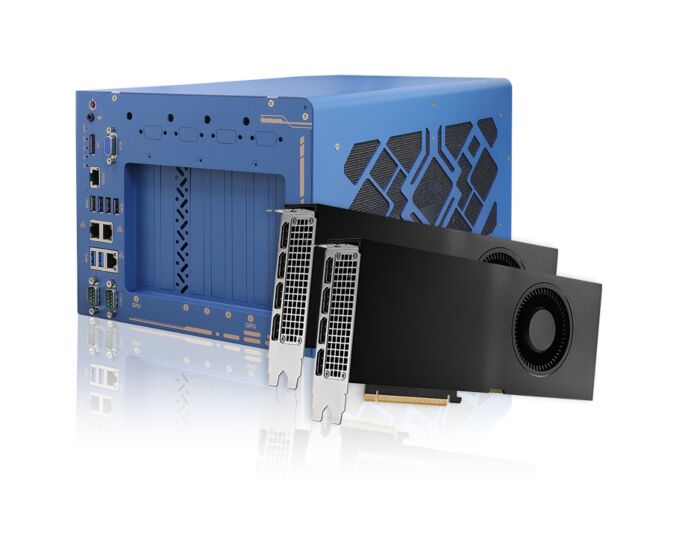
Nuvo-10208GC: Industrial-Grade Edge AI Platform Supporting Dual NVIDIA RTX Series 350W GPU Cards, Intel 14th/13th/12th-Gen Core Processors, 3x Additional PCIe Slots, 10G/2.5G/1G Ethernet
Nuvo-10208GC SeriesStarting at $3,060.00
- Supports dual NVIDIA RTX 350W GPUs
- Patent-pending GPU locking mechanism
- Intel 14th/13th/12th-Gen 35W/65W CPUs
- Up to 64GB DDR5 4800 with Intel R680E
- Three x8, Gen3 PCIe slots (x4 signal)
- 2x 2.5GbE, 1x GbE, optional 10GBASE-T
- 1x internal M.2 NVMe and 2x 2.5" SATA
- 8V-35V DC input with ignition control
- Ruggedized, -25°C to 60°C operation

Frequently Asked Questions
The system provides the following I/O interfaces:
- 2x 2.5GbE ports (Intel I226-IT) and 1x Gigabit Ethernet port (Intel I219-LM)
- 1x optional 10GBASE-T port (Marvell AQC113CS), backward compatible with 5GBASE-T, 2.5GBASE-T and 1000BASE-T
- 6x USB 3.2 Gen2x1 (10Gbps) ports
- 1x internal USB 2.0 port for dongle use
- 2x software-programmable RS-232/422/485 serial ports (COM1/COM2)
- 1x VGA output (up to 1920x1200) and 1x DisplayPort output (up to 4096x2304)
- 1x 3.5mm 4-pole jack for microphone-in and speaker-out
The system accepts 8 to 48V DC input via a 3-pin + 4-pin pluggable terminal block, with ignition power control support for in-vehicle use. The required input range varies with system load:
- Under 100W load: 8V to 48V DC
- Between 100W and 480W (single GPU): 12V to 48V DC
- Between 480W and 1000W (dual GPUs): 24V to 48V DC
Supplying a voltage over 48V will damage the system.
With a 35W CPU and dual NVIDIA 350W GPUs, the operating temperature range is -25°C to 60°C. With a 65W CPU and dual 350W GPUs, the range is -25°C to 60°C with the optional fan kit, or -25°C to 50°C without the fan kit. Storage temperature range is -40°C to 85°C. For sub-zero operating temperatures, a wide-temperature HDD or SSD is required.
The system is rated for humidity of 10% to 90% non-condensing, and complies with MIL-STD-810H Method 514.8 Category 4 for vibration and Method 516.8 Procedure I for shock. It carries CE/FCC Class A EMC certification per EN 55032 and EN 55035.
The system supports up to 128GB ECC/non-ECC DDR5 4800 SDRAM across two SODIMM slots (each slot up to 32GB per module per the manual). For storage, it offers 2x hot-swappable 2.5" SATA trays supporting RAID 0/1, 1x internal M.2 2280 M key (PCIe Gen4 x4) slot for NVMe SSD, and an optional M.2 2280 M key tray for additional removable NVMe storage.
The Nuvo-10208GC provides 2x PCIe x16 slots at Gen4, 8-lanes (used for the dual GPU cards) and 3x additional PCIe x8 slots at Gen3, 4-lanes for expansion cards. It also has 2x full-size mini-PCIe sockets with internal SIM sockets and 1x M.2 2242/3052 B key socket with an internal SIM socket for wireless/cellular modules.
The system supports dual NVIDIA RTX series 350W GPU cards, including RTX Pro 4500, 5000, and 6000 Max-Q, secured by a patented GPU locking bracket mechanism. The manual also lists tested compatibility with cards such as NVIDIA A5000/A6000, Gigabyte RTX 4070 Ti, Leadtek RTX 4080/4080 Super/4070 Ti, MSI RTX 4080/4070 Ti, and MSI RTX 5070/5070 Ti/5080. Contact Neousys for GPU bracket compatibility before purchasing a graphics card.
The Nuvo-10208GC measures 268 mm (W) x 400 mm (D) x 196 mm (H) and weighs 6.5 kg. It is designed for wall-mounting with anti-vibration damping brackets.
Neousys has tested the system with Microsoft Windows 10 LTSC 2021 (x64) and Ubuntu 22.04 LTS/22.04.1 LTS or other distributions with kernel version 5.15 or later. For Linux, users may need to manually compile and install drivers for Intel graphics or the I225/I226 GbE controller if not already included in the kernel.
The system provides 2x full-size mini-PCIe sockets with internal SIM sockets and 1x M.2 2242/3042/3052 B key socket with a SIM slot, allowing installation of 3G/4G/5G modules. SMA antenna apertures are located on the I/O panel for external antenna connection.
How-to Guides
- Disassemble the system enclosure (remove I/O panel, side panel, top panel, and rear exhaust fan screws, then lift off the L-shape cover panel).
- Locate the PCIe x16 slots on the daughter board. When installing dual GPUs, install the first card into the slot furthest from the motherboard.
- Attach the appropriate GPU bracket to the end of the graphics card using the provided screws.
- Plug the provided GPU power cable into the daughter board, using the longer cable for the slot furthest from the motherboard.
- Lower the graphics card and insert its gold fingers into the PCIe slot, ensuring the I/O panel is properly seated, then secure the I/O panel.
- Repeat for the second GPU if installing dual cards, matching power cable lengths to slot position.
- Connect power cables from the daughter board to each graphics card, matching connectors correctly.
- Install the cross bar at the rear of the GPU bracket if using dual GPUs.
- Reinstall the chassis GPU bracket with its four screws, then secure each GPU bracket to the chassis bracket with two screws per bracket.
- Reinstall the enclosure panels.
- Locate the two hot-swappable trays at the bottom side of the enclosure.
- Lift the lever to spring open and access the hot-swap slot (no need to disassemble the enclosure).
- Insert the HDD/SSD with the label facing up and the SATA connector end toward the slot, pushing it about 3/4 of the way in.
- Use the lever to fully push the drive into the slot until it clicks into place.
- Repeat for the second drive if needed.
- Refer to the disassembly procedure; full teardown may not be necessary to reach the M.2 slot.
- Locate the M.2 2280 slot on the motherboard.
- Insert the NVMe module at a 45-degree angle.
- Gently press the module down and secure it with an M2.5 P-head screw.
- Reinstall the system enclosure and panel when done.
- Disassemble the system enclosure to access the motherboard.
- Locate the two SO-DIMM memory slots on the motherboard.
- Insert the memory module's gold fingers into the slot at a 45-degree angle.
- Push down on the module until it clips into position.
- Repeat for the second module if installing dual modules.
- Reinstall the system enclosure when done.
- Connect the vehicle's Battery+ line (12V for sedan, 24V for bus/truck) to the V+ terminal on the 4-pin pluggable terminal block.
- Connect the vehicle's Battery-/GND line to the GND terminal.
- Connect the vehicle's ACC (ignition) line to the IGN terminal.
- Ensure the DC power source and IGN signal share the same ground.
- Use the rotary switch (with a flathead screwdriver) to select the desired ignition control operation mode (0-15) for the power-on/power-off delay behavior.
- In Windows, set "When I press the power button" to "Shut down" so the ignition control function recognizes a normal shutdown and does not force a hard cut-off.
The Nuvo-10208GC supercharges your autonomous driving, surveillance applications, and vision inspection applications. This powerhouse of performance supports the latest Intel 14th/13th/12th-Gen CPUs and two NVIDIA 350W GPUs. To secure the bigger and heavier NVIDIA RTX 40 Series GPUs, Nuvo-10208GC features patent-pending GPU locking and damping brackets that guarantee rock-solid reliability for your on-road and off-road in-vehicle applications.
Nuvo-10208GC is an Intel 14th/13th/12th-Gen rugged edge AI platform supporting dual RTX 40 Series/RTX A6000/A4500 GPU cards to offer GPU performances up to 97 TFLOPS in FP32 for autonomous driving, vision inspection and surveillance applications.
Powered by Intel 14th/13th/12th-Gen CPUs with up to 24 cores and 32 threads, Nuvo-10208GC offers up to twice the performance when compared to previous Intel 10th or 11th Gen platforms. It inherits proven thermal dissipation design for the CPU and two 350W GPUs to optimize overall system performance in harsh temperature conditions. To secure the bigger and heavier NVIDIA RTX 40 series GPU, Nuvo-10208GC features innovative, patent-pending GPU locking brackets to fasten GPUs to the chassis. It also features Neousys’ patented damping bracket to guranatee rock-solid reliability for on-road and off-road in-vehicle applications.
Nuvo-10208GC also incorporates an abundance of I/Os such as 3x 2.5GbE/GbE, 6x USB3.2 Gen2, 1x M.2 M key 2280 Gen4x4 NVMe, dual SATA trays with RAID 0/1 capability, dual display ports and three additional PCIe slots for function expansion. Moreover, it’s equipped with one optional 10G Ethernet port for high-bandwidth data transmission, and one optional M.2 2280 NVMe tray for high-speed, removable data storage.
Utilizing Intel’s 14th/13th/12th-Gen platform, proven thermal and rugged mechanical designs with rich I/O interfaces, Nuvo 10208GC is a ruggedized edge AI platform that offers unprecedented GPU and CPU computing power for various industrial edge AI applications.
| Manufacturer | Neousys |
|---|---|
| Short Description | Nuvo-10208GC is an Intel 14th/13th/12th-Gen rugged edge AI platform supporting dual RTX 40 Series/RTX A6000/A4500 GPU cards to offer GPU performances up to 97 TFLOPS in FP32 for autonomous driving, vision inspection and surveillance applications. |
| Processor | Intel 14th-Gen Core CPU (LGA1700 socket, 65W/ 35W TDP) Intel 13th-Gen Core CPU (LGA1700 socket, 65W/ 35W TDP) Intel 12th-Gen Core CPU (LGA1700 socket, 65W/ 35W TDP) |
| Graphics | Integrated Intel UHD Graphics 770 (32EU) / 730 (24EU) |
| Memory | Up to 64GB ECC/ non-ECC DDR5 4800 SDRAM (two SODIMM slots) |
| Chipset | Intel R680E Platform Controller Hub |
| AMT | Supports Intel vPro/ AMT 16.0 |
| Ethernet Standard | Intel I219-LM I219-LM |
| Video Port | 1x VGA output, supporting 1920 x 1200 resolution |
| Audio | 1x 3.5 mm jack for mic-in and speaker-out |
| PCI Express | 2x PCIe x16 slot@Gen4, 8-lanes |
| M.2 | 1x M.2 2280 M key socket (PCIe Gen4 x4) for NVMe SSD |
| Mini PCI-E | 2x full-size mini PCI Express sockets with internal SIM sockets |
| SATA HDD | 2x hot-swappable HDD trays for 2.5" HDD/ SSD installation (support RAID 0/ 1) |
| DC Input | 3-pin+ 4-pin pluggable terminal block for 8~48V DC input with ignition control |
| Dimension | 268 mm (W) x 400 mm (D) x 196 mm (H) |
| Weight | 6.5 Kg |
| Mounting | Wall-mount with damping brackets |
| Operating Temperature | With 35W CPU and dual NVIDIA 350W GPU: - 25°C to 60°C * |
| Storage Temperature | 40°C ~ 85°C |
| Humidity | 10%~90% , non-condensing |
| Vibration | MIL-STD-810H, Method 514.8, Category 4 |
| Shock | MIL-STD-810H, Method 516.8, Procedure I |
| EMC | CE/ FCC Class A, according to EN 55032 & EN 55035 |
| CPU Family | Intel Core |
| Base CPU Speed | 2.1 to 3.0 GHz, 3.1 to 3.5 GHz |
| Video Output | Display Port, VGA |
| LAN Ports | 1-4 |
| Serial Ports | 1-2 |
| USB 2.0 | 1-2 |
| USB 3.2 | 5 - 8 |
| Max Memory | 64 GB |
| Operating System | Windows 10, Linux |
| Effective Memory Speed | 4800 MHz |
| Form Factor | Shoebox |
| Native Storage Type | 2.5" SSD, M.2 NVMe SSD, Hot Swap Capable |