
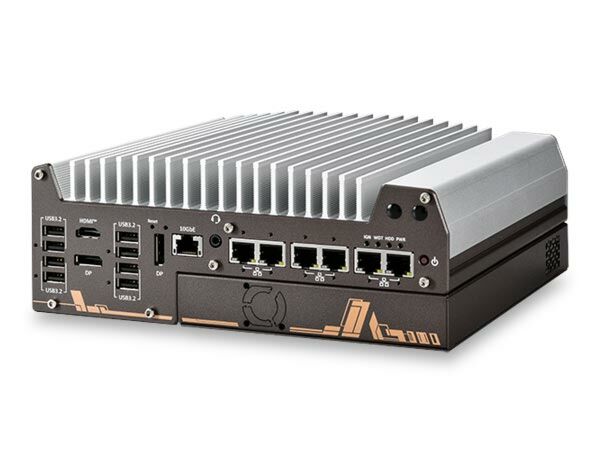
Nuvo-11000: Intel Core Ultra 200 Series Fanless Embedded Computer with 2.5GbE/GbE, USB 3.2, 8-CH DIO, Optional 10GbE, Expansion Cassette, and MezIO
Nuvo-11000 SeriesStarting at $1,695.00
- Intel Core Ultra 200 Series 24C/24T 35W/65W LGA1851 CPU
- Rugged, -25°C to 70°C fanless operation
- Up to 5x 2.5GbE and 1x GigE ports with optional PoE+
- Supporting 9.5 KB jumbo frame
- Up to 8x USB 3.2 Gen2 ports
- 4-CH isolated DI and 4-CH isolated DO
- 1x optional 10GBASE-T Ethernet
- Expansion Cassette for PCIe add-on card accommodation
- MezIO interface for easy function expansion

Frequently Asked Questions
The Nuvo-11000 series includes 1x Gigabit Ethernet (I219-LM) and up to 5x 2.5GbE ports (I226-IT), plus an optional 10GBASE-T Ethernet port on Nuvo-11006 models. Depending on model, it offers up to 8x USB 3.2 Gen2 ports (Nuvo-11006E/LP) or a mix of USB 3.2 Gen2, Gen1, and USB 2.0 ports (Nuvo-11002E/LP). Video output is via 1x HDMI (up to 3840x2160) and 2x DisplayPort. It also has 2x software-programmable RS-232/422/485 ports (COM1/COM2) and 2x RS-232 ports (COM3/COM4), a 3.5mm audio jack, and 4-CH isolated DI plus 4-CH isolated DO.
The system accepts 8 to 48VDC via a 3-pin pluggable terminal block, which also supports an ignition signal input (IGN) for in-vehicle applications. If using the maximum 100W PoE+ power budget, the system should be powered with at least 24V DC.
With a 35W CPU, the system operates from -25°C to 70°C. With a 65W CPU, it operates -25°C to 70°C when configured as 35W TDP, or -25°C to 50°C when configured at full 65W TDP. Storage temperature is -40°C to 85°C, with humidity tolerance of 10% to 90% non-condensing. It meets MIL-STD-810H for vibration (Method 514.8, Category 4) and shock (Method 516.8, Procedure I), and complies with CE/FCC Class A per EN 55032 and EN 55035. For sub-zero or above 60°C operation, a wide-temperature HDD/SSD/NVMe drive is required, and 10G LAN is only operational up to 60°C ambient.
The system supports up to 128GB non-ECC DDR5-6400 SDRAM across two SODIMM slots (max 64GB per slot). Storage options include a Gen5x4 M.2 2280 M-key NVMe slot (Nuvo-11006 models), 2x internal SATA ports for 2.5" HDD/SSD supporting RAID 0/1, and on the LP series, a hot-swappable 2.5" HDD/SSD tray. Expansion is available via 2x full-size mini PCI Express sockets, a MezIO® expansion port, and (on the E series) a PCIe x16 Gen4 slot inside the Expansion Cassette.
Neousys has tested the Nuvo-11000 series with Microsoft Windows 11 LTSC 24H2, Microsoft Windows 10 LTSC 21H2, and Ubuntu 24.04.1 LTS (or other distributions with kernel version 6.8 or higher). For Linux, users may need to manually compile and install drivers for the Intel graphics or I226 GbE controller if not already embedded in the kernel. Graphics driver and RAID support may be limited on some Linux distributions.
The Nuvo-11000E series measures 240mm (W) x 225mm (D) x 90mm (H) and weighs 3.58kg. The Nuvo-11000LP series measures 240mm (W) x 225mm (D) x 79mm (H) and weighs 3.36kg. Both support wall-mounting (standard) or optional DIN-rail mounting.
The system provides an mPCIe socket with a SIM card slot for installing a 4G/3G module, plus a second mPCIe socket without SIM support for Wi-Fi modules. Multiple SMA antenna apertures are available on the front and rear panels for wireless communication.
The E series (Nuvo-11002E/11006E) includes an Expansion Cassette with a PCIe x16 Gen4 slot for add-on cards such as NVIDIA graphics cards up to 145W TDP. The LP series (Nuvo-11002LP/11006LP) does not have the Cassette module but instead features a hot-swappable 2.5" HDD/SSD tray (up to 7mm thickness) and is slightly shorter (79mm vs 90mm height) and lighter (3.36kg vs 3.58kg).
Yes. Ports 3 through 6 on the Nuvo-11006E/LP support optional IEEE 802.3at PoE+ Power Sourcing Equipment (PSE), delivering up to 25W per port with a total system power budget of 100W. PoE power and individual ports can be enabled or disabled in BIOS.
How-to Guides
- Refer to the disassembly section; you may not need to fully dismantle the system to access the M.2 slot.
- Insert the M.2 module into the Gen5 x4 PCIe M.2 2280 slot at a 45-degree angle.
- Gently press the module down and secure it with an M2.5 P-head screw.
- Remove the protective film on the thermal pad at the bottom of the enclosure panel over the NVMe module location.
- Reinstall the system enclosure and panel when done.
- Refer to the disassembly section to open the system.
- Locate the two SO-DIMM memory slots on the motherboard (one on the CPU socket side, one on the expansion socket side).
- Insert the module's gold fingers into the slot at a 45-degree angle.
- Push down on the module until it clips into position.
- Repeat for the second module if installing two.
- Remove the protective film from the memory thermal pad on the heatsink and/or enclosure bottom panel before closing the system.
- Reinstall the system enclosure and panel.
- Turn the system upside-down and remove the four screws securing the Cassette module.
- Gently wiggle and separate the Cassette module from the system enclosure.
- Remove the screw to open the Cassette cover.
- Attach the provided rubber spacers to the four corners on the back of the add-on card (avoid attaching over components).
- Remove the punch-out bezel cover and insert the card into the PCIe slot, ensuring the bezel seats into its notch, then secure the card with a screw.
- Secure the indicated screw on the Cassette module.
- Lower the Cassette module back onto the system enclosure and secure it with its mounting screws.
- Remove the four rubber stands at the bottom of the enclosure if attached.
- For wall mounting: take the two wall mount brackets and four M4 screws from the accessory box, and fix the brackets to the system enclosure with the M4 screws.
- Place the system on a flat wall surface and secure it with four M4 screws. Orient the heatsink fins perpendicular to the ground for better heat dissipation.
- For DIN-rail mounting (optional): fix the DIN-rail clip to the mounting bracket using four M4 flat-head screws, then fix the bracket assembly to the system using four M4 screws.
- Clip the assembled system onto the DIN rail.
- Install at least two hard drives or SSDs in the system.
- Press F2 at boot to enter BIOS, go to Advanced > System Agent (SA) Configuration > VMD setup menu, and enable the VMD controller. Press F10 to save and reboot.
- When the system reboots, press F3 to enter the Device Manager configuration utility and select Intel Rapid Storage Technology.
- Select Create RAID Volume, then configure the Name, RAID Level (RAID-0 or RAID-1), Select Disks (minimum two), Stripe Size (RAID-0 only), and Capacity, then choose Create Volume.
- To install Windows on the RAID volume, prepare a bootable Windows USB drive containing the unzipped f6vmdflpy-x64 driver files.
- During Windows setup, select Load Driver, browse to the driver folder, and select the Intel RST VMD Controller 467F driver.
- The previously created RAID volume will appear as unallocated space; continue with standard Windows installation.
The Nuvo-11000 series is CoastIPC's flagship rugged embedded computer built on the Intel Core Ultra 200 series platform. Powered by TSMC's advanced 3nm photolithography, the latest Core Ultra 200 processors offer up to 24 cores/24 threads with higher CPU clock rates, and an integrated neural processing unit (NPU) for AI acceleration. This results in a 1.2x boost in CPU performance and AI computing capabilities of up to 36 TOPs. Combined with DDR5-6400 memory and PCIe Gen5 support, it delivers a significant improvement in computing power, enhancing performance across diverse industrial applications.
Nuvo-11000 series provides comprehensive I/O capabilities for industrial applications. It includes five 2.5Gb and one 1Gb Ethernet ports with optional PoE+ capability, one optional 10GbE port for high-speed data transfer or 10Gb industrial camera applications, and eight USB 3.2 Gen2 ports for USB 3.2 cameras. Additionally, an upgraded M.2 Gen5x4 slot supports the latest NVMe SSDs, achieving read/ write speeds over 11,000 MB/s, and the system also features 4x isolated DI and 4x isolated DO for automation and machine vision applications.
For extended functionality, the series supports add-on cards via its expansion Cassette, proprietary MezIO® interface, and internal mini-PCIe slots, ensuring adaptability to diverse application requirements.
The advanced Intel Core Ultra 200 processors also bring better energy efficiency to the Nuvo-11000 platform. Compared to the previous generation, they can deliver nearly 120% the performance while consuming only 80% of the power*. Combing a proven thermal design with versatile I/O functions, Nuvo11000 offers a rugged, high-performance embedded computing solution tailored for a wide range of industrial applications.
| Product Available On | Aug 25, 2025 |
|---|---|
| Manufacturer | Neousys |
| Short Description | The Nuvo-11000 series is CoastIPC's flagship rugged embedded computer built on the Intel Core Ultra 200 series platform. Powered by TSMC's advanced 3nm photolithography, the latest Core Ultra 200 processors offer up to 24 cores/24 threads with higher CPU clock rates, and an integrated neural processing unit (NPU) for AI acceleration. This results in a 1.2x boost in CPU performance and AI computing capabilities of up to 36 TOPs. Combined with DDR5-6400 memory and PCIe Gen5 support, it delivers a significant improvement in computing power, enhancing performance across diverse industrial applications. |
| Processor | Supports Intel Core Ultra 200 series CPU (LGA 1851 socket), 35W and 65W TDP - Intel Core Ultra 9 285/285T - Intel Core Ultra 7 265/265T - Intel Core Ultra 5 245/245T/225/225T |
| Graphics | Integrated Intel Xe LPG Graphics |
| Memory | Up to 96 GB non-ECC DDR5 6400 SDRAM (Dual SODIMM slots) |
| Chipset | Intel H810/Q870 Platform Controller Hub |
| AMT | Supports Intel vPro/AMT 16.0 |
| PoE | Optional IEEE 802.3at PoE+ PSE for Port 3 ~ Port 6 100 W total power budget |
| Video Port | 1x HDMI, supporting 3840 x 2160 resolution 2x DisplayPort, supporting 4096 x 2304 resolution |
| Audio | 1x 3.5 mm jack for mic-in and speaker-out |
| M.2 | 1x M.2 2280 M key NVMe socket (PCIe Gen5x4) for NVMe SSD (Nuvo-11006E/DE/LP) |
| SATA HDD | 2x internal SATA port for 2.5” HDD/ SSD installation, supporting RAID 0/ 1(Nuvo-11000E/11000DE) 1x hot-swappable 2.5" HDD tray (7mm HDD/ SSD) 1x internal 2.5" SATA port, supporting RAID 0/ 1 (Nuvo-11000LP) |
| DC Input | 1x 3-pin pluggable terminal block for 8V to 48VDC DC input (V+/ GND/ IGN) |
| Remote Ctrl. & Status Output | 1x 10-pin (2x5) wafer connector for remote on/off control and status LED output |
| Dimension | 240 mm (W) x 225 mm (D) x 90 mm (H) (Nuvo-11000E series) 240 mm (W) x 225 mm (D) x 110.5 mm (H) (Nuvo-11000DE series) 240 mm (W) x 225 mm (D) x 79 mm (H) (Nuvo-11000LP series) |
| Weight | 3.58 kg (Nuvo-11000E Series)/ 3.89 kg (Nuvo-11000DE series) 3.36 kg (Nuvo-11000LP series) |
| Mounting | Wall-mount (standard) or DIN-rail mount (optional) |
| Operating Temperature | With 35W CPU: -25°C to 70°C* With 65W CPU: -25°C to 70°C* (configured as 35W TDP) With 65W CPU: -25°C to 50°C* (configured as 65W TDP) *For sub-zero and over 60°C operating temperature, a wide temperature HDD/SSD/NVMe is required. |
| Storage Temperature | -40°C to 85°C |
| Humidity | 10% to 90% , non-condensing |
| Vibration | MIL-STD-810H, Method 514.8, Category 4 |
| Shock | MIL-STD-810H, Method 516.8, Procedure I |
| EMC | CE/FCC Class A, according to EN 55032 & EN 55035 |