
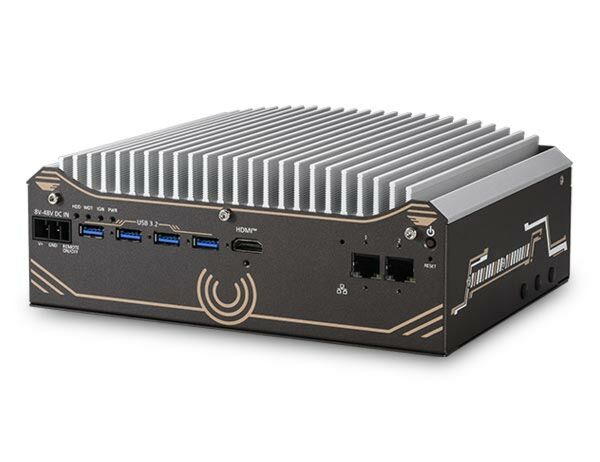
Nuvo-11501: Intel Core Ultra 200S Compact Fanless Computer with 2x 2.5GbE, 4x USB 3.2
Nuvo-11501 SeriesStarting at $1,260.00
- Supports Intel Core Ultra 200S series 35W/ 65W LGA1851 CPU
- Compact 212 x 165 x 80 mm footprint
- Rugged, -10°C to 60°C fanless operation
- Up to 64GB DDR5 6400 memory
- 8V to 48V wide-range DC input
- 2x 2.5GbE and 4x USB3.2 Gen1 with screw-lock
- Supports 1x M.2 2280 Gen4x4 NVMe and 1x 3.5"/2.5" SATA HDD/SSD storage
- HDMI + DP dual display outputs

Frequently Asked Questions
The Nuvo-11501 provides the following external I/O:
- 2x 2.5GBASE-T Ethernet ports (Intel I226-V controllers, screw-lock); Port 2 supports Wake-on-LAN
- 4x USB 3.2 Gen1 (5Gbps) ports with screw-lock
- 2x USB 2.0 ports
- 1x HDMI port (up to 3840 x 2160)
- 1x DisplayPort (up to 3840 x 2160; does not support DP++, requires an active DP-to-HDMI adapter for HDMI output)
- 1x software-programmable RS-232/422/485 port (COM1)
- 3x 3-wire RS-232 ports (COM2/3/4) or 1x RS-422/485 port (COM2)
The system accepts a wide-range 8V to 48V DC input through a 3-pin pluggable terminal block with remote on/off control. The maximum input current for each pin is 20A. The terminal block also supports optional ignition signal input (IGN) for in-vehicle use.
With a 35W CPU, the operating temperature range is -10°C to 60°C. With a 65W CPU, the operating range is also -10°C to 60°C, but installation of the optional fan kit is recommended, especially above 50°C ambient. For sub-zero operation, a wide-temperature HDD or SSD is required. Storage temperature is -40°C to 85°C, humidity 10% to 90% non-condensing.
The system is rated for MIL-STD-810H Method 514.8 Category 4 vibration and Method 516.8 Procedure I shock. It also complies with CE/FCC Class A according to EN 55032 and EN 55035.
The system supports up to 64GB DDR5 6400 memory via a single SODIMM slot. For storage, it has one M.2 2280 M-key socket (PCIe Gen4x4) for an NVMe SSD, and one internal SATA port for a 3.5" HDD or 2.5" HDD/SSD (up to 7mm thickness, Gen3 6Gb/s SATA).
The system provides two full-size mini PCI Express sockets, each with an internal Micro-SIM socket, for 3G/4G modules, plus one M.2 2230 E-key socket for a WiFi module. Multiple SMA antenna apertures are located on the side panel for these wireless modules.
Neousys has tested and verified Windows 11 24H2 and Ubuntu 24.04.1 LTS on the Nuvo-11501. For Linux, users may need to manually compile drivers for Intel graphics or the I225/I226 GbE controllers if not already included in the kernel. System drivers and a Watchdog Timer driver package (WDT_DIO_Setup.exe, v2.4.1.0 or later) are available for download.
The Nuvo-11501 measures 212mm (W) x 165mm (D) x 80mm (H) and weighs 2.5kg, excluding the wall mount kit. It supports optional wall-mount or DIN-rail mounting.
Maximum power consumption varies by CPU SKU, TDP setting, and input voltage. For example, with a 35W Ultra 7 265 CPU, consumption ranges from about 67.4W (PL2) at 12V to 74.8W at 48V. With a 65W Ultra 9 285 CPU, consumption ranges from about 123.5W at 12V to 127.0W at 48V. See the datasheet for the full table across CPU SKUs and voltages.
How-to Guides
- Disassemble the system per the disassembly instructions to separate the heatsink and motherboard, removing the hexa-screws on both I/O panels and the side panel screw.
- Remove the eight screws securing the motherboard to the heatsink (use a hex-bolt socket for the standoffs indicated in red).
- Turn the motherboard over to locate the SODIMM memory slot.
- Insert the memory module's gold fingers into the slot at a 45-degree angle, then push down to clip the module into position.
- Remove the memory module thermal pad's protective film on the heatsink before reassembly.
- Reinstall the motherboard, securing the screws at the standoffs.
- Reinstall the two I/O panels, secure side panel screws and hexa-screws.
- Reinstall the system enclosure.
- Disassemble the system enough to access the M.2 slot (full teardown is not required).
- Remove the heatsink by removing the screw on top and the two screws on the side.
- Locate the M.2 2280 slot on the motherboard.
- Insert the SSD module at a 45-degree angle.
- Gently press down and secure the module with an M2.5 P-head screw.
- Remove the thermal pad's protective film at the bottom of the enclosure panel for the NVMe module.
- Reinstall the heatsink and secure its screws.
- Reinstall the system enclosure and panel.
- Disassemble the system to gain access to the SATA port.
- Separate the hard drive rack from the bottom panel by removing the screws at the bottom of the panel.
- Locate the mounting holes on the bottom of the 2.5" or 3.5" drive.
- Match the mounting holes to the hard drive rack's screw holes and secure the drive: use the red-indicated screw holes for a 3.5" drive, or blue/green-indicated holes for a 2.5" drive.
- Connect the SATA cable to the hard drive.
- Secure the hard drive rack back onto the bottom panel.
- Reinstall the system enclosure and panel.
- Remove the four rubber stands from the bottom of the enclosure if attached.
- Fix the DIN-rail mounting clip to the bracket using four M4 flat-head screws.
- Fix the bracket assembly to the system using four M4 screws.
- Clip the assembled system onto the DIN rail.
- When the system boots up, press F2 to enter the BIOS setup utility.
- Go to [Power] > [Power & Performance].
- Select a value for the [SKU Power Config] option to set the CPU's SKU power limit.
- Press F10 to save changes and exit.
Note: the "Max. Boost" option requires a power supply rated at four times the CPU's TDP for reliable operation.
The Nuvo-11501 is a cost-effective, compact, fanless embedded AI computer powered by an Intel Core Ultra 200S series processor. It is an ideal solution for machine vision or factory automation applications that demand cutting-edge CPU performance, cost efficiency, minimal I/O, and flexible storage options.
Powered by the latest Core Ultra 200S processors, the Nuvo-11501 delivers nearly 120% of the performance while consuming only 80% of the power compared to the previous generation, thanks to TSMC's advanced 3nm process technology. In addition to its superior CPU performance, the Core Ultra 200S series also features an integrated Neural Processing Unit (NPU), providing enhanced AI inference capabilities alongside rule-based algorithms to meet the demands of modern machine vision applications.
The Nuvo-11501 offers essential I/O functions for industrial applications, including dual 2.5 GbE ports, dual display ports, and four USB 3.2 ports. Additionally, it features a Gen4 x4 M.2 NVMe slot for high-speed OS read/write operations, along with an internal 2.5"/3.5" SSD/HDD bay for high-capacity storage, making it ideal for data logging or video recording. For internal expansion, it provides two mPCIe slots and one M.2 E-Key slot for adding COM ports, Wi-Fi, or 5G/ 4G LTE connectivity.
Combining a proven thermal design with essential I/O functionality, the Nuvo-11501 delivers a rugged, compact, and budget-friendly computing solution tailored for a wide range of industrial applications.
| Short Description | The Nuvo-11501 is a cost-effective, compact, fanless embedded AI computer powered by an Intel Core Ultra 200S series processor. It is an ideal solution for machine vision or factory automation applications that demand cutting-edge CPU performance, cost efficiency, minimal I/O, and flexible storage options. |
|---|---|
| Processor | Supports Intel Core Ultra 200S series CPU (LGA 1851 socket), 35W, 65W TDP)
|
| Graphics | Integrated Intel Xe LPG Graphics |
| Memory | Up to 64GB DDR5 6400 memory via one SODIMM slot |
| Chipset | Intel H810 platform controller hub |
| Video Port | 1x HDMI, supporting 3840 x 2160 resolution |
| M.2 | 1x M.2 2280 M key socket (PCIe Gen4x4) for NVMe SSD |
| Mini PCI-E | 2x full-size mini PCI Express sockets with internal SIM sockets |
| SATA HDD | 1x Internal SATA port for 1x 3.5” HDD or 1x 2.5” HDD/ SSD |
| DC Input | 1x 3-pin pluggable terminal block for 8V to 48V DC input with with remote on/off control* *The maximum input current for each pin is 20A |
| Fan | Fanless |
| Dimension | 212 mm (W) x 165 mm (D) x 80 mm (H) |
| Weight | 2.5 kg (excluding wall mount kit) |
| Mounting | Wall-mount (optional) or DIN-rail mount (optional) |
| Operating Temperature | With 35W CPU: -10°C to 60°C* *For sub-zero operating temperature, a wide temperature HDD or Solid State Disk (SSD) is required. |
| Storage Temperature | -40°C to 85°C |
| Humidity | 10% to 90%, non-condensing |
| Vibration | MIL-STD-810H, Method 514.8, Category 4 |
| Shock | MIL-STD-810H, Method 516.8, Procedure I |
| EMC | CE/FCC Class A, according to EN 55032 & EN 55035 |