
Nuvo-2822: Intel Alder Lake N97 Compact Expansion Box-PC with 2x PCIE and 2x PCI Slots
Nuvo-2822 SeriesStarting at $620.00
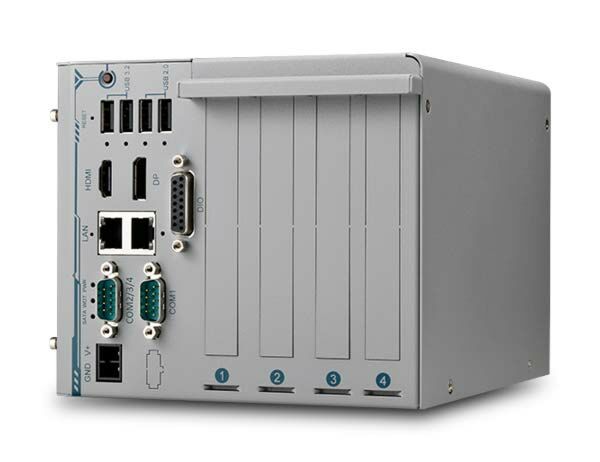
- Intel Alder Lake N97 processor 12W with 4 E-Cores
- 2x PCIe Slots and 2 PCI slots
- 2x GbE, 2x USB3.2 and 2x USB2.0 ports
- 1x M.2 2280 for storage, 1x RS232/422/485, 3x RS232
- 1x DP++ & 1x HDMI 1.4b
- 4-CH isolated DI + 4-CH isolated DO
- 12~24V DC input, ultra-low power consumption at shutdown

Frequently Asked Questions
The Nuvo-2822 provides the following I/O:
- 2x Gigabit Ethernet ports (Intel I210-IT, 1 with Wake-on-LAN)
- 2x USB 3.2 Gen2 ports with screw-lock
- 2x USB 2.0 ports with screw-lock
- 1x DP++ (supports up to 4096 x 2304 resolution) and 1x HDMI 1.4b (supports up to 3840 x 2160 @ 30Hz)
- 1x software-programmable RS-232/422/485 port (COM1) and 3x 3-wire RS-232 ports (COM2/3/4)
- 4-channel isolated digital input and 4-channel isolated digital output
The system accepts 12V to 24V DC input via a 2-pin pluggable terminal block. Supplying a voltage over 24V will damage the system. Optional AC/DC power adapters (PA-160W-OW at 20V/8A and PA-280W-ET2 at 24V/11.67A) are available as accessories.
With the optional fan kit installed, the operating temperature range is -10°C to 70°C. Without the fan kit, the range is -10°C to 60°C. For sub-zero or above-60°C operation, a wide-temperature SSD is required. Storage temperature range is -40°C to 85°C, with humidity of 10% to 90% non-condensing.
The Nuvo-2822 is rated CE/FCC Class A according to EN 55032 and EN 55035. It has been tested to MIL-STD-810H Method 514.8 Category 4 for vibration and MIL-STD-810H Method 516.8 Procedure I for shock.
The system has one SODIMM socket supporting up to 16GB of non-ECC DDR5-4800 SDRAM, and one M.2 2280 M-key slot for SATA-signal-only SSDs (compatible with SATA M.2 SSDs only, not NVMe).
The Nuvo-2822 provides two PCIe slots (1x PCIe x4 Gen3 with 4 lanes, 1x PCIe x4 Gen3 with 1 lane) and two PCI slots (33MHz/32-bit, 5V). These slots are designed to support frame grabbers, motion control cards, COM port expansion cards, and data acquisition cards.
Neousys has tested the Nuvo-2822 with Microsoft Windows 10 LTSC 2021 (x64), Microsoft Windows 11 IoT Enterprise 22H2 (64-bit), and Ubuntu 20.04.2 LTS (or other Linux distributions with kernel version 5.19 or later). For Linux, users may need to manually compile and install drivers for the Intel graphics or I210 GbE controller if not already included in the kernel.
The Nuvo-2822 measures 164.6mm (W) x 214.6mm (D) x 135.6mm (H) and weighs 2.3kg. Optional wall-mounting is available.
Yes. One of the two Gigabit Ethernet ports supports Wake-on-LAN (WOL), allowing the system to be powered on remotely via a magic packet sent over the network. WOL must be enabled in BIOS ([Power] > [Wake On LAN]) and the Power Saving Mode must be disabled for WOL to function correctly.
How-to Guides
- Disassemble the system enclosure by removing the indicated screws on the top panel, side panel, and rear panel, then lift off the L-shaped cover panel.
- Remove the four screws holding the heatspreader and remove the heatspreader to access the motherboard.
- Locate the SO-DIMM memory slot on the motherboard.
- Insert the module's gold fingers into the slot at a 45-degree angle, then push down until it clips into position.
- Remove the protection film from the corresponding thermal pad.
- Reinstall the heat spreader and secure its screws.
- Reinstall the system enclosure and panel.
Note: the system supports a single SO-DIMM slot with a maximum of 16GB non-ECC DDR5-4800. Adding, removing, or reseating a DRAM module will cause an approximately 30-60 second delay on the next boot.
- Disassemble the system enclosure by removing the indicated screws on the top panel, side panel, and rear panel, then lift off the L-shaped cover panel.
- Remove the heatspreader to access the M.2 slot.
- Locate the M.2 2280 expansion slot on the motherboard.
- Insert the SSD module into the slot at a 45-degree angle.
- Secure the module with an M3 P-head screw.
- Reinstall the heat spreader and secure its screws.
- Reinstall the system enclosure and panel.
Note: the M.2 slot only supports SATA-signal M.2 SSDs, not NVMe.
- Confirm the DC power source is within the 12V to 24V range before connecting; supplying over 24V will damage the system.
- Connect the negative polarity (ground) and positive polarity wires to the 2-pin pluggable terminal block using the screw-clamping connections.
- Insert the terminal block into the system's DC input connector.
- Secure the wall-mount bracket to the system using the supplied M4 screws (bracket and screws are included in the accessory box).
- Place the system on a flat surface and secure it in place with screws.
- Ensure the Power Saving Mode in BIOS is set to Disabled.
- Press F2 during boot to enter BIOS setup utility.
- Go to [Power] > [Wake On LAN] and set it to [Enabled].
- Press F10 to save changes and exit, then let the system boot into the operating system.
- In Windows, open Network adapter settings, locate the Intel Gigabit Network Connection adapter, click Configure, then open the Power Management tab and enable the option to allow the device to wake the computer, including magic packet wake support.
Nuvo-2822 is a compact expansion box PC powered by an Intel Alder Lake N CPU featuring two PCIe and two PCI slots. The expansion slots support various frame grabbers, motion control cards, COM port expansion cards, and data acquisition cards.
With up to five times the performance boost compared to our previous Nuvo-2400 series, the new Nuvo-2822 can efficiently process vast amounts of data acquired from extensive I/O interfaces in real-time. It features two Ethernet ports with I210-IT controllers and two USB 3.2 Gen 2 ports with screw lock mechanisms to connect and secure industrial cameras for machine vision applications. Furthermore, the Nuvo-2822 supports an 8-channel isolated DIO and four COM ports to communicate with and control various industrial sensors, indicators, motors, and actuators.
The system also features a unique “Super Power Saving Mode” to minimize energy consumption when the system is in standby (S4/S5) mode, significantly reducing electricity usage. Thanks to its compact dimensions, it can be deployed in restricted spaces or small cabinets. With support for versatile PCIe and PCI expansion cards, it is ideal for industrial control and machine automation applications.
| Manufacturer | Neousys |
|---|---|
| Short Description | Nuvo-2822 is a compact expansion box PC powered by an Intel Alder Lake N CPU featuring two PCIe and two PCI slots. The expansion slots support various frame grabbers, motion control cards, COM port expansion cards, and data acquisition cards. |
| Processor | Intel Alder Lake N97 processor (4C/4T, 2.0 /3.6 GHz, 12W TDP) |
| Graphics | Integrated Intel UHD Graphics with 24EUs |
| Memory | Up to 16 GB DDR5-4800 SDRAM (one SODIMM socket) |
| Video Port | 1x DP++, Supporting 4096 x 2160 resolution 1x HDMI1.4b, Supporting 3840 x 2160 30Hz |
| DIO | 4-CH isolated DI and 4-CH isolated DO |
| PCI Express | 1x PCIe x4 slot @ Gen3, 4-lanes 1x PCIe x4 slot @ Gen3, 1-lanes |
| M.2 | 1x M.2 2280 SATA interface |
| DC Input | 1x 2-pin pluggable terminal block for 12 to 24V DC input |
| Remote Ctrl. & Status Output | 1x 10-pin (2x5) wafer connector for remote on/off control and status LED output |
| Dimension | 164.6mm (W) x 214.6mm (D) x 135.6mm (H) |
| Weight | 2.3kg |
| Mounting | Wall-mount (Optional) |
| Operating Temperature | With FAN Kit: -10°C ~ 70°C1 2 Without FAN Kit: -10°C ~ 60°C1 1For sub-zero and over 60°C operating temperature, a wide temperature Solid State Disk (SSD) is required. 2The optional fan kit is recommended for operating at ambient temperatures higher than 60°C. |
| Storage Temperature | -40°C ~85°C |
| Humidity | 10% ~ 90% , non-condensing |
| Vibration | MIL-STD-810H, Method 514.8, Category 4 |
| Shock | MIL-STD-810H, Method 516.8, Procedure I |
| EMC | CE/FCC Class A, according to EN 55032 & EN 55035 |