
Nuvo-5026E: Intel 6th-Gen Core i7 Fanless Rugged Embedded Computer with Dual PCIe Expansion Cassette, 6x GbE, and MezIO
Nuvo-5026E SeriesStarting at $1,855.00
Warranty and Support Information
Main Features:
- Intel 6th Gen Core i7/i5/i3 LGA1151 35W/65W
- Dual PCIe x8 slots in patented expansion Cassette
- MezIO™ interface for easy function expansion
- Rugged, wide temperature range from -25°C to 70°C fanless operation
- 6x GbE ports, supporting 9.5 KB jumbo frame
- Up to 32 GB, DDR4-2133 SODIMM
- Accommodates two 2.5" SATA HDD/ SSD with RAID 0/1 support
- VGA/ DVI/ DP triple independent display, supporting 4K/2K resolution

Frequently Asked Questions
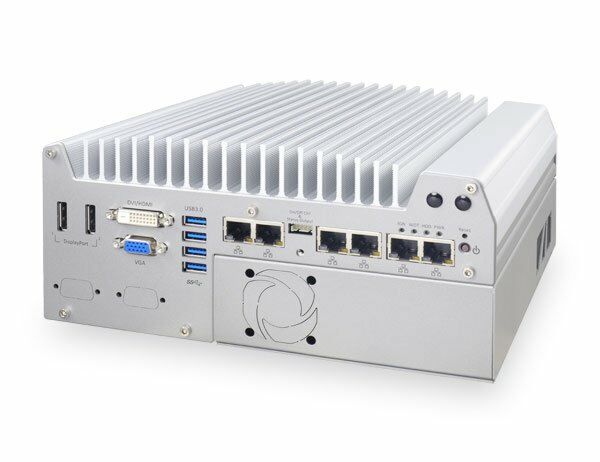
The Nuvo-5026E provides the following interfaces:
- 6x Gigabit Ethernet ports (Intel I219 and 5x I210), with optional IEEE 802.3at PoE+ on ports 3-6 (80W total power budget) on the Nuvo-5026E-PoE
- 4x USB 3.0 ports via native xHCI controller
- 4x USB 2.0 ports
- 1x stacked VGA + DVI-D connector
- 2x DisplayPort connectors supporting 4K2K resolution
- 2x software-programmable RS-232/422/485 ports (COM1 and COM3)
- 1x RS-232 port (COM2)
- 1x Mic-in and 1x Speaker-out audio jacks
- 1x MezIO™ expansion port
The Nuvo-5026E accepts 8~35V DC input via a 3-pin pluggable terminal block. The same terminal block can also accept an ignition signal (IGN) when a MezIO-V20 module is installed.
With the 35W TDP CPUs (i7-6700TE, i5-6500TE, i3-6100TE, Pentium G4400TE), the Nuvo-5026E operates from -25°C to 75°C. With the 65W/51W TDP CPUs (i7-6700, i5-6500, i3-6100), it operates from -25°C to 70°C when configured in 35W CPU mode, or -25°C to 50°C when configured in 65W/51W CPU mode. Storage temperature is -40°C to 85°C. For sub-zero operation, a wide-temperature HDD or SSD is required.
The Nuvo-5026E is CE/FCC Class A certified, according to EN55022, EN55024 and EN55032.
The Nuvo-5026E has two 260-pin DDR4 SODIMM sockets supporting up to 32GB total (two 16GB DDR4-2133 modules). For storage, it provides 2x internal SATA ports (supporting RAID 0/1) for 2.5" HDD/SSD installation, plus a full-size mSATA port that is muxed with mini-PCIe socket #1.
The Nuvo-5026E's expansion Cassette has two x8 PCI Express slots, each running 4-lane (x4) Gen3 PCIe signals, compatible with x4 and x1 PCIe add-on cards. The Cassette supports 7.5A@12V rated current, with a maximum of 60W per PCIe slot when paired with a 65W CPU or 90W when paired with a 35W CPU. A standard-accessory fan is included to help dissipate heat from installed add-on cards.
The Nuvo-5026E has two internal mini-PCIe sockets: one with a front-accessible SIM socket and one with an internal SIM socket (muxed with mSATA). Installing an off-the-shelf mini-PCIe module lets you add WIFI, 3G/4G, GPS, or other functions. Multiple SMA antenna apertures are provided on the front and back panels for antenna connections.
Neousys has tested the Nuvo-5000 series (which includes the Nuvo-5026E) with Microsoft Windows 7 32-bit/64-bit, Windows 8.1 64-bit, Windows 10 64-bit, openSUSE 42.1, Fedora 23, Ubuntu 14.04.4 LTS/16.04 LTS, and Debian 8.3. Drivers are provided on a Drivers & Utilities DVD with a "One-Click" automatic installer, or you can install drivers manually for chipset, graphics, audio, LAN, TPM 2.0, and ME components.
The Nuvo-5026E measures 240 mm (W) x 225 mm (D) x 111 mm (H) and weighs 3.7 kg including CPU, memory, and HDD. It can be wall-mounted using a mounting bracket (standard) or DIN-rail mounted (optional).
Yes. The GbE port implemented using Intel I219-LM supports Wake-on-LAN, allowing the system to be powered on remotely via a magic packet. It also supports Intel AMT 11.0 for remote management such as SOL desktop and remote on/off control.
How-to Guides
- Disassemble the controller enclosure to expose the PCBA (per the disassembly steps for your chassis type).
- Tilt the SODIMM module and insert it into the SODIMM socket.
- Once firmly contacted with the socket connectors, press it down until the clamps of the socket snap into the latching position of the SODIMM module.
- Repeat to install a second DDR4 SODIMM module if desired (up to 32GB total using two 16GB modules).
- Put the controller upside down on a flat surface to expose the trapdoor, and loosen three M3 flat-head screws to remove the trapdoor from the bottom cover.
- Get the HDD thermal pad from the accessory box, remove the protective films, and place it on the center of the HDD bracket.
- Place the HDD/SSD into the bracket, gently push it down to contact the thermal pad, and fix it with M3 flat-head screws. Make sure the HDD is in the correct orientation.
- Pull out the SATA cable inside the chassis and connect it to the HDD/SSD.
- Place the HDD/bracket assembly back into the bottom cover and fix it with three M3 flat-head screws.
- Disassemble the controller to expose the mini-PCIe sockets on the PCBA.
- Tilt the mini-PCIe module and insert it into the mini-PCIe #2 socket, then fix it with one M2.5 P-head screw.
- Attach the IPEX-to-SMA cable to the module.
- Fix the SMA connector of the IPEX-to-SMA cable to one of the antenna apertures on the front or back panel.
- Reassemble the front panel, back panel, and bottom cover, then attach the antenna to the SMA connector.
- Insert a SIM card upside down into the panel-accessible SIM socket to support 3G/4G communication.
- Remove the Cassette from the system by loosening four M4 screws, then gently wiggle and detach it from the main enclosure.
- For the Nuvo-5026E, unscrew three additional screws to remove the Cassette cover.
- Pull the Cassette cover open, then remove the blank faceplate by loosening one M3 screw.
- Install the PCI/PCIe add-on card into the connector, ensuring the faceplate tail is inserted into the mortise, then tighten it with an M3 screw.
- Reassemble the Cassette to the system enclosure and fix it with four M4 screws.
- Make sure the external DC power supply is powered off or disconnected before wiring.
- Get the 3-pin pluggable terminal block from the accessory box (fits 12~24 AWG wires).
- Identify the positive and negative contacts on both the DC power supply and the terminal block; polarity must match positive-to-positive and ground-to-ground.
- Insert the wires into the correct contacts and tighten the clamping screws with a Philips screwdriver.
- Plug the terminal block firmly into the receptacle on the rear panel and tighten the captive screws with a slotted screwdriver.
Caution: The system accepts 8~35VDC. Supplying a voltage over 35V or incorrect polarity will damage the system.
| Manufacturer | Neousys |
|---|---|
| Processor | Intel® Core™ i7-6700 (8M Cache,3.4/ 4.0 GHz, 65W TDP)|Intel® Core™ i5-6500 (6M Cache, 3.2/ 3.6 GHz, 65W TDP)|Intel® Core™ i3-6100 (3M Cache, 3.7 GHz, 51W TDP)|Intel® Pentium® G4400 (3M Cache, 3.3 GHz, 54W TDP)|Intel® Celeron® G3900 (2M Cache, 2.8 GHz, 51W TDP)|Intel® Core™ i7-6700TE (8M Cache, 2.4/ 3.4 GHz, 35W TDP)|Intel® Core™ i5-6500TE (6M Cache, 2.3/ 3.3 GHz, 35W TDP)|Intel® Core™ i3-6100TE (4M Cache, 2.7 GHz, 35W TDP)|Intel® Pentium® G4400TE (3M Cache, 2.4 GHz, 35W TDP)|Intel® Celeron® G3900TE (2M Cache, 2.3 GHz, 35W TDP) |
| Graphics | Integrated Intel®HD graphics 530 or 510 (CPU dependent) |
| Memory | Up to 32 GB DDR4-2133 SDRAM by two SODIMM sockets |
| Chipset | Intel®Q170 platform controller hub |
| AMT | Supports AMT 11.0 |
| Video Port | 1x stacked VGA + DVI-D connector|2x DisplayPort connectors, supporting 4K/2K resolution |
| Audio | 1x Mic-in and 1x Speaker-out |
| SATA HDD | 2x internal SATA port for 2.5" HDD/ SSD installation, supporting RAID 0/1 |
| mSATA | 1x full-size mSATA port (mux with mini-PCIe) |
| DC Input | 1x 3-pin pluggable terminal block for 8~35VDC DC input |
| Dimension | 240 mm (W) x 225 mm (D) x 111 mm (H) |
| Mounting | Wall-mount by mounting bracket (standard) or DIN-Rail mounting (optional) |
| Operating Temperature | with i7-6700, i5-6500, i3-6100 (65W/51W TDP)|-25°C ~ 70°C (configured as 35W CPU mode)|-25°C ~ 50°C (configured as 65W/51W CPU mode) |
| Storage Temperature | -40°C ~ 85°C |
| Humidity | 10%~90%, non-condensing |
| Vibration | Operating, 5 Grms, 5-500 Hz, 3 Axes(w/ SSD, according to IEC60068-2-64) |
| Shock | Operating, 50 Grms, half-sine 11 ms duration (w/ SSD, according to IEC60068-2-27) |
| EMC | CE/ FCC Class A, according to EN55022, EN55024 & EN55032 |
| CPU Cores | 4 |
| CPU Family | Intel Celeron, Intel Core, Intel Pentium |
| Base CPU Speed | 2.1 to 3.0 GHz, 3.1 to 3.5 GHz |
| Video Output | Display Port, DVI-D, VGA |
| LAN Ports | 5-8 |
| Serial Ports | 3-4 |
| USB 2.0 | 5-6 |
| USB 3.0 | 3-4 |
| Max Memory | 32 GB |
| Operating System | Windows 7, Windows 10, Linux |
| Effective Memory Speed | 2400 MHz |
| Form Factor | Fanless |
| Native Storage Type | 2.5" SSD, mSATA Full |
| On/Ignition | Remote On/Off |