
Nuvo-5501 Neousys Compact Fanless Skylake Embedded Controller
Nuvo-5501 SeriesWarranty and Support Information
Main Features:
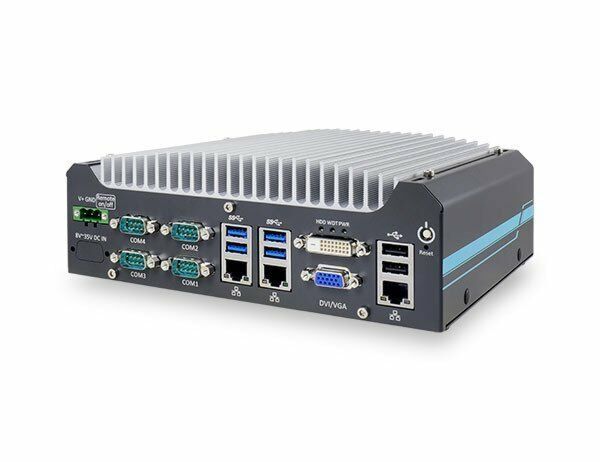
- Compact 221 x 173 x 76 mm footprint
- Supports Intel 6th-Gen Core i7/i5/i3 LGA 1151 socket CPU
- Rugged, -25°C to 70°C fanless operation
- 3x GbE and 4x USB 3.0 ports
- 2x RS-232/422/485 ports and 2x RS-232 ports
- VGA + DVI dual display outputs
- Accommodates one 3.5" HDD or 2.5" HDD/SSD
- Optional 8-CH isolated DI and 8-CH isolated DO

Frequently Asked Questions
The Nuvo-5501 provides 3x Gigabit Ethernet ports (1x via Intel I219-LM, 2x via Intel I210-IT), 4x USB 3.1 Gen1/USB 3.0 ports, 2x USB 2.0 ports, 1x VGA connector, 1x DVI-D connector, 2x software-programmable RS-232/422/485 ports (COM1/COM2), and 2x standard RS-232 ports (COM3/COM4). The Nuvo-5501-DIO variant adds 8-channel isolated DI and 8-channel isolated DO via a DB25 connector.
The system accepts 8~35 VDC power input via a 3-pin pluggable terminal block, which is also used for remote on/off control. Maximum power consumption at 24V is 47.3W with the Core i7-6700TE, 46.8W with the Core i5-6500TE, and 42.5W with the Core i3-6100TE.
The Nuvo-5501 operates from -25°C to 70°C and can withstand storage temperatures from -40°C to 85°C. Note: with the i7-6700TE running in 65W mode, the maximum operating temperature is limited to 50°C, and thermal throttling may occur under sustained full load; CPU power can be configured in BIOS. Sub-zero operation requires a wide-temperature HDD or SSD. The system carries CE/FCC Class A EMC certification per EN 55022, EN 55024 and EN 55032.
The system supports up to 16GB DDR4-2133 memory in a single SO-DIMM slot. It has one internal SATA port that accommodates either a 3.5" HDD or a 2.5" HDD/SSD, one full-size mSATA socket, one full-size mini-PCIe socket, and one M.2 B key socket (with SIM card socket) for 3G/4G modules.
Neousys has tested the following operating systems: Microsoft Windows 7 (x86/x64), Windows 8 (x64), Windows 10 (x64), CentOS 7, Debian 8.7, Fedora 24, OpenSUSE 42.1, and Ubuntu 14.04.4 LTS/16.04 LTS. Note that Windows 7 does not natively support the xHCI USB controller, so the xHCI driver must be patched into the installation media to avoid keyboard/mouse issues during setup.
The Nuvo-5501 measures 221 mm (W) x 173 mm (D) x 76.2 mm (H) and weighs 2.8 kg (including CPU, memory, and HDD). It supports wall-mounting as standard, using two brackets included in the accessory box, or optional DIN-rail mounting using the DINRAIL-31 kit.
The system provides a full-size mini-PCIe socket that can accept modules for functions such as WiFi, GPS, or CAN bus, and a M.2 B key socket with a SIM card slot for 3G/4G modules. SMA antenna openings are located on the side of the chassis for these expansion cards.
The Nuvo-5501-DIO adds 8-channel isolated digital input (DI) and 8-channel isolated digital output (DO) via a rear-panel DB25 female connector. All other specifications are the same between the two models.
Yes. The BIOS includes a "SKU Power Config" option that lets you limit the power draw of a higher-TDP CPU (such as a 65W-rated chip) down to 35W, allowing more CPU choice while balancing computing power against operating temperature range. Note that running an i7-6700 in 65W mode limits maximum operating temperature to 50°C.
How-to Guides
- Disassemble the system enclosure to gain access to the memory module slot (you may not need to fully dismantle the system).
- Locate the single SO-DIMM memory slot on the motherboard.
- Insert the gold fingers of the module into the slot at a 45 degree angle.
- Push down on the edge of the module until the side clips engage and hold the module in place.
- Reinstall the system enclosure and panel.
- Disassemble the system enclosure to gain access to the SATA port.
- For a 2.5" HDD/SSD, secure the drive to the HDD/SSD bracket using 4 M3 flat-head screws, then secure the bracket to the chassis with a flat-head screw (M3 for post-2019 units, #6-32 for pre-2019 units).
- For a 3.5" HDD, secure the drive to the bracket using #6-32 (post-2019) or M3 (pre-2019) flat-head screws, then secure the bracket to the chassis.
- Connect the drive to the motherboard using the provided SATA (blue) and power (red) cables.
- Reinstall the system enclosure and panel.
- Disassemble the system enclosure to gain access to the mini-PCIe slot.
- Insert the mini-PCIe module into the socket at a 45 degree angle.
- Gently press down and secure the module with two M2.5 P-head screws.
- Clip the IPEZ-to-SMA cable onto the module and secure the antenna to the side panel (refer to the module's own manual for the antenna cable connection).
- Reinstall the system enclosure, panel, and external antenna.
- Disassemble the system enclosure to gain access to the M.2 slot and SIM socket.
- Slide the SIM slot outward and lift the SIM card holder, insert the SIM card with pins facing up, and slide it to lock in place.
- Close the SIM holder and secure it by sliding it toward the center of the motherboard.
- Insert the M.2 module into the slot at a 45 degree angle and secure it.
- Clip the IPEZ-to-SMA cable onto the module (refer to the module's manual for antenna cable connection) and secure the antenna to the enclosure panel.
- Reinstall the system enclosure, panel, and attach the external antenna.
- For wall mounting: take the two wall-mounting brackets and four M4 screws from the accessory box and fix the brackets to the Nuvo-5501 using the M4 screws, then place the unit on the wall or flat surface and fix it with screws.
- For DIN-rail mounting (optional DINRAIL-31 kit): fix the DIN-rail mounting clip to the bracket using four M4 flat-head screws, then fix the bracket assembly to the Nuvo-5501 controller with another four M4 screws.
| Manufacturer | Neousys |
|---|---|
| Processor | Supports following CPUs|Intel® Core™ i7-6700TE (8M Cache, 2.4/ 3.4 GHz, 35W TDP)|Intel® Core™ i5-6500TE (6M Cache, 2.3/ 3.3 GHz, 35W TDP)|Intel® Core™ i3-6100TE (4M Cache, 2.7 GHz, 35W TDP)|Intel® Pentium® G4400TE (3M Cache, 2.4 GHz, 35W TDP)|Intel® Celeron® G3900TE (2M Cache, 2.3 GHz, 35W TDP) |
| Graphics | Integrated Intel® HD 530/510 controller |
| Memory | Up to 16GB DDR4-2133 (single SO-DIMM) |
| Chipset | Intel® H110 platform controller hub |
| Video Port | 1x VGA connector|1x DVI-D connector |
| DIO | 8-CH isolated DI and 8-CH isolated DO (optional) |
| M.2 | 1x M.2 B key socket for 3G/4G options with SIM socket |
| Mini PCI-E | 1x full-size mini PCI Express socket |
| SATA HDD | 1x internal SATA port for 3.5" HDD or 2.5" HDD/ SSD |
| mSATA | 1x full-size mSATA socket |
| DC Input | 1x 3-pin pluggable terminal block for 8~35 VDC power input |
| Remote Ctrl. & Status Output | 1x 2x6-pin 2.0mm pin-header connector for remote on/off control and status LED output |
| Dimension | 221mm x 173mm x 76 mm |
| Weight | 2.8 kg (incl. CPU, memory and HDD) |
| Mounting | Wall-mount (standard) or DIN-rail mount (optional) |
| Operating Temperature | -25°C ~ 70°C */** |
| Storage Temperature | -40°C ~ 85°C |
| Humidity | 10%~90%, non-condensing |
| Vibration | Operating, 5 Grms, 5-500 Hz, 3 Axes (w/ SSD, according to IEC60068-2-64) |
| Shock | Operating, 50 Grms, half-sine 11 ms duration (w/ SSD, according to IEC60068-2-27) |
| EMC | CE/FCC Class A, according to EN 55022, EN55032 & EN 55024 |
| CPU Cores | 4 |
| CPU Family | Intel Celeron, Intel Core, Intel Pentium |
| Video Output | DVI-D, VGA |
| LAN Ports | 1-4 |
| Serial Ports | 3-4 |
| USB 2.0 | 1-2 |
| USB 3.0 | 3-4 |
| Max Memory | 16 GB |
| Operating System | Windows 7, Windows 10, Linux |
| Effective Memory Speed | 2400 MHz |
| Form Factor | Fanless |
| Native Storage Type | 2.5" SSD, 3.5" HDD, mSATA Full |