
PB-2500J: Industrial-Grade Expansion Card Intelligent Supercapacitor-Based Uninterruptible Power Backup Module 2500Ws
PB-2500JView SuperCap UPS Backup Modules
Neousys’ PB-2500J series is an innovative power backup solution for demanding industrial applications. Utilizing supercapacitor technology, it features -25°C to 65°C operating temperature range and extremely high durability. Compared to traditional battery-based UPS systems, PB-2500J series can sustain superb reliability in extreme temperature environments and eliminates the drawback of battery performance degradation over time.
- Supercapacitor-based, -25 to 65°C wide temperature operation
- 2500 watt-second energy capacity
- Up to 10 years lifespan and 500,000 charging/ discharging cycles
- Patented CAP energy management technology*
- Maximizes back-up time in the event of a power outage
- Monitors energy consumed and estimates the time required for system shutdown
- User-configurable operating parameters
- Auto/ manual shutdown control
- High/ low voltage protection
- UltraCAP energy/ lifespan configuration

Frequently Asked Questions
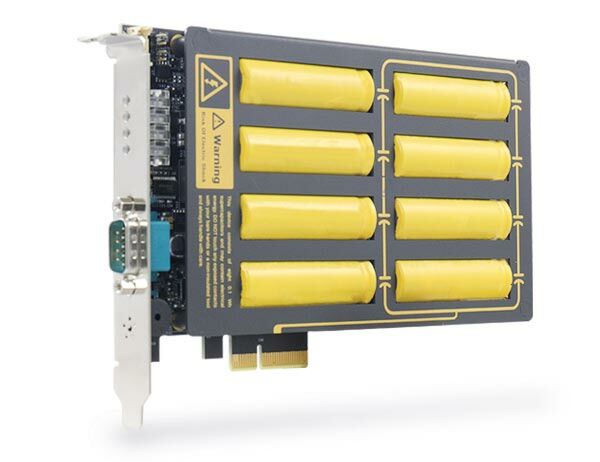
The PB-2500J is a supercapacitor-based power backup module for industrial computers. It uses eight 100F ultracapacitors to store 2500 watt-seconds of energy, which can power a system for seconds to minutes during a power outage, depending on the system's power draw. Its patented CAP energy management technology monitors power consumption and initiates a system shutdown at the optimal time to prevent data loss.
The PB-2500J operates from -25°C to 65°C and can be stored from -40°C to 70°C.
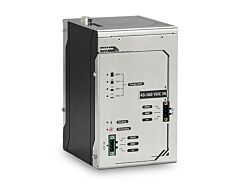
The PB-2500J is available in two form factors: PB-2500J-PCIe, a half-length PCIe card (167 mm W x 111 mm H) designed for Neousys' Nuvo-6000 series, and PB-2500J-CSM, a ready-to-use Cassette module for the Nuvo-5000/7000 series. The CSM version measures 225 mm (D) x 141 mm (W) x 28.7 mm (H).
Expected lifespan depends on operating temperature: over 10 years at 25°C, 76,000 hours at 35°C, 34,000 hours at 45°C, 15,000 hours at 55°C, and 7,200 hours at 65°C, all with the full 2500 watt-second capacity. The lifespan can be extended to 2.2x when configured for 2100 watt-second capacity, or 4.8x when configured for 1750 watt-second capacity. The unit also supports up to 500,000 charging/discharging cycles.
The PB-2500J communicates with the host computer via a 3-wire RS-232 interface through a 9-pin D-sub COM port. This COM port must be configured in RS-232 mode on the host controller to communicate properly.
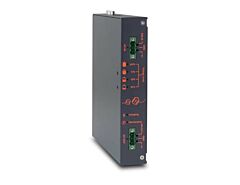
The PB-2500J has four front-panel LEDs. LED 1 (green) shows the SuperCAP energy level relative to 2500J/1736J thresholds. LED 2 (green) shows energy level relative to 1111J/625J thresholds. LED 3 (orange) lights when the unit is being charged. LED 4 (red) lights to indicate a brownout status.
No driver installation is required for PB-2500J-PCIe or PB-2500J-CSM. However, you need the "PB-2500J Parameter Configurer" software, included on the Drivers & Utilities DVD, to access and manage the unit.
The PB-2500J-PCIe can be installed in the Nuvo-6000 series, and the PB-2500J-CSM is designed for the Nuvo-5000/7000/9000 series. Note that PB-2500J is NOT compatible with the Nuvo-6108GC, Nuvo-6108GC-IGN, or Nuvo-8208GC.
The PB-2500J is CE/FCC Class A certified, according to EN 55022 and EN 55024.
How-to Guides
- Loosen the four M3, F-head screws on the front, back, and right side of the chassis, then gently slide the L-shape chassis cover up and to the right to remove it.
- Locate the 2x5 pin 2.0mm pitch wafer connector, the x4 PCI Express slot, and the x16 PCI Express slot on the PCBA board.
- Connect the provided 2x5 pin 2.0mm pitch cable to the PCBA board of the Nuvo-6000 controller.
- Align and insert the golden-finger connector of PB-2500J-PCIe into the PCI Express slot until firmly seated, then secure it with a screw.
- Insert the other end of the 2x5 pin cable into the wafer connector on PB-2500J-PCIe.
- Use a COM-to-COM cable to connect the COM port on PB-2500J-PCIe to the COM port on the Nuvo-6000 controller, ensuring the host's COM port is configured in RS-232 mode.
- Reinstall the controller chassis and reconnect all cables.
- Place the controller upside-down on a flat surface and unfasten the four screws to separate the Cassette module from the controller.
- Separate the cover of the Cassette module and remove the blank faceplate by unfastening its M3 screw.
- Insert one end of the 2x5 pin 2.0mm pitch cable into the wafer connector on the PCBA board in the Cassette module.
- Align and insert the golden-finger connector of PB-2500J-PCIe into the PCI Express slot until firmly seated.
- Connect the 2x5 pin cable to the wafer connector on PB-2500J-PCIe and secure the faceplate with a screw.
- Replace the Cassette module cover and reinstall the Cassette module onto the controller.
- Use a COM-to-COM cable to connect the COM port of PB-2500J-PCIe to the COM port of the controller, and secure both ends. Ensure the host's COM port is set to RS-232 mode.
- Turn the system upside-down and remove the existing Cassette module.
- Gently lower the PB-2500J-CSM onto the system, matching the four Cassette module positioning poles, and secure it with four screws.
- Use a DB9 female/female COM-to-COM cable to connect the COM port of PB-2500J-PCIe to the COM port of the controller, and secure both ports. Ensure the host's COM port is configured in RS-232 mode.
- Open Control Panel > System and Security > Power Options.
- Set "When I press the power button" to "Shut down".
- This ensures Windows performs a full shutdown instead of entering Sleep (S3) mode, which PB-2500J will not recognize as a valid shutdown command.
- Press the Windows key and type "cmd" in the search field.
- Press
Ctrl+Shift+Enterto run the command line with administrative rights. - Change directory to where the PB-2500J_Configurer executable is located.
- Type
PB2500J_Configurer.C16.18.exe com3(replace "com3" with the new COM port number) and press Enter. - In the configurer application, click "Get Parameters" to confirm the new connection reads correct values.
Neousys’ PB-2500J series is an innovative power backup solution for demanding industrial applications. Utilizing supercapacitor technology, it features -25°C to 65°C operating temperature range and extremely high durability. Compared to traditional battery-based UPS systems, PB-2500J series can sustain superb reliability in extreme temperature environments and eliminates the drawback of battery performance degradation over time.
PB-2500J series is composed of eight 100F supercapacitors to provide 2500 watt-second stored energy to sustain your computer during power outage and depending on your system’s power consumption, it could be from seconds to minutes. But what makes PB-2500J novel is its patented CAP energy management technology, an on-board processor that constantly monitors power consumption and evolves with the system. During a power outage, it maximizes the system operation time by estimating the perfect time to initiate system shutdown to prevent data loss.
When it comes to industrial embedded controllers, stability and data loss prevention during power outages are just as important. Neousys’ PB-2500J series aims to redefine reliability and take it to another level. With PB-2500J series, unexpected power loss and unstable power lines are a thing in the past!
SuperCap UPS Backup Modules
| Manufacturer | Neousys |
|---|---|
| Short Description | View SuperCap UPS Backup Modules Neousys’ PB-2500J series is an innovative power backup solution for demanding industrial applications. Utilizing supercapacitor technology, it features -25°C to 65°C operating temperature range and extremely high durability. Compared to traditional battery-based UPS systems, PB-2500J series can sustain superb reliability in extreme temperature environments and eliminates the drawback of battery performance degradation over time. |
| Dimension | Half-length PCIe card 167 mm (W) x 111 mm (H) |
| Operating Temperature | -25°C ~ 65°C |
| Storage Temperature | -40 °C~ 70°C |
| EMC | CE/FCC Class A, according to EN 55022 & EN 55024 |
| Ultracapacitor Configuration | 8x 100F, 3.0V ultracapacitors |
| Capacity | 2500 watt-second |
| Expected Lifespan | >10 years @ 25°C with 2500 w‧s capacity* *Expected lifespan is 2.2x when configured as 2100 watt-second energy capacity, or 4.8x when configured as 1750 watt-second energy capacity. |
| Cycle Life | 500,000 charging/discharging cycles* *Note: NOT compatible with Nuvo-6108GC, Nuvo-6108GC-IGN and Nuvo-8208GC |
| Network Interfacce | 3-Wire RS-232 |