
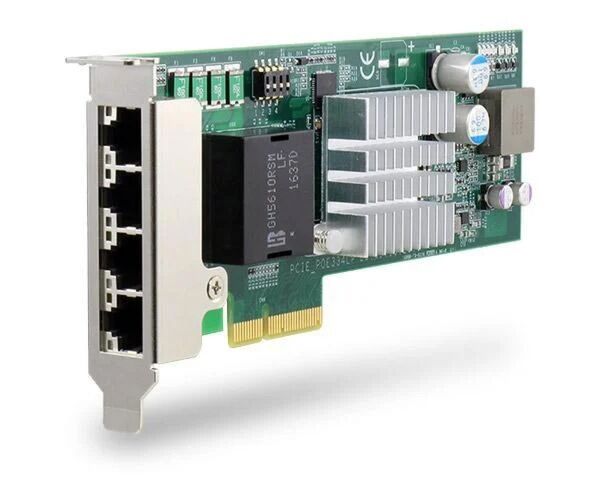
PCIe-PoE334LP: Low-Profile 4-Port Server-Grade Gigabit PoE+ Card with 1 kV Surge Protection
PCIe-PoE334LP- Low-profile form-factor
- 4x ports via Intel I350-AM4 server-grade GigE controller
- Compliant with IEEE 802.3at to deliver 25.5 W each port
- IEC 61000-4-5 Class 2 surge immunity
- Supports 9.5 kB jumbo frame, teaming and IEEE 1588
- Per-port PoE+ power on/ off control via software API

Frequently Asked Questions
The card has 4x Gigabit Ethernet ports powered by an Intel® I350-AM4 server-grade GbE controller. Each port supports 9.5 kB jumbo frames, teaming, and IEEE 1588.
Each port is compliant with IEEE 802.3at-2009 (PoE+) and can deliver up to 25.5 W. The total power budget across all ports is 75 W, limited by the PCI Express bus.
Use CAT-5e or CAT-6 cable, with a maximum cable run of 100 meters.
The card draws a maximum of 1.2 A at 3.3 V and a maximum of 6.2 A at 12 V from the PCI Express bus.
The card is rated for 0°C to 55°C operation with air flow.
The card is CE Class A certified according to EN 55022/55024/55032 and FCC Class A certified according to FCC Part 15, Subpart B. It also meets IEC 61000-4-x Class/Level 2 EMS requirements, including 1 kV surge and 8 kV ESD immunity on signal lines per IEC 61000-4-5 Class 2.
The PCIe-PoE334LP is a low-profile PCIe card measuring 168 mm (W) x 69 mm (H), designed to fit into commercial off-the-shelf 2U server systems. It uses a x4, Gen2 PCI Express bus interface and ships with a full-height bracket.
Yes. DIP switch 4 lets you choose between af mode (IEEE 802.3af, up to 350 mA per port) and high at mode (IEEE 802.3at, up to 720 mA per port).
Yes. Each card has a set of DIP switches to configure a board ID (0-7). This ID is used as a parameter in the software API to specify which card to control, so each card must be set to a different ID when multiple cards are installed.
Yes. The card supports individual per-port PoE power on/off control via Neousys' software API. This can be used to manually cut off or resume power delivery to a connected PoE device, for example to reset a device in the field.
How-to Guides
- Save and close all work in progress.
- Power off and unplug the power cable from the system.
- Open the chassis (side panel) of the computer.
- Locate the x4 PCIe slot or a spare and compatible x16/x8 PCIe slot.
- Align and insert the PCIe-PoE334LP's gold finger into the PCIe slot.
- Secure the PCIe-PoE334LP to the chassis with a screw.
- Reinstall the system's chassis panel to complete the hardware installation.
- Plug in the power cable and power up the system.
- Insert the Neousys driver DVD included in the package into the DVD-ROM.
- Locate and execute the driver installation program matching your operating system (Windows XP, 7/8.1/10 32-bit, 7/8.1 64-bit, or 10 64-bit) from the
\Driver_Pool\GbE_I210_I350\directory. - If your system does not have a DVD-ROM, download the latest driver for the PCIe-PoE334LP from Neousys.
- Follow the on-screen instructions to complete the software installation.
- Begin using the PCIe-PoE334LP once hardware and software components have been installed.
- Locate the DIP switches on the card (indicated in blue).
- Configure DIP switch 4 to select af mode (IEEE 802.3af, up to 350 mA per port) or high at mode (IEEE 802.3at, up to 720 mA per port).
- If installing multiple cards, set DIP switches P1-P3 to a unique board ID (0-7) for each card.
- Use the assigned board ID as a parameter when calling the per-port PoE control API functions.
- Press Windows key + E, right click on Network, and select Properties.
- Right click on the corresponding Local Area Connection (Intel I350 Gigabit Network) and select Properties.
- Click the Configure button, then click on the Advanced tab.
- Highlight Jumbo Packet and select a jumbo frame size from the Value drop-down list. 9014 Byte is recommended for connecting devices with high data rate.
- Download or use the provided WDT_DIO_Setup_v2.2.9.4.exe (or later) driver package.
- Execute the installer and click "Next >".
- Specify an install directory or accept the default (
C:\Neousys\WDT_DIO). - Reboot the system when prompted for the WDT & DIO library to take effect.
- Locate the header files (
\Include), library files (\Lib), function reference (\Manual), and sample code (\Sample\POE_Demo) to begin using functions such asPCI_GetStatusPoEPort,PCI_EnablePoEPort, andPCI_DisablePoEPort.
PCIe-PoE334LP is the latest member of Neousys’ PoE NIC card family. It is the world’s first PoE card to integrate a 4-port server-grade GigE controller and 802.3at PoE+ into a low-profile PCIe card. The low-profile form-factor makes PCIe-PoE334LP the perfect solution for commercial off-the-shelf 2U server computers.
PCIe-PoE334LP is designed with an Intel I350-AM4 GigE controller to offer extraordinary Ethernet performance. It inherits Neousys’ proven PoE technology to power your machine vision cameras and surveillance IP cameras. In addition, PCIe-PoE334LP features a solid surge protection design compliant with IEC 61000-4-5 Class 2. It is capable of withstanding 1 kV surge and 8 kV ESD on signal lines. This is particularly valuable for outdoor surveillance systems or factory automation equipment, where power surges may damage the system through the Ethernet connection.
Incorporating a low-profile form factor and robust surge protection, PCIe-PoE334LP defines a new category of PoE card—a compact yet solid PoE card for servers and rugged industrial applications.
| Manufacturer | Neousys |
|---|---|
| Short Description | PCIe-PoE334LP is the latest member of Neousys’ PoE NIC card family. It is the world’s first PoE card to integrate a 4-port server-grade GigE controller and 802.3at PoE+ into a low-profile PCIe card. The low-profile form-factor makes PCIe-PoE334LP the perfect solution for commercial off-the-shelf 2U server computers. |
| PoE | In compliance with IEEE 802.3at-2009 (PoE+), each port delivers up to 25.5 W of power 75W total power budget (limited by PCI Express bus) |
| PCI Express | x4, Gen2 PCI Express |
| Power Input Voltage | Maximum 1.2 A @ 3.3 V from PCI Express bus Maximum 6.2A @ 12 V from PCI Express bus |
| Dimension | 168 mm (W) x 69 mm (H) |
| Operating Temperature | 0°C ~ 55°C with air flow |
| EMC | CE Class A, according to EN 55022/ 55024/ 55032 FCC Class A, according to FCC Part 15, Subpart B |