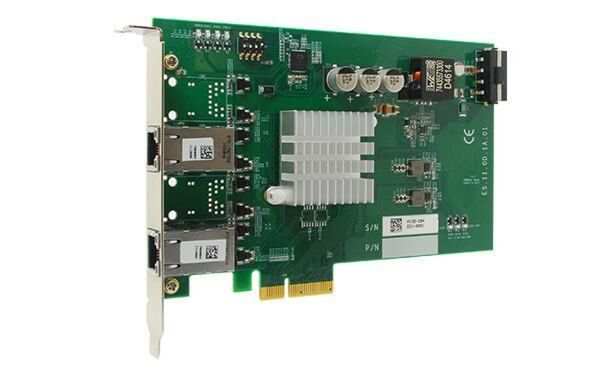
PCIe-PoE352at: 2-Port Server-Grade Gigabit 802.3at PoE+ Frame Grabber Card
PCIe-PoE352at- x4, Gen2 PCI Express interface (2GB/s total bandwidth)
- Intel I350 server-grade Gigabit Ethernet controller
- Supports two (352at) independent GigE ports
- Compliant with IEEE 802.3at to deliver 25.5 W each port
- Supports 9.5 kB jumbo frame, teaming and IEEE 1588
- Per-port PoE+ power on/ off control

Frequently Asked Questions
The PCIe-PoE352at has 2x Gigabit Ethernet ports powered by an Intel® I350-AM2 controller. It is compliant with IEEE 802.3at-2009 (PoE+), and each port can deliver up to 25.5W of power.
The card requires a CAT-5e or CAT-6 cable, with a maximum cable length of 100 meters. A CAT-6 cable is highly recommended since the card is designed for Gigabit Ethernet connectivity.
The PCIe-PoE352at draws a maximum of 0.9A @ 3.3V and a maximum of 4.8A @ 12V, both directly from the PCI Express bus. No external 12VDC power connector is needed, since the card is designed to obtain 12VDC for PoE devices directly from the PCI Express bus.
The PCIe-PoE352at operates from 0°C to 55°C with airflow.
The card measures 167.7mm (W) x 111.2mm (H).
The PCIe-PoE352at uses an x4 Gen2 PCI Express bus interface.
Yes. The Intel® I350 GbE controller used on the PCIe-PoE352at supports jumbo frame sizes of up to 9.5 Kbytes (9.5kB), along with teaming and IEEE 1588 support.
Neousys provides drivers for Windows XP, Windows 7, and Windows 8/8.1 (both 32-bit and 64-bit), included on the Drivers & Utilities DVD. A "One-Click" automatic installation utility is also provided.
Yes. The card supports per-port PoE power on/off control using Neousys-provided API functions (PCI_GetStatusPoEPort, PCI_EnablePoEPort, PCI_DisablePoEPort). This lets you manually cut off or resume power to a connected PD device for fault recovery purposes. A board ID, configured via an on-board DIP switch, is used to identify each card when multiple cards are installed.
How-to Guides
- Configure the Board ID using the DIP switch if necessary.
- Open the chassis of the host computer and expose the x4 PCI Express slot (or a compatible x16 PCI Express slot).
- Align and insert the golden-finger connector of the PCIe-PoE352at into the PCI Express slot until it is firmly contacted.
- Fix the PCIe-PoE352at to the host computer using a screw.
- Locate the DIP switch on the upper-left corner of the PCB.
- Use P1 ~ P3 of the DIP switch to set the desired board ID (0-7).
- Use the configured board ID as a parameter when calling the per-port PoE control API functions to specify which card to address.
- Insert the Neousys Drivers & Utilities DVD into a DVD drive attached to the host computer. A setup utility launches automatically.
- Click "Automatic Driver Installation".
- The setup utility detects the operating system and installs the corresponding driver (takes about 2-3 minutes).
- Once installation is complete, the setup utility reboots Windows and the system works normally afterward.
- Open Network Connections and double-click the corresponding Local Area Connection.
- Click the Configure button, then click the Advanced tab in the property dialog.
- Select the Jumbo Packet setting and choose the desired jumbo frame size (9014 Bytes is suggested for high data rate devices such as a Gigabit Ethernet camera).
- Open Network Connections and double-click the corresponding Local Area Connection.
- Click the Configure button, then click the Advanced tab in the property dialog.
- Select Performance Options and click the Properties button.
- Adjust the Receive Buffers value (default 256 bytes, maximum 2048 bytes; 2048 Bytes is suggested for high data rate devices).
- Repeat the same steps under Performance Options to adjust the Transmit Buffers value (default 256 bytes, maximum 2048 bytes).
| Manufacturer | Neousys |
|---|---|
| Short Description | PCIe-PoE352at is the world’s first PoE frame grabber card combining server-grade GigE controller and 802.3at PoE+ capability. Inheriting Neousys’ expertise on PoE technology, PCIe-PoE352at further incorporates the updated 802.3at-2009 standard and offers up to 25.5W in each port. |