
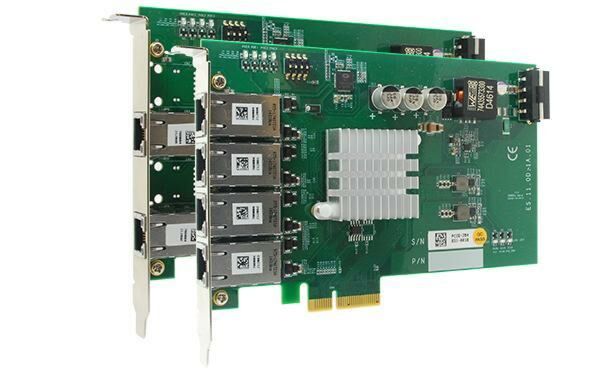
PCIe-PoE354at/PoE352at: 4-Port/2-Port Server-Grade Gigabit 802.3at PoE+ Frame Grabber Card
PCIe-PoE354at-PoE352atStarting at $275.00
- x4, Gen2 PCI Express interface (2GB/s total bandwidth)
- Intel I350 server-grade Gigabit Ethernet controller
- Supports four (354at) or two (352at) independent GigE ports
- Compliant with IEEE 802.3at to deliver 25.5 W each port
- Supports 9.5 kB jumbo frame, teaming and IEEE 1588
- Per-port PoE+ power on/ off control

Frequently Asked Questions
The PCIe-PoE354at has 4 GigE ports powered by an Intel® I350-AM4 controller. The PCIe-PoE352at has 2 GigE ports powered by an Intel® I350-AM2 controller. Both support 9.5 kB jumbo frames, teaming, and IEEE 1588.
Both cards comply with IEEE 802.3at-2009 (PoE+) and each port can deliver up to 25.5 W of power. This is enough to power devices such as PTZ (pan-tilt-zoom) cameras.
Use CAT-5e or CAT-6 cable, with a maximum length of 100 meters. Because these cards are designed for Gigabit Ethernet, a CAT-6 cable is recommended.
The PCIe-PoE354at draws a maximum of 1.2 A @ 3.3 V from the PCI Express bus and up to 9.6 A @ 12 V from either the PCI Express bus or an on-board 4-pin power connector (user-configurable via jumper). The PCIe-PoE352at draws a maximum of 0.9 A @ 3.3 V from the PCI Express bus and up to 4.8 A @ 12 V directly from the PCI Express bus; no external 12 VDC connection is required.
Both cards operate from 0°C to 55°C with airflow.
Both cards use an x4, Gen2 PCI Express interface (2 GB/s total bandwidth) and measure 167.7 mm (W) x 111.2 mm (H).
Yes. The cards detect and classify the connected device before supplying power, so they can work with both PoE Powered Devices (PD) and regular, non-PoE Ethernet devices.
The Drivers & Utilities DVD includes drivers for Windows XP, Windows 7, and Windows 8/8.1 (both 32-bit and 64-bit).
Yes. Both cards support per-port PoE power on/off control through Neousys-provided API functions (PCI_GetStatusPoEPort, PCI_EnablePoEPort, PCI_DisablePoEPort), useful for fault recovery or remotely resetting a connected PoE device.
How-to Guides
- Configure the Board ID using the DIP switch if necessary.
- Open the host computer chassis and expose an available x4 PCI Express slot (or a compatible x16 slot).
- Align and insert the golden-finger connector of the PCIe-PoE352at into the PCI Express slot until firmly seated.
- Secure the card to the host computer chassis with a screw.
- Configure the Board ID using the DIP switch if necessary.
- Configure the 12 VDC source (PCI Express bus or 4-pin power connector) using the P4 DIP switch position if necessary.
- Open the host computer chassis and expose an available x4 PCI Express slot (or a compatible x16 slot).
- Align and insert the golden-finger connector of the PCIe-PoE354at into the PCI Express slot until firmly seated.
- Secure the card to the host computer chassis with a screw.
- If configured to obtain 12 VDC from the 4-pin power connector, plug in the 4-pin power plug from the ATX power supply, confirming correct polarity (+5V/Red, GND/Black, GND/Black, +12V/Yellow) before connecting.
- Locate the DIP switch in the upper-left corner of the PCB.
- Set switch positions P1 through P3 according to the desired Board ID (0-7) per the DIP switch position table.
- Use this Board ID as the
boardIdparameter when calling per-port PoE control API functions to identify this specific card.
- Insert the Drivers & Utilities DVD into a DVD drive attached to the host computer. A setup utility launches automatically.
- Click "Automatic Driver Installation". The utility detects your Windows operating system and installs the corresponding driver.
- Wait about 2-3 minutes for the installation to complete.
- Allow the setup utility to reboot Windows; the system will work normally afterward.
- After installing the Intel® I350 GbE driver, open Network Connections and double-click the corresponding Local Area Connection.
- Click the Configure button, then click the Advanced tab.
- Select the Jumbo Packet setting and choose the desired jumbo frame size (9014 Bytes is suggested for high-data-rate Ethernet devices such as a Gigabit Ethernet camera).
PCIe-PoE354/2at is the world’s first PoE frame grabber card combining server-grade GigE controller and 802.3at PoE+ capability. Inheriting Neousys’ expertise on PoE technology, PCIe-PoE354/2at further incorporates the updated 802.3at-2009 standard and offers up to 25.5W of power each port. PCIe-PoE354/2at is designed with Intel® I350 Gigabit Ethernet controller. This server-grade GigE controller incorporates advanced features such as checksum offloading, segmentation offloading and intelligent interrupt generation/ moderation to increase overall Ethernet performance and reduce CPU utilization. In addition, its single-bus, multi-port topology minimizes compatibility issues with off-the-shelf motherboards when installing multiple cards.
Machine vision applications can be benefited by PCIe-PoE354/2at’s server-grade network performance. Its 25.5W PoE+ can now power PTZ (pantilt-zoom) cameras for surveillance applications. With an excellent cost-per-performance ratio, PCIe-PoE354/2at is your ideal Power over Ethernet solution.
| Manufacturer | Neousys |
|---|---|
| Short Description | PCIe-PoE354/2at are the world’s first PoE frame grabber cards combining server-grade GigE controller and 802.3at PoE+ capability. Inheriting Neousys’ expertise on PoE technology, PCIe-PoE354/2at further incorporates the updated 802.3at-2009 standard and offers up to 25.5W in each port. |
| PoE | In compliant with IEEE 802.3at-2009 (PoE+), each port delivers up to 25.5 W of power |
| Dimension | 168 mm (W) x 111 mm (H) |
| Operating Temperature | 0°C ~ 55°C |
| Power Consumption | PCIe-PoE354at: Maximum 1.2A @ 3.3V from PCI Express bus, Maximum 5.5A @ 12V from PCI Express bus or on-board 4-pin power connector* |
| CPU Cores | 8 |
| CPU Family | Jetson AGX Orin |
| Base CPU Speed | Under 2.0 Ghz |
| Video Output | Display Port |
| LAN Ports | 1-4 |
| Serial Ports | 1-2 |
| USB 3.1 | 5-8 |
| Max Memory | 16 GB |
| Operating System | NVIDIA JetPack 5.0.2 |
| Effective Memory Speed | 3200 MHz |
| Native Storage Type | M.2 NVMe SSD |