
PCIe-PoE425bt: 4-Port 2.5G BASE-T Network Adapter with IEEE 802.3bt PoE++ Capability
PCIe-PoE425bt SeriesStarting at $430.00
- Power up to 90W on a single port
- IEEE 802.3bt PoE++ PSE compliant
- 4x IEEE 802.3bz 2.5GBASE-T ports
- 4x Intel I226-IT controllers
- Available in RJ-45 connectors
- Supports 2.5G/1G/100M/10M speeds
- PCI Express interface x4 Gen2
- Supports a 9.5 kB jumbo frame
- Per-port on/off power control

Frequently Asked Questions
The card provides 4x 2.5Gb Ethernet ports, each powered by an Intel® I226-IT controller. Each port supports 9.5 kB jumbo frames, teaming, and IEEE 1588. The ports are also PoE++ capable, allowing them to power connected devices directly over the Ethernet cable.
The PCIe-PoE425bt complies with IEEE 802.3bt PoE++ Type 3 and Type 4 PSE, delivering up to a maximum of 90W on a single PoE++ port. It is also backward compatible with 802.3at (PoE+) and 802.3af (PoE) powered devices.
Use CAT-5e or CAT-6 cable, with a maximum length of 100 meters.
The card can draw a maximum of 5.5A@12V (66W) from the PCIe gold finger connectors, or a maximum of 12A@12V (144W) from the on-board 6-pin PCIe power connector, depending on the mode selected.
The operating temperature range is 0°C to 55°C when power is supplied from the gold finger connectors, or 0°C to 50°C when power is supplied from the 6-pin connectors.
The card offers two power supply source methods, selectable via DIP switch 4. In at mode (IEEE 802.3at), power is supplied internally from the gold finger connector. In bt mode (IEEE 802.3bt), power is supplied externally via the 6-pin power connector.
The card provides driver support for Intel x86 architecture. Tested operating systems include Microsoft Windows 10 LTSC 2021 (x64) and Ubuntu 20.04.5 LTS, 22.04 LTS, and 22.04.1 LTS, or other Linux distributions with kernel version 5.15 or later. For Linux, you may need to manually compile and install the driver for the Intel I226 GbE controller if it is not embedded in the kernel.
The PCIe-PoE425bt uses a 4-lane, Gen2 PCI Express interface. Its dimensions are 167.7 mm (W) x 111.2 mm (H) x 18.2 mm.
Yes. Each card has a set of DIP switches that let you assign a unique board ID (0-7). This board ID can then be used as a parameter in the per-port PoE control API to identify and control the specific card.
Yes. The card supports per-port PoE on/off control via Neousys' API, allowing you to manually cut off or resume power delivery to a connected PoE device. This is designed for failure recovery in the field to reset connected devices.
How-to Guides
- Save and close all work in progress.
- Power off and unplug the power cable from the system.
- Open the chassis (side panel) of the computer.
- Locate the x4 PCIe slot or a spare and compatible x16/x8 PCIe slot.
- Align and insert the card's gold finger into the PCIe slot, making sure the card's bracket is inserted into the hinge.
- Secure the card to the chassis with a screw.
- Connect the 6-pin PCIe power cable to the daughter board and the card, if needed.
- Reinstall the system's chassis panel to complete installation.
- Locate the DIP switch positions labeled P1 ~ P3 on the card.
- Set the DIP switches to the desired board ID (0 through 7) according to the board ID reference table.
- If installing multiple cards, ensure each card is set to a different board ID before installation.
- Locate DIP switch 4 on the card.
- Set DIP switch 4 to the internal position for at mode, which supplies power from the gold finger connector.
- Set DIP switch 4 to the external position for bt mode, which supplies power from the 6-pin power connector.
- Press Windows key + E, right click on Network, and select Properties.
- Right click on the corresponding Local Area Connection and click Properties.
- Click the Configure button, then click the Advanced tab in the dialog that appears.
- Highlight Jumbo Packet and select a jumbo frame size from the Value drop-down list (9014 Byte is recommended for devices with high data rate).
- Execute WDT_DIO_Setup_v2.4.0.0.exe (or later version).
- Click Next and specify an install directory, or accept the default directory C:\Neousys\WDT_DIO.
- Once installation finishes, reboot the system when prompted; the WDT & DIO library takes effect after reboot.
- Locate header files in \Include, library files in \Lib, function reference in \Manual, and sample code in \Sample\POE_Demo for use in your own program.
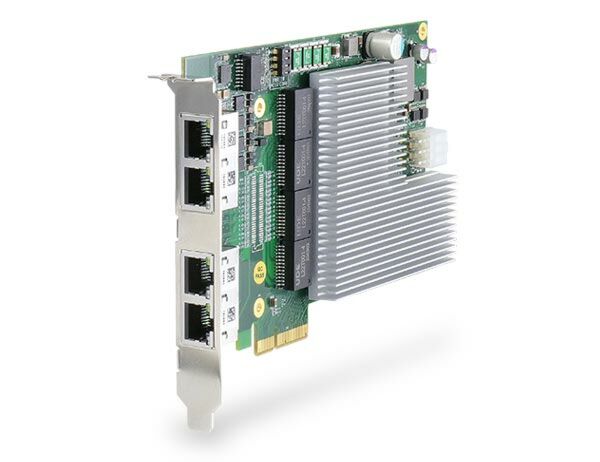
Introducing one of the world’s first 2.5G Ethernet cards featuring IEEE 802.3bt PoE++ PSE capability! The PCIe-PoE425bt is a 4-port 2.5GBASE-T PoE++ card leveraging the cutting-edge Intel I226-IT controller. It complies with IEEE 802bz standard to provide 2.5 Gbps bandwidth and is backward compatible with 1000BASE-T, 100BASE-TX, and 10BASE-TE Ethernet.
In addition to the increase in bandwidth, the PCIe-PoE425bt also features IEEE 802.3bt PSE capability. IEEE 802.3bt, or PoE++, is the latest addition to Power over Ethernet specifications, allowing a single port to provide up to 90W of power supplied to PD over a standard CAT-5e or CAT-6 Ethernet cable. While COTS high PoE PTZ cameras and outdoor WIFI access points may require higher power than 30W, the PCIe-PoE425bt is particularly useful for directly connecting and powering these devices without an external PoE++ injector.
The PCIe-PoE425bt has four RJ-45 connectors for use with generic Ethernet cables. By incorporating 2.5GBASE-T and PoE++ technologies, the PCIePoE425bt is ideal for machine vision and surveillance applications with advanced PoE devices, such as PTZ cameras, high-performance WIFI access points, and industrial NBASE-T cameras.
| Manufacturer | Neousys |
|---|---|
| Short Description | Introducing one of the world’s first 2.5G Ethernet cards featuring IEEE 802.3bt PoE++ PSE capability! The PCIe-PoE425bt is a 4-port 2.5GBASE-T PoE++ card leveraging the cutting-edge Intel I226-IT controller. It complies with IEEE 802bz standard to provide 2.5 Gbps bandwidth and is backward compatible with 1000BASE-T, 100BASE-TX, and 10BASE-TE Ethernet. |
| PoE | In compliant with IEEE 802.3bt PoE++ Type 3 and Type 4 PSE, maximal 90W output on a single PoE++ port Compatible with 802.3at (PoE+) and 802.3af (PoE) PD |
| Ethernet Standard | 4x RJ-45 connectors |
| Power Adapter | Jumper-select 12VDC input Maximum 5.5A@12V (66W) from PCIe gold finger connector Maximum 12A@12V (144W) from on-board 6-pin PCIe power connector |
| Dimension | 167.7mm (L) x 111.2mm (H) x 18.2mm (W) |
| Operating Temperature | 0°C ~ 50°C with airflow (802.3bt mode) 0°C ~ 55°C with airflow (802.3at mode) |
| EMC | CE Class A, according to EN 55032/55035 FCC Class A, according to FCC Part 15, Subpart B |
| # of Port | 4x 2.5G Ethernet ports by four Intel I226-IT controllers, supporting 9.5 kB jumbo frame, teaming, and IEEE 1588 |
| Bus Interface | x4, Gen2 PCI Express |
| Cable Requirements | 100 meters over CAT-5e or better Ethernet cable |
| PoE Ports | 4 |
| LAN Ports | 1-4 |
| Operating System | Windows 7, Windows 10, Linux |