
PCIe-PoE464at: 4-Port 5GBASE-T Ethernet 802.3at PoE+ Frame Grabber Card
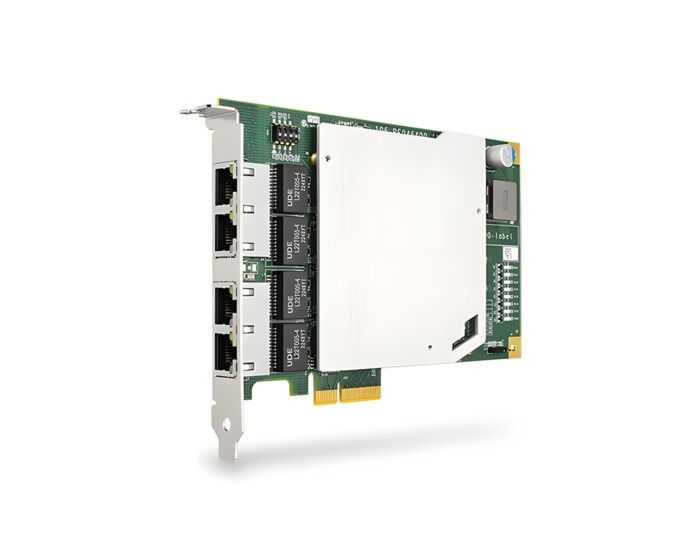
PCIe-PoE464atPCIe-PoE464at is a fanless, four-port 5GBASE-T frame-grabber card with 802.3at PoE+, designed for the growing adoption of 5G industrial cameras
in machine vision. As 5GBASE-T cameras move into high-resolution inspection, AI vision, multi-camera capture, and high-speed production lines,
PCIe-PoE464at provides the bandwidth, power delivery, and synchronization needed for reliable 5G vision deployment.
- 4x IEEE 802.3 5GBASE-T Ethernet ports by four Realtek RTL-8126 controllers
- Compliant with IEEE 802.3at to deliver up to 25.5 W for each port
- Supports 5G/ 2.5G/ 1G/ 100M/10M link speed
- x4, Gen3 PCI Express interface
- Per-port PoE+ power on/ off control
- Supports jumbo frame up to 16 KB
- Supports IEEE 1588 PTP v1/v2 and IEEE 802.1AS time synchronization
- Fanless, 0°C to 55°C operation

Frequently Asked Questions
The card provides 4x 5GBASE-T Ethernet ports, each using a Realtek RTL-8126 controller. Ports support 5G/2.5GBASE-T, 1000BASE-T, 100BASE-TX, and 10BASE-Te link speeds, with 4x RJ-45 connectors for cabling.
Each port complies with IEEE 802.3at-2009 (PoE+) and can deliver up to 25.5 W. Power on/off can be controlled per-port using Neousys' API.
The card requires CAT-5e or CAT-6 cable, with a maximum cable length of 100 meters.
The card draws a maximum of 5.5 A @ 12 V (66 W), supplied from the PCIe gold finger connector. No separate power adapter is required.
The PCIe-PoE464at is a fanless card rated for 0°C to 55°C operation with airflow.
The card is CE Class A certified according to EN 55032/55035, and FCC Class A certified according to FCC Part 15, Subpart B.
The PCIe-PoE464at uses a 4-lane, Gen3 PCI Express interface and measures 167.7 mm (W) x 111.2 mm (H).
Yes. The controllers support jumbo frame sizes of up to 16.3 KBytes (16128 Bytes recommended for high data rate devices) once the driver is installed.
Yes, the card supports IEEE 1588 PTP v1/v2 and IEEE 802.1AS time synchronization, useful for keeping image capture and motion axes synchronized.
Yes. Each card has a set of DIP switches (P1~P3) to configure a unique board ID, which is used as a parameter in the API to identify individual cards when multiple cards are installed.
How-to Guides
- Locate the DIP switches (P1~P3) on the card.
- If installing multiple PCIe-PoE464at cards in one system, set a different board ID for each card using the DIP switch positions.
- Use the configured board ID as a parameter in Neousys' API to specify which card to control.
- Save and close all work in progress.
- Power off and unplug the power cable from the system.
- Open the chassis (side panel) of the computer.
- Locate the x4 PCIe slot, or a spare and compatible x16/x8 PCIe slot.
- Align and insert the PCIe-PoE464at's gold finger into the PCIe slot.
- Secure the card to the chassis with a screw.
- Reinstall the system's chassis panel to complete installation.
Some operating systems include built-in drivers that install automatically. It is still recommended to install the drivers provided by Neousys to enable all functions.
- Download the Realtek driver from the link provided by Neousys.
- If using Linux, download and install the PTP-enabled Linux driver.
- Run the installer and complete setup according to the driver instructions.
- Press Windows key + E, right-click on Network, and select Properties.
- Right-click on the corresponding Local Area Connection (Realtek PCIe 5GbE Family Controller) and click Properties.
- Click the Configure button, then click the Advanced tab.
- Highlight Jumbo Frame and select a size from the Value drop-down list (16128 Bytes is recommended for high data rate devices).
- Press Windows key + E, right-click on Network, and select Properties.
- Right-click on the corresponding Local Area Connection and click Properties.
- Click the Configure button, then click the Advanced tab.
- Highlight Receive Buffers and enter a value (maximum 4096 Bytes; 4096 recommended for high data rate devices).
- Repeat the process for Transmit Buffers, entering a value (maximum 8184 Bytes; 4096 recommended for high data rate devices).
PCIe-PoE464at is a fanless, four-port 5GBASE-T frame-grabber card with 802.3at PoE+, designed for the growing adoption of 5G industrial cameras
in machine vision. As 5GBASE-T cameras move into high-resolution inspection, AI vision, multi-camera capture, and high-speed production lines,
PCIe-PoE464at provides the bandwidth, power delivery, and synchronization needed for reliable 5G vision deployment.
Compared with USB3 vision systems, 5GBASE-T delivers high-bandwidth image transmission while supporting cable lengths of up to 100 meters
over standard Ethernet cabling. The longer reach gives system integrators more flexibility in camera placement, factory layout, and control cabinet
design, reducing the deployment limits often caused by shorter USB3 cable runs.
PCIe-PoE464at integrates four Realtek RTL8126 controllers, providing 5 Gb/s per port, 16 KB jumbo frame support, and compatibility with 2.5 GbE
and 1 GbE links for flexible camera migration. To optimize both weight and thermal performance, PCIe-PoE464at uses a heat spreader to enhance
heat dissipation while helping prevent bracket bending during long-term operation. 802.3at PoE+ reduces external power adapters and wiring cost,
while IEEE 1588 PTP keeps image capture, inspection timing, and motion axes accurately synchronized.
Designed for 5G multi-camera machine vision, PCIe-PoE464at is well suited for high-resolution AOI, electronics assembly inspection, AI-based defect
detection, multi-angle object inspection, high-speed logistics imaging, and large-field-of-view inspection. Its synchronized 5GBASE-T channels deliver
stable, no-frame-loss image acquisition for applications requiring higher resolution, longer cable reach, reliable deployment, and precise timing
control.
| Short Description | PCIe-PoE464at is a fanless, four-port 5GBASE-T frame-grabber card with 802.3at PoE+, designed for the growing adoption of 5G industrial cameras |
|---|---|
| PoE | In compliance with IEEE 802.3at-2009 (PoE+), each port delivers up to 25.5 W. |
| Ethernet Standard | IEEE 802.3 Ethernet interface for 5G/2.5GBASE-T, 1000BASE-T, 100BASE-TX and 10BASE-Te |
| PCI Express | Gen3 PCI Express x4 |
| Dimension | 167.7 mm (W) x 111.2 mm (H) |
| Operating Temperature | 0°C to 55°C with airflow |
| # of Port | 4x 5GBASE-T Ethernet ports |
| Operation Voltage | Maximum 5.5 A@12V (66W) from PCIe gold finger connector |