
POC-400 Series: Intel Elkhart Lake Atom x6425E Ultra-Compact Fanless Embedded Computer with 2.5GbE & PoE+
POC-400/410Starting at $650.00
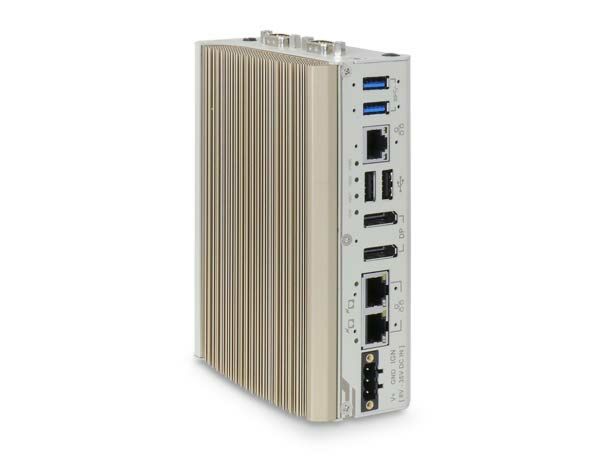
POC-400 is an ultra-compact fanless embedded computer for industrial applications. It utilizes the latest Intel Elkhart Lake Atom x6425E 4-core CPU that delivers 1.8x CPU and 2x GPU performance improvements compared to the previous generation.
- Intel Elkhart Lake Atom 6425E quad-core 2.0GHz/3.0GHz 12W CPU
- Rugged -25 °C to 70 °C fanless operation
- 2x 2.5GbE PoE+ ports and 1x 2.5GbE port with screw-lock
- 2x USB 3.1 Gen1 and 2x USB 2.0 ports with screw-lock
- M.2 2280 M key SATA interface
- Dual DP display outputs supporting 4096 x 2160 resolution
- Front I/O access DIN-mounting design
- MezIO compatible

Frequently Asked Questions
The system provides three 2.5GBASE-T Ethernet ports (Intel I226-IT/I225-IT), two USB 3.1 Gen1 ports (5 Gbps), two USB 2.0 ports, two DisplayPort outputs (up to 4096 x 2160 @ 60Hz), one software-programmable RS-232/422/485 port (COM1), three additional 3-wire RS-232 ports or one RS-422/485 port (COM2/3/4), and a 3.5mm microphone-in/speaker-out jack.
On the POC-400, two of the three Ethernet ports (port #2 and #3) support IEEE 802.3at PoE+. On the POC-410, all three Ethernet ports are standard Ethernet without PoE.
The POC-400 and POC-410 share the same processor, memory, storage, and mechanical specifications. The key difference is Power over Ethernet: the POC-400 has IEEE 802.3at PoE+ capability on Ethernet ports #2 and #3 (delivering up to 25W per port to a Powered Device), while the POC-410 does not have PoE and all three Ethernet ports function as standard 2.5GBASE-T ports.
The system accepts 8-35V DC input via a 3-pin pluggable terminal block. The datasheet specifies the product is intended to be supplied by a Listed Power Adapter or DC power source rated 8-35Vdc, 16A. Supplying a voltage over 35V will damage the system.
Operating temperature range is -25°C to 70°C, and storage temperature is -40°C to 85°C. Humidity range is 10%-90% non-condensing. The system is rated for operational vibration per MIL-STD-810G Method 514.7 Category 4, and operational shock per MIL-STD-810G Method 516.7 Procedure I. It carries CE/FCC Class A certification per EN 55032 and EN 55035. Note that a wide-temperature HDD or SSD is required for sub-zero operating temperature.
The system supports up to 32GB of DDR4-3200 memory via a single SO-DIMM socket. It has one M.2 2280 M key slot for a SATA SSD (SATA signal only, not compatible with NVMe), and one M.2 2230 E key socket that provides PCIe Gen3 x1 and USB 2.0 signal for a WiFi module, Google TPU, or Intel Movidius VPU.
Neousys tests and provides driver support for Microsoft Windows 10 Enterprise LTSC 2019 (64-bit), Microsoft Windows 11 IoT Enterprise 22H2 (64-bit), Ubuntu 20.04.2 LTS or other distributions with kernel ≥ 5.8 for I225-IT LAN models, and Ubuntu 20.04.5 LTS or other distributions with kernel ≥ 5.15 for I226-IT LAN models. On Linux, users may need to manually compile and install the Intel graphics or Ethernet controller driver if it is not embedded in the kernel.
The system ships standard with a DIN-rail mount clip. Optional accessory wall-mount brackets are also available, supporting both standard (horizontal) and vertical wall mounting. Overall dimensions are 56 mm (W) x 108 mm (D) x 153 mm (H), and the unit weighs 0.96 kg.
The internal M.2 2230 E key socket supports a WiFi module, Google TPU, or Intel Movidius VPU module. Four SMA antenna openings on the chassis are reserved for antenna installation when using a WiFi module (e.g., WiFi 5 or WiFi 6). The system also has a MezIO™ expansion port that accepts Neousys MezIO modules to add functions such as isolated DIO, RS-232/422/485, ignition power control, or additional USB 3.1 ports.
The system can be powered on using the front power button, an external non-latched switch connected to the on-board pin header, Wake-on-LAN (issued to Ethernet port #1), or via ignition signal input if a MezIO-V20 module is installed.
How-to Guides
- Disassemble the system enclosure.
- Locate the SO-DIMM slot once the enclosure and heatsink have been removed.
- Insert the gold finger end of the SO-DIMM at a 45 degree angle into the slot and gently push it down until it clips in.
- Remove the memory thermal pad cover and secure the heatsink with the indicated screws.
- Reinstall the system enclosure.
- Disassemble the system enclosure.
- Locate the M.2 2280 M key expansion slot once the enclosure has been removed.
- Insert the M.2 2280 module at a 45 degree angle.
- Gently press the card down and secure it with a screw.
- Reinstall the system enclosure.
- Disassemble the system enclosure.
- Locate the M.2 E key slot once the enclosure and heatsink have been removed.
- Insert the module's gold finger at a 45 degree angle into the socket, press it down, and secure it with a screw.
- If installing a WiFi module, install the module's antennae per the module's user manual.
- Remove the M.2 E key thermal pad cover and secure the heatsink with the indicated screws.
- Remove the antenna cover from the enclosure.
- Secure the SMA antenna body to the enclosure and install the external antenna.
- Reinstall the system enclosure and attach the external antennae.
- Connect the car Battery+ line (12V for sedan, 24V for bus/truck) to V+ on the 3-pin terminal block.
- Connect the car Battery-/GND line to GND.
- Connect the ACC (accessory) line to IGN.
- Ensure the DC power source and IGN signal share the same ground. The IGN input accepts 8-35VDC; supplying a voltage higher than 35VDC may damage the system.
- In Windows, set "When I press the power button" to "Shut down" so the OS performs a full shutdown recognized by the ignition control module.
- Use the rotary switch to select an ignition operation mode (0-15), or set it to mode 15 to use BIOS-configured parameters.
- Secure the DIN rail clip onto the rear of the system enclosure using the M4 screws provided.
- To install the mount plate onto the DIN rail, approach from the top of the rail, tilt downward, and overlap the top clip edge of the mount plate onto the DIN rail first.
- Firmly press the bottom-front of the enclosure to clip the bottom edge of the mount plate onto the rail.
- Confirm the mount plate has clipped onto the DIN rail securely to complete installation.
POC-400 is an ultra-compact fanless embedded computer for industrial applications. It utilizes the latest Intel Elkhart Lake Atom x6425E 4-core CPU that delivers 1.8x CPU and 2x GPU performance improvements compared to the previous generation.
In addition to the performance boost, POC-400 features an ultra-compact design measuring just 56 x 108 x 153 mm, which can easily fit into restricted spaces. The system comes with a DIN-rail mounting chassis and an abundance of front-access I/O interfaces. Featuring three 2.5GBASE-T Ethernet ports with IEEE 802.3 PoE+ capability, they provide higher data bandwidth for devices such as NBASE-T cameras and are backward-compatible with 1000/100/10 Mbps Ethernet. It also has two 4K DisplayPort, 2x USB 3.1 Gen 1, 2x USB 2.0, and COM ports for general industrial applications.
Supporting Neousys’ proprietary MezIO interface for function expansion, you can add functions such as isolated DIO, RS-232/422/485, ignition control, and 4G/ 5G by installing a MezIO module. Moreover, POC-400 comes with an internal M.2 E key socket for a Google TPU or an Intel Movidius VPU module, enabling it to serve as a lightweight AI inference platform at the edge.
Combining the new 10nm Atom CPU, 2.5G Ethernet ports, PoE+, and ultra-compact enclosure with function expansion capabilities, the POC-400 is a compact and yet versatile embedded computer that can fuel various industrial applications.
| Product Available On | Mar 24, 2020 |
|---|---|
| Manufacturer | Neousys |
| Short Description | POC-400 is an ultra-compact fanless embedded computer for industrial applications. It utilizes the latest Intel Elkhart Lake Atom x6425E 4-core CPU that delivers 1.8x CPU and 2x GPU performance improvements compared to the previous generation. |
| Processor | Intel® Elkhart Lake Atom® x6425E quad-core 1.8GHz/3.0GHz 12W |
| Graphics | Integrated Intel® UHD Graphics |
| Memory | Up to 32 GB DDR4-3200 SDRAM by one SODIMM socket |
| PoE | Optional IEEE 802.3at PoE+ on port #2 and #3 |
| Video Port | 2x DisplayPort connector, |
| Audio | 1x 3.5mm jack |
| M.2 | E Key 2230 for VPU TPU por WiFi 2280 SATA III for storage |
| DC Input | 8-35VDC |
| Power Adapter | Suggested 60W AC/DC adapterOperating, MIL-STD-810G, Method 514.7, Category 4 |
| Power Input Voltage | 8-35VDC |
| Power Type | DC |
| Dimension | 56mm x 108mm x 153mm |
| Weight | .96kg/2.1lbs |
| Mounting | DIN, Horizontal Wall, Vertical Wall |
| Operating Temperature | see manual |
| Storage Temperature | -40-85C |
| Humidity | 10%-90% |
| Vibration | Operating, MIL-STD-810G, Method 514.7, Category 4 |
| Shock | Operating, MIL-STD-810G, Method 516.7, Procedure I |
| EMC | CE/FCC Class A, according to EN 55032 & EN 55035 |
| CPU Cores | 4 |
| CPU Family | Intel Atom |
| Base CPU Speed | Under 2.0 Ghz |
| Video Output | Display Port |
| PoE Ports | 2 |
| LAN Ports | 1-4 |
| Serial Ports | 3-4 |
| USB 2.0 | 1-2 |
| USB 3.0 | 1-2 |
| Max Memory | 32 GB |
| Operating System | Windows 10, Linux |
| Effective Memory Speed | 3200 MHz |
| Form Factor | Fanless |
| Native Storage Type | M.2 SATA S80 |