
POC-600: Intel Atom x7425E Ultra-Compact Fanless Embedded Computer with 2.5GbE and PoE+
POC-600 SeriesStarting at $665.00
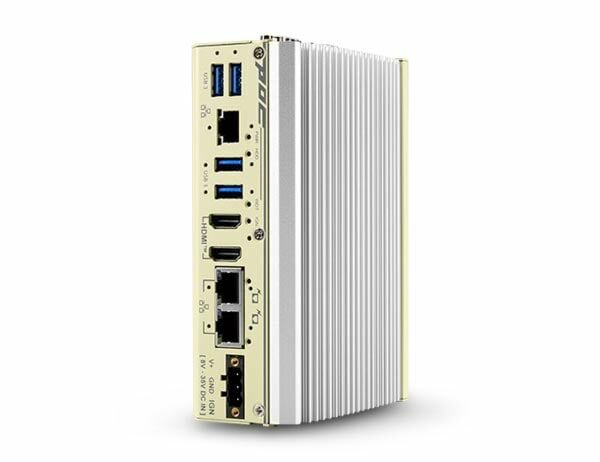
POC-600 is CoastIPC’s new ultra-compact fanless embedded computer based on the Intel Atom x7425E processor. With four efficient cores operating at only 12W TDP and support for up to 16 GB of DDR5 memory, it delivers up to 1.5x CPU performance improvement and higher memory bandwidth than previous Atom platforms, making it a reliable solution for next-generation industrial edge deployments.
- Intel Atom x7425E processor 12W with 4 E-Cores
- Rugged -25 °C to 70 °C fanless operation
- Up to 16GB DDR5-5600 SODIMM
- 2 x 2.5GbE PoE+ ports and 1x 2.5GbE port with screw-lock
- 4 x USB 3.2 with screw-lock
- Dual HDMI display outputs supporting 3840 x 2160 resolution
- Front I/O access and DIN-rail mounting design
- 8 to 35V wide DC input and MezIO compatible

Frequently Asked Questions
The POC-600 front panel provides 3x 2.5GbE ports (Intel I226-IT controllers), with 2 of them supporting IEEE 802.3at PoE+ (up to 50W total power budget), 2x USB 3.2 Gen1 and 2x USB 3.2 Gen2 ports (all screw-lock), and 2x HDMI 1.4b outputs supporting up to 3840 x 2160 resolution. On the COM port panel there is 1x software-programmable RS-232/422/485 port (COM1) and a second connector configurable as 3x 3-wire RS-232 ports (COM2/3/4) or 1x RS-422/485 port (COM2), plus a 3.5mm microphone-in/speaker-out jack and SMA antenna openings.
POC-600 includes 2x 2.5GbE PoE+ ports (IEEE 802.3at, 50W total budget) plus 1x 2.5GbE port. POC-610 has the same 3x 2.5GbE ports but without PoE+ support. Both share the same processor, memory, storage, USB, video, serial, dimensions, and environmental specifications.
The POC-600 series accepts 8 to 35V DC input via a 3-pin pluggable terminal block with a screw clamping mechanism. Supplying voltage over 35V will damage the system.
The system operates from -25°C to 70°C and can be stored from -40°C to 85°C, with 10%-90% non-condensing humidity tolerance. It is rated to MIL-STD-810H for vibration (Method 514.8, Category 4) and shock (Method 516.8, Procedure I), and complies with CE/FCC Class A EMC standards (EN 55032 & EN 55035). Note that sub-zero operation requires a wide-temperature HDD or SSD.
The POC-600 series supports up to 16GB DDR5 SDRAM in a single SODIMM socket (one datasheet lists DDR5-5600, the user manual lists DDR5-4800). For storage, it supports one M.2 2280 M-key SATA-only SSD. Additional storage can be added via optional MezIO modules such as the MezIO-R11 or MezIO-R12, which provide a SATA port for a 2.5" HDD/SSD.
The POC-600 series provides driver support for Microsoft Windows 10 LTSC 21H2, Microsoft Windows 11 LTSC 24H2, and Ubuntu 22.04.2 LTS or other distributions with kernel version 5.19 or higher. For Linux, users may need to manually compile and install drivers for the Intel graphics or I226 controller if not already included in the kernel.
The POC-600 series ships with a standard DIN-rail mount clip. An optional wall mount bracket (horizontal or vertical) is also available. The system dimensions are 56 mm (W) x 108 mm (D) x 153 mm (H), and it weighs 0.98 kg.
The system provides four SMA antenna openings reserved for wireless antenna installation, intended for use with an M.2 E-key module for wireless communication such as WiFi 5 or WiFi 6. Note that the core specification tables do not list an M.2 E-key slot in the primary storage interface section, so confirm wireless module compatibility before quoting this feature.
Yes. The POC-600 series includes a MezIO expansion interface for Neousys MezIO modules. Available modules add functions such as isolated DIO (MezIO-D330, MezIO-D220-50, MezIO-D230-50), additional RS-232/422/485 serial ports (MezIO-C180, MezIO-C181), SATA storage for a 2.5" HDD/SSD (MezIO-R11, MezIO-R12), USB3.1 ports (MezIO-U4-30), or ignition power control with a mini-PCIe socket (MezIO-V21).
How-to Guides
- Disassemble the system enclosure by removing the rear panel screws, the hex-bolt on the COM ports, and the screws on the bottom of the enclosure, then slide the enclosure open.
- Remove the DRAM/M.2 heatsink by unscrewing the indicated screws to access the SODIMM slot.
- Insert the gold-finger end of the SODIMM at a 45-degree angle into the slot.
- Gently push the SODIMM down until it clips into place.
- Remove the memory thermal pad protection film.
- Reinstall the DRAM/M.2 heatsink and secure it with screws.
- Reinstall the system enclosure.
- Disassemble the system enclosure (remove rear panel screws, COM port hex-bolt, and bottom screws, then slide the enclosure open).
- Locate the M.2 2280 M-key expansion slot once the enclosure is removed.
- Insert the M.2 2280 module at a 45-degree angle.
- Gently press the card down and secure it with a screw.
- Remove the thermal pad protection film for the M.2 module.
- Reinstall the DRAM/M.2 heatsink and secure it with screws.
- Reinstall the system enclosure.
Note: the M.2 slot only supports SATA-signal M.2 SSDs.
- Disassemble the system enclosure, but do not remove the DRAM heatsink.
- Locate the MezIO module expansion slot once the enclosure is removed.
- Replace the P-head screws with the stand-off hex bolts supplied with the MezIO module.
- Align the three screw holes and the MezIO port, then gently lower the module onto the PCBA until the MezIO port engages.
- Secure the module using the three screws supplied, fastening one into each standoff.
- Remove the punch-out plate on the enclosure if required for your MezIO module's I/O.
- Reinstall the system enclosure.
- Secure the DIN rail clip onto the rear of the system enclosure using the M4 screws provided.
- Position the mount plate over the top of the DIN rail, tilting downward, and overlap the top clip edge of the mount plate onto the DIN rail.
- Firmly press the bottom-front of the enclosure to clip the bottom edge of the mount plate onto the rail.
- Confirm the mount plate is properly clipped onto the DIN rail to complete installation.
- Press F2 when the system boots up to enter the BIOS setup utility.
- Go to
Power>Wake On LANand set it toEnabled. - Press F10 to save changes and exit BIOS, then let the system boot into the operating system.
- In Windows, press Windows key + E, right-click on Network > Properties > Change adapter settings, then double-click the Intel I226 Gigabit Network Connection adapter and click Configure.
- On the Power Management tab, enable the wake-on-LAN related options and click OK.
POC-600 is CoastIPC’s new ultra-compact fanless embedded computer based on the Intel Atom x7425E processor. With four efficient cores operating at only 12W TDP and support for up to 16 GB of DDR5 memory, it delivers up to 1.5x CPU performance improvement and higher memory bandwidth than previous Atom platforms, making it a reliable solution for next-generation industrial edge deployments.
Despite its small form factor, POC-600 delivers comprehensive connectivity. It integrates three 2.5GbE ports powered by Intel I226-IT controllers, with an option for two PoE+ ports to power cameras or sensors. The system also provides dual HDMI 1.4b outputs supporting 3840 x 2160 resolution, four screw-lock USB 3.2 ports for reliable, high-speed connections, and versatile serial communication via one software-programmable RS-232/422/485 port and additional RS-232 or RS-422/485 ports. For storage, POC-600 supports one M.2 2280 SATA device and a proprietary MezIO interface for adding application-specific functions such as isolated DIO, ignition control, or wireless modules.
With its balance of performance, low power consumption, and robust I/O capabilities, POC-600 is designed for a wide range of industrial applications. It is ideal for machine vision systems requiring multiple high-speed camera connections and smart transportation that demands reliable PoE+ networking. Sharing the same compact footprint as POC-400 and POC-300, POC-600 enables seamless system upgrades and supports DIN-rail mounting for easy, secure installation in industrial control cabinets or confined spaces, enabling next-generation industrial automation and intelligent edge solutions.
| Manufacturer | Neousys |
|---|---|
| Short Description | POC-600 is CoastIPC’s new ultra-compact fanless embedded computer based on the Intel Atom x7425E processor. With four efficient cores operating at only 12W TDP and support for up to 16 GB of DDR5 memory, it delivers up to 1.5x CPU performance improvement and higher memory bandwidth than previous Atom platforms, making it a reliable solution for next-generation industrial edge deployments. |
| Processor | Intel Atom x7425E processor 12W with 4 E-Cores (4C/4T, 1.5/3.4 GHz, 12W TDP) |
| Graphics | Integrated Intel UHD Graphics with 24EUs |
| Memory | Up to 16 GB DDR5-4800 SDRAM (1 x SODIMM socket) |
| PoE | IEEE 802.3at PoE+ on port #2 and #3, 50W total power budget |
| Video Port | 2x HDMI 1.4b, supporting 3840 x 2160 |
| M.2 | 1 x M.2 2280 SATA interface |
| DC Input | 1x 3-pin pluggable terminal block for 8 to 35V DC input |
| Dimension | 56 mm (W) x 108 mm (D) x 153 mm (H) |
| Weight | 0.98 kg |
| Mounting | DIN-rail mount (standard) or wall-mount (optional) |
| Operating Temperature | -25°C ~ 70°C |
| Storage Temperature | -40°C ~ 85°C |
| Humidity | 10%~90%, non-condensing |
| Vibration | MIL-STD-810H, Method 514.8, Category 4 |
| Shock | MIL-STD-810H, Method 516.8, Procedure I |
| EMC | CE/FCC Class A, according to EN 55032 & EN 55035 |