
POC-900: AMD Ryzen PRO 8640U Ultra-Compact Embedded Computer with 4x PoE+, 4x USB 3.2, and MezIO Interface
POC-900 SeriesStarting at $1,340.00
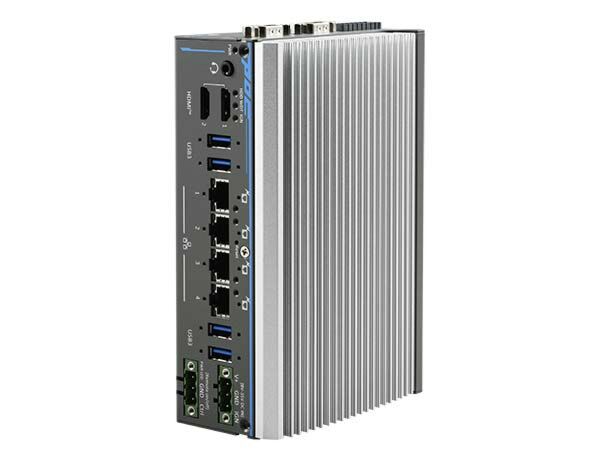
The POC-900 series is the latest addition to the compact POC family, powered by the AMD Ryzen Embedded 8000 series platform. By retaining the same footprint, dimensions, and DIN-rail mounting design as the current POC-700 and POC-500 series, the POC-900 ensures compatibility with existing installations while offering significant performance and connectivity upgrades.
- AMD Ryzen PRO 8640U processor 15W-30W TDP with 6C/ 12T
- 16 TOPs NPU with RyzenTM AI, 31 TOPs for total SoC
- Up to 32 GB ECC/non-ECC DDR5 5600 SDRAM
- 4x PoE+ GbE & 4x USB 3.2 Gen 2 with screw-lock
- Dual HDMITM 2.0b display output, supporting 3840 x 2160 at 60Hz
- Front I/O access and DIN-rail mounting design
- -25°C to 70°C wide temperature operation
- MezIO interface for easy function expansion

Frequently Asked Questions
The POC-900 front panel includes 4x Gigabit Ethernet PoE+ ports (Intel I350-AM4), 4x USB 3.2 Gen2x1 (10 Gbps) Type-A ports with screw-lock, 2x HDMI 2.0b outputs supporting up to 3840 x 2160 @ 60Hz, a 3.5mm mic-in/speaker-out jack, and 3-pin terminal blocks for DC power and remote on/off. The COM port panel adds 1x software-programmable RS-232/422/485 port (COM1), 3x 3-wire RS-232 ports or 1x RS-422/485 port (COM2/3/4), and 4-channel isolated digital input plus 4-channel isolated digital output.
The system accepts 8 to 35V DC input via a 3-pin pluggable terminal block. A separate 3-pin terminal block is used for remote on/off control and PWR LED output. The DC power source should be rated 8-35Vdc, 16A, and supplying a voltage over 35V will damage the system.
The POC-900 operates from -25°C to 70°C in fanless mode at 15W TDP, from -25°C to 45°C in fanless mode at 30W TDP, and from -25°C to 70°C with fan installed at 30W TDP. Storage temperature range is -40°C to 85°C, with humidity tolerance of 10%-90% non-condensing.
The system is EMC certified to CE/FCC Class A (per EN 55032 & EN 55035) and safety certified to UL 62368-1 / IEC 62368-1. It also meets MIL-STD-810H Method 514.8 Category 4 for vibration and Method 516.8 Procedure I for shock, both with wall-mount installed.
The POC-900 supports up to 32GB of DDR5-5600 SDRAM via a single SODIMM socket. For storage, it has one M.2 2280 M-key socket (PCIe Gen4 x4) for an NVMe SSD. It also includes a full-size mini PCI Express socket (PCIe + USB2) with an internal micro-SIM socket for wireless modules.
Yes. The system has a full-size mini-PCIe socket with an internal micro-SIM socket for installing 5G/4G or WiFi modules. Three SMA antenna openings on the COM port panel are reserved for antenna installation when a wireless module is installed.
Neousys provides driver support for Microsoft Windows 11 LTSC 24H2 and Ubuntu 22.04.2 LTS (or other distributions with kernel version 5.19 or higher). Note that on non-Windows distributions, some graphics driver features such as multiple independent displays may not be fully implemented. A separate WDT_DIO driver package is required to use the Watchdog Timer, DIO, and PoE on/off control function APIs.
The POC-900 measures 64mm (W) x 116mm (D) x 176mm (H) in fanless configuration, or 92mm (W) x 118mm (D) x 176mm (H) with the optional fan. It weighs 1.2 kg fanless or 1.4 kg with fan. DIN-rail mounting is standard, with optional wall-mount (horizontal or vertical) brackets available as accessories.
The POC-900 has 4 GbE ports (#1-4) supporting IEEE 802.3at PoE+. Each port can deliver up to 25W to a connected powered device, with a UL-certified power budget of 32W and a maximum power budget of 100W across all ports.
How-to Guides
- Disassemble the system enclosure (remove rear panel screws, COM port hex-bolts, and bottom enclosure screws, then slide the enclosure open).
- Remove the screws securing the NVMe heatsink and the screws indicated on the motherboard.
- Separate the motherboard from the heatsink and turn it upside-down to locate the SO-DIMM slot.
- Insert the gold-finger end of the SO-DIMM at a 45 degree angle, then gently push it down until it clips in.
- Remove the memory thermal pad protection film on the heatsink, turn the motherboard right side-up, and lower it onto the heatsink.
- Secure the motherboard with the indicated screws, reinstall the NVMe heatsink, then reinstall the system enclosure.
- Disassemble the system enclosure.
- Remove the screws securing the NVMe heatsink to expose the M.2 2280 M-key slot.
- Insert the M.2 module at a 45 degree angle into the slot.
- Gently press the card down and secure it with a screw.
- Remove the thermal pad protection film for the M.2 module.
- Reinstall the M.2 heatsink and secure it with the indicated screws.
- Reinstall the system enclosure.
- Disassemble the system enclosure and locate the mini-PCIe and Micro-SIM slots on the motherboard.
- If your module requires a SIM, push the SIM slot holder open, place the SIM into the slot, then flip the holder back and push to lock the SIM in place.
- Insert the mini-PCIe module at a 45 degree angle into the slot and secure the module.
- Clip the IPEX-to-SMA cable onto the module and secure the antenna to the front or rear panel opening (refer to the module's manual for clip-on connection).
- Reinstall the system enclosure and panel.
- Disassemble the system enclosure, leaving the NVMe heatsink in place.
- Locate the MezIO expansion slot on the motherboard.
- Remove the indicated screws and install the stand-off hex bolts shipped with the MezIO module.
- Align the three screw holes to the standoffs and MezIO port, then gently lower the module onto the board until the MezIO port engages.
- Secure the module using the three screws supplied, fastening one on each standoff.
- Remove the punch-out plate on the enclosure if required for your MezIO module's I/O openings.
- Reinstall the system enclosure.
- Secure the DIN rail clip to the rear of the system enclosure using the two M4 screws provided.
- Position the mount plate over the top of the DIN rail, tilting downward, and overlap the top clip edge of the mount plate onto the rail.
- Firmly press the bottom-front of the enclosure to clip the bottom edge of the mount plate onto the rail.
- Confirm the mount plate has clipped securely onto the DIN rail.
The POC-900 series is the latest addition to the compact POC family, powered by the AMD Ryzen Embedded 8000 series platform. By retaining the same footprint, dimensions, and DIN-rail mounting design as the current POC-700 and POC-500 series, the POC-900 ensures compatibility with existing installations while offering significant performance and connectivity upgrades.
Featuring the AMD Ryzen PRO 8640U processor, the POC-900 offers up to 270% performance improvement over POC-500 platforms. In addition, its storage and memory have been enhanced, with support for M2 Gen 4x4 NVMe SSD and DDR5-5600 memory, which enable faster data access and improved system responsiveness for demanding edge AI and industrial applications.
The POC-900 provides four Gigabit Ethernet ports with PoE+, four USB 3.2 ports, and four digital inputs and outputs (DI/ DO) for connectivity with cameras, sensors, and control systems. In addition, it supports Neousys' MezIO interface, allowing flexible I/O expansion to meet specific application requirements. Combining next-generation AMD performance with compact, rugged reliability, the POC-900 is engineered to deliver exceptional computing power and versatility for industrial automation, edge AI, and machine vision deployments.
| Manufacturer | Neousys |
|---|---|
| Short Description | The POC-900 series is the latest addition to the compact POC family, powered by the AMD Ryzen Embedded 8000 series platform. By retaining the same footprint, dimensions, and DIN-rail mounting design as the current POC-700 and POC-500 series, the POC-900 ensures compatibility with existing installations while offering significant performance and connectivity upgrades. |