
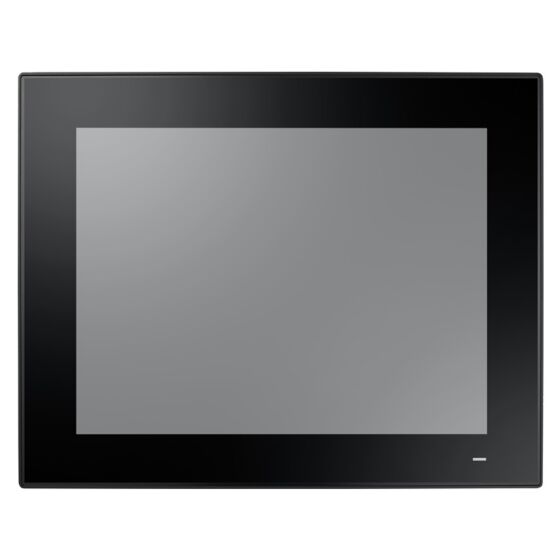
PPC-415 EHL: 15" Fanless Panel PC with Intel Atom x6425E Processor
PPC-415 EHL- 15" XGA TFT LCD with resistive (default) or projected capacitive (by request) touchscreen
- Intel Atom x6425E quad-core, 2.0 GHz processor
- Fanless, slim design
- Supports 1 x 2.5" SATA and 1 x M.2 B key slot for expansion
- 1 x PCI/PCIe x1 expansion slot
- Wide operating temperature range (-20 ~ 60 °C/-4 ~ 140 °F)
- Wide range DC support (9 ~ 32 VDC)
- 1 x isolated RS-422/485 with automatic flow control
- Dual 2.5GBASE-T Ethernet supports Time-Sensitive Network (TSN) technology
- Optional GPIO (8 channels, TTL level)

Frequently Asked Questions
The PPC-415 EHL provides 5 serial ports (2 x RS-232, 1 x isolated RS-422/485, and 2 x RS-232 available on the right side as an optional configuration), 2 x USB 3.2, 3 x USB 2.0 (2 standard, 1 by request), 1 x HDMI 1.4, 1 x DisplayPort 1.4, 1 x Line-Out and 1 x Mic-In, dual Intel Gigabit/2.5GbE Ethernet (Intel I226), and an optional 8-channel TTL-level GPIO. A TPM 2.0 module is also included internally.
The unit accepts a wide-range DC input of 9 ~ 32 VDC through a DC power socket. Power consumption is rated at 50 W based on a Windows 10 64-bit burn-in test. An optional UL-certified 19 VDC, 4.74 A power adapter is also available.
The PPC-415 EHL operates from -20 to 60 °C (-4 to 140 °F) and can be stored from -40 to 60 °C (-40 to 140 °F), with 95% relative humidity (non-condensing) tolerance. It carries CE, FCC Class B, EN 61000-6-2, BSMI, VCCI, UKCA (EMC), and CB, UL, CCC, UKCA (safety) certifications. The front panel is IP66 compliant.
The system supports 1 x SODIMM DDR4 3200 MHz memory (up to 32 GB), 1 x 2.5" SATA bay, and 1 x M.2 B-key bay (2242/2280 or 3042/3052 mm, supporting SATA, PCIe x1, or USB 3.0 signaling). An optional CFast card slot is also available.
The PPC-415 EHL supports Microsoft Windows 10 IoT LTSC (64-bit), Windows 11 (64-bit), and Linux.
Panel mount is the default mounting method. VESA mount, desktop stand, and wall mount are available as options. The VESA screw specification is M4 with an 8 mm screw depth.
Yes. There is an M.2 2230 E-key slot for a wireless card. An optional Wi-Fi 6 + BT 5.2 module (part number PPC-WLAN-D2, 2T2R with antenna) is available. The manual also documents installation of 4G/5G M.2 devices with an antenna bracket, though specific cellular module part numbers are not listed in this data set.
COM3 is a 1000 VDC isolated port that can be set to RS-422 or RS-485 mode through the BIOS Setup Utility (Advanced tab > NCT6126D Super IO Configuration > Serial Port 3 Configuration). When set to RS-485, automatic flow control can be enabled or disabled.
All three share the same Intel Atom x6425E processor, memory, storage, network, and I/O configuration, but differ in screen size and related specs: the PPC-415 has a 15" display (1024 x 768, 500 cd/m2, 50 W power consumption, 5.3 kg), the PPC-417 has a 17" display (1280 x 1024, 350 cd/m2, 60 W, 6.27 kg), and the PPC-419 has a 19" display (1280 x 1024, 350 cd/m2, 55 W, 7.9 kg). Dimensions and panel cutouts also differ between models.
How-to Guides
- Remove the 9 screws and clip from the rear cover, then remove the rear cover.
- Remove the 6 screws holding the VESA mount plate and remove the plate.
- For a 22 x 80 mm M.2 card, insert it into the correct mainboard slot and secure it with the M3 x 5L screw provided.
- For a 22 x 42 mm M.2 card, install the copper cylinder standoff screw first, then insert the card and secure it with an M2.5 x 3L screw.
- Replace the VESA mount plate and rear cover and secure with screws.
- Remove the rear cover (9 screws and clip).
- Remove the 6 screws holding the VESA mount plate and remove it.
- Remove the 4 screws holding the SSD cover and remove it.
- Affix the SSD to the SSD bracket using the 4 screws provided in the accessory box.
- Connect the SATA cable to the SSD, then reassemble the SSD cover, VESA mount plate, and rear cover.
- Remove the rear cover and VESA mount plate.
- Affix the wireless LAN card to its bracket using the screws supplied with the Wi-Fi module (e.g., PPC-WLAN-D2).
- Insert the wireless LAN card into the mainboard slot.
- Connect the card's cables to the antenna holder, noting the correct orientation of the cable end and nut/washer.
- Secure the assembled antenna holder to the top of the panel PC and connect the cables to the wireless LAN card.
- Replace the VESA mount plate, remove the two plugs at the top of the rear cover for the antenna connectors, replace the rear cover, and attach the antennas to the two antenna connectors on top of the panel.
- Before connecting the power cable, verify the AT/ATX switch is set to match your requirements (default is ATX mode).
- Hold the power cable at the plug end and connect the 2-pin male connector to the DC power socket (9 ~ 32 VDC).
- Use the power button on the bottom right of the panel PC to power the unit on.
- Enter BIOS Setup by pressing Delete during boot.
- Go to the Advanced tab and select NCT6126D Super IO Configuration.
- Select Serial Port 3 Configuration.
- Select Serial Port 3 Mode and choose RS422 or RS485.
- If RS485 is selected, choose whether to Enable or Disable the RS485 Auto Flow control option.
- Press F4 to save settings and exit.
The PPC-415 EHL is a 15" fanless panel PC equipped with a high-performance Intel Atom x6425E quad-core, 2.0 GHz, processor that supports both a wide operating temperature range (-20 ~ 60 °C) and wide power input range (9 ~ 32 VDC). The provision of multiple I/O, including 4 x COM, 2 x USB 3.2, 1 x isolated RS-422/485, and dual Intel Gigabit Ethernet, ensures easy integration and connectivity. With the inclusion of 1 x PCI/PCIe expansion slot, PPC-415 EHL can be integrated with fieldbus protocols or proprietary cards for increased application potential.
| Manufacturer | Advantech |
|---|---|
| Short Description | The PPC-415 EHL is a 15" fanless panel PC equipped with a high-performance Intel Atom x6425E quad-core, 2.0 GHz, processor that supports both a wide operating temperature range (-20 ~ 60 °C) and wide power input range (9 ~ 32 VDC). The provision of multiple I/O, including 4 x COM, 2 x USB 3.2, 1 x isolated RS-422/485, and dual Intel Gigabit Ethernet, ensures easy integration and connectivity. With the inclusion of 1 x PCI/PCIe expansion slot, PPC-415 EHL can be integrated with fieldbus protocols or proprietary cards for increased application potential. |
| Enclosure | Front bezel: Die cast aluminum alloy Rear: ABS |
| Mounting | Panel Mount (Default); VESA Mount/ Desktop/ Wall (optional) |
| CPU | Intel Atom x6425E quad core |
| Frequency | 2.0 GHz |
| L2 Cache | 1.5 MB |
| Memory | 1 x SODIMM DDR4 3200 MHz (max. 32 GB) |
| Storage | 1 x 2.5" SATA bay 1 x M.2 B key bay (size: 2242/2280 or 3042/3052 mm; Singal: SATA, PCIe X1, USB 3.0) |
| Network (LAN) | 2 x 10/100/1000/2500 Mbps Ethernet (Intel I226) |
| I/O | 5 x Serial ports: 2 x RS-232, 1 x RS-422/485 with 1K VDC isolation,2 x RS-232 (on right side optional) 2 x USB 3.2, 3 x USB2.0 (2pcs default, 1pcs by request) 1 x Line-Out, 1 x Mic-In 1 x HDMI 1.4 1 x DisplayPort (1.4) 1 x 8bit GPIO (Optional) 1 x TPM2.0 |
| Expansion Slots | 1 x M.2 2230 E Key slot for wireless card 1 x PCIe x1 (default), 1 x PCI (optional); 1 x Cfast card (optional) |
| Watchdog TImer | 255 timer levels, set up by software |
| Speaker | 2 x 1W |
| Display Type | TFT LED panel |
| Display Size | 15" |
| Max Resolution | 1024 x 768 |
| Luminance | 500 |
| Viewing Angle | 88 (left), 88 (right), 88 (up), 88 (down) |
| Backlight Lifetime | 70,000 (typ.) |
| Contrast Ratio | 2500 |
| Light Transmission | 80+/-3% |
| Type | 5-wire analog resistive |
| Controller | USB interface |
| Humidity | 95% @ 40 °C (non-condensing) |
| Ingress Protection | IP66 |
| Operating Temperature | -20 ~ 60 °C (-4 ~ 140 °F) |
| Storage Temperature | -40 ~ 60 °C (-40 ~ 140 °F) |
| Shock | Operating 10 G peak acceleration (11 ms duration), follow IEC 60068-2-27 |
| Vibration Protection | Operating Random Vibration Test 5 ~ 500Hz, 2Grms @with SSD, follow IEC 60068-2-64 |
| EMC | CE, FCC Class B, EN 61000-6-2, BSMI, VCCI, UKCA |
| Safety | CB, UL, CCC, UKCA |
| Front Panel Protection | IP66 compliant |
| Power Input Voltage | 9 ~ 32 VDC |
| Power Consumption | 50W (Burn-in test 8.1 in Windows 10, 64 bit) |
| OS Support | Microsoft Win10 IOT LTSC (64-bit), Win11, Linux |
| Weight | 5.3 kg (11.68 lb) |
| Dimension | 392.2 x 313.5 x 55.1 (15.4 x 12.3 x 2.1 in) |