
RGS-8805GC: EPYC MILAN Series Rugged HPC Server Supporting NVIDIA RTX Graphics Cards
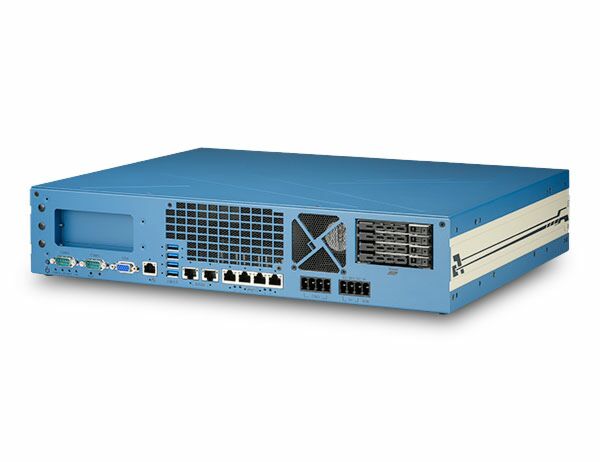
RGS-8805GC Series- Powered by AMD EPYC 7003 series processors up to 64-core/128-thread
- Supports one NVIDIA RTX A6000/A4500 with proprietary heat dissipation
- Rugged -25°C to 60°C operation for edge applications
- 2x 10G Ethernet by Intel X550-AT2 and 4x GbE by Intel I350-AM4
- Supports 4x DDR4 RDIMM/ LRDIMM up to 512GB of memory
- Compact 2U 19" rack-mount enclosure with only 350mm depth
- Four easy-swappable 2.5” SATA trays for 7mm HDD/ SSD
- 8~48V wide-range DC input with built-in ignition power control

Frequently Asked Questions
The system provides the following external I/O:
- 2x 10GBASE-T ports (Intel X550-AT2), backward compatible with 5GBASE-T and 2.5GBASE-T for use with NBASE-T industrial cameras
- 4x Gigabit Ethernet ports (Intel I350-AM4) with IEEE 802.3at PoE+ PSE capability
- 1x VGA port via ASPEED AST2500 BMC, up to 1920x1200@60Hz
- 4x USB 3.1 Gen1 (5Gbps) ports
- 2x software-programmable RS-232/422/485 serial ports (COM1, COM2)
- 4x easy-swappable 2.5" HDD/SSD trays (up to 7mm thickness)
The system accepts 8~48V DC wide-range input via two 4-pin 7.62mm pitch pluggable terminal blocks, which also support ignition control input.
Maximum power consumption (with AMD EPYC 7543P CPU):
- Windows idle: 66.72W at 12V, 70.32W at 24V, 76.3W at 35V, 79.68W at 48V
- Burn-in test (CPU/2D/3D/RAM): 297.96W at 12V, 278.16W at 24V, 294.7W at 35V, 279.84W at 48V
The RGS-8805GC operates from -25°C to 60°C with 100% CPU/GPU loading, and has a storage temperature range of -40°C to 85°C. Humidity tolerance is 10%~90% non-condensing.
It is tested to MIL-STD-810G Method 514.6 (vibration, Category 4) and Method 516.6 Procedure I (shock), and carries CE/FCC Class A EMC compliance according to EN 55032 & EN 55035.
Note: for sub-zero operation, a wide-temperature HDD or SSD is required, and CPU/GPU loading tests were performed using Passmark BurnInTest 9.1 with a 225W CPU; operating temperature degrades with higher CPU TDP.
Memory: 4x RDIMM/LRDIMM slots supporting up to 512GB DDR4-3200.
Storage: 4x easy-swappable 2.5" HDD/SSD trays (up to 7mm thickness) via SATA, plus 1x M.2 2280 M-key socket (PCIe Gen4 x4) for an NVMe SSD.
Expansion: 1x PCIe x16 Gen4 16-lane slot for the RTX A6000/A4500 GPU, 2x PCIe x16 Gen4 8-lane slots for add-on cards, 2x full-size mini PCIe sockets with USIM support, and 1x M.2 3042/3052 B-key socket with dual micro-SIM sockets for 4G/5G modules.
Neousys has tested the following operating systems on the RGS-8805GC:
- Microsoft Windows Server 2016/2019
- Microsoft Windows 10 LTSC
- Ubuntu 18.04.5 LTS & Ubuntu 20.04.0 LTS
For other Linux distributions, the kernel should be upgraded to at least 4.15.18. For Linux, users may need to manually compile and install drivers for the AMD chipset, NVIDIA inference accelerator, or Ethernet controller if not embedded in the kernel. Drivers are available for download from Neousys, including a separate driver package for watchdog timer (WDT) control.
Dimensions: 444.4 mm (W) x 350 mm (D) x 88.1 mm (H). Weight: 8.6 kg (including CPU & RDIMM).
The system ships standard with wall-mount brackets with damping, and supports optional rack-mount installation.
The system supports cellular connectivity via one M.2 3042/3052 B-key socket with dual micro-SIM sockets for 4G/5G modules, and two full-size mini-PCIe sockets with SIM support for 4G/3G modules. SMA antenna apertures are located on the front and rear panels for connecting external antennas. The source data does not document GPS support.
The system supports one NVIDIA RTX A6000 or RTX A4500 GPU installed in a dedicated PCIe x16 Gen4 16-lane slot, providing up to 38.7 TFLOPS FP32 or 309.7 TFLOPS tensor performance. A dedicated tunnel duct and bracket are provided to dissipate heat generated by the GPU.
The DC input terminal block also accepts an ignition signal (IGN) for in-vehicle applications. An MCU-based ignition power control module monitors the ignition signal and turns the system on/off based on configurable power-on and power-off delays, selected via a 16-position rotary switch (modes 0-15). Features include low battery detection (shutdown if input stays below 9V for 12V systems or 18V for 24V systems over 60 seconds), guarded power-on/off delay cancellation, a system hard-off safeguard (10-minute forced cutoff if soft shutdown fails), and a smart off-delay feature for modes 13/14.
How-to Guides
- Disassemble the system enclosure per the disassembly procedure (you may not need to fully dismantle the system to access the M.2 slot).
- Insert the M.2 NVMe module into the M.2 2280 M-key slot at a 45-degree angle.
- Gently press the module down and secure it with an M2.5 P-head screw.
- Remove the thermal pad's protective film.
- Reinstall the system enclosure and panel.
- Disassemble the system enclosure to access internal components.
- Remove the four screws securing the CPU socket/DRAM cover and remove the cover.
- Install memory modules into the specific slots according to the module count illustration in the manual.
- Match the module's gold-finger notch to the slot position, insert at a perpendicular angle, and push down until the side clips lock the module in place.
- Repeat for additional modules.
- Reinstall the system enclosure and panel.
- Disassemble the system enclosure to access internal components.
- Remove the punch-out panel for the inference accelerator on the I/O panel.
- Remove the tunnel duct screws and unplug the supplied power cable from the motherboard.
- Attach the L-shape stopper to the power connector end of the accelerator card.
- Connect the power cable from the motherboard to the accelerator.
- Align and insert the accelerator's goldfingers into the PCIe x16 slot with the power cable facing the fan side.
- Remove the side panel screws and trap door, secure the accelerator's panel with a screw, then replace the trap door.
- Reconnect the power cables to the motherboard and secure the L-shape stopper.
- Reinstall the tunnel duct and secure all indicated screws.
- Reinstall the system enclosure and panel.
- Flick the tray's switch to the right so the tray handle pops open.
- Gently pull the tray out of the enclosure.
- Slide the disk drive into the tray from the side and secure it with screws.
- Insert the tray with the installed disk back into the enclosure, ensuring the SATA connector end goes in first.
- Gently push the tray back into the enclosure until seated.
- Connect the vehicle's Battery+ line (12V for sedan, 24V for bus/truck) to the V+ terminal.
- Connect the vehicle's Battery-/GND line to the GND terminal.
- Connect the vehicle's ACC line to the IGN terminal.
- Ensure the DC power source and IGN signal share the same ground. Do not supply IGN voltage higher than 48VDC.
- Configure the desired ignition mode using the rotary switch, and set Windows to shut down (not sleep) when the power button is pressed.
Imagine an HPC server unleashed from an air-conditioned data center room, roaming freely in the field! RGS-8805GC is just that, a rugged HPC server powered by the AMD EPYC™ 7003 series “MILAN” processor with up to 64-core/ 128-thread unparalleled computing power and 512GB memory capacity. Utilizing a unique partitioned enclosure design, it provides a highly effective airflow for CPU and other components to guarantee a reliable -25°C to 60°C operation for field deployment.
To fuel versatile advanced edge AI applications, RGS-8805GC can host one high-end NVIDIA® RTX A6000 or A4500 GPU which provides up to 38.7 TFLOPS FP32 or 309.7 TFLOPS tensor performance. It comes with a unique enclosure design that creates a sealed tunnel to efficiently dissipate the heat generated from the RTX GPU. RGS-8805GC offers an exceptional balance of CPU and GPU for modern edge AI applications, such as autonomous driving, DL-based vision inspection, and intelligent video analytics.
In terms of I/O connectivity, RGS-8805GC has two 10G Ethernet ports for high-speed data transmission that are backward compatible with 5GBASE-T and 2.5GBASE-T to work with NBASE-T industrial cameras; it has another four Gigabit PoE+ and four USB 3.1 Gen1 ports for connecting additional devices; and four easy-swappable 2.5” HDD trays for data storage. If that’s not enough, RGS-8805 provides two x16 PCIe slots for installing additional I/O cards such as frame grabber or GMSL image capture cards. Not to mention that RGS-8805GC is one of few HPC servers that accept wide-range DC input, helping it to adapt to versatile deployment environments.
RGS-8805GC addresses the challenge of deploying a CPU/ GPU server to the field, where installation space, operating temperature, and power supply are some of the most commonly faced issues. A rugged HPC system that can be installed outside of an air-conditioned environment and capable of operating in harsh environments opens the door to new AI-assisted edge computing for more advanced telecom infrastructure, factory automation, ADAS, and V2X applications.
| Manufacturer | Neousys |
|---|---|
| Processor | AMD EPYC 7003 Series |
| Graphics | Integrated ASPEED AST2500 BMC |
| Memory | up to 512GB DDR4-3200 RDIMM |
| PoE | available on 4x GbE ports PoE+ PSE |
| Video Port | 1x VGA cia ASPEED AST 2500 BMC |
| PCI Express | 1x PCIe x16 Lane Gen 4 (for RTX GPU) 2x PCIe 116 slots @ Gen4, 8-lanes |
| M.2 | 2280 M key for NVMe |
| Mini PCI-E | 2 Full size with SIM support |
| 2.5" Drive | 4x Hot Swap Drawers |
| DC Input | 2x 24 pin 8-48V DC with ignition control |
| Power Adapter | 600W AC/DC |
| Power Input Voltage | 8-48V DC |
| Power Type | DC |
| Dimension | 444.4 x 350 x 88.1mm |
| Weight | 19lbs |
| Operating Temperature | see manual |
| Storage Temperature | -40-85C |
| Humidity | see manual |
| Vibration | see manual |
| Shock | see manual |
| CPU Family | AMD |
| Video Output | VGA |
| PoE Ports | 4 |
| LAN Ports | 5-8 |
| Serial Ports | 1-2 |
| USB 3.1 | 1-4 |
| Operating System | Windows 10, Linux |
| Effective Memory Speed | 3200 MHz |
| Native Storage Type | 2.5" SSD, M.2 NVMe SSD, Hot Swap Capable |
| On/Ignition | Built In Ignition Control |