
SEMIL-2000GC: Full Rack Mount IP69K Waterproof GPU Computer with Intel 14th/13th/12th-Gen Core Processors
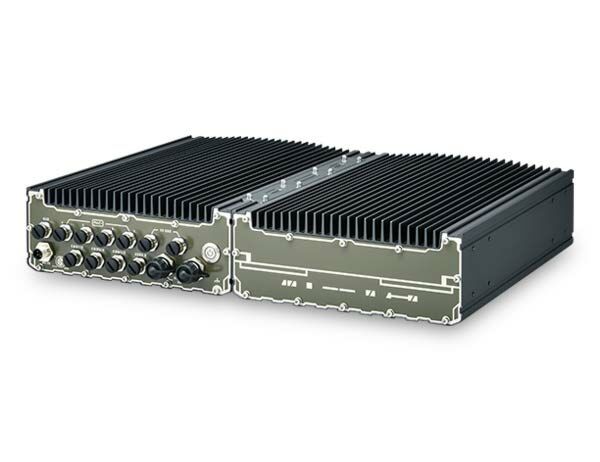
SEMIL-2000GC- IP69K waterproof GPU computer with NVIDIA® L4 GPU
- -40°C to 70°C wide-temperature fanless operation
- 2x 10GbE, 1x GbE, and 4x 2.5GbE PoE+ via M12 X-coded connectors
- 2x SocketCAN and 2x USB3.2 Gen1 Type-C w/ DP alternative mode
- 8 to 48V wide-range DC input with reverse polarity protection and built-in ignition power control
- MIL-STD-810H compliant



Frequently Asked Questions
The SEMIL-2000GC provides the following I/O, all via ruggedized M12 connectors:
- 2x 10GbE (Intel X550-AT2, with Wake-on-LAN)
- 1x GbE (Intel I219-LM, with Wake-on-LAN)
- 4x 2.5GbE with 802.3at PoE+ (Intel I226-IT)
- 2x isolated CAN 2.0 ports (SocketCAN in Linux)
- 2x isolated 3-wire RS-232 ports (COM1/COM2)
- 1x isolated 3-wire RS-232 (COM3) and 1x RS-422/485 port (COM4)
- 2x USB 2.0 (M12 A-coded)
- 2x USB 3.2 Gen1x1 Type-C ports (5Gbps), which can alternatively output DisplayPort
The system accepts 8V to 48V DC input via an M12 L-coded connector, with reverse polarity protection and built-in ignition power control (IGN/GND signal). Maximum power consumption, tested with an i9-13900E CPU and NVIDIA L4 GPU under burn-in load, is approximately 192-194W in 35W CPU TDP mode and 234-238W in 65W CPU TDP mode, depending on input voltage. Actual consumption varies by configuration.
With a 35W CPU, the system operates from -40°C to 70°C. With a CPU at or above 65W TDP, it operates -40°C to 70°C when configured in 35W TDP mode, or -40°C to 60°C when configured in 65W TDP mode. Storage temperature is -40°C to 85°C, and humidity tolerance is 10%-90% non-condensing. The system is rated IP69K for dust/water ingress, complies with MIL-STD-810H for vibration (514.8C-IV Category 4) and shock (516.8 Procedure I), and meets CE/FCC Class A per EN 55032/EN 55024, plus EN 50121 (EN 50155 EMC).
The system supports up to 64 GB DDR5 4800 SDRAM across two SODIMM slots. Internal storage includes one M.2 2280 M-key socket (PCIe Gen4x4) for an NVMe SSD, and two internal SATA ports for 2.5" HDD/SSD, supporting RAID 0/1. Expansion is available via 3x full-size mini-PCIe sockets with SIM slot, 1x M.2 2242/3052 B-key socket with dual SIM slots for a 5G/4G module, and 1x M.2 2230 E-key socket for Wi-Fi.
Neousys has tested the SEMIL-2000 series with Microsoft Windows 10 LTSC 2021 (x64) and Ubuntu 20.04.5 LTS, 22.04 LTS, 22.04.1 LTS, or other Linux distributions with kernel version 5.15 or later. For Linux, users may need to manually compile and install drivers for the Intel graphics or I226 GbE controller if not already included in the kernel, and some distributions may have limited support for features like triple independent display and RAID.
The SEMIL-2000GC measures 440mm (W) x 310mm (D) x 90.5mm (H), excluding the rack-mount bracket, and weighs 12 kg. It supports both rack-mounting and wall-mounting as standard mounting methods.
The system provides expansion slots that support wireless connectivity: an M.2 2230 E-key socket for a Wi-Fi module, and an M.2 2242/3052 B-key socket with dual SIM slots for a 5G/4G module. Additional wireless, GPS, or CAN modules can also be added via the 3x full-size mini-PCIe sockets, which also include a SIM slot.
The system has 4x IEEE 802.3at PoE+ ports (M12 X-coded, 2.5GbE) with a 100W total power budget, delivering up to 25.5W per port to a connected Powered Device (PD), such as an IP camera. PoE automatically detects whether a connected device requires power, so standard (non-PoE) Ethernet devices are also compatible. Each port also has a dedicated PCI Express link for maximum network performance.
The SEMIL-2000GC is a 19" 2U rack-mount IP69K waterproof computer that includes an NVIDIA L4 GPU, supporting Intel 14th/13th/12th-Gen Core processors with 2x M12 10GbE and 4x M12 PoE+ ports. The non-GC SEMIL-2000 series is a 19" 2U half-rack mount IP69K waterproof computer with the same processor and port support but without the integrated NVIDIA L4 GPU.
How-to Guides
- Disconnect all cables and shut down the system.
- Turn the system upside-down and place it on a flat, sturdy surface.
- Unscrew the indicated bottom panel screws in descending order and gently lift the panel to access internal components. If hard drives are installed, disconnect the SATA/power connector by pulling on the connector body, not the cable.
- Locate the M.2 slot underneath the heat-spreader, then remove the heat-spreader by removing its screws.
- Insert the M.2 NVMe SSD module at a 45-degree angle, press down, and secure it with a screw.
- Remove the protective film from the thermal pad if installing for the first time, then reinstall the heat-spreader.
- Make sure the O-ring is properly seated in its groove, tuck all cables back into the enclosure, and replace the bottom panel.
- Secure the panel screws at a torque of 6.3-7.7 kgf-cm in ascending order to complete the installation.
Note: Installing internal modules yourself may affect the system's waterproof rating; consult Neousys/CoastIPC before doing so.
- Disconnect all cables and shut down the system.
- Turn the system upside-down and place it on a flat, sturdy surface.
- Unscrew the indicated bottom panel screws in descending order and gently lift the panel to expose the internal components.
- Identify the mini-PCIe slots and their corresponding SIM slots. If installing a 5G/4G mini-PCIe module, install the SIM card first by releasing the SIM holder, placing the SIM card, and securing the holder.
- Insert the mini-PCIe module into the slot at a 45-degree angle, press down, and secure it with a screw.
- Refer to the module's manual to connect the antenna. Installing an SMA antenna may require returning the unit to an authorized distributor to retain waterproof capability.
- Make sure the O-ring is properly seated, tuck cables back in, and replace the bottom panel.
- Secure the panel screws at a torque of 6.3-7.7 kgf-cm in ascending order to complete the installation.
- Locate the IGN input on the DC-in M12 L-coded connector.
- Connect the vehicle's Battery+ line (12V for a sedan, 24V for a bus/truck) to V+.
- Connect the vehicle's Battery-/GND line to GND.
- Connect the ACC (accessory) line to IGN.
- In BIOS, go to
[Power] > [Ignition Power Control]and set the IGN Operation Mode along with power-on/power-off delay, battery voltage, and low battery threshold as needed. - In Windows, set "When I press the power button" to "Shut down" so the OS performs a full shutdown that the ignition control module can detect; otherwise the system will hard-off after 10 minutes.
Warning: Confirm DC voltage is correct before connecting power. This SKU supports up to 48V input; exceeding the maximum supported voltage will damage the system.
- Locate the rack-mount kit: two brackets, two grips, and eight screws.
- Secure a bracket to each side of the enclosure using the supplied screws.
- Repeat on the other side of the enclosure so both brackets are installed.
- Optionally, attach the grips found in the accessory box by matching them to the openings on the rack-mount brackets and securing them with the M3 screws provided.
- Install at least two hard drives or SSDs (back up any existing data first, as RAID setup may cause irreversible data loss).
- Press F2 at boot to enter BIOS setup, then go to
[Advanced] > [System Agent (SA) Configuration] > [VMD setup menu]. - Select
[Enable VMD controller]and set it to Enabled, then press F10 to save and reboot. - On reboot, press F3 to enter the Device Manager configuration utility, then select
[Intel Rapid Storage Technology]. - Select "Create RAID Volume," name the volume, choose RAID Level (RAID-0 or RAID-1), select the disks, set stripe size (RAID-0 only) and capacity, then select "Create Volume."
- To install Windows onto the RAID volume, prepare a bootable Windows USB with the unzipped "f6vmdflpy-x64" driver files, select "Load Driver" during Windows install, browse to the driver folder, select "Intel RST VMD Controller 467F," and continue with standard Windows installation onto the newly available RAID volume.
SEMIL-2000GC is an extreme-rugged IP69K dustproof and waterproof edge AI platform in a 2U 19" rack-mount form factor. SEMIL-2000GC incorporates Neousys' best-in-class thermal design to ensure fanless maximum GPU performance in wide range -40°C to 70°C temperatures. The system is also integrated with an NVIDIA L4 GPU that offers up to 2.5 times the performance over Tesla T4.
Powered by Intel’s 14th/13th/12th-Gen platform, SEMIL-2000GC benefits from Intel 7 photolithography with performance and efficient core hybrid performances while supporting up to 64 GB DDR5 memory.
SEMIL-2000GC adopts a corrosion-proof stainless steel and aluminum chassis to counteract moisture and salinity. By utilizing M12 connectors, it offers extremely rugged connections in shock and vibration environments with two CAN bus 2.0 with SocketCAN driver, two USB 3.2, seven Ethernet (including two 10GbE), and four 802.3at PoE+ ports to supply 25.5W of power per port to connected compatible devices. Internally, there is an M.2 M-key socket to support NVMe SSD and mini-PCIe sockets for extending feature sets. Additionally, SEMIL-2000GC features two 2.5" SATA SDD/ HDD accommodation, 8-48V wide-range DC input with ignition power control, and it is also in compliance with MIL-STD-810H standards.
| Manufacturer | Neousys |
|---|---|
| Short Description | SEMIL-2000GC is an extreme-rugged IP69K dustproof and waterproof edge AI platform in a 2U 19" rack-mount form factor. SEMIL-2000GC incorporates Neousys' best-in-class thermal design to ensure fanless maximum GPU performance in wide range -40°C to 70°C temperatures. The system is also integrated with an NVIDIA L4 GPU that offers up to 2.5 times the performance over Tesla T4. |
| Processor | Supporting Intel 13th-Gen Core CPU (LGA1700 socket, 65W/35W TDP) - Intel Core i9-13900E/i9-13900TE - Intel Core i7-13700E/i7-13700TE - Intel Core i5-13500E/i5-13400E/i5-13500TE - Intel Core i3-13100E/i3-13100TE Supporting Intel 12th-Gen Core CPU (LGA1700 socket, 65W/35W TDP) |
| Graphics | Integrated Intel UHD Graphics 770 (32EU) |
| Memory | Up to 64 GB DDR5 4800 SDRAM (two SODIMM slots) |
| Chipset | Intel Q670E platform controller hub |
| AMT | Supports Intel vPro/AMT 16.0 |
| PoE | 4x IEEE 802.3at PoE+ PSE with 100 W total power budget |
| Video Port | 2x Type-C USB connector supporting DP output (shared USB3.2 Gen1x1) |
| M.2 | 1x M.2 2280 M key NVMe socket (PCIe Gen4x4) for NVMe SSD |
| Mini PCI-E | 3x full-size mini PCI Express socket with SIM slot |
| SATA HDD | 2x Internal SATA port for 2.5” HDD/ SSD installation, supporting RAID 0/ 1 |
| mSATA | 2x full mSATA internal |
| 2.5" Drive | 2x SATAIII internal |
| DC Input | 8V to 48V DC input, with reverse polarity protection (M12 L-coded) |
| Power Adapter | 280-480W |
| Power Input Voltage | 8-48V DC |
| Power Type | DC |
| Fan | Fanless |
| Dimension | 440mm (W) x 310mm (D) x 90.5mm (H) (excl. rack-mount bracket) |
| Weight | 12kg |
| Mounting | Rack-mounting (standard) and wall-mounting (standard) |
| Operating Temperature | With 35W CPU -40°C to 70°C With CPU operating >= 65W CPU -40°C to 70°C (configured as 35W TDP mode) -40°C to 60°C (configured as 65W TDP mode) |
| Storage Temperature | -40°C ~85°C |
| Humidity | 10%~90% , non-condensing |
| Vibration | MIL-STD-810H, 514.8C-IV. Category 4 |
| Shock | MIL-STD-810H, 516.8 Procedure I |
| EMC | EN 50121 (EN 50155 EMC) CE/FCC Class A, according to EN 55032 & EN 55024 |
| CPU Cores | 6, 8 |
| CPU Family | Intel Core, Intel Xeon |
| Base CPU Speed | 3.1 to 3.5 GHz, Over 3.5 GHz |
| Video Output | Display Port, VGA |
| PoE Ports | 4 |
| Serial Ports | 3-4 |
| USB 2.0 | 3-4 |
| USB 3.0 | 3-4 |
| Max Memory | 64 GB |
| Operating System | Windows 10, Linux |
| Effective Memory Speed | 2400 MHz, 2666 MHz |
| Form Factor | Fanless |
| Native Storage Type | 2.5" SSD, mSATA Full, M.2 SATA S80 |
| On/Ignition | Built In Ignition Control |