
UNO-148: Fanless DIN Rail Controller with 13th or 11th Gen Intel Core Processor and 8GB DDR4
UNO-148 SeriesStarting at $2,535.00
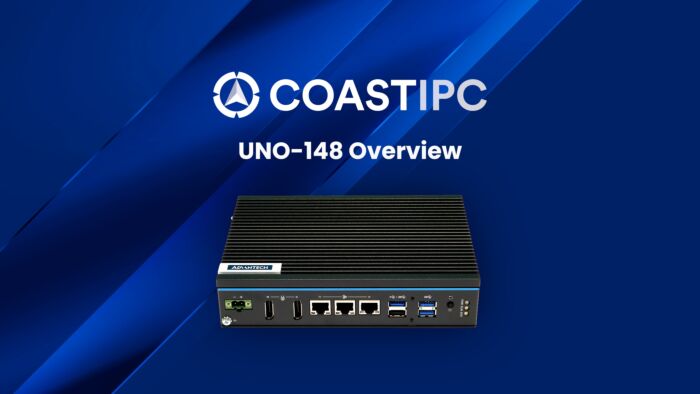
Advantech’s UNO-148 is a DIN rail integrated controller that features a modular design for flexible configuration according to specific usage requirements. UNO-148 is equipped with a 13th or 11th Generation Intel Core i CPU with 8GB DDR4 RAM, 3 x LAN, 4 x COM, 3 x USB 3.0, 1 x USB 2.0, 8 x DI, 8 x DO, and 2 x DP 1.4.
- 13th and 11th Gen Intel Core i CPUs with 8GB DDR4 memory
- Wide operating temperature range (-20 ~ 60 °C/-4 ~ 140 °F)
- 8 x DI, 8 x DO, and 4 x COM with isolation protection
- 1 x M.2 (M key) for 2280 NVMe SSD storage
- 1 x M.2 (B key) for 2242 storage and 3042/3052 cellular modules
- 1 x M.2 (E key) for 2230 Wi-Fi modules
- Supports Time-Sensitive Networking (TSN) technology
- Remote out-of-band (OOB) power management with Advantech’s iBMC technology
- Embedded TPM 2.0 for hardware-based security
- Modular design for optional iDoor extension
- Compliant with IEC 61010-2-201 safety requirements

Frequently Asked Questions
The UNO-148 (11th Gen Intel Core version) provides 3 x LAN (2 x 10/100/1000BASE-T RJ45 and 1 x 10/100/1000/2500BASE-T RJ45), 4 x RS-232/422/485 serial ports (terminal block), 3 x USB 3.2 Gen 2, 1 x USB 2.0, and 2 x DisplayPort 1.4. It also has 8 x isolated digital inputs and 8 x isolated digital outputs.
The UNO-148 V2 (13th Gen Intel Core version) provides 3 x LAN (1 x 10/100/1000BASE-T and 2 x 10/100/1000/2500BASE-T), 4 x RS-232/422/485 serial ports, 2 x USB 3.2 Gen 2, 1 x USB 3.2 Gen 1, 1 x USB 2.0, 2 x DisplayPort 1.4, and the same 8 x DI / 8 x DO configuration.
Both models accept 10–36 V DC input via a 2-pin terminal block. The UNO-148 (V1) draws 31 W typical / 55 W max (61 W max with the iDoor+SATA extension kit, 76 W max with the PCIe x4 extension kit). The UNO-148 V2 draws 41 W typical / 63 W max (72 W max with the iDoor+SATA kit, 87 W max with the PCIe x4 kit).
When the PCIe x4 extension kit (UNO-148-P11EB) is installed, Advantech recommends a 24 V DC (±20%) power input due to the extra power draw.
The operating temperature range is -20 to 60°C (-4 to 140°F) with 0.7 m/s airflow, and storage temperature is -40 to 85°C (-40 to 185°F). The unit carries an IP20 ingress protection rating.
The UNO-148 (V1) is certified to CE, FCC, UL61010-2-201, CCC, and BSMI. The UNO-148 V2 is certified to CE, FCC, UL61010-2-201, CCC, and BSMI as well.
The UNO-148 (V1) ships with 8 GB DDR4 SODIMM-3200 RAM (expandable up to 64 GB using 2 slots) and supports 1 x M.2 M-key 2280 for NVMe SSD, 1 x M.2 B-key 2242 for SSD or 3042/3052 cellular modules, 1 x M.2 E-key 2230 for Wi-Fi, and 1 x full-size mini PCIe slot, plus a nano SIM slot.
The UNO-148 V2 ships with 8 GB DDR5 SODIMM-4800 RAM (expandable up to 64 GB) and supports 2 x M.2 M-key 2280 slots for NVMe SSD (with RAID support), 1 x M.2 E-key 2230 for Wi-Fi, 1 x full-size mini PCIe slot, and a nano SIM slot.
The UNO-148 (V1) supports Windows 10 2019 LTSC, Windows 11, and AdvLinux (Ubuntu 20.04). The UNO-148 V2 supports Windows 10 2021 LTSC, Windows 11, and AdvLinux (Ubuntu 22.04).
The UNO-148 (V1) measures 45 x 140 x 200 mm (W x D x H) and weighs 1.3 kg. The UNO-148 V2 measures 53 x 140 x 200 mm and weighs 1.8 kg. Both use a regular-size aluminum housing designed for DIN-rail mounting.
Yes. Both models include an M.2 E-key slot for 2230 Wi-Fi modules and a nano SIM card slot. The UNO-148 (V1) additionally supports a 3042/3052 cellular module in its M.2 B-key slot. An optional iDoor module (PCM-24S34G-CE) provides LTE/HSPA+/GPRS and GPS via a full-size mPCIe slot with 4G/GPS antennas.
Advantech offers two optional second-stack extension kits for both UNO-148 and UNO-148 V2:
- UNO-148-IS2EA: adds 1 x iDoor slot plus 1 x 2.5" SSD/HDD slot (35 x 140 x 200 mm, 0.4-0.5 kg).
- UNO-148-P11EB (called UNO-148-P11EA on the V2): adds 1 x PCIe x4 slot (35 x 140 x 200 mm, 0.5 kg).
Note: when the PCIe x4 kit is installed, the mPCIe port (Mini1) PCIe signals and the M.2 B-key (CN14) SATA signals are occupied by the expansion kit and cannot be used at the same time.
The UNO-148 uses an 11th Gen Intel Core i CPU with 8 GB DDR4 RAM and 1 x M.2 M-key slot, while the UNO-148 V2 uses a 13th Gen Intel Core i CPU with 8 GB DDR5 RAM and 2 x M.2 M-key slots (supporting RAID). USB configuration also differs: the V1 has 3 x USB 3.2 (Gen 2) + 1 x USB 2.0, while the V2 has 2 x USB 3.2 Gen 2, 1 x USB 3.2 Gen 1, and 1 x USB 2.0. Display output on the V1 supports up to 8K@60Hz across 2 x DP 1.4, while the V2 supports up to 4K@60Hz across 2 x DP 1.4.
How-to Guides
- Always disconnect the power cord from the PC chassis before manual handling; do not connect the chassis while system power is on.
- Insert the positive and negative wires into the V+ and V- contacts on the 2-pin terminal block power connector.
- Tighten the wire-clamp screws to prevent the DC wires from coming loose.
- Use a terminal block suitable for 12-24 AWG (12 A) wire, torqued to 7 lb-in, with copper conductors only.
- Ensure the input cable's temperature rating is higher than 95°C (203°F).
- Confirm the power source is rated 10-36 V DC before connecting.
- Locate the earth-ground connection point on the chassis.
- Use a 16 AWG minimum size green-and-yellow conductor cable to connect the chassis earth terminal to ground.
- Always ground the chassis before connecting other cables to avoid electrostatic discharge damage.
- Remove the two screws from the UNO-148 back cover and remove the cover.
- Attach the heatsink and NVMe bracket using the supplied screws.
- Paste the thermal pad onto the heatsink.
- Remove the screws that are pre-installed (default locked) on the system.
- Install the M.2 NVMe SSD and secure it with the retaining post.
- Attach the heatsink onto the system using the three screws.
- Remove the two screws from the bottom cover of the base unit.
- Remove the iDoor cover (for iDoor/HDD kit) or the front cover and PCIe bracket (for PCIe kit).
- Attach and tighten the extension module to the base unit using the supplied screws (typically five or six screws depending on kit type).
- For the iDoor+HDD kit, install the 2.5" HDD/SSD into the HDD tray, insert the tray into the track, and tighten the screws; then install the iDoor module and secure its cover.
- For the PCIe kit, install the PCIe card into the slot and secure it with screws.
- Reattach the front and bottom covers and secure with screws.
- Hang the DIN-rail clip on one track of the rail.
- Buckle the unit inwards so it snaps onto the other track.
- To remove the unit, pull down the release latch using a screwdriver.
- Note: if a PCIe expansion module is installed, its maximum length must not exceed 182 mm to fit within the DIN-rail mounted enclosure.
Advantech’s UNO-148 is a DIN rail integrated controller that features a modular design for flexible configuration according to specific usage requirements. UNO-148 is equipped with a 13th or 11th Generation Intel Core i CPU with 8GB DDR4 RAM, 3 x LAN, 4 x COM, 3 x USB 3.0, 1 x USB 2.0, 8 x DI, 8 x DO, and 2 x DP 1.4.
The controller also supports 1 x full-size mini PCIe, 1 x M.2 B key, 1 x M.2 M Key, 1 x M.2 E key, and 1 x nano SIM card slot for convenient expansion, satisfying a diverse range of industrial applications. Compliant with IEC 61010-1 safety requirements for industrial use, UNO-148 can be equipped with an optional second-stack extension kit that supports Advantech’s iDoor technology for integrating additional industrial Fieldbus, wireless communication, I/O, and peripheral modules.
| Manufacturer | Advantech |
|---|---|
| Short Description | Advantech’s UNO-148 is a DIN rail integrated controller that features a modular design for flexible configuration according to specific usage requirements. UNO-148 is equipped with a 13th or 11th Generation Intel Core i CPU with 8GB DDR4 RAM, 3 x LAN, 4 x COM, 3 x USB 3.0, 1 x USB 2.0, 8 x DI, 8 x DO, and 2 x DP 1.4. |
| CPU Family | Intel Core |
| LAN Ports | 1-4 |
| Serial Ports | 1-2, 3-4 |
| USB 2.0 | 1-2 |
| USB 3.2 | 1 - 4 |
| Max Memory | 2 GB, 4 GB, 8 GB, 16 GB, 32 GB, 64 GB |
| Operating System | Windows 10, Linux |
| BIOS | AMI UEFI 256Mbit |
| Certification | CE, FCC, UL 61010-2-201, BSMI |
| Enclosure | Aluminum housing |
| Mounting | DIN Rail |
| Memory | 8 GB DDR4 SODIMM-3200 (up to 64 GB with 2 x slots) |
| Network (LAN) | 2 x 10/100/1000BASE-T Fast Ethernet (RJ45) 1 x 10/100/1000/2500BASE-T Fast Ethernet (RJ45) |
| I/O | Isolated Serial Ports 4 x RS-232/422/485 (terminal block) 50 ~115.2 kbps (isolation protection: 2500 VDC) |
| Watchdog TImer | Programmable timer with 255 intervals (1 ~ 255 sec) |
| Operating Temperature | For TDP @ 15W, -20 ~ 60 °C/-4 ~ 140 °F For TDP @ 22W, -20 ~ 50 °C/-4 ~ 122 °F with fan kit |
| Storage Temperature | -40 ~ 85 °C/-40 ~ 185 °F |
| Shock | Operating, IEC 60068-2-27, 50G, half sine, 11ms |
| Vibration Protection | Operating, IEC 60068-2-64, 4Grms, random, 5 ~ 500Hz, 1hr/axis (SSD) Operating, IEC 60068-2-64, 0.3Grms, random, 5 ~ 500Hz, 1hr/axis (HDD) |
| Power Consumption | 31W (typical), 55W (max.) - For UNO-148-IS2EA (iDoor+SATA): 61W max. - For UNO-148-P11EA (PCIe x4): 76W max. |
| Weight | 1.3 kg / 2.86 lb |
| Dimension | 35 x 140 x 200 (1.4 x 5.5 x 7.8 in) |