
Intel Atom Pocket-Size Smart Factory Edge Gateway with 2 x GbE, 1 x mPCIe, HDMI, eMMC
UNO-2271GStarting at $663.00
Main Features
- Intel® Atom™ E3815/E3825 processor with 4GB DDR3L onboard memory
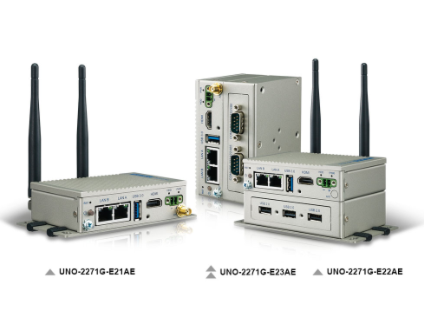
- 2 x GbE, 1 x USB 3.0, 1 x HDMI, option 2 x RS-232/422/485 or 3 x USB2.0
- Compact fanless design
- Rubber stopper design with internal reserved screws for 2nd layer assembly
- Diverse system I/O and isolated digital I/O by iDoor technology
- Supports Fieldbus protocol by iDoor technology
- Supports 30+ iDoor combination with four main categories of smart factory applications
- 32GB eMMC storage onboard

Frequently Asked Questions
The base unit includes 2 x RJ45 GbE LAN ports (10/100/1000 Mbps), 1 x HDMI (supports 1920 x 1080 @ 60Hz), and 1 x USB 3.0 port. Depending on configuration, it also offers either 3 x USB 2.0 ports or 2 x RS-232/422/485 serial ports. It also has 1 x full-size mPCIe expansion slot.
The UNO-2271G is available with two CPU options (Intel Atom E3815 single-core or E3825 dual-core) and three I/O configurations: E21BE/E021AE (Single Stack, 1 x USB 3.0 only), E22BE/E022AE (Single Stack, 3 x USB 2.0 plus USB 3.0), and E23BE/E023AE (Double Stack, 2 x RS-232/422/485 plus USB 3.0). All configurations share 2 x GbE LAN, HDMI, and 1 x mPCIe slot.
The UNO-2271G requires 10~30V DC input via a 2-pin terminal block power connector. Typical power consumption is 12W, with a maximum of 24W.
The UNO-2271G operates from 0 to 50°C (32 to 122°F) at 5~85% relative humidity with 0.7 m/s airflow. Storage temperature range is -40 to 85°C (-40 to 185°F). It carries CE, FCC, UL, CCC, and BSMI certifications, is RoHS compliant, and has an IP30 ingress protection rating.
The UNO-2271G comes with 4GB of onboard DDR3L 1066 MHz memory (not user-upgradeable per the datasheet) and 32GB of onboard eMMC storage. It also supports an mSATA option that shares the mPCIe slot, and includes 1 x full-size mPCIe expansion slot for iDoor modules or other add-in cards.
For mSATA storage, the UNO-2271G supports Windows 7, Windows 10 LTSB, and Advantech Linux. For eMMC storage, it supports Advantech embedded customized Windows 7 64-bit, Windows 10 LTSB, and Advantech Linux.
The UNO-2271G-E21BE/E021AE measures 100 x 70 x 30 mm (3.9" x 2.8" x 1.2"). The E22BE/E23BE/E022AE/E023AE variants measure 100 x 70 x 60 mm (3.9" x 2.8" x 2.6"). The form factor is pocket-sized, the same dimensions as a standard 2.5" SSD/HDD, housed in an aluminum enclosure. Mounting options include stand, wall, and optional VESA, DIN-rail, or pole mounts.
Wireless connectivity is available as an optional accessory rather than a built-in feature. A Wi-Fi module and antenna (EWM-W157H01E, w/ Bluetooth 4.0, 802.11a/b/g/n/ac) and an LTE module with antenna are listed as optional accessories, along with related antenna and cable options.
The UNO-2271G-E21BE/E021AE base units support optional second-stack expansion modules: UNO-2271G-EKBE (1 x iDOOR chassis), UNO-2271G-U3BE (3 x USB 2.0 ports), and UNO-2271G-R2BE (2 x RS-232/422/485 ports). Each module measures 100 x 70 x 30 mm and operates at 0~50°C.
How-to Guides
- Determine the mounting method supported by your unit configuration: standard stand and wall mounting are included; DIN-rail, pole, and VESA mounts are optional accessories.
- For DIN-rail mounting, use the UNO-2271G-DMKAE mounting kit and follow the DIN-rail mount illustration provided with the unit.
- For pole mounting, use the corresponding pole mount kit and follow the pole mount illustration.
- For VESA mounting, use the UNO-2000-VMKAE kit and follow the VESA mount illustration.
- Locate the 2-pin terminal block power connector on the unit's I/O panel.
- Connect a DC power source rated between 10V and 30V DC to the terminal block.
- Ensure the connected supply can provide up to 24W (maximum) of power; typical draw is 12W.
- Use the chassis grounding point on the unit as required for your installation.
- Select the appropriate second-stack module for your UNO-2271G-E21BE/E021AE base unit: UNO-2271G-EKBE (1 x iDOOR), UNO-2271G-U3BE (3 x USB 2.0 ports), or UNO-2271G-R2BE (2 x RS-232/422/485 ports).
- Use the internal reserved screws included in the rubber stopper design to attach the second-layer module to the base unit.
- Confirm the combined assembly stays within the specified operating temperature range of 0~50°C.
- Locate the full-size mPCIe slot inside the unit (shared with the optional mSATA storage function).
- Insert an mSATA module or mPCIe expansion card (such as an iDoor module) into the slot.
- If using mSATA, note that it replaces use of the slot for other mPCIe cards since the slot is shared.
- Reassemble the unit housing after installation.
| Manufacturer | Advantech |
|---|---|
| LAN Ports | 1-4 |
| Serial Ports | 1-2 |
| USB 2.0 | 1-2, 3-4 |
| USB 3.0 | 1-2 |
| Max Memory | 2 GB, 4 GB |
| Operating System | Windows 7, Windows 10, Linux |
| BIOS | AMI EFI64 Mbit |
| Certification | CE, FCC, UL, CCC, BSMI |
| Enclosure | Aluminum Housing |
| Storage | Onboard 32GB eMMC (Option mSATA shared with mPCIe slot) |
| Network (LAN) | 2 x RJ45, 10/100/1000 Mbps IEEE 802.3u |
| Ingress Protection | IP30 |
| Storage Temperature | -40 ~ 85°C ( -40 ~ 185°F) |
| Vibration Protection | Operating, IEC 60068-2-64, 2 Grms, random, 5 ~ 500 Hz, 1hr/axis (mSATA) |
| Power Consumption | 12W (Typical), 24W (Max) |
| OS Support | For mSATA storage: Windows7, Windows10 LTSB, Advantech Linux For eMMC storage: Advantech embedded customized Windows7 64bits, Windows 10 LTSB, Advantech Linux |