
UNO-238 V2: Compact IoT Edge Computer with Intel 12th Gen Core CPU
UNO-238 V2Starting at $1,540.00
- 12th Gen Intel Core i Processor (up to 10 cores)
- Dual Channel DDR5-4800 up to 64GB
- M.2 E-Key, B-Key, M-Key (supports NVMe) expansion for storage/wireless
- Equipped with CANBus for reliable communication
- DC-in terminal block for wiring flexibility
- Supports multiple displays for ThinManager solution
- Supports software APIs, DeviceOn

Frequently Asked Questions
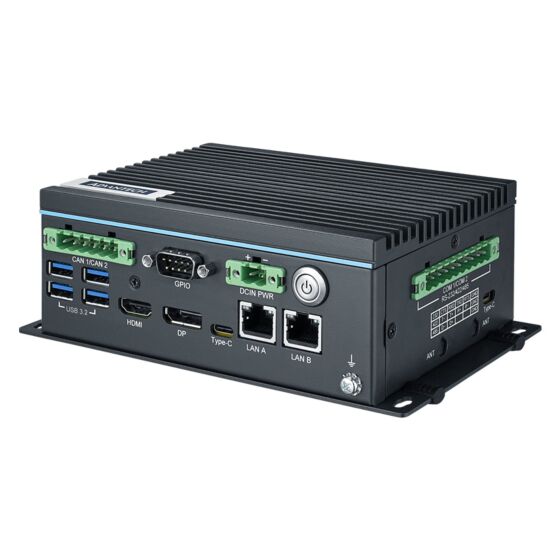
The UNO-238 V2 provides:
- 2 x RS-232/422/485 serial ports (50 to 115.2 Kbps), combo pinout
- 2 x RJ-45 LAN (LAN A: Intel i226-LM 10/100/1000/2500Mbps, LAN B: Intel i219-LM 10/100/1000Mbps)
- 4 x USB 3.2 Gen2 (10Gbps)
- 2 x USB Type-C (USB4, supports DisplayPort 1.4a Alt Mode, one supports Thunderbolt 4)
- 1 x HDMI 2.0 (up to 4096 x 2160 @60Hz)
- 1 x DP 1.4a (up to 4096 x 2304 @60Hz)
- 1 x GPIO (default 8DI)
- 2 x CANBus (CAN2.0, terminal block)
The UNO-238 V2 accepts 12-24V DC input via a terminal block connector, with reversed wiring protection. Typical power consumption is 30W, with a maximum of 60W. The included power adapter is rated 90W (Advantech P/N XARK-ADP-90MDH), and the unit is intended to be supplied by a UL certified power supply/DC source rated 12Vdc, minimum 4.5-5.5A.
Standard operating temperature is 0 to 50 °C with 0.7 m/s airflow. With extended temperature peripherals, the range extends to -20 to 60 °C with 0.7 m/s airflow. Storage temperature is -40 to 85 °C. Certifications include CE, FCC Class A, UL (CB/UL), CCC, and BSMI.
The UNO-238 V2 has two DDR5-4800 SO-DIMM slots supporting up to 64GB total. Storage expansion includes:
- 1 x M.2 B-Key 2242 slot (PCIe x1/SATA, USB 2.0)
- 1 x M.2 M-Key 2280 slot (PCIe x4 Gen4 NVMe)
Additional expansion slots (M.2 B-Key 3042/3052 for LTE and M.2 E-Key 2230 for WiFi) can also be used for storage-adjacent modules as noted in the ordering information.
The UNO-238 V2 supports Windows 10 2021 LTSC, Windows 11, and AdvLinux (Ubuntu 22.04).
The unit measures 150 x 107 x 60 mm (5.91 x 4.22 x 2.36 in) and weighs 1.8 kg (3.9 lb). It has an aluminum housing in a small form factor. Mounting options are stand mount (included) and DIN-rail mount (optional kit, part number UNO-200-DMKBE). A VESA mount kit (UNO-2000G-VMKAE) is also listed as an optional accessory for UNO & FPM integration.
Yes. It has an M.2 B-Key 3042/3052 slot for an LTE module and an M.2 E-Key 2230 slot for a WiFi module. A Nano SIM slot is provided, shared with the M.2 B-Key 3042 LTE slot. Four antenna mounting holes with pre-cut covers are provided for installing an antenna kit when LTE or WiFi is used.
The three SKUs differ only in CPU: the C3N1AE uses an i3-1215UE (6 cores, up to 4.4 GHz), the C5N1AE uses an i5-1245UE (10 cores, up to 4.4 GHz), and the C7N1AE uses an i7-1265UE (10 cores, up to 4.7 GHz). Storage, COM, CAN, USB, display, GPIO, and TPM support are the same across all three models.
Yes. It includes a programmable watchdog timer with 255 intervals (1 to 255 seconds) and TPM 2.0 hardware security, which can be enabled or disabled in the BIOS.
How-to Guides
- Unscrew and remove the bottom (BTM) cover.
- Unscrew the 4 screws holding the internal bracket.
- Unscrew and remove the top cover.
- Paste the thermal pad appropriate to your DDR5 capacity: for 8G/16G modules use thermal pads 1990026727N020 and 1990040197N010; for 32G modules use thermal pads 1990026184N010 and 1990040197N000.
- Install the top cover and secure with the 4 screws.
- Secure the internal bracket with its 4 screws.
- Install the bottom cover and secure with the 4 screws.
- Ensure the equipment is disconnected from all power before wiring.
- Use the terminal block power connector (CN10) located on the unit; the connector supports 12-24V DC input and includes reversed-wiring protection.
- Connect the supplied Earth-Ground cable (16 AWG) between the chassis grounding point and Earth ground for EMI protection.
- Use an approved power adapter or DC source rated 12Vdc, minimum 4.5A, Tmax 60°C, as specified by Advantech.
- Unscrew and remove the bottom (BTM) cover.
- Break open one of the pre-cut antenna holes on the chassis.
- Install the SMA cable through the opened antenna hole and connect it to the installed M.2 WiFi or LTE module.
- Power on the UNO-238 V2 and press "Delete" during POST to enter the BIOS configuration menu.
- On the "Advanced" tab, select "Serial Port 1 Configuration" (or "Serial Port 2 Configuration" for COM2).
- Choose RS-232 mode, RS-422 mode, or RS-485 mode for the COM Port Mode setting.
- Power on the UNO-238 V2 and press "Delete" during POST to enter the BIOS configuration menu.
- On the "Advanced" tab, select "iManager Configuration".
- Select "ACPI Report Method Configuration".
- Select "ACPI Report Method Control" and choose "Custom".
- Select "ACPI Report Method for CANBus" and choose "Exposed".
| Manufacturer | Advantech |
|---|---|
| Short Description | Advantech’s new UNO-200 series focuses on IT-level applications, which only require semi-industrial design and cost efficiency. The new UNO-238 V2 model aims to provide an optimized design with the 12th generation CPU Intel Core Alder Lake P-Series processor. |
| Certification | CE, FCC Class A, UL, CCC, BSMI |
| Enclosure | Aluminum housing |
| Mounting | Stand, DIN-rail (optional) |
| CPU | UNO-238-C3N1AE: Intel i3-1215UE (6 cores) UNO-238-C5N1AE: Intel i5-1245UE (10 cores) UNO-238-C7N1AE: Intel i7-1265UE (10 cores) |
| Frequency | UNO-238-C3N1AE: 1.2 GHz (up to 4.4 GHz) UNO-238-C5N1AE: 1.5 GHz (up to 4.4 GHz) UNO-238-C7N1AE: 1.7 GHz (up to 4.7 GHz) |
| Memory | 2 slots for DDR5 4800 (up to 64 GB max.) |
| Storage | 1 x M.2 B-Key 2242 (PCIe x1/SATA, USB 2.0) 1 x M.2 M-Key 2280 (PCIe x4, Gen 4 NVMe) |
| Network (LAN) | 2 x RJ-45 |
| Expansion Slots | 1 x M.2 B-Key 3042/3052 for LTE module (PCIe x1/SATA, USB 2.0) 1 x M.2 E-Key 2230 for Wifi module (PCIe x1, USB 2.0) |
| Watchdog TImer | Programmable timer with 255 intervals (1 ~ 255 sec) |
| Humidity | Operating, 95% RH @ 40°C, non-condensing Non-operating, 95%RH @ 60°C, non-condensing |
| Operating Temperature | 0 ~ 50 °C with 0.7 m/s airflow -20 ~ 60 °C with 0.7 m/s airflow (With extended temperature peripherals) |
| Storage Temperature | -40 ~ 85 °C / -40 ~ 185 °F |
| Shock | Operating, IEC 60068-2-27, 50G, half sine, 11 ms |
| Vibration Protection | Operating, IEC 60068-2-64, 2 Grms, random, 5 ~ 500 Hz, 1hr/axis |
| Power Input Voltage | 12-24VDC |
| Power Consumption | 30-60W |
| OS Support | WIN10 LTSC x64 v6.08 b052 AdvLinuxTu-IOTG_x64 V4.0.3 |
| Weight | 1.8 kg (3.9 lb) |
| Dimension | 150 x 107 x 60 mm (5.91 x 4.22 x 2.36 in) |