
UNO-247: Intel Celeron J3455 IoT Edge Computer with 2 x LAN, 6 x COM, 4 x USB, 1 x HDMI, 1 x VGA
UNO-247Starting at $785.00
- Intel Celeron J3455 processor
- Robust design with high stability
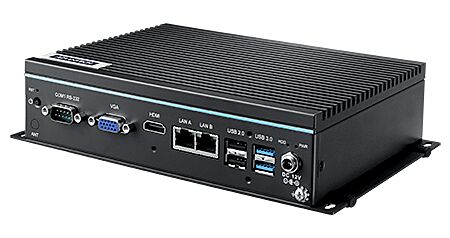
- 2 x GbE, 2 x USB3.0, 2 x USB2.0, 4 x RS232, 2 x RS485, 1 x HDMI, 1 x VGA
- Compact size with fanless design
- Rubber stopper design for stand mount and optional kit for DIN-rail mount.
- Optional 3G/GPS/GPRS/Wi-Fi communication
- Threaded DC Jack design for more steady power supply
- Optimized mechanical design for easier RAM swapping

Frequently Asked Questions
The UNO-247 provides:
- 2 x RJ45 Gigabit LAN (Realtek RTL8111G-CG, 10/100/1000 Mbps)
- 4 x RS-232 serial ports
- 2 x RS-485 serial ports (both via 9-pin D-sub connectors)
- 2 x USB 3.0 and 2 x USB 2.0
- 1 x HDMI 1.4b (up to 3840x2160@30Hz per the datasheet, and 1920x1080@60Hz per the user manual)
- 1 x VGA (up to 1920x1080@60Hz)
- 1 x Line out audio (optional)
The UNO-247 runs on 12V DC input, supplied through a lockable/threaded DC jack (2.5mm). Typical power consumption is 17W, with a maximum of 31W. The equipment is intended to be supplied by a UL-certified power supply or DC source rated 12VDC, 3A minimum.
The datasheet lists 0~50°C with 0.7m/s air flow as standard, and -20~60°C with 0.7m/s air flow when extended-temperature memory is used (see optional memory list). The user manual lists the operating temperature as -20~60°C with 0.7m/s air flow, noting the system safety certification test temperature is 40°C. Storage temperature is -40~85°C (-40~185°F).
The datasheet lists CE, FCC, UL, CCC, and BSMI certifications. The user manual separately lists UL/CB, CCC, and BSMI under Safety, and CE, FCC, CCC, and BSMI under EMC.
The UNO-247 has one DDR3L SO-DIMM slot supporting up to 8GB (1333/1600/1867 MHz). For storage, it supports 1 x full-size mSATA and 1 x drive bay for a 2.5" SATA HDD/SSD (compatible with 9.5mm height HDDs). It also has 1 x full-size mPCIe slot (PCIe/USB signal), 1 x M.2 2230 (E Key) slot, and 1 x Micro SIM card slot.
The datasheet lists OS support for Windows 10 2019 LTSC and Advlinux. Ordering options include a pre-installed Win10 2019 LTSC image and an AdvLinuxTu image.
The UNO-247 measures 200 x 140 x 50 mm (7.8" x 5.5" x 1.9") and weighs 1.0kg (2.2lbs). It uses an aluminum housing and supports stand mount as standard, with an optional DIN-rail mount kit. The user manual also lists wall-mounting (four M4 minimum screws, 4.0mm minimum length) and stand mounting as options.
The datasheet lists optional 3G/GPS/GPRS/Wi-Fi communication support. The unit includes a Micro SIM card slot and reserved antenna holes for these optional modules.
Per the ordering information table: UNO-247-J1N1AE and UNO-247-J1N1AO are the same base configuration (no memory, no storage, no OS preloaded) with the AE variant including audio and the AO variant without audio. UNO-247-J121W10 comes with 4GB memory, a 64GB SSD, and Windows 10 2019 LTSC pre-installed, and includes audio. All three share the same CPU, COM, USB, and display configuration.
How-to Guides
- Remove the 6 screws from the bottom cover of the UNO-247.
- Secure the HDD/SSD to the drive bay using the 4 screws provided.
- Plug in the SATA cable.
- Remove the 6 screws from the bottom cover.
- Install the RAM module (1), place the cover with thermal pad (2) over it, and fix the bracket (3) in place with 4 screws (4).
- Remove the 6 screws from the bottom cover.
- Insert the mSATA/mPCIe card into its socket.
- Fix the mSATA/mPCIe card in place using the screws included in the accessory package.
- Remove the 6 screws from the bottom cover of the UNO-247.
- Insert the M.2 card into the M.2 2230 socket.
- Fix the M.2 card in place using the screws included in the accessory package.
- During Power On Self Test (POST), press the
DelorEsckey to enter BIOS setup. - Use the Main tab to view or change System Time and System Date.
- Use the Advanced tab to configure items such as Trusted Computing, ACPI Settings, Super IO (serial port) configuration, CPU configuration, Network Stack, CSM, and USB configuration.
- Use the Chipset tab to select the OS type (Linux or Windows) before installing the OS.
- Use the Security tab to set an administrator password or configure Secure Boot.
- Use the Boot tab to set boot options such as Bootup NumLock State, Quiet Boot, and Boot Option Priorities.
- Use the Save & Exit tab to save or discard changes, reset, or restore default settings.
| Short Description | The UNO-247 has an optimized mechanical design to make it easier to change the RAM and threaded DC Jack design can support DC lockable function to make it more stable power supply. Also UNO-247 provide a rich I/O interfaces, including 4x RS232, 2x RS-485, 2x USB3.0, 2x USB2.0, 2x Giga LAN ports as well as VGA and HDMI display interfaces. |
|---|---|
| Processor | Intel Apollo Lake Celeron J3455 1.5GHz |
| Graphics | Intel HD Graphics |
| Memory | 1 x slot (DDR3L SO-DIMM support up to 8GB) |
| Watchdog TImer | Programmable 255 levels timer interval, from 1 to 255 sec |
| Video Port | 1 x HDMI 1.4b (3840x2160@30Hz) 1 x VGA (1920x1080@60Hz) |
| Audio | 1 x Line out (optional) |
| DC Input | 1 x Lockable DC Jack |
| Dimension | 200 x 140 x 50 mm (7.8" x 5.. 5" x 1.9") |
| Weight | 1.0kg (2.2lbs) |
| Construction | Aluminum Housing |
| Mounting | Stand Mount, DIN-Rail (Optional) |
| Operating Temperature | 0~50°C with 0.7m/s air flow -20 ~ 60°C with 0.7m/s air flow (With extended temperature peripherals, refer to optional memory list on page 2) |
| Storage Temperature | -40 ~ 85°C ( -40 ~ 185°F) |
| Humidity | 10 ~ 95% RH @ 40°C, non-condensing |
| Vibration | Operating, IEC 60068-2-64, 3Grms, random, 5 ~ 500Hz, 1hr/axis (mSATA) Operating, IEC 60068-2-64, 0.5Grms, random, 5 ~ 500Hz, 1hr/axis (HDD) |
| Shock | Operating, IEC 60068-2-27, 50G, half sine, 11ms |
| Power Consumption | 17W (Typical), 31W (Max) |
| Operation Voltage | 12VDC |