
UNO-247 V2: Intel Processor N97 IoT Edge Computer with 4x LAN, 6x COM, 4x USB, 1x HDMI, and 1x VGA
UNO-247 V2Starting at $820.00
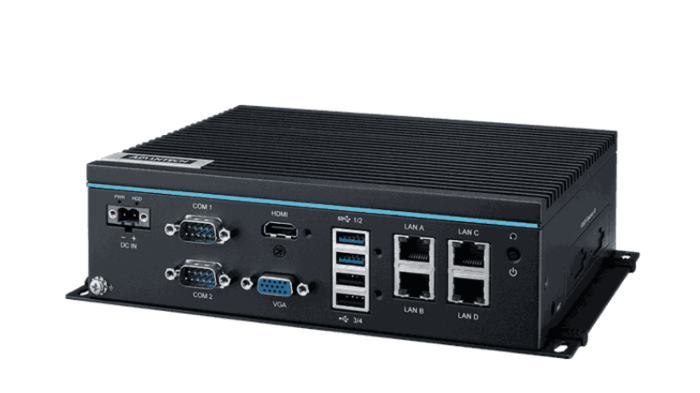
Advantech’s new UNO-200 series focuses on IT level applications, which only require semi-industrial design and cost efficiency. The UNO-247 V2 aims to provide an optimized design with the Intel Alder Lake N97 processor. UNO-247 V2 is IT-oriented and fanless, with IoT edge computing features and sufficient connectivity, including 4x LAN, 6x COM ports, 2x GPIO, 4x USB 3.2, 1x HDMI 2.0, 1x VGA, 1x Remote Connector, 1x mSATA, and 1x Nano SIM card slot.
- Intel Processor N97
- Flexible iDoor expansion design with sufficient IO port
- 4x GbE, 2x USB 3.2, 2x USB 2.0, 2x RS232/422/485, 4x RS485, 1x HDMI, 1x VGA
- Compact size with fanless design
- Optional 4G/GPS/GPRS/Wi-Fi communication
- Terminal block for wiring capability
- Optimized mechanical design for easier RAM swapping
- Support Win11 IoT and Ubuntu 22.04

Frequently Asked Questions
The UNO-247 V2 provides:
- 4 x RJ45 LAN ports (10/100/1000 Mbps, Realtek RTL8111K-CG)
- 2 x RS232/422/485 serial ports and 4 x RS485 serial ports (6 x COM total)
- 2 x USB 3.2 and 2 x USB 2.0 ports
- 1 x HDMI (1.4) and 1 x VGA display output
- 1 x Line out and 1 x Mic in audio jack
- 2 x 8-bit GPIO (DB9)
- 1 x Remote Switch connector and 1 x Terminal block for power
The UNO-247 V2 is powered by 12-24V DC through a terminal block with reversed wiring protection. Typical power consumption is 19W, with a maximum of 60W. The system is intended to be supplied by a UL certified power adapter or DC source rated 12 Vdc, 5-2.5A minimum, with Tmax 60°C.
Operating temperature is 0 ~ 50°C with 0.7 m/s airflow, extending to -20 ~ 60°C with 0.7 m/s airflow when extended-temperature peripherals are used. Storage temperature is -40 ~ 85°C. Relative humidity is 10 ~ 95% RH @ 40°C, non-condensing (operating). The UNO-247 V2 carries CE, FCC, CB/UL, CCC, and BSMI certifications.
The UNO-247 V2 has 1 x M.2 B key 2242 slot supporting SATA storage, plus 1 x mSATA or 1 x drive bay for a 2.5" SATA SSD (optional). Note that an iDoor expansion module cannot be used if a 2.5" SSD is installed, and using a 2.5" SSD requires an additional SATA cable and a jumper setting change (JSATA1) documented in the user manual. Memory is a single DDR5 SO-DIMM slot supporting up to 16GB (DDR5 4800).
The UNO-247 V2 includes a full-size mPCIe slot (SATA/USB2.0 signal), an M.2 B key slot (3042/3052, supporting PCIe/SATA/USB3.0, primarily used for LTE/5G modules), a Nano SIM card slot, and an iDoor expansion bracket.
The UNO-247 V2 supports Windows 11 LTSC IoT and Advlinux (Ubuntu 22.04 is also listed as a supported OS on the datasheet feature list).
The UNO-247 V2 measures 200 x 140 x 60 mm (7.9" x 5.5" x 2.4") and weighs 1.2kg (2.6lbs) net. It has an aluminum housing enclosure and supports stand mounting, with an optional DIN-rail mounting kit.
The UNO-247 V2 offers optional 4G/GPS/GPRS/Wi-Fi communication. It includes a Nano SIM card slot and an M.2 B key slot (3042/3052) for installing an LTE/5G module, along with four antenna mounting holes (pre-cut) for installing an antenna kit when LTE or wireless functions are needed.
TPM is listed as optional on the datasheet. The user manual specifies TPM 2.0 hardware security support, which can be enabled or disabled in the BIOS under Advanced > Trusted Computing.
How-to Guides
- Remove the six screws to disassemble the bottom cover.
- Install and screw the hard drive to the bottom plate.
- Insert the SATA cable.
- Remove the six screws to disassemble the bottom cover (for memory access).
- Plug in the memory module first, then attach the thermal pad and screw the bracket.
- Tighten the external bracket screw.
- Use the Earth-Ground cable (16 AWG) from the accessory bag to connect the chassis grounding point to Earth ground.
- Supply power using an approved adapter rated at 12-24V DC, 5A-2.5A, with Tmax 60°C.
- Connect the power source to the terminal block, which includes reversed wiring protection.
- Press (fold) the pre-cut hole of the ANT opening inside (or outside) to remove it.
- Assemble the SMA connector into the pre-cut hole, then tighten the gasket and nut.
- Power on the system and press
Deleteto enter the BIOS configuration menu. - On the Advanced tab, select NCT6126D Super IO Configuration, then select Serial port 1 or 2 configuration.
- Choose RS-232 mode, RS-422 mode, or RS-485 mode for the COM Port Mode.
- Note that COM 1-2 is a combo port configuration.
- If installing a 2.5" SATA SSD instead of mSATA, obtain the required SATA cable (see optional accessories).
- Locate the JSATA1 jumper on the board.
- Set jumper to Pin1-Pin2 for 2.5" SATA (default is Pin2-Pin3 for mSATA).
Advantech’s new UNO-200 series focuses on IT level applications, which only require semi-industrial design and cost efficiency. The UNO-247 V2 aims to provide an optimized design with the Intel Alder Lake N97 processor. UNO-247 V2 is IT-oriented and fanless, with IoT edge computing features and sufficient connectivity, including 4x LAN, 6x COM ports, 2x GPIO, 4x USB 3.2, 1x HDMI 2.0, 1x VGA, 1x Remote Connector, 1x mSATA, and 1x Nano SIM card slot.
| Short Description | Advantech’s new UNO-200 series focuses on IT level applications, which only require semi-industrial design and cost efficiency. The UNO-247 V2 aims to provide an optimized design with the Intel Alder Lake N97 processor. UNO-247 V2 is IT-oriented and fanless, with IoT edge computing features and sufficient connectivity, including 4x LAN, 6x COM ports, 2x GPIO, 4x USB 3.2, 1x HDMI 2.0, 1x VGA, 1x Remote Connector, 1x mSATA, and 1x Nano SIM card slot. |
|---|---|
| Processor | Intel Alder Lake-N N97 Max at 3.6GHz |
| Graphics | Intel UHD Graphics |
| Memory | 1 x slot (DDR5 SO-DIMM support up to 16GB) |
| Watchdog TImer | Programmable 255-level timer interval, from 1 to 255 sec |
| Video Port | 1 x HDMI 1.4 (4096x2160 @60Hz) 1 x VGA (1920x1080@60Hz) |
| Audio | 1 x Line out, 1 x Mic in |
| DC Input | 1 x Terminal Block, 1 x Remote Switch |
| Power Input Voltage | 24VDC (12-24VDC) |
| Dimension | 200 x 140 x 60 mm |
| Weight | 1.2kg (2.6lbs) |
| Mounting | Stand Mount, DIN-Rail (Optional) |
| Operating Temperature | -20 ~ 60°C with 0.7m/s air flow (With extended temperature peripherals, refer to optional memory list on page 2) |
| Storage Temperature | -40 ~ 85°C ( -40 ~ 185°F) |
| Humidity | Operating, 95% RH @ 40°C, non-condensing Non-operating, 95%RH @ 60°C, non-condensing |
| Vibration | Operating, IEC 60068-2-64, 2 Grms, random, 5 ~ 500 Hz, 1hr/axis |
| Shock | Operating, IEC 60068-2-27, 50G, half sine, 11ms |
| Power Consumption | 19W (Typical), 60W (Max) |