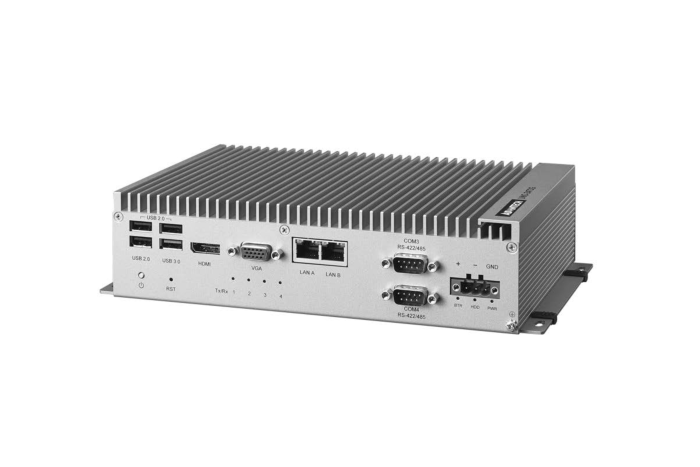
UNO-2473G: Intel Atom E3845/Celeron J1900 Automation Computer with 4 x LAN, 4 x COM, 3 x Mini-PCIe
UNO-2473GStarting at $1,170.00
The UNO-2000 series of embedded automation computers feature a fanless, highly ruggedized design for industrial applications. The series also includes iDoor technology which supports automation feature extensions such as industry fieldbus communication, Wi-Fi/3G, digital I/O, including palm, small, and regular-size form-factors with indicated market segments in terms of entry, value, and performance product positioning.
- 4th Generation Intel Atom/Celeron J1900 Processor up to 1.91/2.0 GHz with 4GB DDR3L memory
- 4/2 x GbE, 3 x USB 2.0 and 1 x USB 3.0/4 x USB 2.0 and 1 x USB 3.0, 2 x RS-232, 2 x RS-422/485 (E3AE), 2 x RS-232/422/485 (J3AE), 1 x VGA, 1 x HDMI, Audio
- Compact with fanless design
- Rubber stopper design with captive screws
- Diverse system I/O and isolated digital I/O by iDoor technology
- 3G/GPS/GPRS/Wi-Fi communication by iDoor technology
- Supports MRAM by iDoor technology
- Chassis grounding protection
- LAN redundancy (Teaming)
- Fault-protected RS-485 transceivers with extended common-mode range

Frequently Asked Questions
The UNO-2473G comes in two variants with different I/O counts:
- UNO-2473G-E3AE: 4 x USB (3 x USB 2.0, 1 x USB 3.0), 4 x GbE RJ45 LAN, 2 x RS-232, 2 x RS-422/485, 1 x VGA, 1 x HDMI, audio line-in/line-out
- UNO-2473G-J3AE: 5 x USB (4 x USB 2.0, 1 x USB 3.0), 2 x GbE RJ45 LAN, 2 x RS-232, 2 x RS-232/422/485, 1 x VGA, 1 x HDMI, audio line-in/line-out
Both models also include an iDoor expansion slot and a chassis grounding point.
The UNO-2473G-E3AE accepts 24VDC ±20% and consumes 15W typical / 68W max. The UNO-2473G-J3AE accepts 12VDC or 24VDC ±20% and consumes 15W typical / 55W max (data sheet) or 10W typical / 14W max (quick start guide hardware spec). Power connects via a 3-pin Phoenix-type connector with reversed-wiring protection.
The UNO-2473G-E3AE operates from -20 to 60°C (-4 to 140°F) at 5-85% RH with 0.7m/s airflow. The UNO-2473G-J3AE operates from -10 to 60°C (14 to 140°F) at 5-85% RH with 0.7m/s airflow. Storage temperature for both is -40 to 85°C at 5-95% RH.
The UNO-2473G has one mSATA slot and one drive bay for a 2.5" SATA HDD/SSD. Note that only one HDD/SSD SATA slot is available (not two). Memory is built-in and not user-upgradeable: 4GB DDR3L, running at 1600MHz on the E3AE model or 1333MHz on the J3AE model.
The UNO-2473G-E3AE has 3 x full-size mPCIe 2.0 slots. The UNO-2473G-J3AE has 1 x full-size mPCIe 2.0 slot. On both variants, one slot (CN16) is dedicated to mSATA storage; the remaining slot(s) support iDoor technology modules such as Wi-Fi, 3G/GPS, isolated serial, or MRAM cards.
The UNO-2473G supports Microsoft Windows 7/8, Windows 10, Windows Embedded Compact 7, and Advantech Linux. Application-ready drivers are provided, and LAN/serial drivers are installed automatically during OS installation.
Wireless and cellular connectivity are supported via optional iDoor modules installed in an mPCIe slot, not built in. Available modules include a Wi-Fi 802.11 ac/a/b/g/n module with Bluetooth (PCM-24S2WF-BE) and a wide-temp 3.75G HSPA + GPS module with a redundant SIM card holder (PCM-24S33G-AE). A suggested Wi-Fi module and antenna kit is also documented for field installation.
The chassis dimensions are 252 x 149 x 62 mm (9.9" x 5.9" x 2.4"). It has a rugged aluminum housing and can be wall-mounted or DIN-rail mounted (optional kit). Optional DIN-rail and VESA mount kits (UNO-2000G-DMKAE, UNO-2000G-VMKAE) are also available.
The E3AE uses an Intel Atom E3845 1.91GHz quad-core processor with 4 x GbE LAN ports, 3 x mPCIe slots, and dedicated RS-422/485 ports. The J3AE uses an Intel Celeron J1900 2.0/2.42GHz quad-core processor with 2 x GbE LAN ports, 1 x mPCIe slot, and combo RS-232/422/485 ports. Power input also differs: the E3AE takes only 24VDC, while the J3AE accepts both 12VDC and 24VDC. Operating temperature also differs at the low end (-20°C for E3AE vs -10°C for J3AE).
How-to Guides
- Remove the power cord.
- Unscrew the screws on the bottom cover.
- Plug an mSATA card with your OS and application program into the mPCIe slot (CN16 on the UNO-2473G).
- Screw the two screws on the board to fix the mSATA card.
- Screw the bottom cover back on.
- Remove the power cord.
- Unscrew the four screws from the bottom cover.
- Screw the HDD to the bottom cover.
- Connect the SATA signal/power cable (already connected to the motherboard) to the hard disk. Note: the UNO-2473G only has one HDD/SSD SATA slot, and the system is not compatible with +12V HDDs — use a HDD with lower power input.
- Secure the bottom cover with the four screws.
- Ensure the power source matches the unit's rating: 24VDC ±20% for the E3AE, or 12VDC/24VDC ±20% for the J3AE.
- Connect the power source to the 3-pin Phoenix-type power connector. Pin 1 is V+ (24VDC), Pin 2 is V-, and Pin 3 is Field Ground.
- The connector features reversed-wiring protection, so accidental reversal of ground and power lines will not damage the system.
- Obtain the optional kit: internal antenna cable (1750006043), a wireless mPCIe module (e.g. EWM-W151H01E), and an antenna (e.g. 1750002842).
- Unscrew the bottom panel and open it.
- Remove the hole(s) on the rear panel for antenna installation.
- Install the internal cable on the rear panel.
- Plug the wireless module with its bracket kit onto the PCI Express mini card socket.
- Connect the internal cable to the module.
- Secure the bottom panel.
- Assemble the antenna on the SMA connector.
The datasheet illustrates DIN-rail and VESA mount configurations, using the optional UNO-2000G-DMKAE (DIN-rail) or UNO-2000G-VMKAE (VESA) mounting kits.
- Select the appropriate optional mounting kit for your installation (DIN-rail or VESA).
- Attach the mounting kit to the chassis using the provided mounting screws.
- Secure the unit to the DIN rail or VESA-compatible surface per the kit instructions.
The UNO-2000 series of embedded automation computers feature a fanless, highly ruggedized design for industrial applications. The series also includes iDoor technology which supports automation feature extensions such as industry fieldbus communication, Wi-Fi/3G, digital I/O, including palm, small, and regular-size form-factors with indicated market segments in terms of entry, value, and performance product positioning.
Both entry and value embedded automation computers feature specific functions and are suitable for data gateway, concentrator, and data server applications. The performance model can shorten your development time and offer multiple networking interfaces to fulfill a diverse range of requirements.
| Manufacturer | Advantech |
|---|---|
| Short Description | The UNO-2000 series of embedded automation computers feature a fanless, highly ruggedized design for industrial applications. The series also includes iDoor technology which supports automation feature extensions such as industry fieldbus communication, Wi-Fi/3G, digital I/O, including palm, small, and regular-size form-factors with indicated market segments in terms of entry, value, and performance product positioning. |
| Mounting | On-board 4GB DDR3L 1333/1600 MHz |
| Memory | On-board 4GB DDR3L 1333/1600 MHz |
| Humidity | 10 ~ 95% @ 40°C (non-condensing) |
| Operating Temperature | -20°C ~ 60°C (-4°F ~ 140°F) @ 5 ~ 85% RH with 0.7m/s airflow |
| Storage Temperature | -40 ~ 85°C ( -40 ~ 185°F) |
| Shock | Operating, IEC 60068-2-27, 50G, half sine, 11ms |
| EMC | CCC, CE, FCC, UL, BSMI |
| Dimension | 252 x 149 x 62 mm (9.9" x 5.9" x 2.4") |