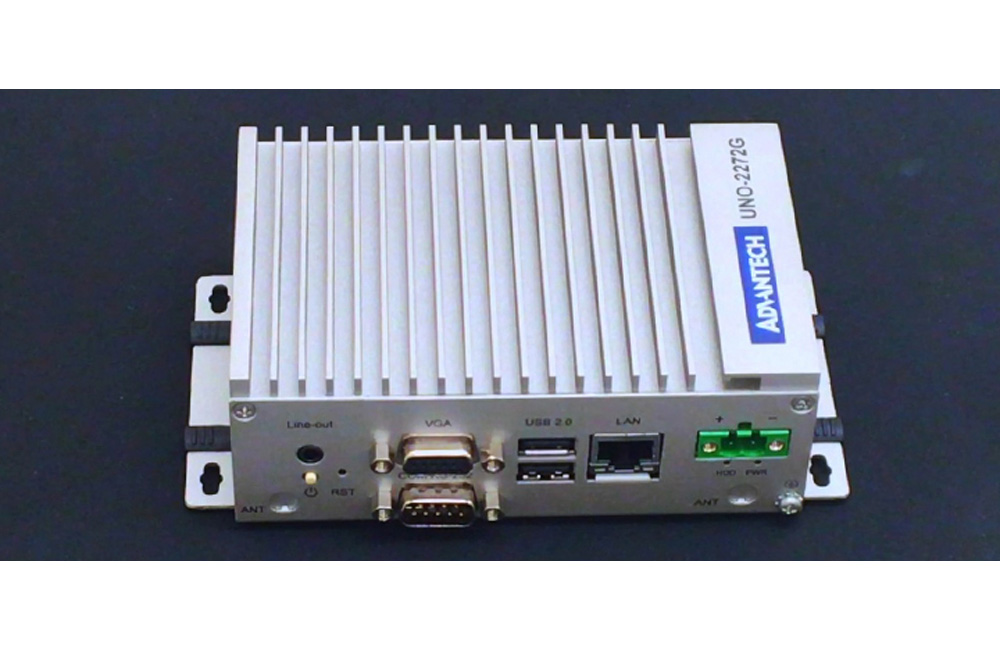
J1900 2.0GHz 4G RAM w/4xCOM, 2xLAN, 1xm
UNO-2473G-J3AEStarting at $940.00
Main Features:
- Intel Celeron J1900 2.42GHz,
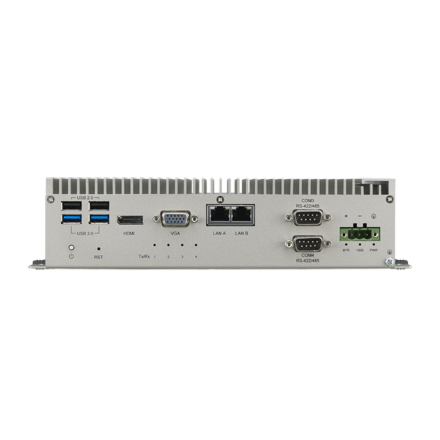
- 4 x GbE, 4 x USB 2.0/3.0, 2 x RS-232, 2 x RS-422/485, 1 x VGA, 1 x HDMI, Audio
- Comprehensive Palm, Small, Regular-size form-factor
- Compact with Fanless Design
- Rubber Stopper Design with Captive Screw
- Diverse system IO and Isolated Digital IO by iDoor Technology
- Supports Fieldbus Protocol by iDoor Technology
- 3G/GPS/GPRS/Wi-Fi Communication by iDoor Technology
- Supports MRAM by iDoor Technology
- Chassis Grounding Protection
- LAN Redundancy (Teaming)
- Fault-Protected RS-485 Transceivers With Extended Common-Mode Range

Frequently Asked Questions
The UNO-2473G-J3AE uses an Intel® Celeron® J1900 Quad Core processor running at 2.0 GHz, paired with 4GB of built-in DDR3L 1600MHz memory. Graphics are handled by the integrated Intel® HD Graphics engine.
The J3AE model provides:
- 5 x USB ports (4 x USB 2.0, 1 x USB 3.0 compliant)
- 2 x RJ45 LAN ports, 10/100/1000 Mbps
- 2 x RS-232 serial ports (DB9)
- 2 x RS-232/422/485 configurable serial ports (DB9)
- 1 x VGA port (supports 1920 x 1080 at 60Hz)
- 1 x HDMI port (supports 1920 x 1080 at 60Hz)
- Audio line-in and line-out
The UNO-2473G-J3AE accepts 12/24VDC ± 20% input via a 3-pin terminal block connector. Power consumption is 15W typical and 55W maximum.
The UNO-2473G-J3AE is rated for operation from -10 to 60°C (14 to 140°F) at 5 ~ 85% relative humidity, with 0.7 m/s airflow. Storage temperature range is -40 to 85°C (-40 to 185°F).
The unit is certified CE, FCC, UL, CCC, and BSMI, and carries an IP40 ingress protection rating.
The system has one mSATA slot and one drive bay for a 2.5" SATA HDD. It also includes 1 x full-size mPCIe slot (mPCIe 2.0) for iDoor expansion modules such as WiFi, cellular/GPS, isolated digital I/O, or MRAM modules.
Supported operating systems include Microsoft® Windows 7/8, Windows 10, Windows Embedded Compact 7, and Advantech Linux.
The unit measures 252 x 149 x 62 mm (9.9" x 5.9" x 2.4") and weighs 1.6 kg (3.5 lbs). It has an aluminum housing and supports stand, wall, VESA (optional), and DIN-rail (optional) mounting.
The unit does not include built-in wireless or cellular hardware, but it supports 3G/GPS/GPRS/WiFi communication through optional iDoor technology expansion modules installed in the mPCIe slot, such as the PCM-24S2WF-BE (WiFi) or PCM-24S33G-AE (3.75G HSPA and GPS).
The E3AE model uses an Intel® Atom™ E3845 processor, has 4 x GbE LAN ports, 4 x USB ports (3 x USB 2.0, 1 x USB 3.0), 3 x full-size mPCIe slots, 2 x RS-232 and 2 x RS-422/485 ports, a 24VDC ±20% power input, 68W max power consumption, and an operating temperature range of -20 to 60°C. The J3AE model uses a Celeron® J1900 processor, has 2 x GbE LAN ports, 5 x USB ports (4 x USB 2.0, 1 x USB 3.0), 1 x full-size mPCIe slot, 2 x RS-232 and 2 x RS-232/422/485 ports, a 12/24VDC ±20% power input, 55W max power consumption, and an operating temperature range of -10 to 60°C.
How-to Guides
- Obtain the optional UNO-2000G-DMKAE DIN Rail Kit.
- Follow the DIN-rail mount illustration provided on the datasheet to attach the mounting bracket to the chassis.
- Snap the unit onto the DIN rail using the attached bracket.
- Obtain the optional UNO-2000G-VMKAE VESA Mount Kit.
- Follow the VESA mount illustration provided on the datasheet to attach the VESA bracket to the chassis.
- Secure the unit to the VESA-compatible mounting surface.
- Locate the 3-pin terminal block power connector on the rear I/O panel.
- Connect a 12VDC or 24VDC power source (± 20% tolerance) to the terminal block, observing correct polarity.
- Use the chassis grounding point to connect the unit to earth ground for grounding protection.
- Verify the power source can supply at least 55W to cover maximum power consumption.
- Power down the unit and disconnect power before opening the chassis.
- Locate the single mSATA slot for installing an mSATA SSD, or the drive bay designed for a 2.5" SATA HDD.
- Insert the storage device into the appropriate slot/bay and secure it per the chassis fasteners.
- Reassemble the chassis and reconnect power.
- Power down the unit and disconnect power before opening the chassis.
- Locate the full-size mPCIe expansion slot.
- Insert the desired iDoor module (e.g., WiFi, cellular/GPS, isolated digital I/O, or MRAM module) into the mPCIe slot.
- Secure the module and reassemble the chassis.
- Connect any required external antenna to the antenna connector on the I/O panel, if applicable to the installed module.
| Manufacturer | Advantech |
|---|---|
| Memory | On-board 4GB DDR3L 1600 MHz |
| Watchdog TImer | Programmable 256 levels timer interval, from 1 to 255 sec |
| Humidity | 10 ~ 95% RH @ 40°C, non-condensing |
| Operating Temperature | - 20°C ~ 60°C (-4°F ~ 140°F) @ 5 ~ 85% RH with 0.7m/s airflow |
| Storage Temperature | -40 ~ 85°C ( -40 ~ 185°F) |
| Shock | Operating, IEC 60068-2-27, 50G, half sine, 11ms |
| EMC | CCC, CE, FCC, UL, BSMI |
| Dimension | 252mm x 149mm x 62 mm (9.9" x 5.9" x 2.4") |