
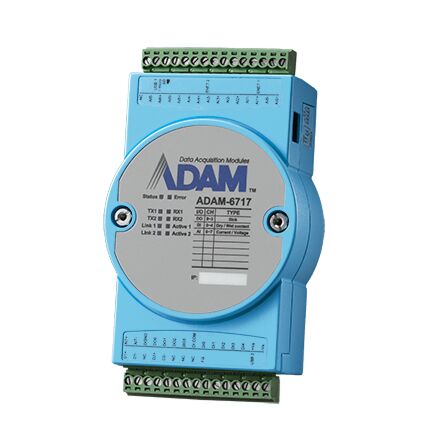
ADAM-6700: 8AI/5DI/4DO Intelligent I/O Gateway
ADAM-6700 Series- Linux Open Platform
- 8ch analog input(current or voltage)/5ch digital input/4ch digital output
- Program by linux C API, Node-RED (graphic programming environment)
- Cloud/database access, edge data analysis and logic control, data visualization by dashboard
- Interfaces: RS-485x2, Ethernet port x 2 ,1 x USB Type-A 2.0, 1 x USB Micro-B 2.0

Frequently Asked Questions
The ADAM-6700 series includes three models: the ADAM-6717 (8 differential analog input channels, 5 digital input channels, 4 digital output channels), the ADAM-6750 (12 digital input channels, 12 digital output channels), and the ADAM-6760D (8 digital input channels, 8 solid-state relay/PhotoMOS output channels for DC loads).
Each ADAM-6700 series gateway has 2 x RJ-45 10/100 Mbps LAN ports (2 MAC IDs), 2 x RS-485 serial ports, 1 x USB Type-A 2.0 port, 1 x USB Micro-B 2.0 port (used as a console/power port), and an optional micro SD slot for external storage.
The ADAM-6700 series accepts a power input of 10 ~ 30 V DC via the Vs+ and Vs- terminal pins. Power consumption is approximately 6 W @ 24 V DC for the ADAM-6717 and ADAM-6750, and approximately 6.5 W @ 24 V DC for the ADAM-6760D. The device can also be powered temporarily via the micro USB port for configuration purposes, but during operation with the Type-A USB port in use, power must come from the Vs+/Vs- terminals.
The operating temperature range is -40 ~ 70°C (-40 ~ 158°F), with a storage temperature range of -40 ~ 85°C (-40 ~ 185°F). Operating humidity is rated at 40°C @85% RH non-condensing, and storage humidity at 85°C @95% RH non-condensing. The series is certified CE and FCC.
Each gateway includes 512MB DDR3L RAM and 512MB NAND flash for system storage. An optional micro SD slot is available for external storage expansion.
The ADAM-6700 series runs RT Linux V3.12 and supports two programming methods: Node-RED, a graphical drag-and-drop programming environment, and C-language APIs for high-level language development.
Each unit has two Ethernet ports with two MAC IDs. If DHCP is enabled but no DHCP server is found, the ports default to 10.0.0.1 (Eth0) and 11.0.0.1 (Eth1). The default web utility and Node-RED login is username root with password 00000000.
The Status LED (green) stays on while booting, flashes every 1 second when the OS is ready, and flashes every 0.5 seconds during image recovery. The Error LED (red) is user-defined. Tx0/Tx1 (yellow) indicate RS-485 transmission, Rx0/Rx1 (green) indicate RS-485 reception, Link0/Link1 (yellow) indicate 100 Mbps Ethernet link, and Active0/Active1 (green) flash during Ethernet data transmission/reception.
The digital input/general isolation rating is 2500 V DC. On the ADAM-6760D, the relay output to power isolation is rated at 1500 Vrms.
How-to Guides
- Ensure the power source supplies 10 ~ 30 V DC.
- Connect the power source to the Vs+ and Vs- terminal pins on the device.
- Note that the micro USB port can power the device only for configuration; during normal operation, or when the Type-A USB port is in use, power must be supplied via the Vs+/Vs- terminals.
- Locate the SW1/SW2 switch bank for the analog input channels (Ch0-Ch7).
- Set the switch to ON for current input mode on a given channel.
- Leave the switch OFF (default) for voltage input mode on a given channel.
- In the web utility, ensure the configured input range for each channel matches the physical switch setting before wiring the signal.
- Connect the LAN port of the ADAM-6700 to your computer.
- Determine the IP address: if using DHCP with a DHCP server, use the assigned address; if DHCP with no server, use the default 10.0.0.1 (Eth0) or 11.0.0.1 (Eth1); if static IP, use the assigned static address. Alternatively, use the ADAM/Apax.NET Utility (v2.05.11 B19 or later) to search for the device and discover its IP.
- Open a web browser and enter the IP address to load the web portal.
- Click "Link" to open the web utility configuration page.
- Log in using the default username
rootand password00000000.
- Turn off the device.
- Copy the new image file onto a micro SD card and insert it into the ADAM-6700 micro SD slot.
- Turn on the device. The Status LED will flash every 0.5 seconds during the update.
- Wait until the Status LED changes to flashing every 1 second, indicating the update is complete.
- Turn off the device and remove the micro SD card.
- Log in to the web utility and open the Firmware tab.
- Click the Firmware Upload icon and select the firmware file (xxxx.bin).
- Click the Update icon to start the update, or Cancel to abort.
- Reboot the device to apply the firmware update.
| Manufacturer | Advantech |
|---|---|
| Short Description | The ADAM-6700 series are intelligent compact gateways aimed at edge applications. Equipped with an Arm Cortex-A8 32-bit 1 GHz microcontroller unit (MCU) and I/O module, the ADAM-6700 series can serve as edge platforms for data acquisition. Furthermore, the ADAM-6700 series gateways support Node-RED and C-language API programming tools to enable flexible implementation according to application demands. |
| Certification | KC, CE, FCC, Node-RED |
| CPU | Cortex-A8 32-Bit |
| Frequency | 1GHz |
| Memory | DDR3L 512MB |
| Storage | NAND flash 512MB for system storage microSD Slot (Optional) |
| Network (LAN) | 2 x RJ-45 10/100 Mbps (2MAC ID) |
| I/O | Serial Ports: 2 x RS-485 USB Ports: 1 x USB Type-A 2.0, 1 x USB Micro-B 2.0 |
| Operating Temperature | -40 ~ 70°C |
| Storage Temperature | -40 ~ 85°C |
| Power Input Voltage | 10 ~ 30 VDC |
| OS Support | RT Linux V3.12 |