
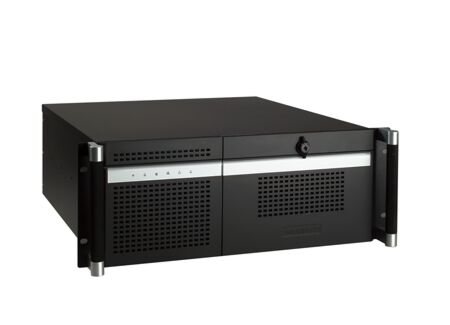
Advantech Quiet 4U Rackmount Chassis with Dual Hot-Swap SAS/SATA HDD Trays
ACP-4320Main Features:
- Supports either an ATX motherboard or a PICMG backplane with up to15 slots
- Support dual SAS/SATA hot-swap HDD trays
- LED indicators and alarm notification for system fault detection
- Low noise system fans
- Built-in Intelligent System Module enabling whole system fan control and remote manageability

Frequently Asked Questions
The chassis provides two 5.25" external drive bays, one 3.5" internal drive bay (for a SATA tray), and two SATA hot-swap HDD trays that support either 3.5" or 2.5" drives.
The front panel includes two USB 2.0 ports, along with LED indicators for Power, HDD, temperature, fan, LAN1 and LAN2.
The backplane version has one 9-pin D-Sub opening. The motherboard version has five 9-pin D-Sub openings and one 25-pin D-Sub opening.
Available single power supplies include a 300W ATX (90-264VAC input, Bronze), a 500W ATX (100-240VAC, Bronze), and a 700W ATX (100-240VAC, Bronze). A 500W 1+1 redundant Gold-rated supply (RPS8-500ATX-GB) is also listed as an option. All units carry CE/FCC/UL/CB/TUV/KC safety certifications and an MTBF of 100,000 hours at 25°C.
Operating temperature range is 0 ~ 40 °C (32 ~ 104 °F), with a non-operating range of -20 ~ 60 °C (-4 ~ 140 °F). Operating humidity is 10 ~ 85% at 40 °C, non-condensing, and non-operating humidity is 10 ~ 95% at 40 °C, non-condensing. Vibration is rated at 1 Grms (5 ~ 500 Hz), and shock at 10G with 11 ms duration, half sine wave.
The chassis measures 482 x 177 x 479 mm (19" x 7.0" x 18.9") and weighs 17.6 kg (38.7 lb).
Yes. The chassis supports either an ATX motherboard or a PICMG backplane with up to 15 slots.
The Intelligent System Module is a built-in board that enables whole-system fan control and remote manageability. It monitors CPU/system fan speed and CPU/system temperature, and supports up to 4 external temperature sensors and 7 fan tachometer inputs. Note: CPU fan speed and temperature monitoring functions are only enabled with Advantech AIMB-78X or PCE-51XX/71XX mainboards.
The Intelligent System Module draws 12V @ 5.25A.
The chassis uses one 12 cm fan rated at 82 CFM and one 6 cm fan rated at 28 CFM, and includes an air filter.
How-to Guides
- Remove the top cover of the chassis.
- Locate the yellow label inside the chassis indicating copper stub locations.
- Follow the label indications to screw the copper stubs into the correct locations for your specific backplane or motherboard model (maximum torque of copper stub is 10 kgf.cm).
- Install the backplane or motherboard into the chassis.
- Remove a SATA HDD tray from the front of the chassis.
- Install the 3.5" or 2.5" SATA HDD into the tray.
- Slide the tray with the drive back into the chassis until seated.
- Power off and disconnect the chassis before servicing.
- Access the fan set as shown in the front panel/fan replacement diagram.
- Remove the old fan and install the replacement fan in the same orientation.
- When connecting fan connectors on the Intelligent System Module, connect them in the correct sequence (e.g., first two fans into FAN1 and FAN2) or the alarm will not function correctly.
- Locate the filter cover on the front of the chassis.
- Remove the filter as shown in the filter removal diagram.
- Clean or replace the filter, then reinstall the filter cover.
- Disconnect the power cord from the chassis before servicing.
- Remove the existing single power supply unit as shown in the replacement diagram.
- Install the replacement power supply, ensuring the power cord plug orientation matches the socket.
- Reconnect the power cord.
| Manufacturer | Advantech |
|---|---|
| Humidity | 10 ~ 85% @ 40°C , non-condensing |
| Operating Temperature | 0°C ~ 40°C (32°F ~ 104°F) |
| Storage Temperature | - 20°C ~ 60°C (-4°F ~ 140°F) |
| Shock | 10G ( with 11 ms duration, half sine wave ) |
| Weight | 17.6 kg (38.7lb) |
| Dimension | 482mm x 177mm x 479 mm (19" x 7.0" x 18.9") |