
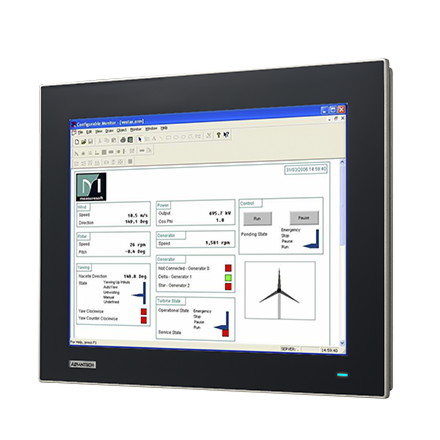
15" XGA Ind Monitor w/Resistive TS (VGA
FPM-7151T-R3AEStarting at $1,110.00
Main Features:
- 15" XGA TFT LED LCD with 50,000 backlight life time
- Robust design with IP66 compliance aluminum front panel
- Wide operating temperature support -20~60C
- Anti-glare screen with tempered glass
- Supports Panel, Wall, Desktop, Rack or VESA arm mounting
- Combo RS-232 & USB interface for touchscreen function
- OSD control pad on rear cover
- Lockable I/O connectors

Frequently Asked Questions
The FPM-7151T uses a 15" XGA LED LCD panel with a maximum resolution of 1024 x 768 and up to 16.7 million colors. It has a viewing angle of 160° (vertical) and 140° (horizontal), luminance of 400 cd/m2, a contrast ratio of 700:1 (typical), and a backlight lamp life (MTBF) of 50,000 hours.
The LCD panel is rated for an operating temperature of -30 to 80°C and a storage temperature of -40 to 85°C. The manual notes that these figures are for the LCD only, and system-level operating/storage temperature should be checked separately.
The FPM-7151T is powered by 24 VDC ± 20% through a Phoenix Jack connector. Maximum power consumption is 16 W ± 20%.
The FPM-7151T front panel is IP66 certified. The unit also meets BSMI, CE, FCC, CCC, and UL safety standards. It is also FCC Class A compliant.
- VGA Port (DB-15): connects to a system's external 15-pin DB-15 connector.
- DP or HDMI port: connects via a standard DP or HDMI cable; only supports digital signals.
- Touchscreen Connector (DB-9): present only if touchscreen is installed; connects to the PC's RS-232 port.
- Touchscreen Connector (USB): present only if touchscreen is installed; connects to the PC's USB port.
- Plug-In Block 3P Male (DC 24V): power connector, mates with an external plug-in block 3P female connector.
Note: RS-232 and USB touchscreen interfaces can be connected at the same time, but USB has higher priority. Switching from USB to RS-232 requires restarting the connected PC or workstation.
The FPM-7151T uses a 5-wire resistive touchscreen with both USB and RS-232 interfaces available.
The touchscreen supports Microsoft Windows XP, Vista, 7, 8, and Linux. Touchscreen drivers for Windows 2000/XP/XPT/XPE/2003/VISTA/7/WES7/2008/8 are provided in the Penmount 6000 folder on the included CD-ROM or from the PenMount website. Linux driver support should be checked directly on the PenMount website.
The FPM-7151T measures 383.2 x 307.3 x 48.0 mm (W x H x D) and weighs 4.2 kg.
The FPM-7151T supports panel mounting, wall mounting, desktop stand mounting, and VESA mounting. It supports both VESA 75 x 75 mm and VESA 100 x 100 mm patterns.
The front bezel is die-cast magnesium alloy, and the rear cover is SECC steel. The front panel is IP66 certified.
How-to Guides
- Confirm the mounting pattern needed: the FPM-7151T supports VESA 75 x 75 mm or VESA 100 x 100 mm.
- Use M4 screws with a length between 8 mm and 10 mm to attach the VESA bracket.
- Use a mounting apparatus suitable for the weight of the unit to avoid injury during installation.
- Position the FPM against the panel cutout.
- Insert the clamps into the side of the FPM.
- Secure the clamp to the panel using the included screws.
- Locate the Penmount 6000 driver folder on the included CD-ROM, or download the driver from the PenMount website.
- Read the installation instructions provided on the CD-ROM before installing.
- Follow the on-screen installation flow for your specific Windows version (2000/XP/XPT/XPE/2003/VISTA/7/WES7/2008/8).
- If switching between USB and RS-232 touchscreen interfaces, uninstall the previous driver first, since USB and RS-232 use different drivers.
- Use the Penmount 6000 Installation Guide for configuration and calibration steps.
- Confirm the power source supplies 24 VDC ± 20%.
- Connect the external plug-in block 3P with flanges (Female MC211-F103 connector) to the unit's Plug-In Block 3P Male (ME050-50803) DC 24V connector.
- Verify the connection is secure before powering on the unit.
FPM-7000T series monitors are the first, true-flat, 4:3, industrial-grade monitors. The 5-wire resistive touchscreen is enclosed in a highly durable, die cast aluminum alloy front bezel that provides IP66-rated protection from water and dust ingress. Additionally, the FPM-7000T series monitors support a wide operating temperature range (-20 ~ 60 °C/-4 ~ 140 °F) and various mount options to ensure easy installation and support for diverse environments.
| Manufacturer | Advantech |
|---|---|
| Brightness | 400+ nit |
| Resolution | 1024 x 768 |
| Screen Size | 10.1-15" |
| Operating System | Windows 7, Windows 10, Linux |
| Certification | BSMI, CCC, CE, FCC Class A, UL |
| Enclosure | Front panel: Die cast magnesium alloy. Rear cover: SECC |
| Mounting | Stand, Wall, Panel and VESA 75x75 & 100x100mm |
| Display Type | XGA TFT LED LCD |
| Display Size | 15" |
| Max Resolution | 1024 x 768 |
| Max Colors | 16.7 M |
| Luminance | 400 |
| Viewing Angle | 160/140 |
| Backlight Lifetime | 50,000 hours |
| Contrast Ratio | 700 : 1 |
| Light Transmission | Above 75% |
| Type | 5-wire analog resistive |
| Humidity | 10 ~ 90% non-condensing |
| Operating Temperature | -20°C ~ 60°C (-4°F ~ 140°F) |
| Storage Temperature | -30°C ~ 70°C (-22°F ~ 158°F) |
| Power Input Voltage | Phoenix Connector: 24 VDC input |
| Power Consumption | 15 W + 20% |
| OS Support | Windows XP, Vista,7, 8,10,XPe and Linux |
| Weight | 4.2kg (9.26lbs) |
| Dimension | 383.2 x 307.3 x 48 mm (15.09" x 12.10" x 1.89") |