
GT-92GC Series: 2U 19" Rack Mount Fanless GPU Computer with NVIDIA RTX 2000 ADA Graphics Card and Intel 14/13th-Gen Core Processor
GT-92GC SeriesStarting at $4,965.00
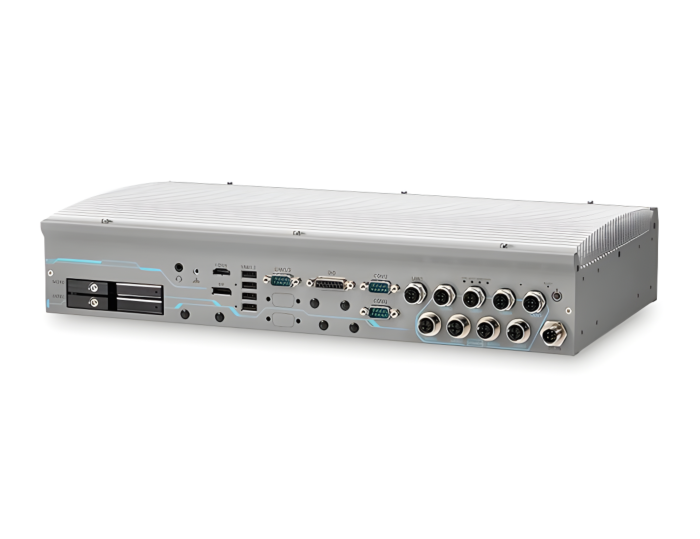
GT-92GC is a 19” rack mount, wide-temperature, fanless GPU computer that delivers excellent CPU and GPU performance by leveraging Intel 14/13/12th-Gen platform and NVIDIA RTX 2000 ADA. Thanks to its high-performance, flexible camera expansion, the GT-92GC is ideal for multicamera applications requiring real-time responses, e.g., AI inspection, robotic guidance, and autonomous machines.
- Intel 14/13th-Gen LGA1700 processor (65W/35W)
- Fanless GPU computer with NVIDIA RTX 2000 ADA
- 2U 19” chassis for rack-mount or wall-mount
- 8V to 48V wide-range DC input via M12 L-Coded connector
- 8x GbE PoE+, 1x GbE ports via M12 X-Coded connectors
- On-board isolated CAN bus for in-vehicle communication
- 1x M.2 2280 M key with PCIe-Gen 4x4 for NVMe storage
- 2x full-size mPCIe sockets with internal SIM sockets
- -25°C to 55°C wide-temperature fanless operation

Frequently Asked Questions
The GT-92GC front panel provides:
- 1x GbE Ethernet (Intel I219-LM, M12 x-coded, with Wake-on-LAN)
- 8x GbE Ethernet with PoE+ (Intel I350-AM4, M12 x-coded connectors)
- 2x isolated CAN 2.0 ports (CAN1/CAN2)
- 4x USB 3.2 Gen2x1 (10 Gbps) Type-A ports
- 1x HDMI 1.4 (up to 4096x2160)
- 1x DisplayPort (up to 4096x2304)
- 2x isolated software-selectable RS-232/422/485 COM ports
- 1x 4-pole 3.5mm audio jack (mic-in/speaker-out)
- Isolated 4-channel digital input and 4-channel digital output via DB15 connector
The GT-92GC accepts 8V to 48V DC input via an M12 L-coded connector, with built-in ignition power control. For 65W CPUs, the recommended DC input range is 18V to 48V. Supplying a voltage over 48V will damage the system.
Maximum power consumption examples include: i7-12700 (65W mode) 141.4W at 24V / 146.4W at 48V; i5-12400 (35W mode) 105.1W at 24V / 110.9W at 48V.
With a 35W CPU, the GT-92GC operates from -25°C to 55°C (without PoE) or -25°C to 50°C (with 50W PoE load). With a 65W CPU, the operating range is -25°C to 35°C. Storage temperature is -40°C to 85°C, and humidity range is 10% to 90% non-condensing. For sub-zero operation, a wide-temperature HDD or SSD is required.
Certifications include EN 50155:2021/IEC 61373 Category I Class B (vibration and shock, body mounted), EN 50121 (EN 50155 EMC), and CE/FCC Class A per EN 55032 & EN 55035.
The system supports up to 64GB ECC/non-ECC DDR5 4800 SDRAM across two SODIMM slots. For storage, it has one M.2 2280 M-key NVMe socket (PCIe Gen4x4, up to 7000 MB/s) and two hot-swappable 2.5" SATA HDD/SSD trays (supporting up to 7mm thick drives) with RAID 0/1 support.
The GT-92GC has two full-size mini PCI Express sockets, each with a SIM card slot, allowing installation of 5G/4G wireless modules along with a Micro-SIM (3FF) card. Multiple SMA antenna apertures on the panel support external antennas for wireless communication. Note that some off-the-shelf mini-PCIe 5G/4G modules use 1.8V I/O instead of standard 3.3V and may not be compatible; check with Neousys if unsure.
Neousys has tested the system with Microsoft Windows 10 LTSC 2021 (x64) and Ubuntu 20.04.5 LTS, 22.04 LTS, 22.04.1 LTS, or other distributions with kernel version 5.15 or higher. On Linux, users may need to manually compile and install drivers for Intel graphics or the I350-AM4 controller if not embedded in the kernel. Graphics driver and RAID support may be incomplete in some Linux distributions.
The GT-92GC measures 440 mm (W) x 249 mm (D) x 88 mm (H), excluding the rack-mount bracket, and weighs 7.7 kg. It supports rack-mounting or wall-mounting, with corresponding brackets available.
Yes. The GT-92GC has 8x IEEE 802.3at PoE+ PSE ports via M12 x-coded connectors. Total power budget is 70W with a 12V vehicle power input, or 100W with a 24V vehicle power input. Each port can deliver up to 25.5W to a powered device. PoE can be enabled/disabled globally or per-port in BIOS, and Neousys provides an API (WDT_DIO driver) to control PoE ports on/off in software.
The GT-92GC has a built-in ignition power control module for in-vehicle use. It monitors the ignition (IGN) signal on the DC input connector and turns the system on/off based on configurable power-on and power-off delays (16 selectable modes via a rotary switch). It also supports low battery detection, guarded delay cancellation, system hard-off after 10 minutes if a normal shutdown fails, and a smart off-delay feature in modes 13/14.
The GT-92GC has 2 isolated CAN 2.0 ports supporting CAN2.0A and CAN2.0B up to 1 Mbps, with SocketCAN support in Linux. CAN termination can be enabled or disabled per port in the BIOS.
How-to Guides
- Power off the system, disconnect all cables and antennas, and remove the bottom panel.
- Locate the heat spreader; the M.2 NVMe slot is underneath it.
- Remove the screws on top of the heat spreader and the screws at the back of the enclosure, then remove the heat spreader.
- Insert the M.2 module into the slot at a 45-degree angle.
- Gently press the module down and secure it with an M3 P-head screw.
- If installing an NVMe SSD for the first time, remove the thermal pad protector film from the heat spreader.
- Place the heat spreader back and secure it with the four screws (top and rear).
- Reinstall the bottom panel.
- Remove the bottom panel to access the mini-PCIe and SIM slots.
- If installing a 5G/4G module requiring a SIM, push the SIM slot holder open and place the SIM card in the slot, then flip the holder closed and push to lock it.
- Insert the mini-PCIe module's gold finger into the socket at a 45-degree angle, press down gently, and secure it with a screw.
- Clip on the mini-PCIe module's antenna cable per the module's user manual.
- Remove one of the antenna covers from the enclosure and secure the SMA antenna connector, then attach the external antenna.
- Reinstall the bottom panel.
- Pull the lever on the 2.5" hot-swappable slot to swing open the cover.
- With the label facing upward, insert the SATA connector side of the drive first, pushing firmly until it is fully seated.
- Push the lever back into the slot until it snaps into position. Use the key provided in the accessory box to lock the slot if desired.
- Repeat for the second tray if installing a second drive.
- Connect the vehicle battery positive line (12V for sedan, 24V for bus/truck) to the V+ pin on the M12 L-coded DC input connector.
- Connect the vehicle battery negative/ground line to the GND pin.
- Connect the vehicle's ACC (accessory/ignition) line to the IGN pin.
- Ensure the DC power source and IGN signal share the same ground. The IGN input accepts 8-48VDC; do not exceed 48VDC.
- In Windows, set "When I press the power button" to "Shut down" so the ignition control function recognizes a completed shutdown rather than sleep (S3).
- Use the rotary switch to select an ignition power control mode (0-14) matching your desired power-on/power-off delay behavior.
- Install at least two SATA HDDs/SSDs in the drive trays.
- Press F2 at boot to enter BIOS, go to Advanced > System Agent (SA) Configuration > VMD setup menu, and enable the VMD controller.
- Press F10 to save and reboot, then press F3 to enter Device Manager configuration utility.
- Select Intel Rapid Storage Technology, then choose "Create RAID Volume".
- Name the volume, select RAID Level (RAID-0 or RAID-1), select the disks, set stripe size (RAID-0 only) and capacity, then select "Create Volume".
- To install Windows on the RAID volume, prepare a bootable Windows USB with the Intel RST driver files copied onto it.
- During Windows setup, select "Load Driver", browse to the RST driver location, and select "Intel RST VMD Controller 467F".
- The RAID volume will appear as unallocated space; continue with standard Windows installation.
GT-92GC is a 19” rack mount, wide-temperature, fanless GPU computer that delivers excellent CPU and GPU performance by leveraging Intel 14/13th-Gen platform and NVIDIA RTX 2000 ADA. Thanks to its high-performance, flexible camera expansion, the GT-92GC is ideal for multicamera applications requiring real-time responses, e.g., AI inspection, robotic guidance, and autonomous machines.
GT-92GC has a proven thermal design to guarantee reliable system operation from -25°C to 55°C. It features a passive-cooling design for the motherboard and 70W GPU card. Supporting eight GigE cameras (or IP cameras) and four USB3 cameras, the GT-92GC is ideal for various vision-based AI applications. It also provides flexible data storage options, including one M.2 2280 Gen4x4 NVMe providing up to 7000 MB/s extreme read/write speeds and two 2.5" SATA HDD/SSD to expand storage capacity.
With performance enhancements and comprehensive I/Os, GT-92GC is the perfect edge AI inference platform for industrial environments such as inspection vehicles, smart agriculture, and autonomous machines.
| Manufacturer | Neousys |
|---|---|
| Short Description | GT-92GC is a 19” rack mount, wide-temperature, fanless GPU computer that delivers excellent CPU and GPU performance by leveraging Intel 14/13/12th-Gen platform and NVIDIA RTX 2000 ADA. Thanks to its high-performance, flexible camera expansion, the GT-92GC is ideal for multicamera applications requiring real-time responses, e.g., AI inspection, robotic guidance, and autonomous machines. |
| Processor | Supporting Intel 14th-Gen Core CPU (LGA1700 socket, 65W/35W TDP) Supporting Intel 13th-Gen Core CPU Supporting Intel 12th-Gen Core CPU (LGA1700 socket, 65W/35W TDP) |
| Graphics | Integrated Intel UHD Graphics 770 (32EU) |
| Memory | Up to 64 GB ECC/non-ECC DDR5 4800 SDRAM (two SODIMM slots) |
| Chipset | Intel R680E platform controller hub |
| AMT | Supports Intel vPro/ AMT 16.0 |
| PoE | 8x IEEE 802.3at PoE+ PSE with |
| Video Port | 1x HDMI 1.4, supporting 4096×2160 resolution |
| Audio | 1x 3.5 mm jack for mic-in and speaker-out |
| DIO | 4-CH isolated DI and 4-CH isolated DO |
| M.2 | 1x M.2 2280 M key NVMe socket (PCIe Gen4x4) for NVMe SSD |
| Mini PCI-E | 2x full-size mini PCI Express socket with SIM slot |
| SATA HDD | 2x hot-swappable HDD trays for 2.5" HDD/ SSD installation, supporting RAID 0/ 1 |
| DC Input | 43V to 160V DC input (M12 K-coded) |
| Remote Ctrl. & Status Output | Built-in ignition power control |
| Dimension | 440mm (W) x 250mm (D) x 88mm (H) (excl. rack-mount bracket) |
| Weight | 7.7 kg |
| Mounting | Rack-mounting (optional) and wall-mounting (optional) |
| Operating Temperature | With 35W CPU: With 65W CPU: 2For 65W CPUs, the recommended DC input range is 18V to 48V. |
| Storage Temperature | -40°C to 85°C |
| Humidity | 10% to 90% , non-condensing |
| Vibration | EN 50155:2017/ IEC 61373, Category I, Class B - Body mounted |
| Shock | EN 50155:2017/ IEC 61373, Category I, Class B - Body mounted |
| EMC | EN 50121 (EN 50155 EMC) |