
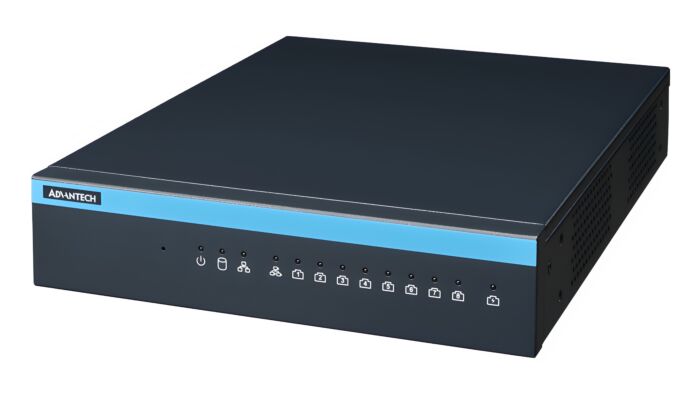
MIC-717-OX: AI NVR Solution with NVIDIA Metropolis Microservices on Jetson Orin
MIC-717-OXStarting at $2,520.00
- Compact fan design
- Embedded NVIDIA Jetson Orin NX capable of up to 100 TOPS
- Support 1 x 3.5" SATA HDD, or 1 x 2.5" SSD
- Integrated with NVIDIA Metropolis Microservices on Jetson
- Supports Allxon 24/7 remote monitoring and OTA deployment

Frequently Asked Questions
The MIC-717-OX provides the following I/O:
- 2 x 10/100/1000 Mbps Ethernet ports
- 8 x RJ-45 PoE ports (IEEE 802.3af, total power budget 123.2 W)
- 1 x HDMI output (max resolution 3840 x 2160 @ 60 Hz)
- 2 x USB 2.0 (external)
- 1 x USB 3.0 (internal, used for recovery mode)
- 4-channel digital input / 4-channel digital output (DI/DO)
- 1 x Nano SIM slot
The system requires 54 V DC input at 4.26 A, supplied through an external power supply adapter. The power supply type is AT/ATX, 54 V DC.
The MIC-717-OX operates from 0 to 50°C (32 to 122°F), with derating possible when a cellular LTE module is installed. Storage temperature range is -40 to 85°C (-40 to 185°F). Operating humidity is rated at 95% relative humidity @ 40°C (104°F), non-condensing.
Certifications include UL, cUL, CE, UKCA, RoHS, and Reach (SVHC). Safety compliance is UL/CSA/IEC/EN 62368-1.
The unit supports:
- 1 x M.2 2280 (M-Key, NVMe, PCIe x4) used for OS/storage installation
- 1 x 3.5" SATA HDD or 1 x 2.5" SSD bay
- 1 x M.2 3042 (B-Key, USB signal)
- 1 x Nano SIM slot
- 1 x TPM 2.0 module
Depending on the model/SKU variant, the MIC-717-OX ships with either 8 GB or 16 GB of 128-bit LPDDR5 memory, providing 102.4 GB/s of bandwidth.
The MIC-717-OX is available with either the Jetson Orin NX 8GB module (up to 70 TOPS AI performance, 6-core Arm Cortex-A78AE CPU, 1.5 MB L2 + 4 MB L3 cache) or the Jetson Orin NX 16GB module (up to 100 TOPS AI performance, 8-core Arm Cortex-A78AE CPU, 2 MB L2 + 4 MB L3 cache). Both share the same 1024-core NVIDIA Ampere GPU with 32 Tensor Cores.
The MIC-717-OX runs on NVIDIA JetPack, requiring JetPack version 5.1 or above as the board support package (BSP). It is also integrated with NVIDIA Metropolis Microservices on Jetson and supports Allxon 24/7 remote monitoring and OTA deployment.
The MIC-717-OX measures 254.5 x 195.0 x 44.45 mm (10.0 x 7.67 x 1.75 in) and weighs 1.14 kg (2.5 lb) without a hard disk installed. It supports desktop or wall-mount installation.
The unit includes 1 x Nano SIM slot and an LTE bracket accessory kit is available as an optional part, indicating support for an LTE cellular module. Note that operating temperature may be derated when an LTE module is installed.
The MIC-717-OX has 4 isolated digital inputs and 4 isolated digital outputs. Digital inputs operate at 5 to 30 V with a maximum input voltage of 30 V. Digital outputs are dry contact type with a maximum operating voltage of 30 V and maximum operating current of 0.5 A.
How-to Guides
- Power off the MIC-717-OX and disconnect all cables.
- Locate the internal SATA port and HDD bay.
- Use the supplied SATA cable and HDD screws to secure a 1 x 3.5" HDD or 1 x 2.5" SSD into the bay.
- Connect the SATA cable to the internal SATA connector.
- Reassemble the enclosure and reconnect power.
- Prepare a HOST PC running x86 Linux (Ubuntu 20.04 or 18.04); avoid using a virtual machine due to USB device allocation issues.
- Shut down the MIC-717-OX.
- Connect the HOST PC to the MIC-717-OX internal USB port (CN14) using a USB cable.
- Set the SW_REC1 jumper to pins 2-3 to force USB Recovery Mode.
- Power on the MIC-717-OX.
- On the HOST PC, run
lsusband confirm the device shows as "NVidia Corp.", indicating recovery mode is active. - Copy the flashing tool to the HOST PC and unzip it:
sudo tar -xpjf MIC-717OX_Jetpack<version>_AutoLogin_<version>.tbz2thencd Linux_for_Tegra/. - Execute the flashing command:
sudo ./tools/kernel_flash/l4t_initrd_flash.sh --external-device nvme0n1p1 -c tools/kernel_flash/flash_l4t_external.xml -p "-c bootloader/t186ref/cfg/flash_t234_qspi.xml" --showlogs --network usb0 p3509-a02+p3767-0000 internal. - Power off the MIC-717-OX and move the SW_REC1 jumper back to pins 1-2.
- Power on the device. Log in using the default account (user: mic-717ox, password: mic-717ox).
- Attach the two supplied mounting brackets to the unit using the provided M4*5L screws.
- Position the unit against the wall using the wall mount dimensions as a guide.
- Secure the unit to the wall through the mounting bracket holes.
- Turn the unit upside down to access the base.
- Attach the 4 supplied rubber feet using the M3*5L screws provided in the packing list.
- Place the unit upright on a flat, stable surface.
- Power off the unit and disconnect all cables.
- Remove the M.2 cover located at the bottom base of the enclosure.
- Install or replace the M.2 2280 (NVMe, PCIe x4) or M.2 3042 (USB) card as needed.
- Reattach the M.2 cover before powering the unit back on.
AI NVR Solution with NVIDIA Metropolis Microservices on Jetson Orin:
- Compact fan design
- Embedded NVIDIA Jetson Orin NX capable of up to 100 TOPS
- Support 1 x 3.5" SATA HDD, or 1 x 2.5" SSD
- Integrated with NVIDIA Metropolis Microservices on Jetson
- Supports Allxon 24/7 remote monitoring and OTA deployment
| Manufacturer | Advantech |
|---|---|
| Short Description | AI NVR Solution with NVIDIA Metropolis Microservices on Jetson Orin: |
| Certification | UL, cUL, CE, UKCA, RoHS, Reach (SVHC) |
| Mounting | Desktop/Wallmount |
| CPU | Jetson Orin NX 8GB AI Performance: 70 TOPS GPU: 1024-core NVIDIA Ampere architecture GPU with 32 Tensor Cores CPU: 6-core Arm Cortex-A78AE v8.2 64-bit CPU 1.5 MB L2 + 4 MB L3 Memory Capacity: 8 GB 128-bit LPDDR5 102.4 GB/s Jetson Orin NX 16GB AI Performance: 100 TOPS GPU: 1024-core NVIDIA Ampere architecture GPU with 32 Tensor Cores CPU: 8-core Arm Cortex-A78AE v8.2 64-bit CPU 2 MB L2 + 4 MB L3 Memory Capacity: 16 GB 128-bit LPDDR5 102.4 GB/s |
| Memory | 8GB, 16GB |
| Storage | M.2 1 x M.2 2280 (M-Key, NVMe, signal: PCIe x4) HDD/SSD 1 x 3.5" HDD or 1 x 2.5" SSD |
| I/O | Ethernet: 2 x 10/100/1000 Mbps |
| Humidity | 95% relative humidity @ 40°C (104°F), non-condensing |
| Operating Temperature | 0 to 50°C (32 to 122°F) |
| Shock | 10G / 11ms |
| Vibration Protection | 3 Grms @ 5 to 500 Hz, random, 1 hr/axis |
| Safety | UL/CSA/IEC/EN 62368-1 |
| Weight | 1.14 kg (2.5 lb) |
| Dimension | 254.5 x 195.0 x 44.45 mm (10.0 x 7.67 x 1.75 in) |