
MIC-770 V2 Compact Fanless System with 10th Gen Intel Xeon/Core i CPU Socket (LGA 1200)
MIC-770 V2Starting at $1,295.00
Main Feature
- Intel® 10th Gen Xeon®/Core™ i CPU socket-type (LGA1200) with Intel® W480E/H420E chipset
- Wide operating temperature (-10 ~ 60 °C)
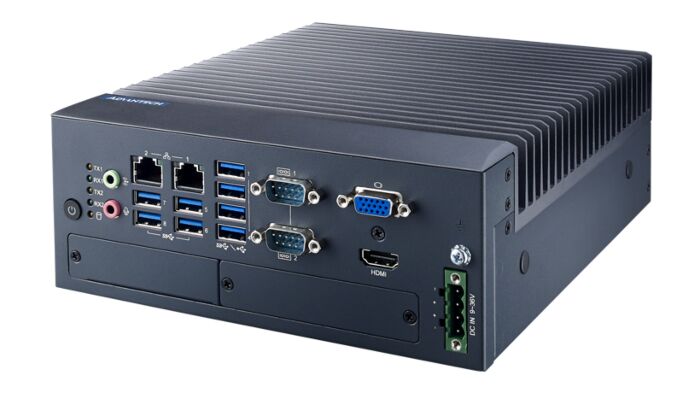
- VGA and HDMI output
- 2 x GigaLAN, 2 x USB 3.2 (Gen2) and 6 x USB 3.2 (Gen1)
- 2 x RS-232/422/485 and 4 x RS232 serial ports (Optional)
- 1 x 2.5" HDD/SSD, and 1 x mSATA
- 9 ~ 36 VDC input power range
- IP40 dust proof for deployment in harsh environment
- Supports FlexIO and iDoor technology, flexible configure additional HDMI, DVI, Comport, DIO, Remote switch IO
- Supports Advantech i-Modules
- Supports Advantech SUSIAPI and embedded software APIs

Frequently Asked Questions
The MIC-770 V2 provides the following external I/O, depending on SKU:
- 1 x VGA (DB15, up to 1920 x 1200) and 1 x HDMI (up to 3840 x 2160 @30Hz)
- 2 x GbE RJ45 (LAN1 Intel I219, LAN2 Intel I210IT)
- W480E SKU: 2 x USB 3.2 Gen2, 6 x USB 3.2 Gen1, 1 x USB 2.0 (internal)
- H420E SKU: 4 x USB 3.2 Gen1, 4 x USB 2.0
- 2 x DB9 serial ports supporting RS-232/422/485 with auto flow control, expandable to 4 additional RS-232 ports via an optional cable/kit
- 2 x audio jacks (1 x line-out, 1 x mic-in)
The MIC-770 V2 accepts 9~36 VDC input via a 4-pin plug-in terminal block. Typical power consumption is 35.3W, with a maximum of 112W. The system supports both AT and ATX power modes (configurable by an internal jumper).
Operating temperature is -10 ~ 60 °C for the 35W CPU SKUs and -10 ~ 50 °C for the 65W CPU SKUs, both with an industrial wide-temperature SSD and 0.7 m/s airflow. Storage temperature range is -40 ~ 85 °C. The unit is rated IP40 for dust protection and is certified to CE/FCC Class A, CCC, BSMI (EMC) and CB/UL, CCC, BSMI (safety). RED compliance applies only when bundled with the specific standard unit and Wi-Fi module listed in the datasheet.
The system supports 1 x 2.5" HDD/SSD drive bay (expandable to 2 x 2.5" SSD with an optional kit, or 2 x 3.5" HDD via an i-Module) and 1 x mSATA slot. It has 2 x 260-pin DDR4 SODIMM sockets (dual-channel DDR4 2666/2933 MHz), supporting up to 32GB per socket and 64GB total. The W480E SKU with Xeon/i3 CPUs supports ECC memory. The W480E SKU also supports SATA RAID 0/1/5/10.
The MIC-770 V2 supports Windows 10, Windows 10 IoT, Linux OS, and Ubuntu 20.04. Drivers (chipset, graphics, ME, LAN, RAID, audio) are available from the Advantech support website by searching for the MIC-770 V2 product page. Advantech recommends installing drivers in this order: chipset, graphics, ME, then other drivers.
The MIC-770 V2 measures 77 x 192 x 230 mm (3.07" x 7.55" x 9.05", W x H x D) and weighs 2.8 kg (6.17 lbs). It is designed for desktop or wall mounting, and optional DIN rail and wall mounting kits are available.
The W480E SKU (MIC-770W-20A1) supports Intel Xeon CPUs, ECC memory (with W and i3 CPUs), 3 x independent displays, 2 x USB 3.2 Gen2 + 6 x USB 3.2 Gen1, 3 x SATA, RAID 0/1/5/10, and 1 x Mini PCIe + 1 x Mini PCIe/mSATA expansion. The H420E SKU (MIC-770H-20A1) supports Pentium/Celeron and lower-tier CPUs only, 2 x independent displays, 4 x USB 3.2 Gen1 + 4 x USB 2.0, 2 x SATA, no RAID, and 1 x Mini PCIe + 1 x mSATA expansion.
Yes. The MIC-770 V2 is designed around an "expansion slot module" concept and supports Advantech i-Modules for additional PCIe/PCI slots, GPU cards, MXM GPU, or extra storage bays. It also supports Flex I/O modules for additional display outputs, COM ports, GPIO, TPM 2.0, or remote power on/off functions. Refer to the i-Module and Flex I/O datasheets for details on each part number.
The system has 2 x DB9 serial ports (COM1/COM2) supporting RS-232/422/485 with auto flow control, configurable in BIOS. Up to 4 additional RS-232-only ports (COM3-6) can be added via an optional cable kit (P/N 98R17500601).
How-to Guides
- Remove the 4 screws and detach the bottom cover.
- Remove the 4 screws holding the HDD tray and take out the tray.
- Secure the HDD/SSD to the tray using 4 HDD screws (P/N: 1930002235).
- Connect the SATA data cable and SATA power cable to the drive.
- Reassemble the HDD tray and secure it with 4 screws.
- Reattach the bottom cover.
For i-Module storage installation, refer to the separate i-Module manual.
- Remove the 4 screws and detach the bottom cover.
- Remove the 4 screws holding the HDD tray and take it out.
- Remove the 3 screws securing the memory thermal cover.
- Affix the supplied thermal pad (P/N: 1990019498N000) onto the memory module.
- Place the memory module into the SODIMM socket.
- Ensure the thermal pad and memory thermal cover are fully seated and secured before reassembling.
- Remove the 4 screws and detach the bottom cover.
- Install the module into Mini PCIe socket 1, or an mSATA card into Mini PCIe socket 2, and secure with screws.
- Replace the bottom cover and secure it with screws.
Note: The W480E SKU provides 1 x Mini PCIe (via Nano-SIM) and 1 x Mini PCIe/mSATA slot. The H420E SKU provides 1 x Mini PCIe (via Nano-SIM) and 1 x mSATA slot.
- Confirm your power source is within the 9~36 VDC input range.
- Use the supplied 4-pin Phoenix power connector (P/N: 1652003234).
- Wire the connector according to the pin assignment: Pin 1 GND, Pin 2 +9~36VDC, Pin 3 +9~36VDC, Pin 4 GND.
- Plug the connector into the 4-pin header on the front of the unit.
- Power on the system using the front power on/off button.
- Remove the 4 screws and detach the bottom cover.
- Remove the HDD tray and the expansion module baffle.
- Remove the baffle cover.
- Assemble the chosen Flex I/O module onto the motherboard, connecting it with a cable if required (refer to the motherboard I/O connector diagram for the GPIO connector location).
- Secure the module baffle with screws.
- Reattach the bottom cover and secure it with screws.
| Manufacturer | Advantech |
|---|---|
| CPU Family | Intel Core, Intel Xeon |
| Base CPU Speed | Under 2.0 Ghz, 2.1 to 3.0 GHz, 3.1 to 3.5 GHz, Over 3.5 GHz |
| Video Output | VGA, HDMI |
| Max Memory | 2 GB, 4 GB, 8 GB, 16 GB, 32 GB, 64 GB |
| BIOS | AMI 256Mb/128Mb SPI Flash |
| CPU | 10th Generation Processor (TDP 35W) - W-1290TE, W-1270TE*, W-1250TE*, i9-10900TE, i7-10700TE, i5-10500TE, i3-10100TE, G6400TE 10th Generation Processor (TDP 65W) - i9-10900E, i7-10700E, i5-10500E, i3-10100E, G6400E(58W), G5900E(58W). |
| Memory | Technology Dual-channel DDR4 2933/2666 MHz (W480E SKU supports ECC) Socket 2 x 260-pin DDR4 SODIMM (up to 32GB per socket) Maximum Capacity 64GB |
| Storage | HDD 1 x 2.5" HDD/SSD (up to 2 x 2.5" SSD by optional kit; 2 x 3.5" HDD by i-Module) mSATA 1 RAID 0/1/5/10 (W480E SKU only) |
| I/O | USB W480E: 2 x USB3.2 (Gen2), 6 x USB3.2 (Gen1), 1 x USB 2.0 (Internal) H420E: 4 x USB3.2 (Gen1), 4 x USB2.0 Serial Port 2 x DB9, RS-232/422/485 support auto flow control; 4 x RS-232 (Optional) Audio 2 (1 x line out and 1 x mic in) |
| Expansion Slots | Module Supports Advantech i-Modules Mini PCIe/mSATA W480E: 1 x mini PCIe (via Nano-SIM), 1 x mini PCIe/mSATA H420E: 1 x mini PCIe (via Nano-SIM), 1 x mSATA |
| Watchdog TImer | Output System reset Interval Programmable 1 ~ 255 sec/min |
| Display Type | Chipset Xeon and Core i: Intel HD Graphics 630, supports DirectX 12 Pentium/Celeron: Intel HD Graphics 610, supports DirectX 12 VGA 1 x DB15, up to 1920 x 1200 maximum resolution HDMI 1 x HDMI, up to 4096 x 2160@30Hz (with optional expansion cable for 2nd HDMI or 1 x DVI connector) Multiple Display W480E: 3 x independent displays (third display output via optional cable) H420E: 2 x independent displays |
| Humidity | 95% @ 40 C (non-condensing) |
| Operating Temperature | 65W CPU w/ industrial wide Temp. SSD-10 ~ 50 C with 0.7 m/s air flow 35W CPU w/ industrial wide Temp. SSD -10 ~ 60 C with 0.7 m/s air flow Non-operating -40 ~ 85 C |
| Shock | With SSD: 20G, IEC-68-2-27, half-sine wave, 11 ms duration |
| Power Input Voltage | 9 ~ 36 VDC |
| Power Consumption | Typical: 35.3W Maximum: 112W |
| Weight | 2.8 kg (6.17 lbs) |
| Dimension | 77 x 192 x 230 mm (3.07" x 7.55" x 9.05") |