
Nuvo-7100VTC: Neousys Intel 8th-Gen Core i In-Vehicle Fanless Embedded Controller
Nuvo-7100VTC SeriesStarting at $1,855.00
- Intel 8th-Gen. Coffee Lake Core i7/i5/i3 CPU
- Wide temperature operation, -25°C ~70°C
- On-board CAN bus
- Isolated digital I/O
- 6x GbE ports (PoE+ ports 3~6)
- 4x USB3.1 Gen. 2/ 4x USB3.0 Gen. 1
- 4K2K resolution, VGA/DVI/DP triple independent display support
- 8~35V wide-range DC input with built-in ignition power control


Frequently Asked Questions
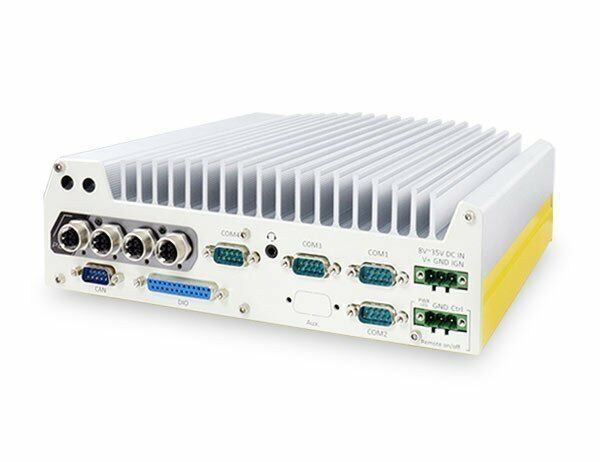
The Nuvo-7100VTC series offers the following front and rear I/O:
- 2x Gigabit Ethernet ports (I219 and I210) plus 4x IEEE 802.3at PoE+ ports (25.5W per port, 100W total budget) via M12 x-coded connectors (RJ45 on Nuvo-7104VTC/7108VTC variants)
- 4x USB 3.1 Gen2 (10Gbps) and 4x USB 3.1 Gen1 (5Gbps) ports
- 1x VGA (up to 1920x1200), 1x DVI-D (up to 1920x1200), 1x DisplayPort (up to 4096x2304)
- 2x software-programmable RS-232/422/485 ports (COM1/COM2) and 2x RS-232 ports (COM3/COM4)
- 1x isolated CAN 2.0 port
- 4x isolated digital inputs and 4x isolated digital outputs
- 1x mic-in and 1x speaker-out audio jack
The system accepts 8~35VDC via a 3-pin pluggable terminal block, which also supports ignition signal input. Maximum power consumption depends on CPU: 72W (Max.) @24V with i7-8700T, 68.4W (Max.) @24V with i5-8500T, and 62.64W (Max.) @24V with i3-8100T (all in 35W TDP mode).
Operating temperature is -40°C to 70°C (limited to 50°C when using CPUs with greater than 35W TDP, where thermal throttling may occur under sustained full load). Storage temperature is -40°C to 85°C. The system is rated for 10%~90% non-condensing humidity, MIL-STD-810G vibration (Method 514.6, Category 4) and shock (Method 516.6, Procedure I), and is CE/FCC Class A compliant per EN 55032 & EN 55024.
Note: for sub-zero operating temperature, a wide-temperature HDD or SSD is required.
The Nuvo-7100VTC supports:
- Up to 64GB DDR4 2666/2400 SDRAM across two SODIMM slots (32GB max per slot)
- 1x hot-swappable 2.5" HDD/SSD tray plus 1x internal SATA port for 2.5" HDD/SSD, supporting RAID 0/1
- 1x M.2 2280 M-key NVMe socket (PCIe Gen3 x4) for NVMe SSD or Intel® Optane™ memory
- 1x full-size mSATA port (mux with mini-PCIe)
- 1x full-size mini-PCIe socket with internal SIM socket (mux with mSATA), plus 2x additional full-size mini-PCIe sockets (USB signals only) with internal SIM sockets
- 2x M.2 2242 B-key sockets with dual front-accessible SIM sockets, supporting dual SIM mode with a compatible M.2 LTE module
Neousys has tested the system with Microsoft Windows 10 (x64), Fedora 29, and Ubuntu 16.04.5 LTS / 18.04.0 LTS. For other Linux distributions, the kernel should be upgraded to 4.15.18 or later. A "Drivers & Utilities" DVD is included that can automatically detect the OS and install all necessary drivers, or drivers can be installed manually in a specific sequence (chipset, graphics, audio, LAN, then ME).
The Nuvo-7100VTC measures 240mm (W) x 225mm (D) x 84mm (H) and weighs approximately 3.5kg. It ships with Neousys' patented damping bracket as standard, with an optional DIN-rail mounting kit available. A wall mount bracket is also supported.
The system supports wireless expansion via two M.2 2242 B-key sockets and three mini-PCIe sockets (one full-size mux with mSATA, two full-size USB-signal-only), each paired with SIM card slots for 3G/4G modules. Dual SIM mode is supported specifically with the Sierra Wireless EM7455/7430 M.2 LTE module; for other 4G add-on solutions, SIM slot 1 is the default functioning slot. SMA antenna apertures are provided on the front and rear panels for wireless modules.
The Nuvo-7100VTC series is the standard in-vehicle controller with a hot-swappable 2.5" drive slot. The Nuvo-7200VTC series adds a patented Cassette module with a PCIe x16 Gen3 slot for an add-on card (such as a graphics card) and features dual 2.5" removable drives. The Nuvo-7250VTC series uses a supercapacitor-based power backup solution (PB-2500J, 2500 watt-second capacity) to safely shut down the system during power outages.
Yes. The Nuvo-7100VTC has 4x IEEE 802.3at PoE+ ports (M12 x-coded connectors, 25.5W per port / 100W total budget). The Nuvo-7104VTC has the same 4 PoE+ ports but with RJ45 connectors instead. The Nuvo-7108VTC has 8x IEEE 802.3at PoE+ ports via RJ45 connectors, with the same per-port and total power budget figures.
How-to Guides
- Disassemble the system enclosure as described in the system disassembly procedure.
- Locate the two SO-DIMM memory slots on the motherboard (supports up to 32GB DDR4-2666 per slot).
- Insert the gold fingers of the memory module into the slot at a 45-degree angle.
- Push down on the memory module until it clips into position.
- Repeat for the second module if needed.
- Reinstall the system enclosure and panel.
Note: Adding, removing, or reinstalling a DRAM module will cause an approximately 30-60 second delay on the first boot after the change.
- Refer to the system disassembly section; you may not need to fully disassemble the system to reach the M.2 slot.
- Insert the M.2 module into the x4 PCIe M.2 2280 slot at a 45-degree angle.
- Gently press the module down and secure it with an M2.5 P-head screw.
- Reinstall the system enclosure and panel.
- If installing Intel Optane memory for hard drive acceleration, follow the separate BIOS setup and driver installation procedure.
- Locate the 3-pin pluggable terminal block on the rear panel (shared with DC power input).
- Connect the vehicle battery+ line (12V for sedan, 24V for bus/truck) to V+.
- Connect the vehicle battery-/GND line to GND.
- Connect the ACC (accessory) line to IGN.
- Ensure the DC power source and IGN signal share the same ground. Do not supply more than 35VDC to the IGN input.
- Configure the desired ignition power control mode using the rotary switch, or set it to Mode 15 to configure timing parameters in BIOS.
- In Windows, set "When I press the power button" to "Shut down" so the ignition control function correctly recognizes a completed shutdown.
- Take the wall mount bracket and four M4 screws out of the accessory box.
- Fix the wall mount bracket to the system enclosure using the M4 screws.
- Place the system on a flat surface and secure it further with M4 screws.
- When wall mounting, orient the heatsink fins perpendicular to the ground for better heat dissipation.
- Ensure at least two hard drives or SSDs are installed, and back up all data before proceeding.
- Press F2 at boot to enter BIOS setup, go to Advanced > SATA And RST Configuration > SATA Mode Selection, and select "Intel RST Premium With Intel Optane System Acceleration".
- Go to Boot, select "Legacy Boot Type", then press F10 to save and reboot.
- On reboot, press Ctrl+I to enter the RAID configuration utility and select "Create RAID Volume".
- Enter a volume name, then select RAID Level (RAID0/Stripe or RAID1/Mirror).
- Select a Stripe Size (RAID0 only) and set the desired Capacity.
- Confirm the settings, select "Create Volume", and confirm the data-deletion warning to complete RAID creation.
| Manufacturer | Neousys |
|---|---|
| Short Description | The Nuvo-7000VTC is designed for in-vehicle applications, is extremely reliable, and is capable of extreme rugged connectivity. It is powered by an Intel 8th/9th Gen Core processor, and can accept up to 64GB of DDR4 memory. The versatile Nuvo-7000VTC has Input/output options including Digital IO and CAN Bus. |
| Graphics | Integrated Intel® HD Graphics 630 |
| Chipset | Intel® Q370 platform controller hub |
| PoE | 4x IEEE 802.3at (25.5W) Gigabit PoE+ ports by Intel® I210|- M12 x-coded connector (Nuvo-7100VTC);|- RJ45 connector (Nuvo-7104VTC)||8x IEEE 802.3at (25.5W) Gigabit PoE+ ports by Intel® I210,|- RJ45 connector (Nuvo-7108VTC) |
| Audio | 1x Mic-in and 1x speaker-out |
| M.2 | 1x M.2 2280 M key socket (PCIe Gen3 x4) for NVMe SSD or Intel® Optane™ memory installation|2x M.2 2242 B key socket, one with dual front-accessible SIM sockets, supporting dual SIM mode with selected M.2 LTE module |
| SATA | 1x hot-swappable HDD tray for 2.5" HDD/ SSD installation|1x Internal SATA port for 2.5" HDD/ SSD installation, supporting RAID 0/ 1 |
| Remote Ctrl. & Status Output | 1x 3-pin pluggable terminal block for remote control and PWR LED output |
| Dimension | 15" x 13.5" x 7" |
| Storage Temperature | -40° ~ 85°C |
| Humidity | 10%~90% , non-condensing |
| EMC | EN 50155 (Nuvo-7100VTC),|E-Mark (Nuvo-7108VTC)|CE/FCC Class A, according to EN 55022 & EN 55024 |
| CPU Cores | 6, 8 |
| CPU Family | Intel Core |
| Base CPU Speed | 2.1 to 3.0 GHz |
| Video Output | Display Port, DVI-D, VGA |
| PoE Ports | 4, 8 |
| LAN Ports | 5-8 |
| Serial Ports | 3-4 |
| USB 3.1 | 5-8 |
| Max Memory | 64 GB |
| Operating System | Windows 10, Linux |
| Effective Memory Speed | 2400 MHz, 2666 MHz |
| Form Factor | Fanless |
| Native Storage Type | 2.5" SSD, mSATA Full, M.2 NVMe SSD |
| On/Ignition | Remote On/Off |