
Neousys POC-451 Series
POC-451VTCStarting at $880.00
POC-451VTC is an ultra-compact in-vehicle computer with E-Mark certificate for in-vehicle applications, such as mobile gateway, mobile surveillance and passenger information system.
- Intel® Atom® x6425E quad-core processor
- Rugged -25°C to 70°C fanless operation
- 2x 2.5GbE PoE+ ports and 1x 2.5GbE port
- 1x M.2 2242/ 3052 B key for 4G/5G module
- 2x M.2 2230 E key for WIFI and edge TPU module
- Conduction-cooled heatsink for M.2/ mPCIe modules
- Dual M.2 2280 M key for SATA SSD
- 8~35V DC input with built-in ignition power control

Frequently Asked Questions
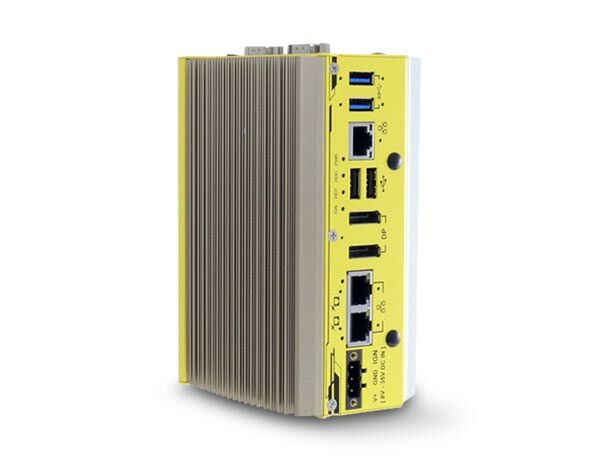
The front panel provides:
- 3x 2.5GBASE-T Ethernet ports (Intel I225 controllers), with ports #2 and #3 supporting IEEE 802.3at PoE+
- 2x USB 3.1 Gen1 (5 Gbps) ports
- 2x USB 2.0 ports
- 2x DisplayPort connectors supporting up to 4096 x 2160 @ 60Hz
- 1x CMOS reset button
- 1x 3-pin pluggable terminal block for DC input/ignition
The COM port panel adds a software-programmable RS-232/422/485 port (COM1) and a second connector configurable as either a single RS-422/485 port or three 3-wire RS-232 ports (COM2/3/4), plus an optional 3.5 mm mic-in/speaker-out jack. A separate DIO panel provides isolated digital I/O and DB9 connectors reserved for CAN module installation.
The system accepts 8V to 35V DC input via a 3-pin pluggable terminal block (IGN/GND/V+), with built-in ignition power control for in-vehicle deployment. Supplying a voltage over 35V will damage the system.
The system operates from -40°C to 70°C and stores from -40°C to 85°C. For wide-temperature use, a wide-temperature/industrial M.2 M key SATA SSD is required, and full operating range may be constrained if both mini-PCIe and M.2 wireless modules are installed. It carries E-Mark certification and meets CE/FCC Class A (EN 55032 & EN 55035), MIL-STD-810G Method 514.6 (vibration) and Method 516.6 (shock).
Memory: one SODIMM socket supporting up to 32 GB DDR4-3200. Storage: 2x M.2 2280 M key sockets (SATA signal only). Wireless/expansion: 2x M.2 2230 E key sockets for WiFi or Google Edge TPU modules, 1x M.2 2242/3052 B key socket for 4G/5G modules with dual SIM support, and 1x full-size mini-PCIe socket (USB2 signal only). The system also supports fTPM 2.0.
Due to Intel's driver policy, POC-451VTC only officially provides driver support for Windows 10 64-bit (tested on Windows 10 Professional 64-bit and Windows 10 IoT Enterprise 64-bit). For Linux, use kernel versions no later than 5.8 (tested on Ubuntu 20.04.2 LTS). On Linux you may need to manually compile drivers for Intel graphics or the I225 controller if not embedded in the kernel.
The POC-451VTC measures 153 mm (W) x 108 mm (D) x 72 mm (H) and weighs 1.4 kg. It ships standard with a vertical-type wall-mount bracket, and an optional DIN-rail mount is available.
The system supports WiFi and 4G/5G cellular expansion via its M.2 E key (2230), M.2 B key (2242/3052 with dual SIM support), and mini-PCIe sockets. Six SMA antenna openings are provided across the chassis panels for external antenna installation. GPS support is not documented in the source data.
The system provides 4 isolated digital input channels and 4 isolated digital output channels, with 2500 Vrms isolation. Digital inputs accept 5-24V for logic high and 0-1.5V for logic low. Digital outputs use Power MOSFET + iCoupler technology with sinking current output (100 mA sustained, 250 mA peak per channel). Both polling and change-of-state interrupt operation modes are supported.
The ignition power control module monitors the IGN signal (accepts 12V or 24V) applied via the 3-pin terminal block and turns the system on/off according to a configurable power-on/power-off delay. It also supports low-battery detection, a hard-off safeguard (forces power off 10 minutes after power-off delay if the OS fails to shut down), and 16 selectable operation modes (0-15) via a rotary switch, with mode 15 allowing full configuration in BIOS.
Yes. The two 802.3at PoE+ ports can be manually enabled or disabled per-port using function APIs (GetStatusPoEPort, EnablePoEPort, DisablePoEPort) included in the Neousys WDT_DIO driver package. This is useful for fault recovery or power-cycling a connected powered device.
How-to Guides
- Power off the system, disconnect all cables and antennas, and place the system on a flat surface.
- Disassemble the system enclosure to access the motherboard, or remove the bottom heatsink screws to access the MezIO card M.2 slot.
- Insert the M.2 2280 M key SSD at a 45 degree angle into the slot.
- Press the module down and secure it with a screw.
- Remove the thermal pad protective film from the heatsink and reattach the heatsink with its screws.
- Reinstall the system enclosure.
Note: the M.2 M key slots only support SATA-signal SSDs.
- Disassemble the system enclosure to expose the SO-DIMM slot.
- Insert the gold-finger end of the SO-DIMM at a 45 degree angle into the slot.
- Gently push the SO-DIMM down until it clips into place.
- Remove the memory thermal pad protective film and secure the module heatsink with its screws.
- Reinstall the system enclosure.
- Remove the four screws on the bottom heatsink and lift it off to access the M.2 B key slot on the MezIO card. Adjust the copper standoff to suit 2242/3042 or 3052 module size.
- Slide the SIM bracket in the indicated direction and lift it open.
- Insert the micro-SIM (3FF) card, close the bracket, and slide it to lock the SIM in place (dual SIM supported).
- Insert the M.2 module at a 45 degree angle, press down, and secure with a screw.
- Connect the module's antenna per its manual, remove an antenna cover from the enclosure, and secure the SMA antenna body.
- Remove the thermal pad protective film from the heatsink and reattach the bottom heatsink with its screws.
- Locate the 3-pin pluggable terminal block (shared for DC power and ignition input).
- Connect the vehicle Battery+ line (12V for sedan, 24V for bus/truck) to V+.
- Connect the vehicle Battery-/GND line to GND.
- Connect the ACC (accessory/ignition) line to IGN.
- Ensure the DC power source and IGN signal share the same ground. The IGN input accepts 8~35VDC; do not exceed 35VDC.
- In Windows, set "When I press the power button" to "Shut down" so the OS performs a full shutdown that the ignition control module can detect.
- Secure the DIN rail clip onto the rear of the system enclosure using the two M4 screws provided.
- Position the mount plate over the top of the DIN rail, tilting downward, and overlap the top clip edge of the mount plate onto the rail first.
- Firmly press the bottom-front of the enclosure to clip the bottom edge of the mount plate onto the rail.
- Confirm the mount plate is fully clipped onto the DIN rail.
POC-451VTC is an ultra-compact in-vehicle computer with E-Mark certificate for in-vehicle applications, such as mobile gateway, mobile surveillance and passenger information system. It leverages the latest Intel® Elkhart Lake Atom® x6425E CPU, delivering 1.8x and 2x performance improvement for the CPU and GPU respectively, compared to the previous generation.
POC-451VTC provides multiple M.2 and mPCIe slots for installation of 4G/5G, WIFI5/6, CAN bus and edge TPU module for modern in-vehicle applications. It can therefore extend WIFI and broadband wireless communication as well as AI inference functionality inside a compact footprint. More than that, POC-451VTC introduces a dedicated conduction-cooled heat spreader to bring out and dissipate heat generated by M.2/mPCIe modules to maintains optimal system performance at high temperature environment.
POC-451VTC further offers three 2.5GBASE-T Ethernet ports with PoE+ capability for powering PoE PD devices, such as IP camera and GigE camera. They are backward-compatible with 1000/100 Mbps Ethernet to work with most existing Ethernet devices. It also provides isolated DIO for sensor/actuator control and 8V-35V wide range DC input with ignition power control for in-vehicle deployment.
Combining significant performance boost, 2.5G PoE+ ports, superior thermal reliability for communication and inference, POC-451VTC is a AI-capable, mobile gateway solution to explore more possibility of versatile in-vehicle applications.
| Manufacturer | Neousys |
|---|---|
| Short Description | POC-451VTC is an ultra-compact in-vehicle computer with E-Mark certificate for in-vehicle applications, such as mobile gateway, mobile surveillance and passenger information system. |
| Processor | Elkhart Lake Atom x64 25E quade-core 2.0 Ghz/3.0 GHz 12W |
| Graphics | Intel UHD |
| Memory | ddr$-3200 SDRAM by one SODIMM socket up to 32GB |
| PoE | ports 2 and 3 PoE+ |
| Ethernet Standard | Intel i225 |
| Video Port | 2x DisplayPort |
| Audio | optional |
| DIO | 4x Isolated DI 4x Isolated DO |
| M.2 | 2x M.2 2230 E Key 1x M.2 2242/3052 B Key with SIM |
| Mini PCI-E | 1x full size slot |
| Power Input Voltage | 8-35V DC |
| Power Type | DC |
| Dimension | 153 x 108 x 72mm |
| Weight | .96Kg |
| Mounting | Vertical wall included DIN Rail Optional |
| Operating Temperature | see specification sheet |
| Storage Temperature | see specification sheet |
| Humidity | see specification sheet |
| Vibration | see specification sheet |
| Shock | see specification sheet |
| CPU Cores | 4 |
| CPU Family | Intel Atom |
| Base CPU Speed | Under 2.0 Ghz |
| Video Output | Display Port |
| PoE Ports | 2 |
| LAN Ports | 1-4 |
| Serial Ports | 3-4 |
| USB 2.0 | 1-2 |
| USB 3.1 | 1-4 |
| Max Memory | 32 GB |
| Operating System | Windows 10, Linux |
| Effective Memory Speed | 3200 MHz |
| Form Factor | Fanless |
| Native Storage Type | M.2 SATA S80 |