
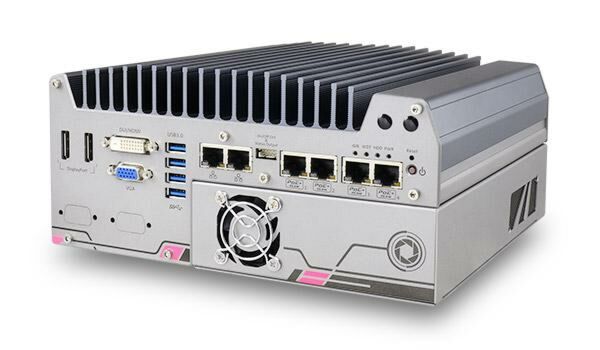
Nuvis-5306RT Neousys 6th-Gen Intel Vision Controller with Vision-Specific I/O
Nuvis-5306RTWarranty and Support Information
Main Features:
- Intel 6th Gen Core i7/i5 65W/35W CPU, up to 32 GB DDR4
- Integrated vision-specific I/O
- 4-CH CC/CV lighting controller
- 4-CH camera trigger outputs
- 1-CH quadrature encoder input
- 8-CH isolated DI and 8-CH isolated DO
- Patented MCU-based, real-time I/O control by DTIO V2 and NuMCU
- Built-in camera interfaces
- 4-CH IEEE 802.3at Gigabit PoE+ ports
- 4-CH USB 3.0 ports
- Supports nVidia GTX 950/1050 for GPU-accelerated MV

Frequently Asked Questions
The Nuvis-5306RT uses an LGA1151 socket and supports 6th-Gen Intel Core CPUs: Core i7-6700 (8M Cache, 3.4/4.0 GHz, 65W TDP), Core i5-6500 (6M Cache, 3.2/3.6 GHz, 65W TDP), Core i7-6700TE (8M Cache, 2.4/3.4 GHz, 35W TDP), and Core i5-6500TE (6M Cache, 2.3/3.3 GHz, 35W TDP). CPU power can be configured in BIOS to trade off performance against operating temperature.
The system integrates a 4-channel LED lighting controller (constant current up to 2A/channel or constant voltage 24VDC, 100 kHz dimming), 4-channel camera trigger output (12VDC), a 1-channel quadrature encoder input (A/B/Z), 8-channel isolated digital input, and 8-channel isolated digital output (4 high-speed channels for strobe/PWM and 4 high-current channels up to 500 mA). These are managed by Neousys' patented MCU-based real-time I/O control using DTIO V2 or NuMCU firmware.
The front/rear panels provide: 6 Gigabit Ethernet ports (1x Intel I219, 5x Intel I210), with 4 of those ports supporting IEEE 802.3at PoE+ (80W total budget); 4x USB 3.1/3.0 ports (1000 MB/s total bandwidth) and 4x USB 2.0 ports; 1x stacked VGA + DVI-D and 2x DisplayPort (supporting up to 4K2K resolution); 2x software-programmable RS-232/422/485 ports (COM1 & COM3) plus 1x RS-232 port (COM2); and 1x mic-in / 1x speaker-out audio jacks.
The system accepts 8~35V DC input via a 3-pin pluggable terminal block. Maximum power consumption is rated as 49.2W (2.05A@24V) with the Core i7-6700TE and 47.8W (1.99A@24V) with the Core i5-6500TE. A 10-pin (2x5) wafer connector is also provided for remote on/off control and status LED output.
With the 35W TDP CPUs (i7-6700TE, i5-6500TE), operating range is -25°C to 60°C. With the 65W TDP CPUs (i7-6700, i5-6500), the range is -25°C to 60°C when configured in 35W CPU mode, or -25°C to 50°C when configured in 65W CPU mode. A wide-temperature HDD or SSD is required for sub-zero operation. Storage temperature is -40°C to 85°C, and humidity range is 10%-90% non-condensing.
The system is certified CE/FCC Class A, according to EN 55022, EN 55032, and EN 55024.
The system supports up to 32GB DDR4-2133 SDRAM via two SO-DIMM sockets. Storage options include 2x internal SATA ports for 2.5" HDD/SSD (with RAID 0/1 support) and 1x full-size mSATA port (muxed with mini-PCIe). There is also 1x internal mini-PCIe socket with a front-accessible SIM socket and a second mini-PCIe socket with internal SIM socket (muxed with mSATA).
Yes. The system provides 1x PCIe x16 slot at Gen3 with 8-lane PCIe signals inside its Cassette expansion enclosure, supporting a 75W NVIDIA GPU card or COTS CameraLink and CoaXPress camera interface cards. The Cassette's patented ventilation design is engineered to manage GPU heat even at 60°C ambient under 100% GPU load.
Neousys has tested the system with Microsoft Windows 7 (x86/x64), Windows 8 (x64), Windows 10 (x64), Microsoft Windows Embedded Standard 7, CentOS 7, Debian 8.7, Fedora 24, OpenSUSE 42.1, and Ubuntu 14.04.4 LTS/16.04 LTS. A Drivers & Utilities DVD provides one-click automatic driver installation for Windows.
The Nuvis-5306RT measures 240 mm (W) x 225 mm (D) x 111 mm (H) and weighs 4.5 kg. Standard mounting is a wall-mount bracket, with DIN-rail mounting available as an optional accessory.
How-to Guides
- Place the system upside down on a flat surface and loosen the three screws on the HDD bracket.
- Remove the protective film on the thermal pad in the center of the bracket.
- Place the HDD/SSD on the bracket, press it gently against the thermal pad, and secure it with M3 flat-head screws in the correct orientation.
- Connect the SATA cable inside the enclosure to the HDD/SSD.
- Wiggle the bracket back into the enclosure and secure it with three M3 flat-head screws.
- Disassemble the system enclosure as described in the enclosure disassembly procedure.
- Remove the MezIO module by unfastening its three screws.
- Locate the mini-PCIe sockets on the motherboard; the SIM slot of one socket is on the rear panel.
- Insert the module's gold finger at a 45-degree angle into the socket, press it down, and secure it with an M2.5 P-head screw.
- Clip the IPEX-to-SMA cable onto the module and attach the antenna to the front or rear panel.
- Insert a SIM card if required, upside down, until it clicks into the slot.
- Reinstall the system enclosure and panels.
- Unfasten the three M3 flat-head screws at the bottom of the Cassette module and remove the Cassette module's bottom panel.
- Remove the PCIe slot cover and gently lower the graphics card, aligning the PCIe gold fingers into the slot.
- Make sure the bottom of the graphics card's slot cover is properly inserted into the enclosure hinge.
- Secure the graphics card's slot cover with two M3 flat-head screws.
- Reinstall the Cassette enclosure and secure it with the three M3 flat-head screws.
- Make sure the DC power supply is unplugged before connecting cables.
- Take the 3-pin pluggable terminal block from the accessory box; it fits wires of 12~24 AWG gauge.
- Identify positive and negative contacts on your DC power supply and match them positive-to-positive and ground-to-ground on the terminal block.
- Insert the wires into the matching terminal block contacts and tighten the clamping screws with a Philips screwdriver.
- Plug the terminal block into the system's 3-pin DC input connector and secure it with a flat-head screwdriver.
Warning: the system accepts 8~35 VDC. Supplying a voltage over 35V or incorrect polarity will damage the system.
- Remove the four rubber stands at the bottom of the enclosure if attached.
- Get two wall-mounting brackets and four M4 screws from the accessory box and fix the brackets to the bottom of the system.
- Place the system on a flat surface and secure it with screws, or use the keyhole-shaped holes on the brackets to suspend the system on a wall.
- Orient the system so the heatsink fins are vertical for optimal heat dissipation, and maintain at least 20mm clearance underneath the system for GPU cooling efficiency.
| Manufacturer | Neousys |
|---|---|
| Processor | Supports 6th-Gen Intel® Core™ LGA1151 CPU|- Intel® Core™ i7-6700(8M Cache,3.4/4.0 GHz, 65W TDP)|- Intel® Core™ i5-6500(6M Cache, 3.2/3.6 GHz, 65W TDP)|- Intel® Core™ i7-6700TE(8M Cache, 2.4/3.4 GHz, 35W TDP)|- Intel® Core™ i5-6500TE (6M Cache, 2.3/3.3 GHz, 35W TDP) |
| Graphics | Integrated Intel® HD Graphics 530 |
| Memory | Up to 32 GB DDR4-2133 SDRAM by two SODIMM sockets |
| Chipset | Intel® Q170 Platform Controller Hub |
| AMT | Supports AMT 11.0 |
| PoE | IEEE 802.3at PoE+ PSE on GigE Port 3 ~ Port 6, 80 W total power budget |
| Video Port | 1x stacked VGA + DVI-D connector|2x DisplayPort connectors, supporting 4K2K resolution |
| Audio | 1x Mic-in and 1x Speaker-out |
| PCI Express | 1x PCIe x16 slot @ Gen3, 8-lanes PCIe signals in Cassette, supporting|- 75W NVIDIA® GPU card|- COTS CameraLink and CoaXPress camera interface card |
| Mini PCI-E | 1x internal mini PCI Express socket with front-accessible SIM socket|1x internal mini PCI Express socket with internal SIM socket (mux with mSATA) |
| SATA HDD | 2x Internal SATA port for 2.5” HDD/SSD installation, supporting RAID 0/1 |
| mSATA | 1x full-size mSATA port (mux with mini-PCIe) |
| DC Input | 1x 3-pin pluggable terminal block for 8~35VDC DC input |
| Remote Ctrl. & Status Output | 1x 10-pin (2x5) wafer connector for remote on/off control and status LED output |
| Dimension | 240 mm (W) x 225 mm (D) x 111 mm (H) |
| Weight | 4.5 kg (incl. CPU, GPU, memory and HDD) |
| Mounting | Wall-mount by mounting bracket or optional rack-mount kit |
| Operating Temperature | with i7-6700TE, i5-6500TE (35W TDP) -25°C ~ 60°C |with i7-6700, i5-6500 (65W TDP) -25°C ~ 60°C|(configured as 35W CPU mode)|-25°C ~ 50°C (configured as 65W CPU mode) |
| Storage Temperature | -40°C ~ 85°C |
| Humidity | 10%~90% , non-condensing |
| Vibration | Operating, 5 Grms, 5-500 Hz, 3 Axes (w/ SSD, according to IEC60068-2-64) |
| Shock | Operating, 50 Grms, Half-sine 11 ms Duration (w/ SSD, according to IEC60068-2-27) |
| EMC | CE/FCC Class A, according to EN 55022, EN55032 & EN 55024 |
| CPU Cores | 4 |
| CPU Family | Intel Core |
| Base CPU Speed | 2.1 to 3.0 GHz, 3.1 to 3.5 GHz |
| Video Output | Display Port, DVI-D, VGA |
| PoE Ports | 4 |
| LAN Ports | 5-8 |
| Serial Ports | 3-4 |
| USB 2.0 | 5-6 |
| USB 3.1 | 1-4 |
| Max Memory | 32 GB |
| Operating System | Windows 7, Windows 10, Linux |
| Effective Memory Speed | 2400 MHz |
| Form Factor | Fanless |
| Native Storage Type | 2.5" SSD, mSATA Full |
| On/Ignition | Remote On/Off |