
Nuvo-10000: Intel 14th/13th/12th-Gen Core i9/i7/i5/i3 Expansion Box PC With Up to 7 PCIe/PCI Slots
Nuvo-10000Starting at $1,415.00
- Supports Intel 14th/13th/12th-Gen Core i9/i7/i5/i3 Pentium and Celeron LGA 1700 CPU
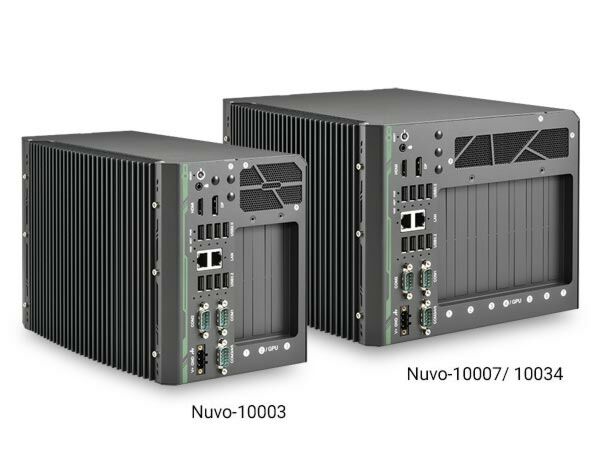
- Compact footprint with up to seven expansion slots
- Two x16 PCIe, three x8 PCIe and two x4 PCIe slots (Nuvo-10007)
- Two x16 PCIe, two x8 PCIe and three PCI slots (Nuvo-10034)
- One x16 PCIe and two x8 PCIe slots (Nuvo-10003)
- 8x USB 3.2 Gen2 ports with screw-lock
- 1x 2.5G and 1GbE ports with screw-lock
- DP++ / HDMI 1.4b dual display outputs
- 2x 2.5" SATA HDD/ SSD accommodation support RAID control
- Supports single NVIDIA GPU card with up to 115W TDP

Frequently Asked Questions
All Nuvo-10000 models share the same I/O panel. It includes:
- 8x USB 3.2 ports total: 4x Gen2 (10 Gbps) and 4x Gen1 (5 Gbps), all with screw-lock panel holes
- 1x internal USB 2.0 Type-A port
- 1x 2.5G Ethernet port (Intel I226-IT) and 1x Gigabit Ethernet port (Intel I219-LM)
- 1x HDMI 1.4b port (up to 3840 x 2160) and 1x DisplayPort (up to 4096 x 2304)
- 2x software-selectable RS-232/422/485 ports (COM1/COM2) and 3x 3-wire RS-232 ports (COM3/COM4/COM5) sharing a DB9 connector
- 1x 3.5mm audio jack for mic-in/speaker-out
The system accepts 12 to 35V DC via a 3-pin pluggable terminal block. Note that when the system load is 150W or less, the required DC input range is 12V to 35V; when the load is between 151W and 320W (such as with a GPU card installed), the required DC input is 24V to 35V. Supplying a voltage over 35V will damage the system.
Power consumption depends on the installed CPU and configuration. Reference figures from the manual include:
- i7-12700 (65W mode): 141.4W max @ 24V, 146.4W max @ 48V
- i7-12700TE (35W mode): 106.6W max @ 24V, 111.8W max @ 48V
- i5-12400 (35W mode): 105.1W max @ 24V, 110.9W max @ 48V
- i5-12400 (65W mode): 120.5W max @ 24V, 126.2W max @ 48V
Actual consumption may vary depending on configuration.
Operating temperature is -25°C to 60°C, and storage temperature is -40°C to 85°C. For sub-zero operating temperature, a wide-temperature HDD or SSD is required. Humidity range is 10% to 90%, non-condensing. The system is rated for MIL-STD-810H vibration (Method 514.8, Category 4) and shock (Method 516.8, Procedure I), and carries CE/FCC Class A certification per EN 55032 & EN 55035.
The system supports up to 64GB of DDR5 4800 SDRAM across two SODIMM slots. For storage, it provides 2x SATA ports for internal 2.5" HDD/SSD installation (supporting RAID 0/1), plus 1x M.2 2280 M-key slot for a SATA SSD. A third internal SATA port is also available. Drive bays support up to 15mm thickness HDD/SSD.
Yes. The system has two full-size mini PCI Express sockets with an internal micro SIM socket, allowing installation of 4G/3G (and per the manual, also 5G) wireless modules. SMA antenna apertures are located on the I/O panel for external antenna connections. Note: some off-the-shelf mini-PCIe 4G modules use 1.8V I/O instead of the standard 3.3V and may not be compatible; contact Neousys for compatibility if unsure.
Yes, the system supports a single NVIDIA GPU card with up to 115W TDP. An 8-pin connector supplies additional power delivery to the graphics card for stable operation.
The system has been tested with Microsoft Windows 10 LTSC 2021 (x64), Microsoft Windows 11 IoT Enterprise 22H2 64-bit, and Ubuntu 20.04.5 LTS, 22.04 LTS, 22.04.1 LTS, or other distributions with kernel version 5.15 or higher. For Linux, users may need to manually compile and install drivers for Intel graphics or the I225/I226 GbE controller. Graphics driver and RAID functionality may not be fully implemented on all Linux distributions.
The Nuvo-10007 and Nuvo-10034 share the same dimensions: 241mm (W) x 280mm (D) x 188mm (H), weighing 5.2kg. The Nuvo-10003 measures 157mm (W) x 280mm (D) x 188mm (H), weighing 4.2kg. All models ship with wall-mount as the standard mounting method, and a wall-mount bracket is included in the accessory box.
All three models share the same CPU support, chipset, memory, I/O panel connections, and mounting options, but differ in expansion slots and size:
- Nuvo-10007: 2x PCIe x16 (Gen3, 8-lanes), 3x PCIe x8 (Gen3, 4-lanes), 2x PCIe x4 (Gen3, 2-lanes) — 7 slots total
- Nuvo-10034: 2x PCIe x16 (Gen3, 8-lanes), 2x PCIe x8 (Gen3, 4-lanes), 3x PCI (33MHz/32-bit 5V)
- Nuvo-10003: 1x PCIe x16 (Gen3, 16-lanes), 2x PCIe x8 (Gen3, 4-lanes) — smaller 3-slot chassis
How-to Guides
- Refer to the "Disassembling the System" and CPU removal sections to gain access to the DRAM slot on the CPU socket side.
- Locate the two SO-DIMM memory slots on the motherboard (one on the expansion slot side, one on the CPU socket side).
- Insert the gold fingers of the module into the slot at a 45-degree angle, then push down to clip the module into position.
- Push the memory module down until it clips into place.
- If installing on the CPU socket side, remove the thermal pad protection film first.
- Repeat for the second module if needed.
- Reinstall the system enclosure and panel when done.
- Refer to the "Disassembling the System" section to open the enclosure.
- Locate the M.2 M-key slot on the motherboard (SATA signal only - not compatible with NVMe).
- Insert the M.2 module into the slot at a 45-degree angle.
- Gently press the module down and secure it with an M3 P-head screw.
- Reinstall the system enclosure when done.
- Refer to the "Disassembling the System" section to open the enclosure.
- Remove the screws securing the HDD/SSD tray, located underneath the daughterboard, and pull out the tray.
- With the SATA connectors facing inward, secure the HDD/SSD to the tray using flathead screws from underneath (supports up to 15mm thickness; one or two drives can be installed).
- Insert the tray about 3/4 of the way in, then firmly and gently push it fully into place so the drives engage the SATA connectors.
- Secure the screws holding the tray in place.
- Reinstall the system enclosure and panel when done.
- Refer to the "Disassembling the System" section to open the enclosure.
- Locate the mini-PCIe and SIM slots on the motherboard.
- Slide and lift the SIM card holder, insert the Mini-SIM card with pins facing up, then shut and slide the holder to lock the SIM card in place.
- Insert the mini-PCIe module into the slot at a 45-degree angle and secure it with an M3 P-head screw.
- Clip the IPEX-to-SMA cable onto the module and secure the antenna to the front or rear panel (refer to the module's own manual for the clip-on connection).
- Secure the external antenna to complete the installation.
- Reinstall the system enclosure and panel when done.
- Install at least two hard drives or SSDs (RAID 0 for striping performance, RAID 1 for mirrored data security).
- On boot, press F2 to enter BIOS setup, then go to [Advanced] > [System Agent (SA) Configuration] > [VMD setup menu] and enable the VMD controller. Press F10 to save and reboot.
- On reboot, press F3 to enter the Device Manager configuration utility and select [Intel Rapid Storage Technology].
- Select "Create RAID Volume", then configure Name, RAID Level (RAID-0 or RAID-1), Select Disks (minimum two), Stripe Size (RAID-0 only), and Capacity.
- Highlight "Create Volume" and press ENTER to build the RAID volume.
- Press F10 to save and Esc to exit the utility.
- To install Windows onto the RAID volume, prepare a bootable USB with the unzipped "f6vmdflpy-x64" driver files, select "Load Driver" during Windows setup, browse to the driver folder, select "Intel RST VMD Controller 467F", and continue with standard Windows installation onto the RAID volume.
Nuvo-10000 series is the ideal choice to replace your bulky rack-mount or wall-mount IPC systems. The system offers up to seven PCIe/PCI slots in its compact chassis to deliver the same level of expandability as off-the-shelf 4U 19" IPCs. Users can install a wide variety of AIO, DIO, communication, image capture and motion control cards for versatile applications.
Leveraging Intel 14th/13th/12th-Gen Alder Lake Core i desktop processors with Q670 chipset, Nuvo-10000 series delivers exceptional computing power over traditional IPCs in a comparatively compact size with a competitive price. It features eight USB 3.2 ports with screw-lock mechanism for USB3 cameras. There is one GbE, one 2.5 GbE, 5 COM ports, and accommodates two 2.5" HDDs/ SSDs with the addition of an internal SATA port for a third HDD/SSD. The system can also support a 115W NVIDIA® GPU to offer significant AI computing power for modern deep-learning applications.
Driven by the increasing demand for industrial IoT, vision inspection and machine automation, Nuvo-10000 series is a flexible all-around rugged solution that can satisfy various industrial applications. With an assortment of I/O ports and flexible 7-slot PCIe/ PCI expandability, Nuvo-10000 series is geared for the fifth industrial revolution.
| Manufacturer | Neousys |
|---|---|
| Short Description | Nuvo-10000 series is the ideal choice to replace your bulky rack-mount or wall-mount IPC systems. The system offers up to seven PCIe/PCI slots in its compact chassis to deliver the same level of expandability as off-the-shelf 4U 19" IPCs. Users can install a wide variety of AIO, DIO, communication, image capture and motion control cards for versatile applications. |
| Processor | Supporting Intel 14th-Gen Core CPU (LGA1700 socket, 65W/35W TDP)
Supporting Intel 13th-Gen Core CPU (LGA1700 socket, 65W/35W TDP)
Supporting Intel 12th-Gen Core CPU (LGA1700 socket, 65W/35W TDP)
|
| Graphics | CPU dependent Integrated Intel UHD graphics 770 (32EU)/730 (24EU) |
| Memory | Up to 64 GB DDR5 4800 SDRAM (two SODIMM slots) |
| Chipset | Intel Q670E platform controller hub |
| AMT | Supports Intel vPro/AMT 16.0 |
| Video Port | 1x HDMI 1.4b, supporting 3840 x 2160 resolution 1x DisplayPort, supporting 4096 x 2304 resolution |
| Audio | 1x 3.5 mm jack for mic-in and speaker-out |
| PCI Express | Nuvo-10007 Nuvo-10034 Nuvo-10003 |
| M.2 | 1x M.2 2280 SATA interface |
| Mini PCI-E | 2x full-size mini PCI Express socket with internal micro SIM socket |
| SATA | 2x SATA ports for internal 2.5” HDD/ SSD installation (support RAID 0/ 1) |
| DC Input | 1x 3-pin pluggable terminal block for 12 to 35V DC input |
| Remote Ctrl. & Status Output | 1x 10-pin (2x5) wafer connector for remote on/off control and status LED output |
| Dimension | Nuvo-10007 Nuvo-10034 Nuvo-10003 |
| Weight | Nuvo-10007 Nuvo-10034 Nuvo-10003 |
| Mounting | Wall-mount (standard) |
| Operating Temperature | -25°C ~ 60°C* * For sub-zero operating temperatures, a wide temperature HDD or Solid State Disk (SSD) is required. |
| Storage Temperature | -40°C ~ 85°C |
| Humidity | 10% ~ 90% , non-condensing |
| Vibration | Operating, MIL-STD-810H, Method 514.8, Category 4 |
| Shock | Operating, MIL-STD-810H, Method 516.8, Procedure I |
| EMC | CE/FCC Class A, according to EN 55032 & EN 55035 |