
Nuvo-5608VR: Neousys Intel 6th-Gen Core i Fanless Mobile Surveillance System
Nuvo-5608VRStarting at $1,800.00
Warranty and Support Information
Main Features:
- Supports Intel 6th-Gen Core i7/i5/i3 LGA1151 socket-type CPU
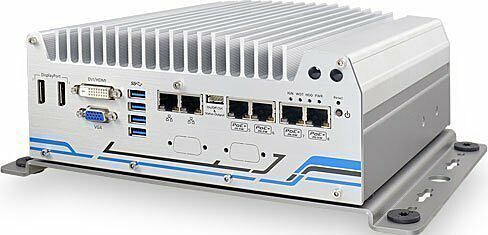
- 8x 802.3at PoE+ ports and 2x GbE ports
- 2x 3.5" HDD accommodation, support RAID 0/1 with over 24TB capacity
- Dedicated HDD heat-spreader for optimized thermal performance
- 4x full-size mini-PCIe sockets with SIM support
- 4-CH isolated DI and 4-CH isolated DO
- 1x CAN 2.0 port
- 8~35V wide-range DC input with built-in ignition power control
- Patented damping brackets to withstand 1Grms vibration

Frequently Asked Questions
The Nuvo-5608VR provides:
- 2x Gigabit Ethernet ports (Intel I219 and I210)
- 8x IEEE 802.3at (25.5W) Gigabit PoE+ ports by Intel I210, with 120W total power budget
- 4x USB 3.0/3.1 ports and 4x USB 2.0 ports
- 1x VGA, 1x DVI-D, and 2x DisplayPort video outputs
- 2x software-programmable RS-232/422/485 ports (COM1, COM3) and 1x RS-232 port (COM2)
- 1x CAN 2.0 port
- 4-CH isolated digital input and 4-CH isolated digital output
- 1x microphone-in and 1x speaker-out jack
The system accepts 8~35VDC input via a 3-pin pluggable terminal block, with built-in ignition power control. Maximum power consumption depends on the CPU installed: approximately 49.2W (2.05A@24V) with the Core i7-6700TE, 47.8W (1.99A@24V) with the Core i5-6500TE, and 39.4W (1.64A@24V) with the Core i3-6100TE. The total PoE+ power budget is 120W with 24VDC input, but is limited to 100W when 12VDC input is applied.
With mSATA/SSD storage and a 35W CPU, operating temperature is -25°C to 70°C; with a 3.5" HDD installed, it is -10°C to 60°C. With a 65W CPU, the range is -25°C to 50°C (mSATA/SSD) or -10°C to 60°C (HDD). Storage temperature is -40°C to 85°C, with 10%~90% non-condensing humidity. The system is rated CE/FCC Class A (per EN 55032/EN 55022 & EN 55024) and carries operating vibration/shock ratings of 1 Grms (5-500 Hz, 3 axes) and 30 Grms half-sine 11ms, both with HDD and damping bracket installed.
The system has two 260-pin DDR4 SO-DIMM sockets supporting up to 32GB of DDR4-2133 SDRAM. It accommodates two 3.5" hard drives via internal SATA ports, supporting RAID 0/1 with over 24TB total capacity. There is also one full-size mSATA port that is muxed with one of the mini-PCIe sockets.
Neousys has tested the Nuvo-5608VR with Microsoft Windows 7 (x86/x64), Windows 8 (x64), Windows 10 (x64), Windows Embedded Standard 7, CentOS 7, Debian 8.7, Fedora 24, OpenSUSE 42.1, and Ubuntu 14.04.4 LTS/16.04 LTS. Note that Windows 7 requires a manually patched xHCI driver for USB keyboard/mouse support during installation, and certain Linux distributions may have limited graphics or RAID driver support.
The Nuvo-5608VR measures 240mm (W) x 225mm (D) x 98mm (H) and weighs approximately 3.5kg. It is mounted using Neousys' patented wall-mount/anti-vibration damping bracket, which uses shock-absorbing grommets and is designed for in-vehicle installation.
The system provides four full-size mini-PCIe sockets with SIM card support (two on the motherboard, two on the MezIO module), allowing installation of WiFi, 3G/4G, GPS, or other mPCIe expansion modules. SMA antenna apertures are available on the front and rear panels for wireless communication.
The system includes 1x CAN 2.0 port via a DB9 connector, supporting CAN2.0A and CAN2.0B up to 1Mbps for communication with other in-vehicle CAN devices. CAN bus termination can be enabled or disabled in BIOS if no external resistor is used.
Ignition power control is an MCU-based feature that monitors the ignition (IGN) signal on the 3-pin terminal block and turns the system on/off according to a predefined power-on/power-off delay. It supports low-battery detection, guarded delay durations, a system hard-off after 10 minutes if soft shutdown fails, and smart off-delay for modes with long power-off delays. Sixteen operation modes are selectable via a rotary switch, with mode 15 allowing full BIOS-configurable parameters.
How-to Guides
- Disassemble the system enclosure as described in the enclosure disassembly procedure.
- Remove the eight screws on the bottom panel to separate the two heatsinks.
- Attach the supplied thermal conducting pad to the bottom PCB section of the hard drive and remove its plastic cover.
- Place the separated heatsink onto the bottom of the hard drive and secure it using the four supplied flathead screws.
- Attach the heatsink/HDD assembly to the bottom panel and secure with four screws.
- Repeat the steps to install the second heatsink and hard drive.
- Connect the SATA cable and power supply cable to the hard drives before reinstalling the bottom panel.
- Reinstall the system enclosure and panel when done.
- Disassemble the system enclosure as described in the enclosure disassembly procedure.
- Locate the SO-DIMM slots once the bottom cover has been removed.
- Insert the gold fingers of the memory module into the slot at a 45-degree angle, then push down on the edge of the module until the side clips secure it in place.
- Repeat to install the second module if needed.
- Reinstall the system enclosure and panel when done.
- Disassemble the system enclosure as described in the enclosure disassembly procedure.
- Locate the mPCIe sockets on the motherboard or MezIO module. It is recommended to install 4G SIM mPCIe modules onto the MezIO module's socket to avoid signal conflicts.
- Insert the mPCIe module's gold finger at a 45-degree angle into the socket, press down gently, and secure it with an M2.5 P-head screw.
- Clip the IPEX-to-SMA cable onto the module and attach the antenna to the front or rear panel.
- Insert a SIM card (if required) into the SIM slot associated with the mPCIe socket, upside down (gold fingers facing up).
- Reinstall the system enclosure and panel when done.
- Make sure the DC power supply is unplugged before connecting cables.
- Take the supplied 3-pin pluggable terminal block, which accepts wire gauges of 12~24 AWG.
- Identify the positive and negative contacts of your DC power supply and match them to the terminal block: positive (+) to positive (+), and ground (GND) to ground (GND).
- Insert the wires into the matching terminal block contacts and tighten the clamping screws with a Philips screwdriver.
- Plug the terminal block into the system's 3-pin DC input connector and secure it with a flat-head screwdriver.
- For ignition control, connect the vehicle battery+ line to V+, battery-/GND line to GND, and the ACC (ignition) line to IGN, ensuring the DC power source and IGN signal share the same ground.
- Install at least two hard drives in the system.
- Boot the system and press F2 to enter BIOS setup.
- Go to Advanced > SATA Configuration, then set SATA Mode Selection to RAID.
- Go to Boot, select Legacy Boot Type, then press F10 to save and reboot.
- When the system reboots, press Ctrl+I to enter the RAID Configuration Utility.
- Select Create RAID Volume, enter a volume name, and choose RAID0 (Stripe) or RAID1 (Mirror).
- Select a stripe size (RAID0 only), then specify the volume capacity or leave blank for full capacity.
- Review settings, select Create Volume, and confirm the data-deletion warning to complete RAID volume creation.
| Manufacturer | Neousys |
|---|---|
| Processor | Supports 6th-Gen Intel® Core™ i7/i5/i3 LGA1151 CPU|Intel® Core™ i7-6700 (8M Cache, 3.4/4.0 GHz, 65W TDP)|Intel® Core™ i5-6500 (6M Cache, 3.2/3.6 GHz, 65W TDP)|Intel® Core™ i3-6100 (3M Cache, 3.7 GHz, 51W TDP)|Intel® Core™ i7-6700TE (8M Cache, 2.4/3.4 GHz, 35W TDP)|Intel® Core™ i5-6500TE (6M Cache, 2.3/3.3 GHz, 35W TDP)|Intel® Core™ i3-6100TE (4M Cache, 2.7 GHz, 35W TDP) |
| Graphics | Integrated Intel® HD Graphics 530 |
| Memory | Up to 32 GB DDR4-2133 SDRAM (two SO-DIMM slots) |
| Chipset | Intel® Q170 Platform Controller Hub |
| AMT | Supports AMT 11.0 |
| PoE | 8x IEEE 802.3at (25.5W) Gigabit PoE+ ports by Intel®, 120W total power budget |
| Video Port | 1x stacked VGA + DVI-D connector|2x DisplayPort connectors, supporting 4K/2K resolution |
| Audio | 1x mic-in and 1x speaker-out |
| DIO | 4x isolated DI and 4x isolated DO |
| Mini PCI-E | 1x full-size mini-PCIe socket with panel-accessible SIM socket|1x full-size mini-PCIe socket with internal SIM socket (mux with mSATA)|2x full-size mini-PCIe sockets (USB signals only) with internal SIM sockets |
| SATA HDD | 2x internal SATA port for 3.5" HDD installation, supporting RAID 0/1 |
| mSATA | 1x full-size mSATA port (mux with mini-PCIe) |
| DC Input | 1x 3-pin pluggable terminal block for 8~35VDC DC input |
| Remote Ctrl. & Status Output | 1x 10-pin (2x5) wafer connector for remote on/off control and status LED output |
| Dimension | 240mm (W) x 225mm (D) x 98mm (H) |
| Weight | 3.5kg |
| Mounting | Neousys' patented damping bracket |
| Operating Temperature | -25°C ~ 70°C (with mSATA/SSD)|-10°C ~ 60°C (with 3.5" HDD) |
| Storage Temperature | -40°C ~ 85°C |
| Humidity | 10%~90% , non-condensing |
| Vibration | Operating, 1Grms, 5-500Hz, 3 Axes (w/ HDD and damping bracket installed, according to IEC60068-2-64) |
| Shock | Operating, 30 Grms, Half-sine 11ms Duration (w/ HDD and damping bracket installed, according to IEC60068-2-27) |
| EMC | CE/FCC Class A, according to EN 55022 & EN 55024 |
| CPU Cores | 4 |
| CPU Family | Intel Core |
| Base CPU Speed | 2.1 to 3.0 GHz, 3.1 to 3.5 GHz |
| Video Output | Display Port, DVI-D, VGA |
| PoE Ports | 8 |
| LAN Ports | 8+ |
| Serial Ports | 3-4 |
| USB 2.0 | 5-6 |
| USB 3.0 | 3-4 |
| Max Memory | 32 GB |
| Operating System | Windows 7, Windows 10, Linux |
| Effective Memory Speed | 2400 MHz |
| Form Factor | Fanless |
| Native Storage Type | 3.5" HDD, mSATA Full |
| On/Ignition | Remote On/Off |